Hello there Uniters,
I am going to use some images to explain better my problem :
I want to create a basic game mechanic with mouse input ( so it can mimic a unique finger swap ) to dictate a force and direction to the object, in this case, the ball.
What I want is this :
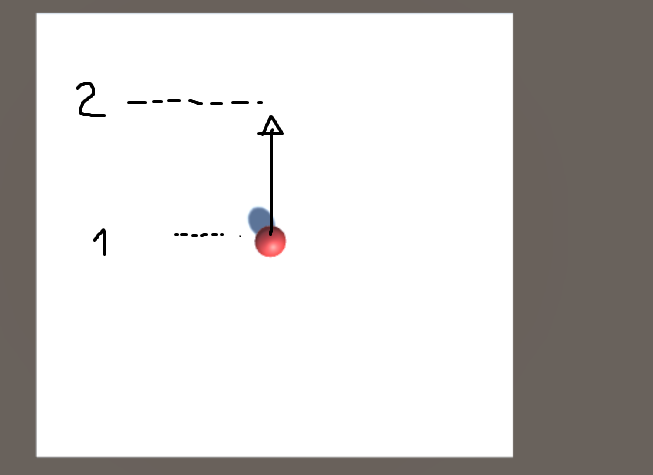
Input.GetMouseButtonDown(0) to set the 1 point and then I drag it and then with Input.GetMouseButtonUp to set the 2nd point and the ball would jump bit by bit there.
The problem I find is that it only moves in the X-Axis. So left and right in this perspective.
It only works when I click on the ball ( as intended ) but I cannot make it move in other directions.

So basically I am trying to move it in a 2D view in the X and Y and convert it ( i believe so ) into a 3D coordinate world location.
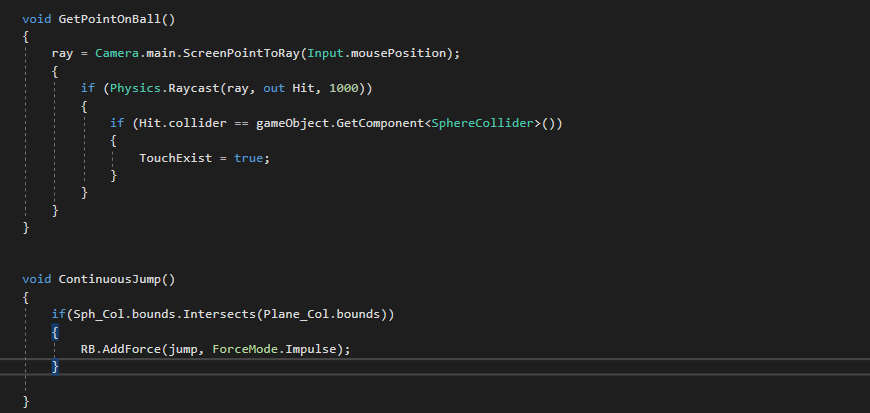
( I forgot to include the touch boolean in this one but the 3rd image is exactly the same as this with the boolean )

Could anyone give me a hand on this and try to guide me or explain to me what could I be doing wrong?
Thank you in advance.
At first glance, I can see that you are transforming a vector with a position transformation method
Try (pseudocode):
vector3 firstInputInWorldCoordinates = ScreenToWorldPoint(firsClick);
vector3 secondInputInWorldCoordinates = ScreenToWorldPoint(secondClick);
vector3 dir = secondInputInWorldCoordinates - firstInputInWorldCoordinates
I think the first thing you may understand is that there is not a direct transformation between 3D to 2D. (not really true)
Imagine you have a 3D model. WIth a cam, you can create project the 3d model in a 2d image.
But now imagine that you have a 2D imagen and you want to project it in a 3D model. For simplicity, lets say that you can’t.
In your case, sometime you can recreate the 3D dimension somehow. For example, you can transform the screen position in a world position, but this will not have depth. In this case, you can choose the nearclip, or you can use a ray.
Maybe this blueprint could help you.
using UnityEngine;

public class ForceBall : MonoBehaviour
{
    public Rigidbody rb;
    public Camera cam;
    public Vector3 firstClick;
    public Vector3 secondClick;

    public Vector3 dir;


    // Update is called once per frame
    void Update ()
    {
        if (Input.GetMouseButtonDown(0))
        {
            firstClick = ScreenToWorld(Input.mousePosition);
        }
        else if (Input.GetMouseButtonUp(0))
        {
            secondClick = ScreenToWorld(Input.mousePosition);
        }

        dir = secondClick - firstClick;

    }

    Vector3 ScreenToWorld(Vector3 screenPos)
    {
        Ray ray = Camera.main.ScreenPointToRay(Input.mousePosition);
        RaycastHit hit;
        if (Physics.Raycast(ray, out hit))
        {
            return hit.point;
        }

        screenPos.z = cam.nearClipPlane;
        return cam.ScreenToWorldPoint(screenPos);

    }

    void FixedUpdate()
    {
        rb.AddForce(dir);
    }

    private void OnDrawGizmos()
    {
        Gizmos.color = Color.blue;
        Gizmos.DrawSphere(firstClick, 0.5f);
        Gizmos.color = Color.red;
        Gizmos.DrawSphere(secondClick, 0.5f);
        Gizmos.color = Color.white;
        Gizmos.DrawRay(firstClick, dir);
    }
}