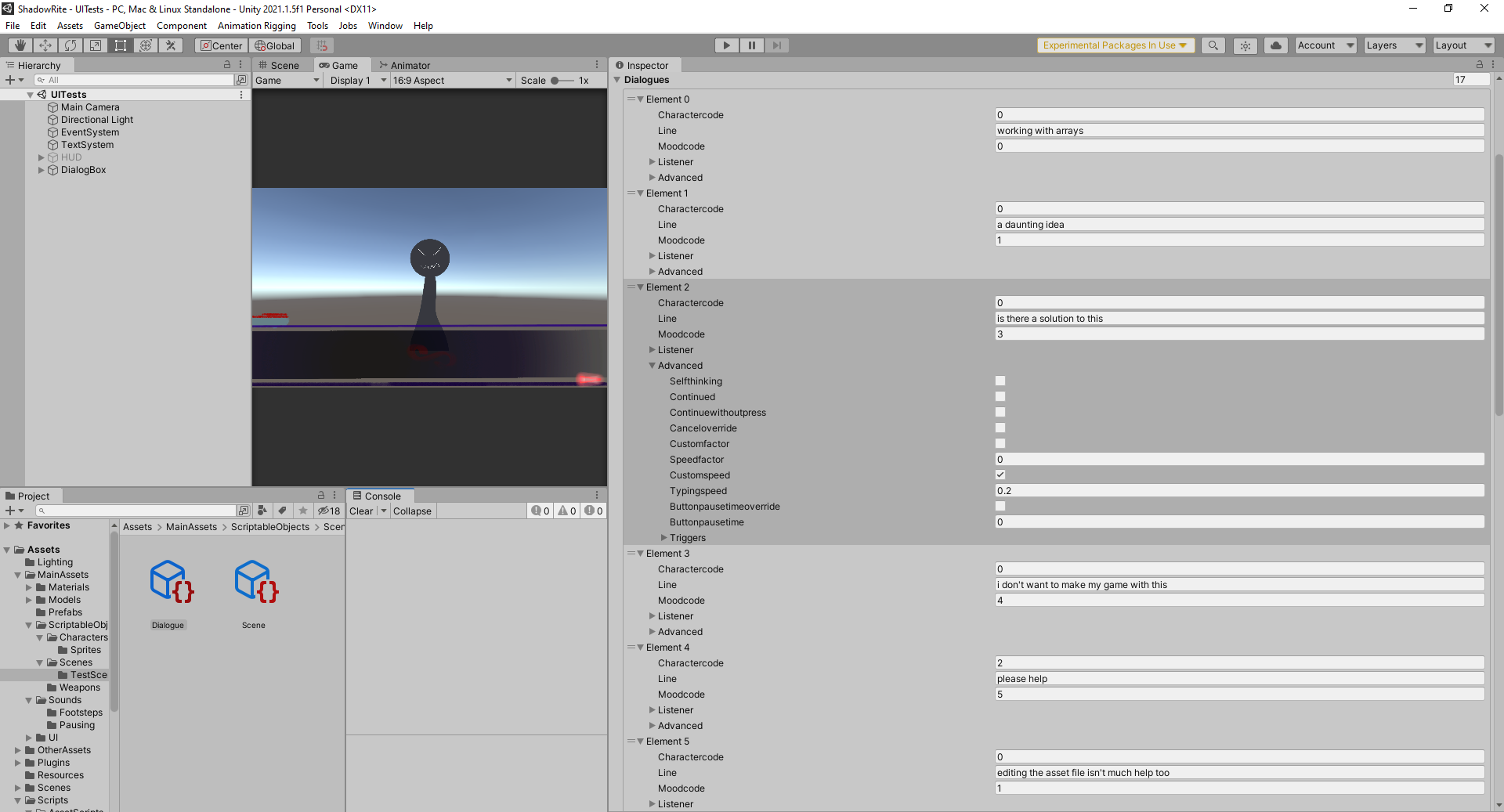
So im working on a nice and detailed dialogue system with many properties like an extensive control over the speeds and when to continue etc…im working using scriptable objects that work as dialogue and have an array of a class DialogueLine in it which contain multiple properties about the line for example who is speaking and stuff like that…however since my game is supposed to be very long, working with arrays in such an environment can be daunting…also while you can add elements to the end of an array, you cannot do it in midst of two…which is important since sometimes you just might need to edit the script a bit without screwing anything over…this is how it looks right now…
i thought maybe i could edit the asset file of the scriptable object to do it and while it can help me add elements in any order i want…it’s by no way a clean and efficient thing to work with…
Is there any method i can combine the benefits of both…i would prefer working in a text editor…there is a tool called yarnspinner…but i have no idea if it would work in my case and help me build scriptable objects…please help!
Thanks in advance
3 Answers
3
I’m not sure if you are aware of Unity’s array editing features. First of all you can select an array element in the inspector and press CTRL+D to duplicate the selected element. So you effectively insert a value at that place. Furthermore for quite some time now Unity uses the ReorderableList to show arrays in the inspector. Notice the two small horizontal bars in front or each element. You can grab the element there and drag it around to reorder the elements.
I was quite sure that in the past Unity had also a shortcut to remove an array element. However none of the obvious keyboard shortcuts work. However you can use the context menu when clickin on an element and choose “delete array element”.
Note that the usability could probably be greatly improved with a property drawer. Proper tooling is part of game development. Some people prefer to use just the stock functionality. However the Untiy editor is quite easy to extend, so you may want to have a look at editor scripting.
If you want to load the conversation data from an external file, I would highly recommend to use a more common format like json. This would be much more robust and flexible compared to a CSV file. JSON can actually represent arbitrary nested data.
Just as an example, over here I posted an example for a custom json mesh format and the corresponding loader. Yes, the loader code is really that short thanks to my SimpleJSON parser and the Unity extension file.
Hello dear @rage_co I’m here
So, let’s start from the beginning…
Using scriptable objects in your specific case would be very convenient, but as you have already said, it would lead you to a very long and difficult to manage list, as well as heavy in memory.
A possible solution would be to “break up” the entire dialogue into small dialogues to be loaded in runtime… possible solution, but not as efficient as possible.
Method 1:
In my opinion, the best solution for you, who want to use a text editor, is to use a CSV file or similar stuff and then load it into memory when you need it… even this however, it would be convenient to divide it into various sub-dialogs.
Here a preview of a CSV file (viewed on Apple Numbers App):
Method 2:
The last idea that comes to mind in a few minutes, is to make a .txt file formatted according to your needs, writing a line for each value and inserting a break line when moving on to the next element. Here is an example of a formatted file:
Conclusions:
The methods listed above may not be suitable for your use … actually, I don’t really know how you set everything up and if in the “listeners” item you need to link a prefab, a gameObject or other, which would require further modifications or tricks to to adapt.
I hope you can find the best solution to your problem and that one of mine will help you.
What just happened? whoever heard of a billion dollar using an external hosting service forgetting to renew their license insert laughing…Anyways @Devster2020 your code is working totally fine…except that .Split() takes a char value…so i used Char.Parse() and it worked but now i can only keep one character as a divider…which is undesirable since i use characters for formatting my text so i don’t want to waste any of them…also…i want to be abled to automatically create and Save the scriptable object files…here is what i made with your help
using System.Collections;
using System.Collections.Generic;
using UnityEngine;
using System.IO;
using System;

public class DialogueReader : MonoBehaviour
{
  public char divider;
  public DialoguesToImport[] toimport;

  void Start()
  {
    foreach(DialoguesToImport import in toimport)
    {
      ReadDialogueFile(import.filepath, import.dialogue);
    }
  }

  void ReadDialogueFile(string path, Dialogue dialogue)
  {
    if(!File.Exists(path))
    {
      Debug.LogError("no such file exists");
      return;
    }

    string filedata = File.ReadAllText(path);
    LoadDialogueData(filedata, dialogue);
  }


  void LoadDialogueData(string data, Dialogue dialogue)
  {
    string[] elements = data.Split(divider);

    List<DialogueLine> dialogues = new List<DialogueLine>();

    foreach(string element in elements)
    {
      string[] separator = {""};
      string[] values = element.Split(',');
      Debug.Log(values[0]);
      int charactercode = Int32.Parse(values[0]);
      string line = values[1];
      int moodcode = Int32.Parse(values[2]);
      bool enabled = false;
      int listenercode = 0;
      int listenermood = 0;

      if(values.Length > 3)
      {
        enabled = true;
        listenercode = Int32.Parse(values[3]);
        if(values.Length >= 4)
        {
          listenermood = Int32.Parse(values[3]);
        }
      }
      else
      {
        enabled = false;
        listenercode = 0;
        listenermood = 0;
      }

      DialogueLine dialogueline = new DialogueLine();
      dialogueline.charactercode = charactercode;
      dialogueline.line = line;
      dialogueline.moodcode = moodcode;
      SecondPerson listener = new SecondPerson();
      listener.enabled = enabled;
      listener.charactercode = listenercode;
      listener.moodcode = listenermood;
      dialogueline.listener = listener;
      AdvancedLineOptions advanced = new AdvancedLineOptions();
      dialogueline.advanced = advanced;

      dialogues.Add(dialogueline);
    }

    dialogue.dialogues = dialogues.ToArray();
  }
}

[System.Serializable]
public class DialoguesToImport
{
  public string filepath;
  public Dialogue dialogue;
}
this is totally error free and works totally perfect if i create a Dialogue object and feed it to this script through the to import array… think i can work with making individual objects…the main problem is that i don’t want to use characters to split it…and thanks again for all the help


@Devster2020 sorry for disturbing ya again but if you have any advice ill be grateful
– rage_co