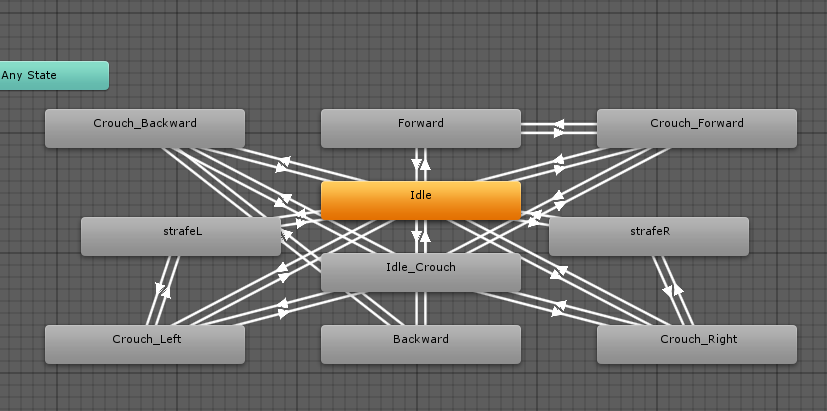
I have states A, B, and C. And the conditions for transitioning from A to B, or from A to C, (or from B to C) are almost identical. It would save me time and effort if i could cop and paste the transition data, as a new link between two different states, and then just add whatever extra conditions are needed
when it gets like that, i wonder if i might feel incluined to dump the blueprints and do it by script. That’d probably be easier for complex logic.
I wonder though, can’t you use a blend tree for all those crouch states ? If the conditions to get into them are mostly the same, then you’d just need to differentiate within the blend tree, the more specific conditions for each crouch state.
or maybe i have no clue what i’m talking about, i’m just fresh from tutorials after all
I was using blend trees but because each of the transitions has more than one state they started to mess up slightly and we were getting a running motion when a crouch was supposed to be happening-
In the near future we hope to get the tree sorted out and smoothed using blend trees but for now whilst we’re getting ready for public alpha, its fine!
Hello, I don’t know if you’ve found solutions to your problems since this thread is pretty old, but I was facing the same issue and i think I might of found a solution! I discovered that that if I drag a network of states and transitions that I want to copy into a state machine. I can then copy the state machine with all my transitions intact and drag them out to hook into my original blend-tree. Hope this helps!
Hey, this helps alot!! what I would like to also know is that if we copy parameters such as trigger names or do we have manually add them… and then paste both settings and conditions.
I hope there is a way to do this
I know this is an old post but hoping to get some help on it since its related thanks
Nice job dude. Helped alot for one of my problems.
Have another problem where I need to copy an entire layer(states, transitions, animations,etc) from an assets controller to my characters main controller. Is there anything you know of that will do that. I’ve been looking for awhile now and haven’t been able to find anything.
Maybe you should try Animator Override Controllers?
Or if it doesn’t work to you, the feature what you need might be not hard to do by just writing a script. I will do that if I have time.
omg thanks, this totally solved a frustrating problem with my game that I’ve been trying to figure out for hours! Erroneously thought it was to do with my code.
I want to make use of this tool, but i’m a bit of a noob, i don’t know what or where to download. Isn’t there a unity package that i can download? Sorry for being so blind.