I receive this javascript error when installing accelerator on one machine. This PC has had prior versions of accelerator installed. I uninstalled them and removed the services. Accelerator still works correctly after receiving the error during the install.
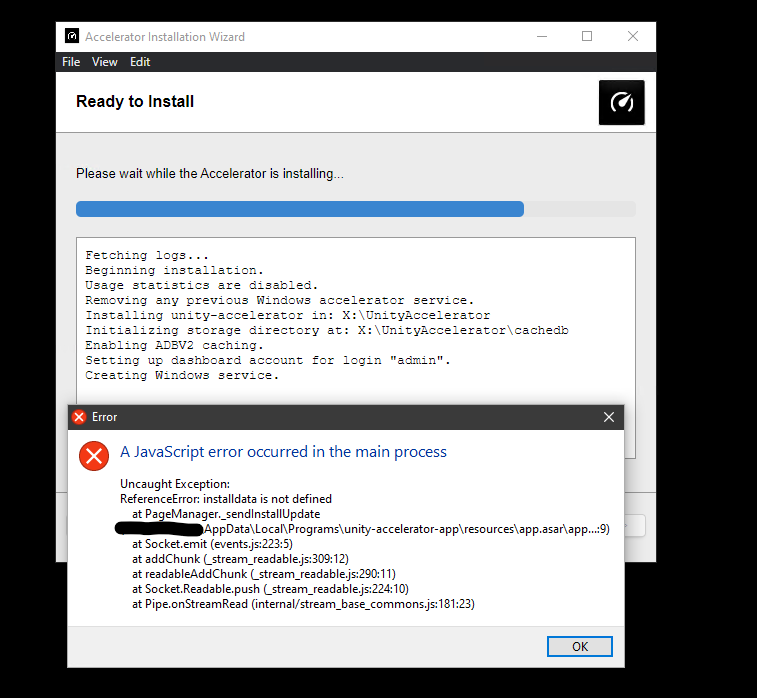
Thank you for the report! My immediate guess is that it is a bug in our routines that relay install update events from the underlying command-line-installer to the gui-installer, so it should have no adverse effects. I will file an internal ticket to research and fix this, thanks again!
I’m still experiencing this with the latest version, 1.0.941, but instead of it working correctly after install, it doesn’t install anything and clicking “finish” doesn’t close the installer
I have a similar issue is anyone able to share how to overcome this?
We are having the same issue, any update on a fix or a workaround?
Same here today
Hi, this post Unity Accelerator Ubuntu 20.04 Server Headless Install describes how to install the Accelerator without the GUI installer, if you find yourself in a situation where the GUI installer doesn’t work for you.
Essentially, download the binary at the link in that post and:
-
run the binary with these args to generate a sample config file:
./unity-accelerator-v1.0.941+g6b39b61-macos install --sample install.json
( on MacOS or Linux, you will likely have to make the binary executable with
chmod +x unity-accelerator-v1.0.941+g6b39b61-macos) -
edit the json config file with these receommended changes:
"ADBV2Enabled": true,<— Set to true, caching will be enabled for the Asset Pipeline Database V2. For the accelerator, this is a protobuf-based protocol used with Unity Editor versions greater than or equal to 2019.3.
"StorageDirectory": "<path-to-desired-config-folder-location>", <—The directory where the configuration, logs, persisted metrics, and other small bookkeeping files will be kept.
"CacheDirectory": "<path-to-cache-folder>", <— The directory where the cached items and a tracking database will be kept. Defaults to StorageDirectory if an empty string.
"DashboardLogin": "<username>", <— "The primary login for the built-in dashboard. Leave empty if you do not wish to enable the built-in dashboard.
"DashboardPassword": "<password", <— If DashboardLogin is set, this will be the password for the account. This IS plaintext here, and is just for convenience sake. It would be more secure to call ‘unity-accelerator dashboard password’ yourself after installation.
-
Dry run the install, passing your modified config json file so you can evaluate the actions the installer would take.:
./unity-accelerator-v1.0.941+g6b39b61-macos install --dry-run install.json -
When satisfied, run the install with the config to finalize the installation
./unity-accelerator-v1.0.941+g6b39b61-macos install install.json