This is using the “New Input System”. I would recommend watching a basic, beginner YouTube video tutorial on how to add the New Input System to your project and how to create/save input actions that you can reference in your code
I have a question about the PlayerController and GatherInput script. They should be both added to the Player component? And I still have this problem Assets\Scripts\GatherInput.cs(10,12): error CS0246: The type or namespace name ‘Controls’ could not be found (are you missing a using directive or an assembly reference?) , I dont know what is up with the Controls thing , I created a input system file added the jump and move controls but I dont know what to do with it next , I watched some videos but I dont see something similar to what you did, that error is from this line of code public Controls myControls;.
Just following up on this as Lemnul and I spoke about this outside of this thread a while back, but if I understand correctly- with the new input system when you create your Input Actions Asset, whatever you name these Input Actions is what C# class will be generated that references those inputs. In my project the Input Actions was name “Controls” so that is what Unity was trying to reference in the comment above which Lemnul posted. Please see the reference image below. Hopefully that makes sense to anyone reading this down the road.

Hello my man, would you mind sending me the settings of your Input Actions? Or the whole project if it’s public 
Hey man could you by any chance send the entire project? I’m fairly new to programming and I’m trying to figure things out with little to no luck. It would be appreciated, thank you.
I don’t see the value in having the entire project at your disposal. You basically already do with having the code. You should be able to make it work with the code that is available. If not, there’s other things you should be looking into first in my opinion.
Hello man. I have a slight problem as well, still trying to figure out why I’m getting this error “Assets\Scripts\GatherInput.cs(26,20): error CS1061: ‘Controls’ does not contain a definition for ‘Player’ and no accessible extension method ‘Player’ accepting a first argument of type ‘Controls’ could be found (are you missing a using directive or an assembly reference?)” It’s in onEnable and OnDisable… do i have to make something with the controls script ?
Not positive but I’m assuming it has something to do with the Action Map in the Input Actions being named “Player” in my case.

Thanks man this is exactly what was the problem… wasn’t sure what to put there as i have always used the old input system
Could you show me what you have in it ? I’m trying to make it work 
okey i figured that out, the only problem is the raycast on left and right… i’m trying to understand it yet i don’t see the point in checking it that way… why do you check if player is grounded through 2 raycasts ?
this is an old project that I haven’t worked on in a long time. I wouldn’t do it that way anymore. now I check using a ContactFilter2D. Something like this:
[field: SerializeField] public ContactFilter2D CF { get; private set; }
//check if the rigidbody is touching the contact filter
public bool Grounded => RB.IsTouching(CF);
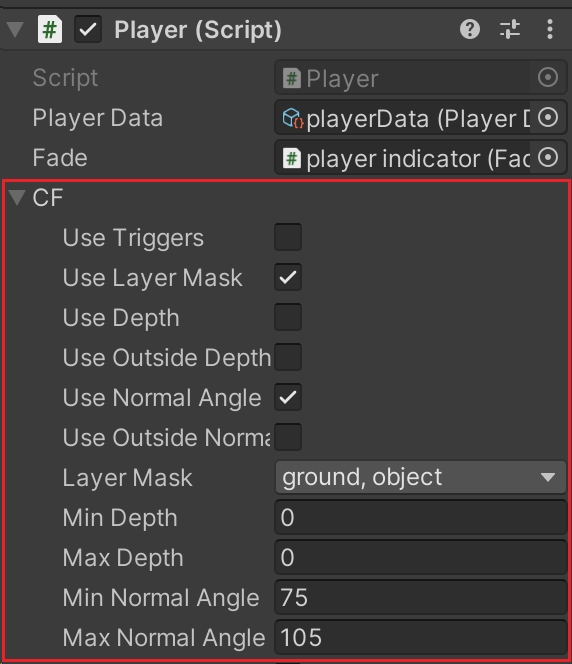
Okey I’m just stupid and blind it was as simple as setting the raycast on more than 0 so it could detect it XD and the raycast are there cose not always is the middle part on platform (Leaving it here for anyone lost in it as well)[And sorry English is not my first language so if there are gramar mistakes, i apologise]
Installed and configured Input system. Created Input Actions named Controls, received Controls.cs with the same name. I start the game - I press the spacebar, the player jumps, there are no errors in the console.
When I press w - the player does not jump, there is an error in the console. I press a or d - the player does not move, there is an error in the console.
Most likely I need to change something in my Input system.

Error
! InvalidOperationException: Cannot read value of type ‘Single’ from composite ‘UnityEngine.InputSystem.Composites.Vector2Composite’ bound to action ‘Player/Move[/Keyboard/w,/Keyboard/s,/Keyboard/a,/Keyboard/d,/Keyboard/upArrow,/Keyboard/downArrow,/Keyboard/leftArrow,/Keyboard/rightArrow]’ (composite is a ‘Int32’ with value type ‘Vector2’) UnityEngine.InputSystem.InputActionState.ReadValue[TValue] (System.Int32 bindingIndex, System.Int32 controlIndex, System.Boolean ignoreComposites) (at Library/PackageCache/com.unity.inputsystem@1.4.4/InputSystem/Actions/InputActionState.cs:2808) UnityEngine.InputSystem.InputAction+CallbackContext.ReadValue[TValue] () (at Library/PackageCache/com.unity.inputsystem@1.4.4/InputSystem/Actions/InputAction.cs:1939) GatherInput.StartMove (UnityEngine.InputSystem.InputAction+CallbackContext ctx) (at Assets/Scenes/physics test scene/GatherInput.cs:50) UnityEngine.InputSystem.Utilities.DelegateHelpers.InvokeCallbacksSafe[TValue] (UnityEngine.InputSystem.Utilities.CallbackArray1[System.Action1[TValue]]& callbacks, TValue argument, System.String callbackName, System.Object context) (at Library/PackageCache/com.unity.inputsystem@1.4.4/InputSystem/Utilities/DelegateHelpers.cs:46) UnityEngine.InputSystem.LowLevel.<>c__DisplayClass7_0:<set_onUpdate>b__0(NativeInputUpdateType, NativeInputEventBuffer*) UnityEngineInternal.Input.NativeInputSystem:NotifyUpdate(NativeInputUpdateType, IntPtr)
Please create your own thread rather than hijacking existing threads.
Also note, there are dedicated forums so for your post, you can use the Input System forum.
how am i supposed to resolve
The type or namespace name ‘IPlayerActions’ does not exist in the namespace ‘Controls’ (are you missing an assembly reference?)
error?
can you provide me with your control scripts i am very new to unity
no thank you i got it