LWF - an open-source tool for bringing Flash animation to Unity and HTML5

LWF - an open-source developer tool for Unity and HTML5

LWF (Lightweight SWF) is a framework for 2D User Interface and 2D Animation. It is based on an animation data converted from an Adobe Flash SWF file. And it also works well with NGUI. Please take a look at the presentation of LWF and the sample.

LWF in production

Press Release from GREE, Inc. (http://www.gree.co.jp/en/news/press/2012/1018_01.html)

LWF Presentation

Description and Implementation of LWF - http://gree.github.com/lwf/presentation20121115/

LWF Sample

Basic2 Sample - http://gree.github.com/lwf-demo/unity/basic2/

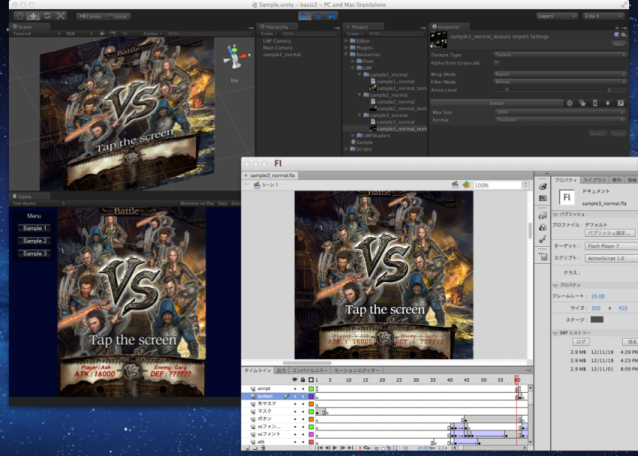
Screenshot (Unity Editor, Flash CS6)
1087122--40904--$unity_flash.png

These samples also work on HTML5!

How to import your Adobe Flash data into your Unity project

LWF on GitHub

Yes! It’s an Open Source! Under the zlib License.

http://gree.github.com/lwf/

Unity PlugIns from GREE, Inc.

This sounds awesome!

only for mobile platform? not support windows standalone player?

LWF should work on windows standalone player as well.

However unity-systemfontrenderer( https://github.com/gree/unity-systemfontrenderer ) that is an optional component for LWF, doesn’t support windows yet.

I uploaded a basic sample (http://gree.github.com/lwf-demo/unity/basic2/) and the project of it (https://github.com/gree/lwf-demo/tree/master/unity/basic2). Please take a look at these!

uploaded a screenshot of Unity Editor and Flash CS6. HTML5 version samples are also available.

Uploaded a screencast, “How to import your Adobe Flash data into your Unity project” (youtube).

LWFS, Converter and Previewer for LWF - https://github.com/gree/lwfs

Hello, Nice work.

I have things to wonder, I’m looking for 2d skeleton animation solution now. LWF looks perfect solution for me.

Have no experience on Flash, but google showed me “motion tween” enable to make skeleton animation. and in presentation of LWF, motion tween may be usable. Is it right? and I’d like to know what version of flash is recommended for making artwork. Thanks ahead. :slight_smile:

I’m happy to hear that!

Yes! It is right. We did it like the following.

1101813--41415--$char1.png 1101813--41414--$char0.png

I recommend you to use Adobe Flash CS6, but older versions of Adobe Flash should work for LWF.

Thank you, the image you attached is really helpful for me to understand how you did!

Hi,

This sounds very impressive but I am missing a point: If I make a 2D UI with NGUI, can I “export” it somehow to HTML5 with your tool?

Thanks

Stephane

Thank you for your interest, but LWF is not for that purpose even though LWF works well NGUI.

LWF is based on an animation data converted from a Flash SWF file. It means that you can use Adobe Flash for authoring 2D User Interface and 2D animation. And LWF works well on NGUI, for example, 2D characters on NGUI panel.

are you planing to add AS3 support or is it just for animations?

We have no plan to support AS3. I recommend you to use Scaleform if you would like to use AS3 on Unity.

LWF also supports SWF version 3 Action. It allows to control movieclips or to notify events to the application program, for example, at the end of the animation or when a button is pressed.

http://gree.github.com/lwf-demo/pdf/FLASHforLWFproductionguideline.pdf

  • play
  • stop
  • gotoAndPlay
  • gotoAndStop
  • nextFrame
  • prevFrame
  • tellTarget
  • fscommand

I updated LWF for rendering textures in the Scene View in Unity!

https://github.com/gree/lwf

The previous version of LWF doesn’t render textures at all in the Scene View if the LWF data doesn’t use a texture sheet. Thus, it is difficult to adjust position, but now, you can see textures in the Scene View at last!

Also, there is another presentation of LWF. Please take a look it.
http://www.slideshare.net/hiroyuki-haga/2013-0209greeopenhackdayenglish

This is an awesome project. Thanks for sharing.

First I would like to say that LWF seems very promising and looking forward to using it!

Our team is currently looking to implement this tool within Unity to implement high quality animations in our upcoming game. We ran into a few issues while testing this program and are looking for solutions to help us get LWF running in our pipeline.

We followed the Unity install steps outlined in the following video: http://www.youtube.com/watch?v=A_AhTosm1NU
And we also followed the Flash LWF install steps in: http://www.youtube.com/watch?v=K7awPpMplIk

The problem we ran into was that the same texture was being placed onto the separate images. I’ve attached a screen shot showing you an example of the issue we’re experiencing: Imgur: The magic of the Internet

We’ve spent some time trying to fix the issue on our own with no luck, so we’re hoping we can get some help from the developers.

Thank you for your time and creating this awesome tool for us to use.

EDIT: Our developer found the problem, we were trying to use our swf + spritesheet that we ran through the swf2lwf.rb script with a LWFObject script. We changed the LWFObject to a LWFPlayer and it worked. Our mistake.

Thank you! :smile:

Hmm, it sounds odd to me. LWFObject should work as well. Could you share with me your fla, swf, texture sheet and Unity project?

hi,
this technology looks like perfect solution for exFlash developers moving to unity, that’s why we are trying to adopt it for our project
first try led to few errors, probably on our side, but I am just unable to find where we are wrong, can you please take a look?

when exporting from flash i get this trace

Warning shape is contained 1. symbole name = root
Warning shape is contained 2. symbole name = root
Warning shape is contained 3. symbole name = root
Warning shape is contained 4. symbole name = root
Warning shape is contained 5. symbole name = root
Warning shape is contained 6. symbole name = root
Warning shape is contained 7. symbole name = root
Warning shape is contained 8. symbole name = nohy
Warning shape is contained 9. symbole name = nohy
Warning shape is contained 10. symbole name = nohy
Warning shape is contained 11. symbole name = nohy
Warning shape is contained 12. symbole name = nohy
Warning shape is contained 13. symbole name = nohy
Warning shape is contained 14. symbole name = nohy
Warning shape is contained 15. symbole name = ostatni
Warning shape is contained 16. symbole name = ostatni
Warning shape is contained 17. symbole name = ostatni
Warning shape is contained 18. symbole name = ostatni
Warning shape is contained 19. symbole name = ostatni
Warning shape is contained 20. symbole name = ostatni
Warning shape is contained 21. symbole name = ostatni
Warning shape is contained 22. symbole name = telo
Warning shape is contained 23. symbole name = telo
Warning shape is contained 24. symbole name = telo
Warning shape is contained 25. symbole name = telo
Warning shape is contained 26. symbole name = telo
Warning shape is contained 27. symbole name = telo
Warning shape is contained 28. symbole name = telo
Warning shape is contained 29. symbole name = Tween 3

Publish SWF completed! 0.88 sec

when converting swf to lwf in ruby i have this 2 warnings

C:\Ruby193\swf2lwf>ruby swf2lwf.rb dog.swf
WARN: Shape(16) is not rect.
WARN: bitmap(nohy_noha_b_z_natazena.png 96x111) is specified UVWH(0,0)-(5,6).

and when runing in unity i have this error

NullReferenceException: Object reference not set to an instance of an object
LWF.UnityRenderer.ResourceCache.m__1D (System.String filename) (at Assets/Plugins/lwf/renderer/common/lwf_unity_resourcecache.cs:131)
LWF.UnityRenderer.ResourceCache.LoadLWFData (System.String filename, System.Func2 lwfDataLoader) (at Assets/Plugins/lwf/renderer/common/lwf_unity_resourcecache.cs:161) LWFPlayer.Load (System.String path, System.String texturePrefix, System.String fontPrefix, Single zOffset, Single zRate, Int32 renderQueueOffset, Int32 cachingFrames, UnityEngine.Camera camera, Boolean autoPlay, System.Func2 lwfDataCallback, System.Action1 lwfLoadCallback, System.Action1 lwfDestroyCallback, System.Func2 lwfDataLoader, System.Func2 textureLoader, System.Action`1 textureUnloader) (at Assets/Plugins/lwf/wrapper/LWFPlayer.cs:103)
Dog.Start () (at Assets/Dog.cs:9)

thanks for your help

I’ve made a demo with LWF and posted a semi-tutorial about it: Flash Animation in Unity with LWF - blog.sokay.net

I hope it helps someone!