genail
June 12, 2014, 9:10am
1
Mad Mesh Combiner
Now available in the Asset Store!
Asset Store | Support | Previous WIP Thread
Features
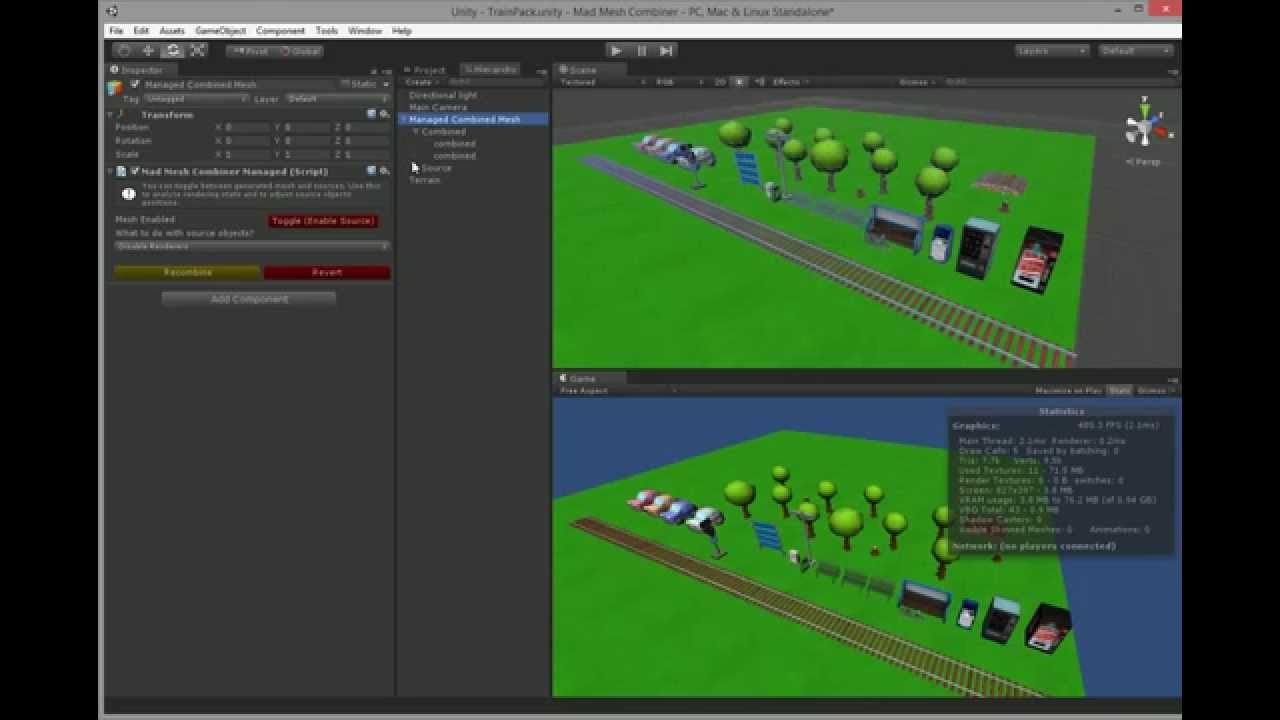
Combines multiple objects into one, just select them and click the “Combine” button
Merges multiple materials into one using atlases*
Support for tiled materials
Scripts and colliders from source objects are preserved
Merging bump maps
You can toggle between merged and source objects to change how merged mesh looks like even after merging
No scripting abilities required!
Under active development!**
When merging into one atlas/material is not possible, Mad Mesh Combiner will create two or more materials. It is based on variation of selected objects.
How it compares to other combining tools available in the Asset Store?
It’s easy! Many tools in the asset store has been created for people who have great knowledge about Unity meshes and materials. With Mad Mesh Combiner you don’t need to know nothing more than there are objects that you want to combine.
It has been tested in production. With this tool we’ve created large number of levels in our Train Control game. We know how to make mesh combining easy!
It is actively supported. There are still plenty of features that we will add very soon. Have an issue? Just write to us!
We have experience with Unity Editor scripting. Until now we’ve released Energy Bar Toolkit and Mad Level Manager . Both scripts have 5/5 rating. We don’t want Mad Mesh Combiner to be worse
The future
Ability to setup optimal vertices count (meshes will be combined to bigger ones, but not bigger than given vertices count)
Dynamic mesh merging
Support for sub-meshes
Support for skinned meshes
genail
June 13, 2014, 2:05pm
2
The new version of Mad Mesh Combiner has been released! (1.1)
New Features
You can now move your source objects to their original position
You can remove unused source object from the scene
Texture atlas splitting
Improvements
Progress bar while combining meshes
Optimizing mesh after the combining
Bug Fixes
Selecting different objects don’t need the window to be reopened again
Fixed multiple “Combined” directory creation
Fixed NRE when combining disabled objects and materials without textures
genail
June 17, 2014, 1:14pm
3
Note to all my clients. I am going on vacations and I won’t be available as I usually am until June 23 (Monday). I am still monitoring forums and email, so no message will be leaved unanswered.
Cheers!
genail
July 4, 2014, 10:33am
4
Mad Mesh Combiner 1.1.1 is available!
New version of Mad Mesh Combiner has been released! This time we focused on fixing bugs from the previous version and making the GUI more readable.
New Features
Ability to split result mesh into smaller chunks
Improvements
More readable GUI for managed object
Bug Fixes
Atlas textures no longer marked as readable (huge memory consumption)
Fixed 65K vertices limit bug
Fixed UV2 merge
Fixed CubeMap support
im1
July 7, 2014, 2:50am
5
sweet!
so did u add/fix everything so apocalyptic city pack demo scene would completely combine properly?
im1
July 7, 2014, 3:02am
6
sadly no, oh well back to the drawing board…
https://www.dailymotion.com/video/x15i1py
Mesh.uv2 is out of bounds. The supplied array needs to be the same size as the Mesh.vertices array.
UnityEngine.Mesh:set_uv2(Vector2[])
MadMeshCombiner.MadMeshCombinerTool:Combine(String, ObjectGroup, Transform) (at Assets/Mad Mesh Combiner/Scripts/Editor/MadMeshCombinerTool.cs:409)
MadMeshCombiner.MadMeshCombinerTool:RecombineManaged(MadMeshCombinerManaged) (at Assets/Mad Mesh Combiner/Scripts/Editor/MadMeshCombinerTool.cs:114)
MadMeshCombiner.MadMeshCombinerWindow:CombineManaged() (at Assets/Mad Mesh Combiner/Scripts/Editor/MadMeshCombinerWindow.cs:132)
MadMeshCombiner.MadMeshCombinerWindow:Combine() (at Assets/Mad Mesh Combiner/Scripts/Editor/MadMeshCombinerWindow.cs:115)
MadMeshCombiner.MadMeshCombinerWindow:OnGUI() (at Assets/Mad Mesh Combiner/Scripts/Editor/MadMeshCombinerWindow.cs:96)
UnityEditor.DockArea:OnGUI()


Mesh.vertices is too large. A mesh may not have more than 65000 vertices.
UnityEngine.Mesh:set_vertices(Vector3[])
MadMeshCombiner.MadMeshCombinerTool:Combine(String, ObjectGroup, Transform) (at Assets/Mad Mesh Combiner/Scripts/Editor/MadMeshCombinerTool.cs:404)
MadMeshCombiner.MadMeshCombinerTool:RecombineManaged(MadMeshCombinerManaged) (at Assets/Mad Mesh Combiner/Scripts/Editor/MadMeshCombinerTool.cs:114)
MadMeshCombiner.MadMeshCombinerWindow:CombineManaged() (at Assets/Mad Mesh Combiner/Scripts/Editor/MadMeshCombinerWindow.cs:132)
MadMeshCombiner.MadMeshCombinerWindow:Combine() (at Assets/Mad Mesh Combiner/Scripts/Editor/MadMeshCombinerWindow.cs:115)
MadMeshCombiner.MadMeshCombinerWindow:OnGUI() (at Assets/Mad Mesh Combiner/Scripts/Editor/MadMeshCombinerWindow.cs:96)
UnityEditor.DockArea:OnGUI()


Mesh.colors is out of bounds. The supplied array needs to be the same size as the Mesh.vertices array.
UnityEngine.Mesh:set_colors(Color[])
MadMeshCombiner.MadMeshCombinerTool:Combine(String, ObjectGroup, Transform) (at Assets/Mad Mesh Combiner/Scripts/Editor/MadMeshCombinerTool.cs:405)
MadMeshCombiner.MadMeshCombinerTool:RecombineManaged(MadMeshCombinerManaged) (at Assets/Mad Mesh Combiner/Scripts/Editor/MadMeshCombinerTool.cs:114)
MadMeshCombiner.MadMeshCombinerWindow:CombineManaged() (at Assets/Mad Mesh Combiner/Scripts/Editor/MadMeshCombinerWindow.cs:132)
MadMeshCombiner.MadMeshCombinerWindow:Combine() (at Assets/Mad Mesh Combiner/Scripts/Editor/MadMeshCombinerWindow.cs:115)
MadMeshCombiner.MadMeshCombinerWindow:OnGUI() (at Assets/Mad Mesh Combiner/Scripts/Editor/MadMeshCombinerWindow.cs:96)
UnityEditor.DockArea:OnGUI()


Mesh.normals is out of bounds. The supplied array needs to be the same size as the Mesh.vertices array.
UnityEngine.Mesh:set_normals(Vector3[])
MadMeshCombiner.MadMeshCombinerTool:Combine(String, ObjectGroup, Transform) (at Assets/Mad Mesh Combiner/Scripts/Editor/MadMeshCombinerTool.cs:406)
MadMeshCombiner.MadMeshCombinerTool:RecombineManaged(MadMeshCombinerManaged) (at Assets/Mad Mesh Combiner/Scripts/Editor/MadMeshCombinerTool.cs:114)
MadMeshCombiner.MadMeshCombinerWindow:CombineManaged() (at Assets/Mad Mesh Combiner/Scripts/Editor/MadMeshCombinerWindow.cs:132)
MadMeshCombiner.MadMeshCombinerWindow:Combine() (at Assets/Mad Mesh Combiner/Scripts/Editor/MadMeshCombinerWindow.cs:115)
MadMeshCombiner.MadMeshCombinerWindow:OnGUI() (at Assets/Mad Mesh Combiner/Scripts/Editor/MadMeshCombinerWindow.cs:96)
UnityEditor.DockArea:OnGUI()


Mesh.tangents is out of bounds. The supplied array needs to be the same size as the Mesh.vertices array.
UnityEngine.Mesh:set_tangents(Vector4[])
MadMeshCombiner.MadMeshCombinerTool:Combine(String, ObjectGroup, Transform) (at Assets/Mad Mesh Combiner/Scripts/Editor/MadMeshCombinerTool.cs:407)
MadMeshCombiner.MadMeshCombinerTool:RecombineManaged(MadMeshCombinerManaged) (at Assets/Mad Mesh Combiner/Scripts/Editor/MadMeshCombinerTool.cs:114)
MadMeshCombiner.MadMeshCombinerWindow:CombineManaged() (at Assets/Mad Mesh Combiner/Scripts/Editor/MadMeshCombinerWindow.cs:132)
MadMeshCombiner.MadMeshCombinerWindow:Combine() (at Assets/Mad Mesh Combiner/Scripts/Editor/MadMeshCombinerWindow.cs:115)
MadMeshCombiner.MadMeshCombinerWindow:OnGUI() (at Assets/Mad Mesh Combiner/Scripts/Editor/MadMeshCombinerWindow.cs:96)
UnityEditor.DockArea:OnGUI()


Mesh.uv is out of bounds. The supplied array needs to be the same size as the Mesh.vertices array.
UnityEngine.Mesh:set_uv(Vector2[])
MadMeshCombiner.MadMeshCombinerTool:Combine(String, ObjectGroup, Transform) (at Assets/Mad Mesh Combiner/Scripts/Editor/MadMeshCombinerTool.cs:408)
MadMeshCombiner.MadMeshCombinerTool:RecombineManaged(MadMeshCombinerManaged) (at Assets/Mad Mesh Combiner/Scripts/Editor/MadMeshCombinerTool.cs:114)
MadMeshCombiner.MadMeshCombinerWindow:CombineManaged() (at Assets/Mad Mesh Combiner/Scripts/Editor/MadMeshCombinerWindow.cs:132)
MadMeshCombiner.MadMeshCombinerWindow:Combine() (at Assets/Mad Mesh Combiner/Scripts/Editor/MadMeshCombinerWindow.cs:115)
MadMeshCombiner.MadMeshCombinerWindow:OnGUI() (at Assets/Mad Mesh Combiner/Scripts/Editor/MadMeshCombinerWindow.cs:96)
UnityEditor.DockArea:OnGUI()


Mesh.uv2 is out of bounds. The supplied array needs to be the same size as the Mesh.vertices array.
UnityEngine.Mesh:set_uv2(Vector2[])
MadMeshCombiner.MadMeshCombinerTool:Combine(String, ObjectGroup, Transform) (at Assets/Mad Mesh Combiner/Scripts/Editor/MadMeshCombinerTool.cs:409)
MadMeshCombiner.MadMeshCombinerTool:RecombineManaged(MadMeshCombinerManaged) (at Assets/Mad Mesh Combiner/Scripts/Editor/MadMeshCombinerTool.cs:114)
MadMeshCombiner.MadMeshCombinerWindow:CombineManaged() (at Assets/Mad Mesh Combiner/Scripts/Editor/MadMeshCombinerWindow.cs:132)
MadMeshCombiner.MadMeshCombinerWindow:Combine() (at Assets/Mad Mesh Combiner/Scripts/Editor/MadMeshCombinerWindow.cs:115)
MadMeshCombiner.MadMeshCombinerWindow:OnGUI() (at Assets/Mad Mesh Combiner/Scripts/Editor/MadMeshCombinerWindow.cs:96)
UnityEditor.DockArea:OnGUI()


Failed setting triangles. Some indices are referencing out of bounds vertices.
UnityEngine.Mesh:set_triangles(Int32[])
MadMeshCombiner.MadMeshCombinerTool:Combine(String, ObjectGroup, Transform) (at Assets/Mad Mesh Combiner/Scripts/Editor/MadMeshCombinerTool.cs:410)
MadMeshCombiner.MadMeshCombinerTool:RecombineManaged(MadMeshCombinerManaged) (at Assets/Mad Mesh Combiner/Scripts/Editor/MadMeshCombinerTool.cs:114)
MadMeshCombiner.MadMeshCombinerWindow:CombineManaged() (at Assets/Mad Mesh Combiner/Scripts/Editor/MadMeshCombinerWindow.cs:132)
MadMeshCombiner.MadMeshCombinerWindow:Combine() (at Assets/Mad Mesh Combiner/Scripts/Editor/MadMeshCombinerWindow.cs:115)
MadMeshCombiner.MadMeshCombinerWindow:OnGUI() (at Assets/Mad Mesh Combiner/Scripts/Editor/MadMeshCombinerWindow.cs:96)
UnityEditor.DockArea:OnGUI()


Mesh.uv2 is out of bounds. The supplied array needs to be the same size as the Mesh.vertices array.
UnityEngine.Mesh:set_uv2(Vector2[])
MadMeshCombiner.MadMeshCombinerTool:Combine(String, ObjectGroup, Transform) (at Assets/Mad Mesh Combiner/Scripts/Editor/MadMeshCombinerTool.cs:409)
MadMeshCombiner.MadMeshCombinerTool:RecombineManaged(MadMeshCombinerManaged) (at Assets/Mad Mesh Combiner/Scripts/Editor/MadMeshCombinerTool.cs:114)
MadMeshCombiner.MadMeshCombinerWindow:CombineManaged() (at Assets/Mad Mesh Combiner/Scripts/Editor/MadMeshCombinerWindow.cs:132)
MadMeshCombiner.MadMeshCombinerWindow:Combine() (at Assets/Mad Mesh Combiner/Scripts/Editor/MadMeshCombinerWindow.cs:115)
MadMeshCombiner.MadMeshCombinerWindow:OnGUI() (at Assets/Mad Mesh Combiner/Scripts/Editor/MadMeshCombinerWindow.cs:96)
UnityEditor.DockArea:OnGUI()


Material doesn't have a texture property '_CubeMap'
UnityEngine.Material:GetTexture(String)
MadMeshCombiner.ObjectGroup:<CubeMapTextures>m__D(GameObject) (at Assets/Mad Mesh Combiner/Scripts/Editor/MadMeshCombinerTool.cs:630)
System.Linq.Enumerable:ToArray(IEnumerable`1)
MadMeshCombiner.ObjectGroup:CubeMapTextures() (at Assets/Mad Mesh Combiner/Scripts/Editor/MadMeshCombinerTool.cs:630)
MadMeshCombiner.MadMeshCombinerTool:Combine(String, ObjectGroup, Transform) (at Assets/Mad Mesh Combiner/Scripts/Editor/MadMeshCombinerTool.cs:267)
MadMeshCombiner.MadMeshCombinerTool:RecombineManaged(MadMeshCombinerManaged) (at Assets/Mad Mesh Combiner/Scripts/Editor/MadMeshCombinerTool.cs:114)
MadMeshCombiner.MadMeshCombinerWindow:CombineManaged() (at Assets/Mad Mesh Combiner/Scripts/Editor/MadMeshCombinerWindow.cs:132)
MadMeshCombiner.MadMeshCombinerWindow:Combine() (at Assets/Mad Mesh Combiner/Scripts/Editor/MadMeshCombinerWindow.cs:115)
MadMeshCombiner.MadMeshCombinerWindow:OnGUI() (at Assets/Mad Mesh Combiner/Scripts/Editor/MadMeshCombinerWindow.cs:96)
UnityEditor.DockArea:OnGUI()


Error assigning 2D texture to cubemap texture property: Dimensions must match
UnityEngine.Material:SetTexture(String, Texture)
MadMeshCombiner.MadMeshCombinerTool:Combine(String, ObjectGroup, Transform) (at Assets/Mad Mesh Combiner/Scripts/Editor/MadMeshCombinerTool.cs:435)
MadMeshCombiner.MadMeshCombinerTool:RecombineManaged(MadMeshCombinerManaged) (at Assets/Mad Mesh Combiner/Scripts/Editor/MadMeshCombinerTool.cs:114)
MadMeshCombiner.MadMeshCombinerWindow:CombineManaged() (at Assets/Mad Mesh Combiner/Scripts/Editor/MadMeshCombinerWindow.cs:132)
MadMeshCombiner.MadMeshCombinerWindow:Combine() (at Assets/Mad Mesh Combiner/Scripts/Editor/MadMeshCombinerWindow.cs:115)
MadMeshCombiner.MadMeshCombinerWindow:OnGUI() (at Assets/Mad Mesh Combiner/Scripts/Editor/MadMeshCombinerWindow.cs:96)
UnityEditor.DockArea:OnGUI()


Error assigning 2D texture to cubemap texture property '_Cube': Dimensions must match
UnityEngine.Material:SetTexture(String, Texture)
MadMeshCombiner.MadMeshCombinerTool:Combine(String, ObjectGroup, Transform) (at Assets/Mad Mesh Combiner/Scripts/Editor/MadMeshCombinerTool.cs:435)
MadMeshCombiner.MadMeshCombinerTool:RecombineManaged(MadMeshCombinerManaged) (at Assets/Mad Mesh Combiner/Scripts/Editor/MadMeshCombinerTool.cs:114)
MadMeshCombiner.MadMeshCombinerWindow:CombineManaged() (at Assets/Mad Mesh Combiner/Scripts/Editor/MadMeshCombinerWindow.cs:132)
MadMeshCombiner.MadMeshCombinerWindow:Combine() (at Assets/Mad Mesh Combiner/Scripts/Editor/MadMeshCombinerWindow.cs:115)
MadMeshCombiner.MadMeshCombinerWindow:OnGUI() (at Assets/Mad Mesh Combiner/Scripts/Editor/MadMeshCombinerWindow.cs:96)
UnityEditor.DockArea:OnGUI()


Error assigning 2D texture to cubemap texture property: Dimensions must match
UnityEditor.AssetDatabase:SaveAssets()
MadMeshCombiner.MadMeshCombinerAtlasBuilder:CreateAtlas(String, Texture2D[], Shader) (at Assets/Mad Mesh Combiner/Scripts/Editor/MadMeshCombinerAtlasBuilder.cs:126)
MadMeshCombiner.MadMeshCombinerTool:Combine(String, ObjectGroup, Transform) (at Assets/Mad Mesh Combiner/Scripts/Editor/MadMeshCombinerTool.cs:280)
MadMeshCombiner.MadMeshCombinerTool:RecombineManaged(MadMeshCombinerManaged) (at Assets/Mad Mesh Combiner/Scripts/Editor/MadMeshCombinerTool.cs:114)
MadMeshCombiner.MadMeshCombinerWindow:CombineManaged() (at Assets/Mad Mesh Combiner/Scripts/Editor/MadMeshCombinerWindow.cs:132)
MadMeshCombiner.MadMeshCombinerWindow:Combine() (at Assets/Mad Mesh Combiner/Scripts/Editor/MadMeshCombinerWindow.cs:115)
MadMeshCombiner.MadMeshCombinerWindow:OnGUI() (at Assets/Mad Mesh Combiner/Scripts/Editor/MadMeshCombinerWindow.cs:96)
UnityEditor.DockArea:OnGUI()


Error assigning 2D texture to cubemap texture property '_Cube': Dimensions must match
UnityEditor.AssetDatabase:SaveAssets()
MadMeshCombiner.MadMeshCombinerAtlasBuilder:CreateAtlas(String, Texture2D[], Shader) (at Assets/Mad Mesh Combiner/Scripts/Editor/MadMeshCombinerAtlasBuilder.cs:126)
MadMeshCombiner.MadMeshCombinerTool:Combine(String, ObjectGroup, Transform) (at Assets/Mad Mesh Combiner/Scripts/Editor/MadMeshCombinerTool.cs:280)
MadMeshCombiner.MadMeshCombinerTool:RecombineManaged(MadMeshCombinerManaged) (at Assets/Mad Mesh Combiner/Scripts/Editor/MadMeshCombinerTool.cs:114)
MadMeshCombiner.MadMeshCombinerWindow:CombineManaged() (at Assets/Mad Mesh Combiner/Scripts/Editor/MadMeshCombinerWindow.cs:132)
MadMeshCombiner.MadMeshCombinerWindow:Combine() (at Assets/Mad Mesh Combiner/Scripts/Editor/MadMeshCombinerWindow.cs:115)
MadMeshCombiner.MadMeshCombinerWindow:OnGUI() (at Assets/Mad Mesh Combiner/Scripts/Editor/MadMeshCombinerWindow.cs:96)
UnityEditor.DockArea:OnGUI()


Mesh.uv2 is out of bounds. The supplied array needs to be the same size as the Mesh.vertices array.
UnityEngine.Mesh:set_uv2(Vector2[])
MadMeshCombiner.MadMeshCombinerTool:Combine(String, ObjectGroup, Transform) (at Assets/Mad Mesh Combiner/Scripts/Editor/MadMeshCombinerTool.cs:409)
MadMeshCombiner.MadMeshCombinerTool:RecombineManaged(MadMeshCombinerManaged) (at Assets/Mad Mesh Combiner/Scripts/Editor/MadMeshCombinerTool.cs:114)
MadMeshCombiner.MadMeshCombinerWindow:CombineManaged() (at Assets/Mad Mesh Combiner/Scripts/Editor/MadMeshCombinerWindow.cs:132)
MadMeshCombiner.MadMeshCombinerWindow:Combine() (at Assets/Mad Mesh Combiner/Scripts/Editor/MadMeshCombinerWindow.cs:115)
MadMeshCombiner.MadMeshCombinerWindow:OnGUI() (at Assets/Mad Mesh Combiner/Scripts/Editor/MadMeshCombinerWindow.cs:96)
UnityEditor.DockArea:OnGUI()


Error assigning 2D texture to cubemap texture property: Dimensions must match
UnityEngine.Material:get_mainTexture()
MadMeshCombiner.<RemoveDisabledOrNullTexture>c__Iterator0:MoveNext() (at Assets/Mad Mesh Combiner/Scripts/Editor/MadMeshCombinerTool.cs:57)
System.Collections.Generic.List`1:AddRange(IEnumerable`1)
MadMeshCombiner.MadMeshCombinerTool:Analyze(IEnumerable`1) (at Assets/Mad Mesh Combiner/Scripts/Editor/MadMeshCombinerTool.cs:33)
MadMeshCombiner.MadMeshCombinerTool:AnalyzeSelected() (at Assets/Mad Mesh Combiner/Scripts/Editor/MadMeshCombinerTool.cs:24)
MadMeshCombiner.MadMeshCombinerWindow:AnalyzeSelected() (at Assets/Mad Mesh Combiner/Scripts/Editor/MadMeshCombinerWindow.cs:48)
MadMeshCombiner.MadMeshCombinerWindow:OnSelectionChange() (at Assets/Mad Mesh Combiner/Scripts/Editor/MadMeshCombinerWindow.cs:43)
UnityEditor.HostView:OnSelectionChange()


Error assigning 2D texture to cubemap texture property '_Cube': Dimensions must match
UnityEngine.Material:get_mainTexture()
MadMeshCombiner.<RemoveDisabledOrNullTexture>c__Iterator0:MoveNext() (at Assets/Mad Mesh Combiner/Scripts/Editor/MadMeshCombinerTool.cs:57)
System.Collections.Generic.List`1:AddRange(IEnumerable`1)
MadMeshCombiner.MadMeshCombinerTool:Analyze(IEnumerable`1) (at Assets/Mad Mesh Combiner/Scripts/Editor/MadMeshCombinerTool.cs:33)
MadMeshCombiner.MadMeshCombinerTool:AnalyzeSelected() (at Assets/Mad Mesh Combiner/Scripts/Editor/MadMeshCombinerTool.cs:24)
MadMeshCombiner.MadMeshCombinerWindow:AnalyzeSelected() (at Assets/Mad Mesh Combiner/Scripts/Editor/MadMeshCombinerWindow.cs:48)
MadMeshCombiner.MadMeshCombinerWindow:OnSelectionChange() (at Assets/Mad Mesh Combiner/Scripts/Editor/MadMeshCombinerWindow.cs:43)
UnityEditor.HostView:OnSelectionChange()
Hello i have big problem with terrain trees. Does your asset include it?
Hello im,
Unfortunately Apocalyptic City Pack is not fully supported yet. I have it and I’ve tested it. There are some things to be done before it will work:
Submeshes support
Multiple materials support
This will take me a little more time that I’ve expected. First I need to split MadMeshCombinerTool to several components to properly analyze the scene.
There’s a one thing that i need to mention.
There’s a chance that I will go to another conclusion after working with this a little more.
Cheers!
Hello Azaroth,
I’ve tried to place trees on terrain. Unfortunately I don’t see a way to access each tree instance, so Mad Mesh Combiner won’t be able to merge them.
I’m using QuickBrush for placing trees in my game, so Mad Mesh Combiner can merge them into one. I strongly recommend this one
Cheers!
1 Like
genail
July 8, 2014, 8:51am
10
im:
sadly no, oh well back to the drawing board…
https://www.dailymotion.com/video/x15i1py
Mesh.uv2 is out of bounds. The supplied array needs to be the same size as the Mesh.vertices array.
UnityEngine.Mesh:set_uv2(Vector2[])
MadMeshCombiner.MadMeshCombinerTool:Combine(String, ObjectGroup, Transform) (at Assets/Mad Mesh Combiner/Scripts/Editor/MadMeshCombinerTool.cs:409)
MadMeshCombiner.MadMeshCombinerTool:RecombineManaged(MadMeshCombinerManaged) (at Assets/Mad Mesh Combiner/Scripts/Editor/MadMeshCombinerTool.cs:114)
MadMeshCombiner.MadMeshCombinerWindow:CombineManaged() (at Assets/Mad Mesh Combiner/Scripts/Editor/MadMeshCombinerWindow.cs:132)
MadMeshCombiner.MadMeshCombinerWindow:Combine() (at Assets/Mad Mesh Combiner/Scripts/Editor/MadMeshCombinerWindow.cs:115)
MadMeshCombiner.MadMeshCombinerWindow:OnGUI() (at Assets/Mad Mesh Combiner/Scripts/Editor/MadMeshCombinerWindow.cs:96)
UnityEditor.DockArea:OnGUI()


Mesh.vertices is too large. A mesh may not have more than 65000 vertices.
UnityEngine.Mesh:set_vertices(Vector3[])
MadMeshCombiner.MadMeshCombinerTool:Combine(String, ObjectGroup, Transform) (at Assets/Mad Mesh Combiner/Scripts/Editor/MadMeshCombinerTool.cs:404)
MadMeshCombiner.MadMeshCombinerTool:RecombineManaged(MadMeshCombinerManaged) (at Assets/Mad Mesh Combiner/Scripts/Editor/MadMeshCombinerTool.cs:114)
MadMeshCombiner.MadMeshCombinerWindow:CombineManaged() (at Assets/Mad Mesh Combiner/Scripts/Editor/MadMeshCombinerWindow.cs:132)
MadMeshCombiner.MadMeshCombinerWindow:Combine() (at Assets/Mad Mesh Combiner/Scripts/Editor/MadMeshCombinerWindow.cs:115)
MadMeshCombiner.MadMeshCombinerWindow:OnGUI() (at Assets/Mad Mesh Combiner/Scripts/Editor/MadMeshCombinerWindow.cs:96)
UnityEditor.DockArea:OnGUI()


Mesh.colors is out of bounds. The supplied array needs to be the same size as the Mesh.vertices array.
UnityEngine.Mesh:set_colors(Color[])
MadMeshCombiner.MadMeshCombinerTool:Combine(String, ObjectGroup, Transform) (at Assets/Mad Mesh Combiner/Scripts/Editor/MadMeshCombinerTool.cs:405)
MadMeshCombiner.MadMeshCombinerTool:RecombineManaged(MadMeshCombinerManaged) (at Assets/Mad Mesh Combiner/Scripts/Editor/MadMeshCombinerTool.cs:114)
MadMeshCombiner.MadMeshCombinerWindow:CombineManaged() (at Assets/Mad Mesh Combiner/Scripts/Editor/MadMeshCombinerWindow.cs:132)
MadMeshCombiner.MadMeshCombinerWindow:Combine() (at Assets/Mad Mesh Combiner/Scripts/Editor/MadMeshCombinerWindow.cs:115)
MadMeshCombiner.MadMeshCombinerWindow:OnGUI() (at Assets/Mad Mesh Combiner/Scripts/Editor/MadMeshCombinerWindow.cs:96)
UnityEditor.DockArea:OnGUI()


Mesh.normals is out of bounds. The supplied array needs to be the same size as the Mesh.vertices array.
UnityEngine.Mesh:set_normals(Vector3[])
MadMeshCombiner.MadMeshCombinerTool:Combine(String, ObjectGroup, Transform) (at Assets/Mad Mesh Combiner/Scripts/Editor/MadMeshCombinerTool.cs:406)
MadMeshCombiner.MadMeshCombinerTool:RecombineManaged(MadMeshCombinerManaged) (at Assets/Mad Mesh Combiner/Scripts/Editor/MadMeshCombinerTool.cs:114)
MadMeshCombiner.MadMeshCombinerWindow:CombineManaged() (at Assets/Mad Mesh Combiner/Scripts/Editor/MadMeshCombinerWindow.cs:132)
MadMeshCombiner.MadMeshCombinerWindow:Combine() (at Assets/Mad Mesh Combiner/Scripts/Editor/MadMeshCombinerWindow.cs:115)
MadMeshCombiner.MadMeshCombinerWindow:OnGUI() (at Assets/Mad Mesh Combiner/Scripts/Editor/MadMeshCombinerWindow.cs:96)
UnityEditor.DockArea:OnGUI()


Mesh.tangents is out of bounds. The supplied array needs to be the same size as the Mesh.vertices array.
UnityEngine.Mesh:set_tangents(Vector4[])
MadMeshCombiner.MadMeshCombinerTool:Combine(String, ObjectGroup, Transform) (at Assets/Mad Mesh Combiner/Scripts/Editor/MadMeshCombinerTool.cs:407)
MadMeshCombiner.MadMeshCombinerTool:RecombineManaged(MadMeshCombinerManaged) (at Assets/Mad Mesh Combiner/Scripts/Editor/MadMeshCombinerTool.cs:114)
MadMeshCombiner.MadMeshCombinerWindow:CombineManaged() (at Assets/Mad Mesh Combiner/Scripts/Editor/MadMeshCombinerWindow.cs:132)
MadMeshCombiner.MadMeshCombinerWindow:Combine() (at Assets/Mad Mesh Combiner/Scripts/Editor/MadMeshCombinerWindow.cs:115)
MadMeshCombiner.MadMeshCombinerWindow:OnGUI() (at Assets/Mad Mesh Combiner/Scripts/Editor/MadMeshCombinerWindow.cs:96)
UnityEditor.DockArea:OnGUI()


Mesh.uv is out of bounds. The supplied array needs to be the same size as the Mesh.vertices array.
UnityEngine.Mesh:set_uv(Vector2[])
MadMeshCombiner.MadMeshCombinerTool:Combine(String, ObjectGroup, Transform) (at Assets/Mad Mesh Combiner/Scripts/Editor/MadMeshCombinerTool.cs:408)
MadMeshCombiner.MadMeshCombinerTool:RecombineManaged(MadMeshCombinerManaged) (at Assets/Mad Mesh Combiner/Scripts/Editor/MadMeshCombinerTool.cs:114)
MadMeshCombiner.MadMeshCombinerWindow:CombineManaged() (at Assets/Mad Mesh Combiner/Scripts/Editor/MadMeshCombinerWindow.cs:132)
MadMeshCombiner.MadMeshCombinerWindow:Combine() (at Assets/Mad Mesh Combiner/Scripts/Editor/MadMeshCombinerWindow.cs:115)
MadMeshCombiner.MadMeshCombinerWindow:OnGUI() (at Assets/Mad Mesh Combiner/Scripts/Editor/MadMeshCombinerWindow.cs:96)
UnityEditor.DockArea:OnGUI()


Mesh.uv2 is out of bounds. The supplied array needs to be the same size as the Mesh.vertices array.
UnityEngine.Mesh:set_uv2(Vector2[])
MadMeshCombiner.MadMeshCombinerTool:Combine(String, ObjectGroup, Transform) (at Assets/Mad Mesh Combiner/Scripts/Editor/MadMeshCombinerTool.cs:409)
MadMeshCombiner.MadMeshCombinerTool:RecombineManaged(MadMeshCombinerManaged) (at Assets/Mad Mesh Combiner/Scripts/Editor/MadMeshCombinerTool.cs:114)
MadMeshCombiner.MadMeshCombinerWindow:CombineManaged() (at Assets/Mad Mesh Combiner/Scripts/Editor/MadMeshCombinerWindow.cs:132)
MadMeshCombiner.MadMeshCombinerWindow:Combine() (at Assets/Mad Mesh Combiner/Scripts/Editor/MadMeshCombinerWindow.cs:115)
MadMeshCombiner.MadMeshCombinerWindow:OnGUI() (at Assets/Mad Mesh Combiner/Scripts/Editor/MadMeshCombinerWindow.cs:96)
UnityEditor.DockArea:OnGUI()


Failed setting triangles. Some indices are referencing out of bounds vertices.
UnityEngine.Mesh:set_triangles(Int32[])
MadMeshCombiner.MadMeshCombinerTool:Combine(String, ObjectGroup, Transform) (at Assets/Mad Mesh Combiner/Scripts/Editor/MadMeshCombinerTool.cs:410)
MadMeshCombiner.MadMeshCombinerTool:RecombineManaged(MadMeshCombinerManaged) (at Assets/Mad Mesh Combiner/Scripts/Editor/MadMeshCombinerTool.cs:114)
MadMeshCombiner.MadMeshCombinerWindow:CombineManaged() (at Assets/Mad Mesh Combiner/Scripts/Editor/MadMeshCombinerWindow.cs:132)
MadMeshCombiner.MadMeshCombinerWindow:Combine() (at Assets/Mad Mesh Combiner/Scripts/Editor/MadMeshCombinerWindow.cs:115)
MadMeshCombiner.MadMeshCombinerWindow:OnGUI() (at Assets/Mad Mesh Combiner/Scripts/Editor/MadMeshCombinerWindow.cs:96)
UnityEditor.DockArea:OnGUI()


Mesh.uv2 is out of bounds. The supplied array needs to be the same size as the Mesh.vertices array.
UnityEngine.Mesh:set_uv2(Vector2[])
MadMeshCombiner.MadMeshCombinerTool:Combine(String, ObjectGroup, Transform) (at Assets/Mad Mesh Combiner/Scripts/Editor/MadMeshCombinerTool.cs:409)
MadMeshCombiner.MadMeshCombinerTool:RecombineManaged(MadMeshCombinerManaged) (at Assets/Mad Mesh Combiner/Scripts/Editor/MadMeshCombinerTool.cs:114)
MadMeshCombiner.MadMeshCombinerWindow:CombineManaged() (at Assets/Mad Mesh Combiner/Scripts/Editor/MadMeshCombinerWindow.cs:132)
MadMeshCombiner.MadMeshCombinerWindow:Combine() (at Assets/Mad Mesh Combiner/Scripts/Editor/MadMeshCombinerWindow.cs:115)
MadMeshCombiner.MadMeshCombinerWindow:OnGUI() (at Assets/Mad Mesh Combiner/Scripts/Editor/MadMeshCombinerWindow.cs:96)
UnityEditor.DockArea:OnGUI()


Material doesn't have a texture property '_CubeMap'
UnityEngine.Material:GetTexture(String)
MadMeshCombiner.ObjectGroup:<CubeMapTextures>m__D(GameObject) (at Assets/Mad Mesh Combiner/Scripts/Editor/MadMeshCombinerTool.cs:630)
System.Linq.Enumerable:ToArray(IEnumerable`1)
MadMeshCombiner.ObjectGroup:CubeMapTextures() (at Assets/Mad Mesh Combiner/Scripts/Editor/MadMeshCombinerTool.cs:630)
MadMeshCombiner.MadMeshCombinerTool:Combine(String, ObjectGroup, Transform) (at Assets/Mad Mesh Combiner/Scripts/Editor/MadMeshCombinerTool.cs:267)
MadMeshCombiner.MadMeshCombinerTool:RecombineManaged(MadMeshCombinerManaged) (at Assets/Mad Mesh Combiner/Scripts/Editor/MadMeshCombinerTool.cs:114)
MadMeshCombiner.MadMeshCombinerWindow:CombineManaged() (at Assets/Mad Mesh Combiner/Scripts/Editor/MadMeshCombinerWindow.cs:132)
MadMeshCombiner.MadMeshCombinerWindow:Combine() (at Assets/Mad Mesh Combiner/Scripts/Editor/MadMeshCombinerWindow.cs:115)
MadMeshCombiner.MadMeshCombinerWindow:OnGUI() (at Assets/Mad Mesh Combiner/Scripts/Editor/MadMeshCombinerWindow.cs:96)
UnityEditor.DockArea:OnGUI()


Error assigning 2D texture to cubemap texture property: Dimensions must match
UnityEngine.Material:SetTexture(String, Texture)
MadMeshCombiner.MadMeshCombinerTool:Combine(String, ObjectGroup, Transform) (at Assets/Mad Mesh Combiner/Scripts/Editor/MadMeshCombinerTool.cs:435)
MadMeshCombiner.MadMeshCombinerTool:RecombineManaged(MadMeshCombinerManaged) (at Assets/Mad Mesh Combiner/Scripts/Editor/MadMeshCombinerTool.cs:114)
MadMeshCombiner.MadMeshCombinerWindow:CombineManaged() (at Assets/Mad Mesh Combiner/Scripts/Editor/MadMeshCombinerWindow.cs:132)
MadMeshCombiner.MadMeshCombinerWindow:Combine() (at Assets/Mad Mesh Combiner/Scripts/Editor/MadMeshCombinerWindow.cs:115)
MadMeshCombiner.MadMeshCombinerWindow:OnGUI() (at Assets/Mad Mesh Combiner/Scripts/Editor/MadMeshCombinerWindow.cs:96)
UnityEditor.DockArea:OnGUI()


Error assigning 2D texture to cubemap texture property '_Cube': Dimensions must match
UnityEngine.Material:SetTexture(String, Texture)
MadMeshCombiner.MadMeshCombinerTool:Combine(String, ObjectGroup, Transform) (at Assets/Mad Mesh Combiner/Scripts/Editor/MadMeshCombinerTool.cs:435)
MadMeshCombiner.MadMeshCombinerTool:RecombineManaged(MadMeshCombinerManaged) (at Assets/Mad Mesh Combiner/Scripts/Editor/MadMeshCombinerTool.cs:114)
MadMeshCombiner.MadMeshCombinerWindow:CombineManaged() (at Assets/Mad Mesh Combiner/Scripts/Editor/MadMeshCombinerWindow.cs:132)
MadMeshCombiner.MadMeshCombinerWindow:Combine() (at Assets/Mad Mesh Combiner/Scripts/Editor/MadMeshCombinerWindow.cs:115)
MadMeshCombiner.MadMeshCombinerWindow:OnGUI() (at Assets/Mad Mesh Combiner/Scripts/Editor/MadMeshCombinerWindow.cs:96)
UnityEditor.DockArea:OnGUI()


Error assigning 2D texture to cubemap texture property: Dimensions must match
UnityEditor.AssetDatabase:SaveAssets()
MadMeshCombiner.MadMeshCombinerAtlasBuilder:CreateAtlas(String, Texture2D[], Shader) (at Assets/Mad Mesh Combiner/Scripts/Editor/MadMeshCombinerAtlasBuilder.cs:126)
MadMeshCombiner.MadMeshCombinerTool:Combine(String, ObjectGroup, Transform) (at Assets/Mad Mesh Combiner/Scripts/Editor/MadMeshCombinerTool.cs:280)
MadMeshCombiner.MadMeshCombinerTool:RecombineManaged(MadMeshCombinerManaged) (at Assets/Mad Mesh Combiner/Scripts/Editor/MadMeshCombinerTool.cs:114)
MadMeshCombiner.MadMeshCombinerWindow:CombineManaged() (at Assets/Mad Mesh Combiner/Scripts/Editor/MadMeshCombinerWindow.cs:132)
MadMeshCombiner.MadMeshCombinerWindow:Combine() (at Assets/Mad Mesh Combiner/Scripts/Editor/MadMeshCombinerWindow.cs:115)
MadMeshCombiner.MadMeshCombinerWindow:OnGUI() (at Assets/Mad Mesh Combiner/Scripts/Editor/MadMeshCombinerWindow.cs:96)
UnityEditor.DockArea:OnGUI()


Error assigning 2D texture to cubemap texture property '_Cube': Dimensions must match
UnityEditor.AssetDatabase:SaveAssets()
MadMeshCombiner.MadMeshCombinerAtlasBuilder:CreateAtlas(String, Texture2D[], Shader) (at Assets/Mad Mesh Combiner/Scripts/Editor/MadMeshCombinerAtlasBuilder.cs:126)
MadMeshCombiner.MadMeshCombinerTool:Combine(String, ObjectGroup, Transform) (at Assets/Mad Mesh Combiner/Scripts/Editor/MadMeshCombinerTool.cs:280)
MadMeshCombiner.MadMeshCombinerTool:RecombineManaged(MadMeshCombinerManaged) (at Assets/Mad Mesh Combiner/Scripts/Editor/MadMeshCombinerTool.cs:114)
MadMeshCombiner.MadMeshCombinerWindow:CombineManaged() (at Assets/Mad Mesh Combiner/Scripts/Editor/MadMeshCombinerWindow.cs:132)
MadMeshCombiner.MadMeshCombinerWindow:Combine() (at Assets/Mad Mesh Combiner/Scripts/Editor/MadMeshCombinerWindow.cs:115)
MadMeshCombiner.MadMeshCombinerWindow:OnGUI() (at Assets/Mad Mesh Combiner/Scripts/Editor/MadMeshCombinerWindow.cs:96)
UnityEditor.DockArea:OnGUI()


Mesh.uv2 is out of bounds. The supplied array needs to be the same size as the Mesh.vertices array.
UnityEngine.Mesh:set_uv2(Vector2[])
MadMeshCombiner.MadMeshCombinerTool:Combine(String, ObjectGroup, Transform) (at Assets/Mad Mesh Combiner/Scripts/Editor/MadMeshCombinerTool.cs:409)
MadMeshCombiner.MadMeshCombinerTool:RecombineManaged(MadMeshCombinerManaged) (at Assets/Mad Mesh Combiner/Scripts/Editor/MadMeshCombinerTool.cs:114)
MadMeshCombiner.MadMeshCombinerWindow:CombineManaged() (at Assets/Mad Mesh Combiner/Scripts/Editor/MadMeshCombinerWindow.cs:132)
MadMeshCombiner.MadMeshCombinerWindow:Combine() (at Assets/Mad Mesh Combiner/Scripts/Editor/MadMeshCombinerWindow.cs:115)
MadMeshCombiner.MadMeshCombinerWindow:OnGUI() (at Assets/Mad Mesh Combiner/Scripts/Editor/MadMeshCombinerWindow.cs:96)
UnityEditor.DockArea:OnGUI()


Error assigning 2D texture to cubemap texture property: Dimensions must match
UnityEngine.Material:get_mainTexture()
MadMeshCombiner.<RemoveDisabledOrNullTexture>c__Iterator0:MoveNext() (at Assets/Mad Mesh Combiner/Scripts/Editor/MadMeshCombinerTool.cs:57)
System.Collections.Generic.List`1:AddRange(IEnumerable`1)
MadMeshCombiner.MadMeshCombinerTool:Analyze(IEnumerable`1) (at Assets/Mad Mesh Combiner/Scripts/Editor/MadMeshCombinerTool.cs:33)
MadMeshCombiner.MadMeshCombinerTool:AnalyzeSelected() (at Assets/Mad Mesh Combiner/Scripts/Editor/MadMeshCombinerTool.cs:24)
MadMeshCombiner.MadMeshCombinerWindow:AnalyzeSelected() (at Assets/Mad Mesh Combiner/Scripts/Editor/MadMeshCombinerWindow.cs:48)
MadMeshCombiner.MadMeshCombinerWindow:OnSelectionChange() (at Assets/Mad Mesh Combiner/Scripts/Editor/MadMeshCombinerWindow.cs:43)
UnityEditor.HostView:OnSelectionChange()


Error assigning 2D texture to cubemap texture property '_Cube': Dimensions must match
UnityEngine.Material:get_mainTexture()
MadMeshCombiner.<RemoveDisabledOrNullTexture>c__Iterator0:MoveNext() (at Assets/Mad Mesh Combiner/Scripts/Editor/MadMeshCombinerTool.cs:57)
System.Collections.Generic.List`1:AddRange(IEnumerable`1)
MadMeshCombiner.MadMeshCombinerTool:Analyze(IEnumerable`1) (at Assets/Mad Mesh Combiner/Scripts/Editor/MadMeshCombinerTool.cs:33)
MadMeshCombiner.MadMeshCombinerTool:AnalyzeSelected() (at Assets/Mad Mesh Combiner/Scripts/Editor/MadMeshCombinerTool.cs:24)
MadMeshCombiner.MadMeshCombinerWindow:AnalyzeSelected() (at Assets/Mad Mesh Combiner/Scripts/Editor/MadMeshCombinerWindow.cs:48)
MadMeshCombiner.MadMeshCombinerWindow:OnSelectionChange() (at Assets/Mad Mesh Combiner/Scripts/Editor/MadMeshCombinerWindow.cs:43)
UnityEditor.HostView:OnSelectionChange()
Are you using the latest version? I don’t see these errors in 1.1.1.
im1
July 8, 2014, 1:18pm
11
well for me im getting those errors with the latest version of the software and the Apocalyptic City Pack asset
even in yours i can see the textures on the streets messed up it looks like giant manhole covers repeated for sidewalk and your not showing any of the errors your getting which result in such things since you’ve cropped your image and not showing the whole unity application
from what you’ve posted you still have to do things like
Submeshes support
Multiple materials support
before the said asset will work…
genail
July 8, 2014, 1:47pm
12
im:
well for me im getting those errors with the latest version of the software and the Apocalyptic City Pack asset
even in yours i can see the textures on the streets messed up it looks like giant manhole covers repeated for sidewalk and your not showing any of the errors your getting which result in such things since you’ve cropped your image and not showing the whole unity application
from what you’ve posted you still have to do things like
Submeshes support
Multiple materials support
before the said asset will work…
I’ve checked the error stack trace and I am sure that you DO have the outdated version. I don’t know if you have my asset bought, but you have the 1.1, and 1.1.1 is available from July 3rd.
ACP is a very difficult case, because it was created with desktop platform in mind. Anybody who will use Mad Mesh Combiner with assets created for mobiles shouldn’t experience any problems. If opposite, I am here to fix this, and I can do that quite fast
Back to ACP. I believe that I can handle it, but not without a price. MMC will need to cut out some shaders and effect, but I will do everything that I can to make the textures to display correctly. It’s complicated and it will take me some time, no way around it.
Cheers!
im1
July 8, 2014, 2:00pm
13
im using latest version of the software from the asset store
so please check the asset store to ensure that it has latest version
in future please put release number or better update history in readme file so we all can know what release we have
but to be sure im just importing everything into clean project and trying again
genail
July 8, 2014, 2:06pm
14
im:
im using latest version of the software from the asset store
so please check the asset store to ensure that it has latest version
in future please put release number or better update history in readme file so we all can know what release we have
but to be sure im just importing everything into clean project and trying again
Just checked that. Seems that in the Asset Store there is 1.1.1, so no mistake here.
im1
July 8, 2014, 2:12pm
15
ok looks like i didnt have 1.1.1 (damn unity asset store update/import not properly updating existing project)
trying again now… sorry for confusion
in addition to adding changelog / version number to readme
please add version number to mesh combine window that way people will know for sure
and it will cut down wasted time supporting customers like myself that are having problems with unity asset store update/import into existing projects
genail
July 8, 2014, 2:15pm
16
FYI I’m just working on brand new method of merging materials. The previous method was looking for materials with same shader and made a texture out of it.
The new method will work like this:
For each object…
If object is using only one material use the simple merging method
If object have many submeshes…
Try to merge many materials into one (even at the cost of loosing shader settings)
If some textures have tiling enabled, do not touch them
Collect shader variations (to find objects that are using same shader configurations) as groups
Merge each group
By first MMC will force the shaders to be changed, later I will add configuration options. I believe that changing expensive shaders is the fair cost for merging all objects into small amount of meshes/materials.
im1
July 8, 2014, 2:22pm
18
good news i imported the whole thing and not a single exception!
but i do see bad textures and textures that are missing so you see model frame that does not have a texture so its invisible, well except when you select it in the editor and see the wireframe
still i guess this version comes a long ways and it looks just like the materials thing is still an issue in dealing with such a complex asset.
i dont think most assets would have these difficulties, but i will try with other large assets off asset store when this one is done ok…
cya for now and look towards your next release where i hope all issues will be finally resolved
by the way you have what is shaping to be the best mesh combine that ive tested… so when it passes the torture tests i’ll do nice review, ok… i like to torture the authors whose assets i buy before giving them review
genail
July 8, 2014, 2:31pm
19
That’s good!
Hi there, how does this work with lightmaps? If I have lightmaps baked on the original meshes, do I have to bake lightmaps again on the new combined mesh?