I have a model in generic rig with ‘Hips’ as the root node.
and I made an animation with Unity Animation Window that moves the hips.
Now I want the translation on hips to be used by Animator’s ‘Apply Root Motion’;
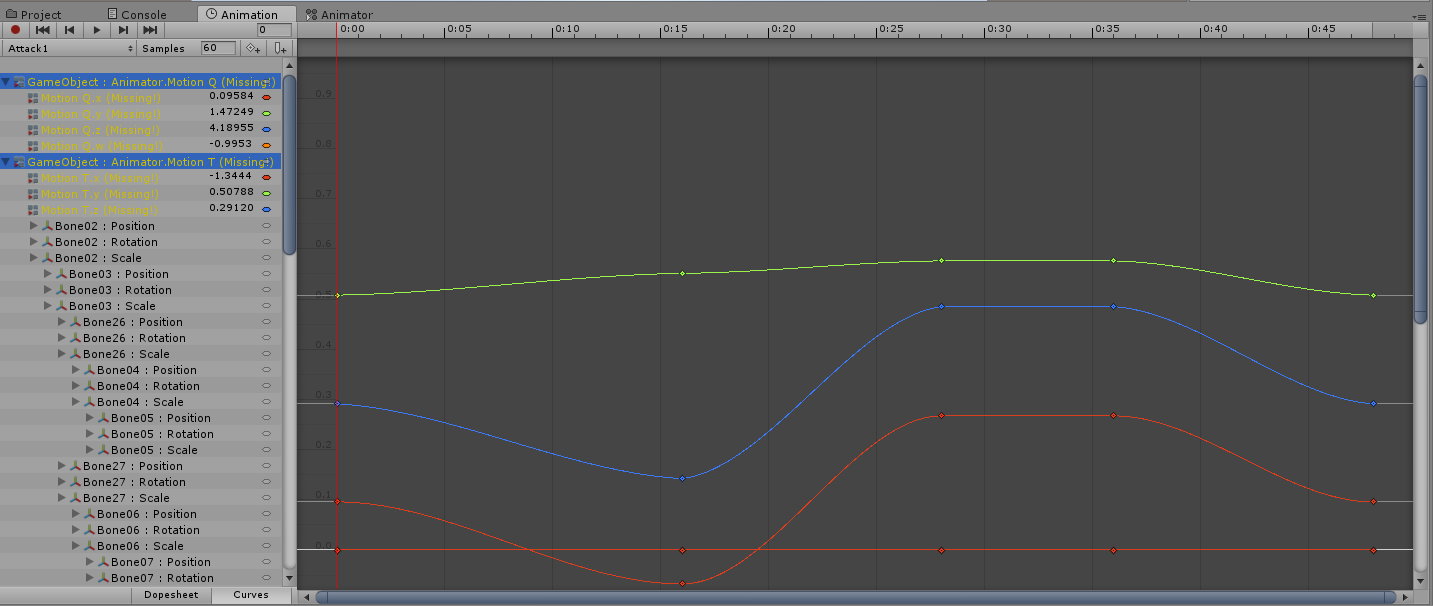
I checked other imported animation, they have animated properties of ‘Animator.Motion T’ and ‘Animator.Motion Q’, the curves looks similar with ‘Hips’.
So, my question is, if I duplicate the ‘Hips.localPosition’ and ‘Hips.localRotation’, make two animated properties of ‘Animator.Motion T’ and ‘Animator.Motion Q’ with script, will the Animator handle the Root motion properly?
If true, will blending multiple animations affect the correctness?
Yes that exactly how mecanim does it under the hood. The curve for the root node are copied from the specified transform in the tools to properties Motion.T and Motion.Q. So it should work perfectly.
What going on is that when we create the mecanim animation clip we have to resample the whole clip and for each sample we convert the transform animation curve to muscle animation curve, this is the retargeting step. This is why you see so many keyframe,
That been said, you still have access to the transform curve in the animation clip, if you need to edit them you should edit the transform animation curve and then reprocess your clip to generate mecanim root motion.
I’ve made a last try on switching form AnimationClip.SetCurve to AnimationUtility.SetEditorCurve, and it works, even automatically handled the update of Animation TreeView.
Maybe it’s because I’m using Generic clip not muscle clip? No matter what, the end justifies the means
Thanks for your replies, it’s great to hear some inner details.
Hello. Does root motion require a rig and a model? I’ve got a simple sprite character, and I’m trying to tie its movement to animation, but to no avail.
I set MotionT components as follows:
var binding = new EditorCurveBinding();
binding.path = "MotionT.x";
binding.type = typeof(Animator);
binding.propertyName = propName;
AnimationUtility.SetEditorCurve(clip, binding, curve);
Curve is the root object’s corresponding position component’s animation curve.
The curves are displayed in Animation window Curve mode, but their value is always zero in properties panel. No root motion is applied.
All “Based Upon”'s of the clip are set to Root Node Position, changing them to other values doesn’t seem to work. All “Bake Into Pose” checkboxes are turned off.
I also tried few other binding paths, like “Motion T” or “m_MotionT”, neither worked.
Yes, I did invert these parameters, I suppose it happened when editing code before publication, since they’re not inverted in the source.
Here’s the full method:
AddMotionCurve()
[MenuItem("My Commands/Add root motion curve")]
public static void AddMotionCurve()
{
    var clips = Selection.GetFiltered(typeof(AnimationClip), SelectionMode.Assets)
        .Cast<AnimationClip>();

    foreach (AnimationClip clip in clips)
    {
        var bindings = AnimationUtility.GetCurveBindings(clip);

        foreach (EditorCurveBinding sourceBinding in bindings)
        {
            if (sourceBinding.path != "")
            {
                // We are only looking at the root component
                continue;
            }

            var property = sourceBinding.propertyName;

            if (property.StartsWith("m_LocalPosition."))
            {
                property = property.Replace("m_LocalPosition.", "MotionT.");
            }
            else
            {
                // Not interested in this property
                continue;
            }

            var binding = new EditorCurveBinding();
            binding.path = "";
            binding.type = typeof(Animator);
            binding.propertyName = property;

            var curve = AnimationUtility.GetEditorCurve(clip, sourceBinding);

            AnimationUtility.SetEditorCurve(clip, binding, curve);
        }
    }
}
Test project (a scene with a cube and some animations) is attached.
When I posted my previous message, I thought that MotionT is some hidden Unity parameter for root motion, however, it occurs to me, that it could be some property of TMPxyz’s model. If that is the case, how can I use root motion without rig and model (just some GameObject hierarchy and Mechanim animations)?
Not sure I understand your question sorry. But MotionT is an Animation curve generated by the model importer when you import an animation or can be created manually by a user script like you did. Since root motion drive always the root transform, it will work even with sprite because you need at least one game object in your scene to display sprite.
I want to create an animation clip which will move my object (cube, for example) for some distance relative to its previous position. So if I loop this animation, the object would continue moving further and further away from the starting point, instead of just teleporting back on clip restart.
Here’s what I do:
Create a new Unity Project
Add a cube to the scene, select its GameObject in Hierarchy tree.
Create an animation for the cube (Window → Animation, Create New Clip) which changes cube’s Position linearly from (0, 0, 0) to (5, 0, 0) over one second. Animator Controller is automatically created.
Right now, if I press Play button, the cube travels 5 units along X axis, resets to zero, and starts over again.
I add the script with previously mentioned command, save the project, select the animation asset, and launch the command. The script creates curves for properties “MotionT.x” “MotionT.y” “MotionT.z” with an empty path (“”) and Animator type, taking the actual curve data from corresponding “m_LocalPosition” components
If I press Play, the cube still travels 5 units and then starts over from zero.
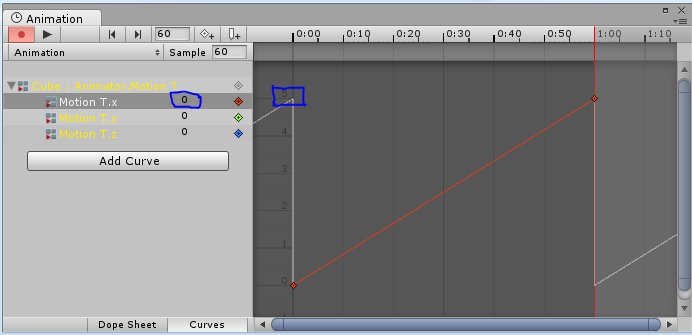
Now I delete clip’s Position curves, leaving only MotionT curves (“Cube : Motion T” in animation window).
You can see that the curve’s value is not displayed correctly in an edit field:
To been able to create a root motion curves you need first some animation curve on your root object and your object need to be setup as a generic rig(Humanoid rig handle the root motion automatically).
The ‘Generate root motion curves’ button will only appear if both condition are true.
I had some animation files,use generic rig,it correct in play mode,but in editor ,it can not to be edit,display missing ,I try to editor ,but will destory all key in the animation,how to do?
Whoops, didn’t see this alert until now. Here’s the code I’m using, it’s a bit strange because I’m reading a long animation clip at runtime which I’m then splitting into several individual clips. One of the objects animated is called “Root Bone” so I’m assigning the Root Bone properties to the root transform. I check if they are localPosition or rotation, and assign them to “MotionT” and “MotionQ” respectively.
var curve = new AnimationCurve(newKeyframes.ToArray());

if (relativePath == "Root Bone")
{
    var end = propertyName.IndexOf('.');
    var property = propertyName.Substring(0, end);
    var data = propertyName.Substring(end);
    switch (property)
    {
        case "localPosition":
            propertyName = "MotionT" + data;
            break;
        case "localRotation":
            propertyName = "MotionQ" + data;
            break;
        case "localScale":
            continue;
    }

    clip.SetCurve(string.Empty, typeof(Animator), propertyName, curve);
}
else
{
    clip.SetCurve(relativePath, typeof(Transform), propertyName, curve);
}