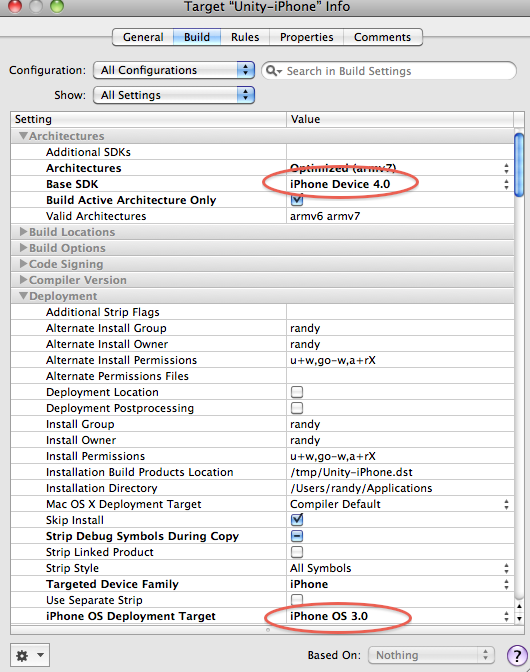
Not sure if people are aware of this but… it is important to have the iPhone OS 4.0 SDK (iOS 4) installed on your development machine and have the Base SDK set to 4.0 in Xcode. This way your game will work well with multitasking on the iPhone/Touch (actually fast app switching) when iOS 4 is released.
If you set the Base SDK to “iPhone Device 4.0” and the Deployment Target to “iPhone OS 3.0”, your game will work with fast app switching (multitasking) on iPhones/Touches running iOS 4 and still work fine with devices that haven’t yet updated.
Careful! I’m running into a versioning snafu with the above process. I attempted to do exactly what Randy describes with deployment target.
Note: Unity iPhone has a sdk target in the player settings. The max sdk in Unity iPhone 1.7 is currently 3.2.
Note: iOS 4 GM SDK includes base sdk of only 3.2 and 4.0 (not 3.0 or 3.1)
These tests were run Unity iPhone Advanced 1.7 with level 3 stripping and Xcode 3.2.3
my test case 1:
-Set sdk target in unity player settings to 3.0 or 3.1, then build, then launch the xcode project.
-The xcode project is apparently broken and says “missing base sdk”.
-This is because the iOS 4 tools don’t have 3.0 or 3.1 included.
-The deployment target field is also missing from the Get Info in the project. The xcode project seems useless and cannot be remediated to have corrected sdk versions.
my test case 2:
-Set sdk target in unity player settings to 3.2, then build, then launch the xcode project.
-The xcode project seems fine.
-Change the xcode project’s base sdk to 4.0 and set the deployment target to 3.0 as Randy describes above.
-The build seems to work fine. However the problem is if you look at your info.plist file in your built .app it will say minimum required os version is 3.2 not 3.0!!
-This .app cannot be installed on OS 3.1 device. Editing the plist file is not an option because that breaks the code signing.
-I suspect the cause is Unity uses it’s player settings sdk target to do some intermediate compilation with the gcc compiler.
-Then xcode detects that and sets the minimum os required to whatever is common for all the libraries, overriding whatever was set in deployment target.
If the iOS 4 SDK had base sdk of 3.0 and 3.1 available, then it seems like it would be possible to set that in the player settings in Unity, then adjust the deployment target in xcode, and everything would hang together nicely.
Maybe Unity player settings need to have deployment target version as well as base sdk version, just like the xcode project? Just an idea.
I hope this saves someone some head scratching and maybe we can come up with a workaround.
base sdk no longer is a usefull measure. Apple does not offer any previous SDK, only the most current one for the platform.
means 4.0 for iphone, 3.2 for ipad.
the rest can only be configured any longer through the deployment target you set on the “active target” (right below project settings in the project menu on top) in unity xcode projects
dreamora, if if you read my post carefully, you see that deployment target is ignored and xcode is replacing it with a higher number, e.g. 3.2 in the .apps plist file. 3.2 only runs on iPad! so this does not help me support 3.1 iphone/touch users.
Summary: using Unity iPhone 1.7 and iOS 4 SDK there seems to be no way to get the deployment target set to 3.1 or 3.0. Check the min os version in the info.plist file in your build .app bundle.
And if in doubt try installing the build app on an OS 3.1 iphone and it won’t install. The min os version setting in the .app’s info.plist file is what rules.
I am really sorry, but I don’t see how reading it even more carefully makes incorrect information more correct.
I built 2 distinct iPhone projects (one older, one all new created with unity iphone 1.7 yesterday, iphone target, no stripping etc) yesterday with dev provision with OS 3.0 target, iTouch 1st gen on 3.1.3. Project was set to target ARM6 / ARM7 and active architecture naturally ARM6.
Both were running and worked.
Perhaps your behavior was enforced by you forcing in ipad for example. The way how thats going to work will have to be seen due to the ipad not going to os4 till autumn / winter 2010.
dreamora, ok thanks, so your non-confirmation of my case is helpful!
Any ideas why the min os version is getting set to 3.2 in my info.plist of the built app? Not sure what you mean “you forcing in ipad for example”. I set iphone only, not iphone + ipad in the unity player settings.
-What Xcode version are you using? Is it the iOS 4 GM (3.2.3 I think?)
-What sdk version did you set in Unity player settings?
-What platform did you set in Unity player settings? (iphone only I assume)
Any other ideas?
I ignored the setting in the player settings so whatever 1.7 defaults to. as none exists anymore, there is no point in them. Set the base sdk to 4.0 in xcode, deployment target to 3.0 in the active target settings (device, release)
Its iPhone only, right.
the interesting part is that you are getting “min os version set in plist”, because I don’t even have such a key in my plist in the dev builds and did never add one to any adhoc / deploy builds either.
Maybe the Unity advanced stripping is adding more compilation steps? That’s the only difference between what you and I are doing as far as I can tell.
I’ll play around with it more tonight and maybe followup with some screenshots showing the info.plist entry that’s thwarting me from installing app on OS 3.1 device.
Stripping does not add anything to xcode project. it only has an impact on the static code libraries which are used. none of that has an impact on the signing and alike.
one thing I can say is that I required to clean old dublicates of my development profile and reinstall the new one on my os3 device. potentially thats a consequence of the “team development profile” or alike, unsure. Didn’t care much about it after the “signing not possible” error got lost.
That is a one time thing
and no its not the only thing. if you have any deployment target in your plist then you obviously messed with it too and impact the outcome in a potentially negative way (or a way thats for ipad only / universal binary)
Hmmm well I posted the exact steps and version settings I used, above. Not sure that I “messed with it”, or that I am spreading incorrect information for that matter. I am simply posting my results as concisely as possible. Thank you for your feedback. I’m going to do some more tests tonight and I’ll post what I find.
MMM… So i publish out of unity iphone 1.7 sdk version set to 3.0 and also tried 3.2. IN xcode i set up base sdk to 4.0 and ive tried 3.0 and 4.0 in the deployment target.
( i have ios 4 on my ipod )
but i get this error.
anyone have the same issue?
thanks in advance
Can’t run ‘Unity-iPhone’ - was built for ‘armv7’, but device requires ‘armv6’ or compatible architecture.
Ive finally gotten xcode 3.2.3/Unity 1.7 to build with SDK 4. Everything works but I get an internal xcode error after the app is transferred to my phone.
in the project info:
Architectures Standard (armv 6-armv 7)
base SDK iPhone Device 4.0
Valid Architectures armv 6
iPhone OS Deployment Target iPhone OS 4.0
Configuration release
In project menu Set Active Architecture : armv 6