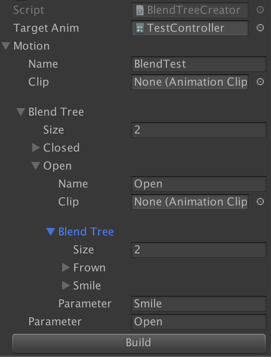
Quick query - Is it possible to copy and paste blend trees? or rather to move them around.
My movement state machine consists of several nested blend trees. The other night, I needed to create a new blend tree at the top of the tree, and couldn’t find anyway to do this, other than the time consuming practice of rebuilding the whole state.
Bump: A cheat-y way to do this is to right-click somewhere, say “Copy State Machine”, then paste that, then go into the sub-state, and drag out the Blend Tree into the main layer.
The same here… Is there anybody who knows the answer? It’s so fraustrating to do the whole job manauly again. I hope there will be a chance to do it through editor scripting.
For the love of all things holy why cant you do this!
Blend trees could be really good but they are so inflexible. If you want to add something to the start of a blend tree you just have to manually rebuild the whole thing!?!
Well I’d better get back to rebuilding a whole massive blend tree (something that could take seconds).
Hehe , yeah I think pretty much everything gets prioritised before animation sadly, look at how long it took to get zoom in the view. Blend trees as they stand are a problem though because its a wall that stops you from experimenting and creating better animation.
You can build blend trees with through scripting, it’s probably out of my skill level but I might have a look today and see if I can come up with something usable.
Well I got this happening, basically you put this script on a gameObject and fill out the array -
Press build and it creates a blend tree in the animator controller you referenced up the top.
It’s still pretty bad but it’s a start and it still might be less frustrating than setting it up the standard way.
If anyone wants to add to it, please do! I have limited experience with this stuff and the Unity folk are too busy to look at this low level fundamental stuff
using System.Collections;
using System.Collections.Generic;
using UnityEngine;
using UnityEditor.Animations;

public class BlendTreeCreator : MonoBehaviour
{

    public AnimatorController targetAnim;

    [System.Serializable]
    public class subMotionClass
    {
        public string name;
        public AnimationClip clip;

        [Space(12)]
        public List<subMotionClass> blendTree;
        public string parameter;
    }
    public subMotionClass motion;

    public void CheckIfStateExists()
    {
        for (int i = 0; i < targetAnim.layers.Length; i++)
        {
            for (int z = 0; z < targetAnim.layers[i].stateMachine.states.Length; z++)
            {
                if (targetAnim.layers[i].stateMachine.states[z].state.name == motion.name)
                {
                    //cant seem to delete states
                    //DestroyImmediate(targetAnim.layers[i].stateMachine.states[z].state);
                }
            }
        }
    }

    public void BuildInitialBlendTree()
    {
        CheckIfStateExists();

        Debug.Log("Building Blend Tree");
        UnityEditor.Animations.BlendTree blendTree;
        targetAnim.CreateBlendTreeInController(motion.name, out blendTree, 0);
        blendTree.blendParameter = motion.parameter;

        PopulateBlendTree(motion, blendTree);
    }

    void PopulateBlendTree(subMotionClass subMotion, BlendTree subBlendTreeNode)
    {
        //add Clip to blendtree
        if (subMotion.clip != null)
        {
            subBlendTreeNode.AddChild(subMotion.clip);
        }
        else
        //create a new blend tree
        {
            for (int i = 0; i < subMotion.blendTree.Count; i++)
            {
                UnityEditor.Animations.BlendTree newBlendTree = subBlendTreeNode.CreateBlendTreeChild(0);
                newBlendTree.name = subMotion.blendTree[i].name;
                newBlendTree.blendParameter = subMotion.blendTree[i].parameter;
                PopulateBlendTree(subMotion.blendTree[i], newBlendTree);
            }
        }
    }
}
And the editor script for a button (put it in an editor folder)…
using System.Collections;
using System.Collections.Generic;
using UnityEngine;
using UnityEditor;

[CustomEditor(typeof(BlendTreeCreator))]
public class BlendTreeCreatorEditor : Editor
{
    public override void OnInspectorGUI()
    {
        BlendTreeCreator script = (BlendTreeCreator)target;
        base.OnInspectorGUI();

        if (GUILayout.Button("Build ", GUILayout.MinHeight(20)))
        {
            script.BuildInitialBlendTree();
        }
    }
}
Found this piece of code from unity feedback page:
using UnityEditor;
using UnityEngine;
using UnityEditor.Animations;

public class CreateBlendtreeAsset : MonoBehaviour {

[MenuItem("AnimTools/GameObject/Asset from Blendtree")]
static void CreateBlendtree()
{
string path = "Assets/";

string currentPath = AssetDatabase.GetAssetPath(Selection.activeObject);
if (currentPath != null)
{
path = currentPath;
}

BlendTree BT = Selection.activeObject as BlendTree;

BlendTree BTcopy = Instantiate<BlendTree>(BT);

AssetDatabase.CreateAsset(BTcopy, AssetDatabase.GenerateUniqueAssetPath(path + "_" + BT.name + ".asset"));
}
}
It’s an editor function that can save the selected blendtree as an asset in the animator’s folder, you can drag n drop the blendtree asset to other nested blendtree hierarchy to reuse them. But there also seems to be some bugs in unity with this workflow. I haven’t met it yet, but no guarantees.
Just met the bug I’ve mentioned before, it occurs when you replace a blendtree in your animator, if the blendtree is a local asset, it will be deleted, remember to backup all your local blendtree assets so won’t panic when they got deleted by unity.
I created an editor that works with the animator window that has the ability to duplicate blend trees. It can also be used to re-structure blend trees with drag/drop, and has a template system for saving off blend trees that you want to re-use. There are a ton of other time saving features that really help speed up editing animation controllers. Check it out here: Anim Tree Editor | Animation Tools | Unity Asset Store


 , yeah I think pretty much everything gets prioritised before animation sadly, look at how long it took to get zoom in the view.
 Blend trees as they stand are a problem though because its a wall that stops you from experimenting and creating better animation.