Native Touch Faster touch via callbacks from the OS, with a real hardware timestamp
Requirement : Unity 2017.1+ For iOS and Android.
(Technically should work even with versions lower than that since it is all native, but I can only provide support for 2017.1+)
Your Unity game could be much more responsive
Did you feel like your app is more sluggish, has much worse perceived latency, or oddly not as satisfying as other apps installed on the same device? The common sayings is that because Unity adds more audio latency, but did you know you are able to improve the input latency as well?
Responsive game translates to more 5 stars reviews for those who didn’t care to write a review for you before. Existing 5 stars reviewers already has something specific to say, but things like snappiness and responsiveness must be felt. For players, it is probably hard to explain what’s exactly the cause of this “fun experience” they are getting but they will come to your review page and just say that the game was fun. For us, it is time to make that magic happen by reducing latency.
How?
Native Touch achieve low latency input by trying to hack into the earliest line possible that we are able to cleanly add a static method callback in the native side, even before giving the input to Unity, as you will soon learn more in the Implementation page the details of its inner workings. Everything has been explained to the point that you could just implement the whole plugin yourself, because native stuff is scary and being the most transparent to developers is important.
By the way, for those not accustomed to native development on iOS and Android, since the beginning both has an entry point of any input as a callback and not state polling like Unity. It is clear that this callback way could be the fastest because it aligns closely with the native side, and making the state to poll easily from these callbacks like what Unity did for us definitely take some CPU time.
You used to “poll” for touch in Unity via Input.___ but did you know when exactly those touches were made? We are forced to use in-frame time based on asking Time.realTimeSinceStartup or calculating from Time.deltaTime for so long since the creation of Unity that we feel was such a natural thing to do.
By that, however, you are assuming the touch happened right there at that line of code (Time.realTimeSinceStartup) or at the beginning of this frame (Time.deltaTime). Neither are true because for the touch to be available for polling right now it must had happened somewhere in the previous frame. This is also a weakness of polling-based API.
And so, in timing-based game you are favoring early-pressing players and punishing late-pressing players because rather than the time they touch the screen you are using the time in the next nearest frame.
Recover lost data
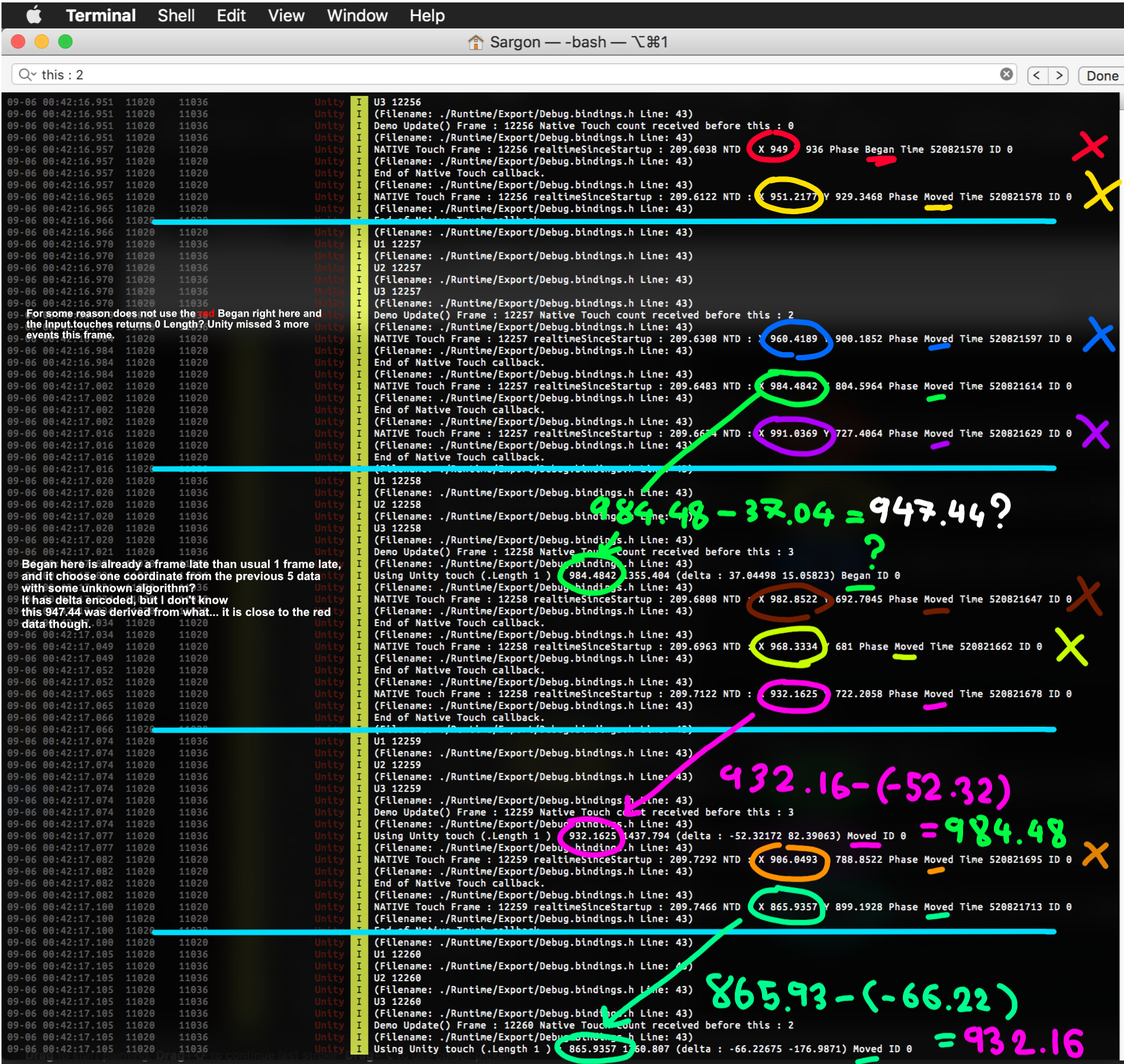
What you get from Input.touches is only an interpretation of all the native callbacks that may happen more than 1 time before this frame. On both iOS and Android Unity has its own interpretation algorithm which “summarize” the callbacks but unfortunately discarded some movement details. With Native Touch, we will get all of the original movements reported by the OS. Look at this example, from the actual 9 callbacks we received from native compared with Unity’s Input.GetTouch only 3 representative data was derived, the rest discarded.
For the extreme details of how native callbacks translated into what we see in Input.touches, I welcome you to the Callback Details page. Even for non Native Touch user, have you ever wondered how differently Unity prepared the Touch for us on each platform?
“Native Touch reports faster touch event directly to Unity via callbacks. Make fair performance judgement with a real hardware touch timestamp.”
Benefit highlights 1. At least 1 frame faster input. 2. Unexpectedly translates to better “perceived” audio latency. 3. Fair judgement with a real hardware touch timestamp. 4. Native fields, all available. 5. Recover lost data. 6. Unity touch still works.
Read details of each one in the home page, plus how it really works :
Please do not hesitate to ask anything here or join the Discord channel. Thank you.
Don’t know if this niche plugin has any audience (but personally I think this is such an important problem of Unity…), but anyways I have some updates coming for you.
For those who are irritated by non-responsiveness of Unity Android game compared to other engine, this together with Native Audio could potentially bring the experience to be better.
So in the next version this plugin will be renamed to just “Native Touch”. The approach for Android is replacing the activity with special ones that is capable to call to Unity directly even before the MotionEvent goes through normal Unity pipeline.
The research concluded that my plugin can call a method response in Unity by 1 frame earlier. Which means about -16ms faster touch. Here’s some sample data.
Plus, this correlates directly with “perceived” audio latency if you want to play an audio as a result of a touch. That is to say you get a free -16 ms better audio latency when that audio is a result of input using Native Touch.
Frame-independent native touch timestamp
Additionally in the next version you can get frame-independent native touch timestamp from both iOS and Android platform. You used to check Input.Touch etc. in a frame. But did you know when your player touched the screen? In game that involves timing to scoring like music games or fighting game knowing a frame independent touch time is crucial to ensure good experience and fair judgement to your player from the game. Using the frame time for the received touch favor early-touching player and punishes late-touching player since the time they get is of the next frame. Any touch always occur before the current frame you are checking, so with frame dependent vanilla Unity touch every Unity game unknowingly condition players to touch earlier so they can get better score/result.
Big breaking API changes
I have made too many bad design decision so I am going to turn over the new leaf for the next version. Sincerely sorry for the current user but it is for the better.
Dropping Unity Touch callback. It is difficult to fit 2 different native data to one unifying struct, plus if I managed to do that it would be just like what Unity do in the first place. We want to be native, fast, and hard core.
Start mode was previously minimal mode (true/false) and raw mode (true/false). That was confusing, and together with the removal of Unity Touch support it is just “full mode” (true/false) now. Not-full-mode equals to previously minimal = true.
It will include .asmdef but you can delete it if you don’t like.
ECS support investigation
This is not confirmed yet, but since this plugin is based on calling callback on touch I will try if I can create some entity representing the touch and add them to the world at that moment. If this is possible, when your System comes around for the update they can find the touch immediately. You don’t have to relay data manually.
The support will comes in the form of :
Pre-made IComponentData that your System can choose to inject. Also provide the EntityArchetype in case you want to use it yourself.
Some way for you to say to the plugin which World would you like the touch entities to go to.
I want to implement something similar to iOS native pull-down menu, so my main wish is to identify a swipe as soon as it enters the screen. And from where it entered.
When Unity’s default Touch slides into the screen and is seen for the first time, its ‘position’ is not guaranteed to be on the border of the screen, but might be somewhere on (20, 500)
Hoping your implementation will solve this
Any heads-up to watch out for?
I have tested my implementation (actually not implementation since it just mirrors what the native side told me) it is still not guaranteed to be at the border of the screen as you described.
This is because touch screen updates at fixed rate and depending on when that update comes where your finger is right now it is going to use that value. Meaning that if you drag finger into the screen fast then you would get larger value. I tried to do it as slowest as possible and the minimum I get is 16. (iPod Touch Gen 5)
So even if you are developing a pure Xcode app, you would still need some application level way to check border touch without relying on the point being started from 0 coordinate.
However one interesting point is that iOS has several of official recognizers. One of which, the
UIScreenEdgePanGestureRecognizer (https://developer.apple.com/documentation/uikit/uiscreenedgepangesturerecognizer) should be able to do exactly what you want. A recognizer will try to interpret a series of coordinate into a meaningful action.
Native Touch is using a custom recognizer which its task is to forward touches to Unity. Technically it should not be too difficult to write a special interface to swap Native Touch’s recognizer out for other official ones. However I got this idea just now and it is not likely to be in this next version that is coming soon.
Yes, screen edge pan gesture recogniser seems to be what I would need. I want to have several little “pull-out” tongues on the sides of the screen (maybe like 3 on each side).
Also equally proud of my findings of how Unity’s Input API summarize touches from native callbacks, which I have recorded them here : http://exceed7.com/native-touch/callback-details.html. Of course these rule are not derived from source code but from trial and error, so the actual rule might not be exact. For instance, did you know on iOS the touch with Began phase can have non-zero delta position even though it is supposed to be the first one in the chain? Did you know iOS can produce touch with finger ID = 0 and 1 at the same time even with only one finger?
Ah, sounds like what I was looking for! I could probably compute where the touch came from & simulate the ScreenEdgePanGestureRecognizer? Though, not available on Android, probably …Will have to read your tutorial
Have you noticed that the Unity touch API sometimes blips/glitches on Android? The nature of the glitch is such that the data no longer represents the time/position of a swipe. For example, when tracing a swipe there would (intermittently) be a few missed touch points in the data. You’d expect that the first touch after the glitch would recover the average, and still represent the time/position correctly but it doesn’t. I was developing a flick kick football game but 1 in 50 swipes exhibited this data error.
There are Android flick kick games which don’t exhibit this touch data error eg; Flick Kick Football, which I don’t think is written in Unity.
I went as far as writing my own Android plugin to capture raw Android touches, but still the problem remained. I was wondering if your plugin bypasses this problem or if you noticed it all? I was testing with a mid-range 4 year old android device by simply outputting the touch points on the screen.
Yes, this happens intentionally. I did a comparison of Unity’s returned coordinate vs native data and found some patterns that Unity used to infer the final coordinate you get from all native data. You can read about it in this page http://exceed7.com/native-touch/callback-details.html , in Android > “VS Unity” section.
For example native touch can contains movement at the same time as Began and Ended phase. Common in quick flick gesture, usually at native side you would at minimum get 5 events : Began-Moved (together) → Moved → Moved-Ended (together) while in Unity it is usually interpreted as 3 events of Began (might contains the first moved embeded as delta) → Moved → Ended (the last moved discarded)
That is in the case the gesture lasts equal or longer than 3 frames, if shorter the touch will be more summarized while from native side you get them all. If only 1 frame, with Unity’s input API the Ended phase is delayed to the next frame in order to make the touch continuous from API user perspective.
If your problem goes along this line then yes you could use Native Touch and interpret the native data yourself.
I have not found this behaviour. You are saying that when you drag fast enough and it glitches, next your finger stay still, that coordinate is now inaccurate indefinitely? And what is the reference point for your correct time/position? Because it is impossible for Unity to match with true finger position because of frame-based update. (You can see the presentation video where I showed the Unity’s coordinate vs Native Touch vs Android debug coordinate vs my actual finger)
I just downloaded your asset, but whenever I try to make a build and run it on my phone with your asset on my project, I get this error message: “Failure To initialize ! Your hardware does not support this application, sorry !”
I have a Samsung Galaxy S6 Edge and I’m working on Unity 2017.4.1f1, I tried to switch to another version of Unity but this doesn’t solve any problem.
I have encountered that problem before which it fixed itself by upgrading Unity version. For 2017.4, you should be using 2017.4.14f1 right now. 1f1 is very far behind. (It is an LTS version too, so it should contains all the bug fixes from new version)
If it does not fix the problem, try reinstalling your Android SDK components to newest version. (Not JDK and NDK, just the SDK)
I am thinking of adding this asset to my android business app which is built upon using Unity UI system, and I want to make those scroll rects been scrolled more responsively by user’s touch inputs. However, the integration part is what’s been stopping me from getting the asset because my app is relayed on Unity UI event like OnPointerClick, OnBeginDrag, … etc to do the navigation. If I am to integrate this asset to my project, do I have to stop using all those Unity UI events? Or this asset would just recognize the touch input faster so that I can just keep the way it is? Thank you in advance.
Hello, Native Touch will not make any Unity touches faster unfortunately. It provides you a completely new input channel. All Unity UI events will be unchanged and continue to work as usual. So, Native Touch cannot solve Unity UI’s responsiveness for you unless you roll a new one based on data from the new touch input channel.
The new channel is a static method, which it will be called on each touch from the native side. That same event would soon arrive at Unity’s EventSystem but you will get them first from Native Touch, without any processing + with timestamp.
Hello, so there will be no difference between Native Touch and the Unity Touch system? If that’s truth we have to wait until Unity 2019 release to see a faster touch input system? Anyway, thanks for your plugin, it’s good to see people interested finding solutions to this kind of problems.
Hello. No, what I meant is that by installing Native Touch, Unity’s touch will not change/degrade/upgrade its functionality. The previous user ask if Native Touch could (directly or indirectly) improves Unity’s input which is tied to EventSystem component, GraphicRaycaster, then to all uGUI. The answer is no, because it is a new input channel activated before sending the input to the usual channel. You then get both the old way and native way as 2 choices of handling the input.
There is a difference between Native Touch and Unity Touch, that Native Touch came from the OS directly by its most native way : callbacks. This let you do something in the most barebone way and you know you cannot go any more primitive than this (other than abandoning C#, then a better plugin than Native Touch would call a callback in Java/Objective-C with lower interop cost)
Ok, thanks. It’s good to know that, so I’m going to include native touch in my android game, because Unity’s Touch is really slow :(.[quote=“5argon, post:15, topic: 698323, username:5argon”]
Hello. No, what I meant is that by installing Native Touch, Unity’s touch will not change/degrade/upgrade its functionality. The previous user ask if Native Touch could (directly or indirectly) improves Unity’s input which is tied to EventSystem component, GraphicRaycaster, then to all uGUI. The answer is no, because it is a new input channel activated before sending the input to the usual channel. You then get both the old way and native way as 2 choices of handling the input.
There is a difference between Native Touch and Unity Touch, that Native Touch came from the OS directly by its most native way : callbacks. This let you do something in the most barebone way and you know you cannot go any more primitive than this (other than abandoning C#, then a better plugin than Native Touch would call a callback in Java/Objective-C with lower interop cost)
[/quote]
Hey, version 3.0.0 is now online! As stated by Semantic Versioning, when left most number changes comes with breaking changes. This version fixes bugs and introduce ways to support resolution scaling and a newer dynamic resolution scaling.
Native Touch’s coordinate is unscaled, if your game uses Resolution Scaling (Or dynamic resolution scaling) then Screen.width/height/resolution/etc will be scaled down too. If you use that to calculate something with Native Touch’s returned coordinate then it is wrong. (Unity’s Input.___ API will be scaled down too)
Since native side has no idea how small Unity is scaling things, the approach is to use this method to return resolution of Screen.__ API as if it wasn’t scaled. It got the same bounds as what coordinate that is returning from Native Touch. Then you could calculate the touch coordinate into the scaled coordinate.
## Changed ### Native Touch now returns “Native Scale” instead of just (virtual) scale.
This is a breaking change and a fix at the same time. Previously there is a mistake that returns just scale in NativeTouchRecognizer.mm line 92. Now it is instead nativeScale.
The reason is Unity’s coordinate is going by the native scale. See this table, the -Plus device have a smaller multiplier from 3 to 2.608.
That means the previous version of Native Touch returns coordinate higher than Unity’s bound when it goes to 3x where actually it is just 2.608x, for example. This update brings them down to the same bound.
## Fixed
Demo is updated to work correctly in the case of using Resolution Scaling.
NativeTouchTracker demo is updated to work correctly in the case of using Resolution Scaling.
Fixed extern methods intended for iOS side mistakenly getting into Android build and cause linker error.
Better XML code documentation.
What’s coming next? I have added one to the to-do list :
### iPad Pro and Apple Pencil 2 support
I am getting an iPad Pro this year. After that I could confirm if we can fully utilize the ProMotion 120Hz input fully or not, and if there are any missing information from the new Apple Pencil that Unity discards but we could recover or not.
However, I am suspecting that it is already supported currently, but without able to confirm by myself I can’t guarantee the support status of this.
Version 4.0.0 is on the way. It upgrades the interop mechanism and address problems in platform like Android IL2CPP where callback speed is bad, with a completely new API to access the touches without any callback. This API is possible thanks to the new interop mechanism too. If you want a beta, direct message me an invoice to try it out as usual.
# [4.0.0] ## Added ### New underlying interop mechanism : ring buffer
The talk back from native to C# is improved. Relying less on delegate and more “communication via memory area”. It is a straight upgrade and you have nothing to lose from user’s perspective regardless of modes of operation. (It’s a new backend of sorts) The callback based API you use is still the same.
How it was working previously :
C# send a delegate to static method to native.
Native wait for touch callback from OS.
Native call that delegate with the touch data. Its argument is a single touch struct, and to be allocated from platform-specific touch structure to allow cross platform. (MotionEvent for Android, and UITouch for iOS) Plus it is not easy to send the whole object from Java or Objective C that C# can understand so I must make a struct.
So you receive tons of callback when you mash the screen.
This is mostly not a problem on iOS IL2CPP and Android Mono, the callback is as fast as “just a method call”. However on Android IL2CPP, the Java → C# method call is very slow, as slow as 16ms (1 frame of 60 FPS). This is not acceptabe. Be able to handle touch in a “callback style” in Unity is the core function of Native Touch. But it is no use if the callback is so slow that it arrives later than Unity’s touch.
The new way it is working right now :
C# allocates a fixed length array of touches as a ring buffer.
This is pinned and its address is sent to native side to use.
C# send a delegate to static method to native also, but this time its argument is no longer touch struct, but just 2 int specifying where in the ring buffer to check out the data and how long from that point. (Wraps around to beginning, as per ring buffer definition.)
Native wait for touch callback from OS.
The native side writes those touches to the ring buffer boundary. It knows the fixed length allocated at managed side. Along the way it remembers where it start writing and how much it had written.
When finished one set of touches, native side use the delegate to tell C# to “check out” the ring buffer at where and how long.
C# check the ring buffer it owned and found that there are new touch data written from the native side.
C# iterates through them and present you each touch as the same as before. You still get to see NativeTouchData given to you one by one, but the iteration has been moved from native side to managed C#. Each touch is no longer gated by native to managed delegate callback.
All C# side still remains in safe code. It uses IntPtr which is usable in safe context to give native side the address.
This approach aims to solve several things :
Previously IL2CPP on Android (but not iOS, and not on Mono Android) had abysmal delegate callback performance. This patch greatly reduces amount of callbacks needed. (As high as 5x lower when the screen is really busy.) On Android by compiling with Mono backend the delegate performance improved instantly. This might be because native to managed delegate in Android is assisted by JIT mechanism. When on AOT only backend like IL2CPP something may have become more difficult to do. I suspect that Java View call to invoke that remembered C# delegate is not passed through IL2CPP, and so it is not “just a function pointer call” anymore. Something heavy is added. Still, even with a mere 1 callback on Android IL2CPP it is unacceptable that it takes 1 frame or more. But ring buffer allows a new API that could be used instead of callback style. More in its own section.
Previously each callback is weighted by a full touch struct on the parameter. Now it is just 2 integers. Lighter is always better.
Previously there is a touch struct allocation at native side. Now it wrote directly to the ring buffer which C# owns using a struct-mapped pointer which is maintained to match the C# side. There is no allocation at all not counting the native touch struct coming from the OS’s callback. (MotionEvent and UITouch)
### New StartOption added : noCallback
Be able to handle touch in a “callback style” in Unity is the core function of Native Touch. I am adding one more approach more similar to Input.touches you used to do.
To recap, the previous “callback based” API sends C# static method to be “reverse p-invoked” by Java’s View or iOS’s UIGestureRecognizer when it receive a touch. With ring buffer shared memory upgrade in this version, the reverse p-invoke is just telling C# to look at specific spot in those memory areas. The native had written something new (touch data) to it. C# see new data and understand that those are new touches. Greatly improve interop speed by talking via memory content plus lesser callback, rather than purely via callbacks with a lot of parameters.
But still, platform like Android IL2CPP is very bad at calling even one Java → C# delegate. And this call is blocking the Java View’s touch handler. Though, if I tell C# to tell C to call delegate back to C#, this is fast, in fact 2x faster than Mono. Likely IL2CPP optimized these cross platform complexity into “just a function call”.
Native Touch is special because the originator of action is Java’s view. Java is JNI-ing to C to invoke the delegate because Java could not do direct memory write (required for the ring buffer optimization) and Java is too coward to do direct method pointer call. This C invoking C# works, but probably IL2CPP knows nothing about it. So when it jumbles into IL2CPP’ed Android, something heavy must be in place to make it work. (Probably something heavy like C#'s reflection?)
Native Touch 4.0.0 allows opting out completely from receiving callbacks with noCallback on the StartOption used when you call NativeTouch.Start(). Previously Native Touch will not allow you to start without registering any callback. Now even with callback registered, it will let you start and completely ignores the callbacks.
What’s the point? How to receive touches then? This bring us to the next feature…
### New touch handling style added : Ring buffer iteration API NativeTouch.touches.
Instead of relying on callbacks, you wait for your touches in Update() as usual. BUT instead of checking Input.touches, you now have an access to NativeTouch.touches.
This NativeTouch.touches is essentially that ring buffer but with a wrapper to help you read from the correct place on it. It contains .TryGetAndMoveNext(out NativeTouchData), an easy interface that you could while until you have catch up with the latest data on the ring buffer.
One advantage over the callback based is that you have no worry about thread. Remember that the callback way is initiated by native side. The thread in that callback scope is depending on what thread the native side is using. On Android, it is not in the same thread as Unity’s main thread and is completely not in sync. This make it a bit difficult to migrate and use those NativeTouchData for things waiting in the main thread. Potentially involving some mutex locks to make it safe.
When you use NativeTouch.touches API, you are reading from the same ring buffer that native side is writing new touches to, which might be in parallel. But not to worry as I have made sufficient mutex locks that it properly waits or avoiding each other. (This lock is not enabled on iOS, as the write is not in parallel unlike in Android)
When you was using the callback way, you are likely doing some kind of caching of those touches in order to make the main thread’s Update() to be able to use them. Now you can think that this caching and making it main thread compatible is already done for you. have Except you didn’t pay the cost of native callback with noCallback start option! On platform like Android IL2CPP where callback is expensive, using noCallback with waiting to do ring buffer iteration in the next Update() is often faster than the usual callback way.
Also, did we completely defeat the point of Native Touch? No, for several reasons :
Still could be faster : The data may still appear earlier or equal to Input.touches. I had a report that some phone have Input.touches data appears as late as 3 frames from the touch. You may see data appearing in NativeTouch.touches earlier. It cannot be later, the code is instructed to write to ring buffer area even before handing the touch to Unity.
Still more data : The touches waiting in the ring buffer of NativeTouch.touches have touch timestamps. Even if they arrive at the same time as Input.touches, you have some missing information that Unity discarded.
Still customizable and source available : The touches is “native”. We can modify the plugin to include more from the native side that you fear Unity is discarding or processed out to fit the Touch data structure. Touch timestamp is one such thing that we added back. Unity’s touch processing is in closed source. We could do nothing about it. The “native” in the name is guaranteeing you can do whatever native Android or iOS can do about those events equally. But Native Touch make them appears in Unity easier without any processing.
What we lose by using ring buffer iteration-based API :
Previously it is possible to make it in time to use data from the callback for moving object, that is still earlier than rendering submission in the game loop. This make it visibly faster that Native Touch could speed up things. With this the chance of being able to do so still exists but lower, since we wait until the next main thread Update() to use the touches.
Previously it is possible to do a thread safe thing in that callback. Everything there is 100% faster than waiting for Unity main thread’s Update(). For example, if you want to make an app that plays sound instantly you touch the screen without any other logic (don’t care where you touch the screen), nothing could beat placing native audio playing code in the Native Touch static callback. (No, AudioSource is not thread safe. The audio playing must be main thread independent for platform like Android which the callback comes in an another thread.)
## Changed ### ClearCallbacks() now cannot be used while in Start() state.
It is now not possible to use NativeTouch.ClearCallbacks() while you are in Native Touch enabled state. Stopping Native Touch on platform like iOS can cause a remaining queued touches to be dispatched for the last time. If you clear the callbacks before stopping it could lead to null reference error. (Because Native Touch is intentionally not doing null check, for speed.)
## Fixed
Better error throwing in the code.
Demo scene is fixed to show how to do ring buffer iteration based API together with noCallback start option.
[iOS] No longer replays tons of touches on calling NativeTouch.Stop(). The fix for this is achieved by never removing the touch recognizer but just temporarily turn it off. The strange touch replay through UIView was caused when removing the recognizer.
=============================================
The APK demo (http://5argon.info/d/NativeTouchDemo.apk) in the website has been updated ahead of time. The real website is still not up to date yet until it is released for real. Now I am testing it.
The demo is now showing how to do ring buffer iteration in the code. And also built with IL2CPP Android.
When you use the callback button, the red box is ahead but it could block and lag the phone’s input thread depending on how expensive the callback is. But still this version cause much less callback than 3.0.0, so even if with callback-based it is faster. (The spinning cube was added to show that the lag is independent of Unity’s main thread, still spinning smoothly even while the input is lagging.)
When you use ring buffer button, it would no longer lag the phone as 0 callback are made, but the red box is still ahead of yellow box.
Red box being ahead of yellow is indicating that even without callbacks, we are still having frame advantage over Unity’s Input.touches by instead reading off NativeTouch.touches.
The important point of that ring buffer button is it would start with StartOption : noCallback : true. Then use NativeTouch.touches.TryGetAndMoveNext to read the written touches from the buffer directly, instead of relying on callbacks to carry those data to you.
Native Touch is not able to do it that easily, NT is just a crude way to make native do callbacks to Unity on touch. The uGUI’s event system is one big code that largely comes from Unity’s closed source black box.
The last time we saw the touch is at native side (where Native Touch tries to intercept) then suddenly they are already became Touch struct and coming on Input.touches API and activating Graphics Raycaster. I have no way to modify that unless Unity open up the source code.
So to replace it, you have to completely stop using the callback and somehow use Native Touch’s data to execute what was in your callback. (so, not easy unfortunately)