Hello so I am currently following a youtube tutorial series on a simple game of checkers that I made models for and want to branch off after I am done.and I am following him exactly but since we are not using the same assets, I am getting issues lining up stuff on my board.
So far I have this as my code to spawn my pieces on the board:
using System.Collections;
using System.Collections.Generic;
using UnityEngine;

public class CheckersBoard : MonoBehaviour {

    public Piece[,] pieces = new Piece[8, 8];
    public GameObject WhitePiecePrefab;
    public GameObject BlackPiecePrefab;

    public Vector3 boardOffset = new Vector3(-3, 0, 5);
    public Vector3 pieceOffset = new Vector3(0, 0, -2);

    private void Start()
    {
        GenerateBoard();
    }

    private void GenerateBoard()
    {
        // Generate White Team
        for(int y = 0; y < 3; y++)
        {
            for(int x = 0; x < 8; x += 2)
            {
                // Generate Our Piece
                GeneratePiece(x, y);
            }
        }
    }

    private void GeneratePiece(int x, int y)
    {
        GameObject go = Instantiate(WhitePiecePrefab) as GameObject;
        go.transform.SetParent(transform);
        Piece p = go.GetComponent<Piece>();
        pieces[x, y] = p;
        MovePiece(p, x, y);
    }

    private void MovePiece(Piece p, int x, int y)
    {
        p.transform.position = (Vector3.right * x) + (Vector3.forward * y) + boardOffset + pieceOffset;
    }

}
I have adjusted the values like crazy but this is the best I can get.
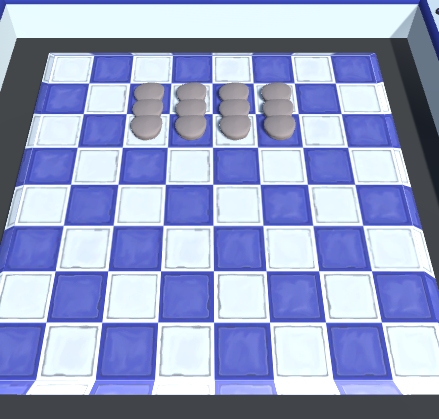
And this is the result I get:
Does anyone know a better way to set the grid up? Sorry if I am missing information, I can provide more.
It looks like his code is assuming the grid is 1x1(unity-units) for each block, if your model isn’t the same size the code won’t work.
I recommend using the assets he provided and “modeling over them”, tracing them if you will, this will make sure you have the same size but with your art work instead of his.
If you use a different size I predict you’ll also have troubles with the movement code and such and you’ll need to scale the entire in-code grid.
Thats what I thought! His video its doing it correctly even though its on a different axis. All I need them to do is split apart more haha. I’ll keep trying to figure it out though, but I’m glad someone pointed it out so im not crazy.
I assume he is only representing this in an XY fashion in-code(I do this too all the time), the code looks to be correct.
if you look at the last line he is using .forward and .right
The board is my Gamemaster kinda. the table doesn’t serve any function besides the background, pretend its not even there. I just don’t know why the board won’t get setup when its the exact same model imported in haha
edit: Theres only one board, I don’t know what you mean by two tables.
I mean if you put the table that the tutorial gives you in the scene together with the table you modeled, are they the same size?
I realize it’s only the background and doesn’t “serve and function”(besides showing the players the grid).
“I just don’t know why the board won’t get setup when its the exact same model imported in haha”
So it won’t work even with the table the tutorial gives you?
better re-watch the tutorial and see if you missed anything.
Ok, so. Board as the gamemaster I meant all my scripts are going to be attached to it, but I don’t think that’s relevant. And yes, The table from the tutorial lines up with the table I made. Also, I meant the table is the background, not the board itself ( Sorry )
And that’s why I’m confused, I can’t even get it working with the assets he provided. See my screenshot above though, I think that might be an issue? I’m working at like a -90 angle or something.
The red grid is the unity grid that I recolored cause I have troubles seeing the white sometimes.
(Not trying to sound mean, thanks alot for helping! )
Oh yeah, I do this too, I just didn’t think of that because it is indeed not relevant, haha.
Then I would go back, re-watch the tutorial and see that his code is identical to yours. (or your to his, technically, but nvm)
Nothing to be sorry about, lol
Looks like the Y axis is pointing up, like it should, I don’t see why you think you’re off by 90 degrees.
the only thing is it looks like the grid isn’t 1X1, but that is probably because of the perspective.
0% of what you said was even remotely mean.
that’s what we’re here for.
that and procrastinating our own developments, haha.
I thought I was -90 off because I guess I thought XYZ was where Z was up and down like in blender. I have alot of learning to do haha novice mistakes I suppose. I am currently redoing the whole video so far, hopefully I don’t encounter it again I’m not sure what I did wrong but something clearly is amiss.


 )
) )
)