For a student videogame project, i’d like to use Analytics (for easing some testing protocols in a situation and a time that are ours now), but i am meeting some trouble with it.
First of all, every tutorial and documentation i’ve been watching tells me to use the Analytics Event tracker, but it appears that it doesn’t appear in my test projects.
Is it normal ? Do we have to take it from an external source ? How can i do without it ?
For some context, i have been testing it on 2019 3.3f1 and 2020.0.1b6
Thanks for the reply !
If i have understood i include that syntax and the events i’d like to implement directly in the concerned gameobjects right ?
Can I use standard events with that method too ?
Yes, you can certainly use standard events as the documentation states. I just installed Analytics Library 3.6.11 (the latest) and see the AnalyticsEvent top level object and able to write code exactly as in the documentation. I’m using Unity 2019.4 and it should be available in recent versions also.
I’m using Unity 2020.3.15f2 and Analytics library 3.5.3 (which is the latest one being shown to be in package manager and has the verified text next to it).
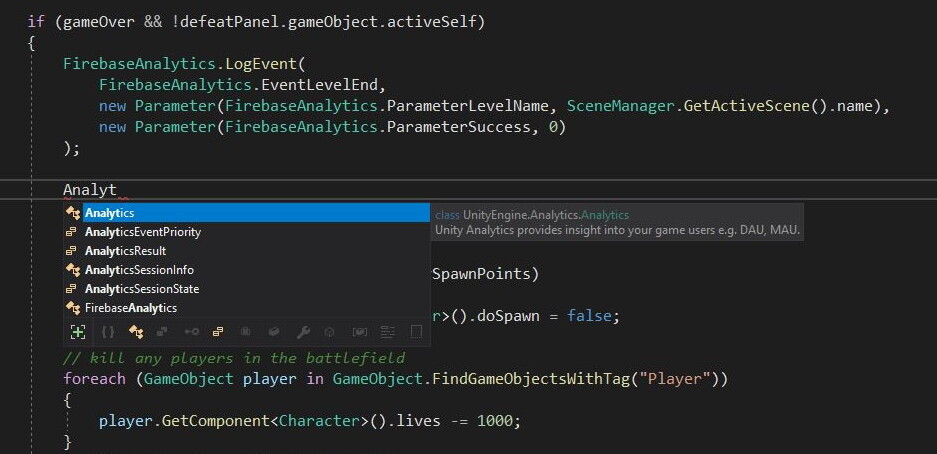
In my code I have written using UnityEngine.Analytics;, but as can be seen from the screenshot below AnalyticsEvent is not available to me.
I just installed Unity 2020.3.15 and confirmed that AnalyticsEvent is present in Analytics Library 3.5.3. Are you using Visual Code? It sounds like your Intellisense may not be behaving correctly. I’m using Visual Studio. If you save the script regardless of errors in your editor, does Unity also complain?
Please try my suggestion to confirm. Also please try with a brand new/empty project to make sure there are no namespace collisions. Also try deleting the /Library folder and allow it to rebuild. Also try edit > preference > external tools > recreate project file