Objects rendering only on editor, but not on build (they get invisible)

Everything works fine in the editor (except that shadows don’t work, but that’s not the case), but when I build the game, none of the objects are rendered, and only the skybox and UI text is visible. But although they aren’t appearing, they are working as normally (i.e. these objects’ triggers work fine when the determined event occurs, like colliding to a specified object, for example).

I searched for this issue but didn’t found any answer. Could it be my cheap computer’s fault (Intel Celeron without an external graphics card)?

In editor game mode:
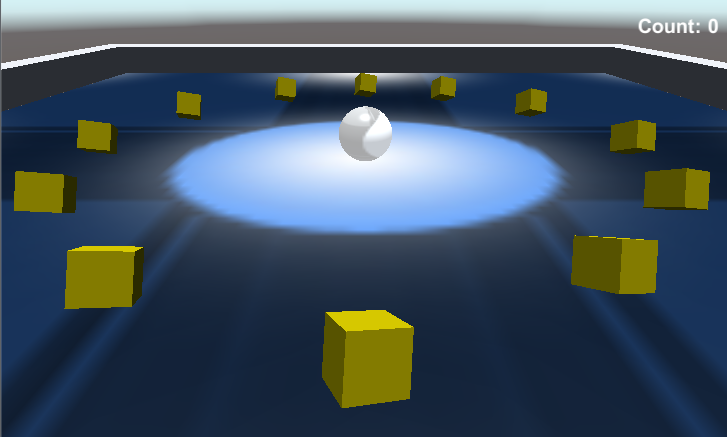
In buit game:

64343-capturar2.png

Yes, I runned both the editor and the built game in the same quality, and also tried to run it in Fastest quality, but no, it made no difference in the built game.

Also, there is no object tagged with “Editor only”, only one have a custom tag and all the others are “Untagged”. And the camera’s culling mask is set to “Everything”.

I've the same issue :(...........If some1 knows how 2 solve this problem, plz, plz, plz....... we really need ur help..... thxs in advance :D

I am having the same issue. Anyone out there have an answer to this issue.

I am having the same issue. Anyone out there have an answer as to why this might happen?

3 Answers

3

I found out what was causing it: yes, it’s the computer’s fault.

By the fact that my PC is very old, its graphics card doesn’t support Unity’s default shader, so it can’t render the objects, when built. This is solved by changing the selected shader for each object to “Legacy shader”. It will become kind of ugly, but everything will render fine.

Mh probably the Transform component on the Canvas :p private RectTransform m_CanvasTransform;

I discovered my issue as well. I had a background in my 2D app and it was on the same Y axis as the objects. Once I changed it to -10 on the Y axis everything worked as expected. The confusing part was that it working in the editor. To my way of thinking, I should have experienced issues in the editor also.

For 2D UI, I had a similar problem, it was the sort order on the canvas, I changed from 0 to 1 and it worked, another UI element was drawn on top of it.

Your problem can be solved in a simple way if you choose to destroy the gameobject instead. If its possible try to use the AudioClip variable for the audio you want to use. other.gameObject.GetComponent<AudioSource>().audio.PlayOneShot(yourAudioClip); Destroy(other.gameObject, yourAudioClip.length); The destroy function will wait till end of the audioclip before destroying the object. You can add some code inbetween if you want to play a death animation or disable the renderer of the object to make them dissapear etc.