Peppermint Data Binding is a lightweight data binding framework for Unity. It provides a simple and easy way for Unity games to utilize data binding.
Overview
Clean code
Peppermint data binding is based on property and reflection. The class does not need to inherit from specified class or interface, any object that has properties can be used as a binding source or target. Existing code can support data binding with only minimal changes.
*To detect source changes, the source must implement INotifyPropertyChanged interface, or inherits the Bindable base class.
Easy to setup
Making the UI support data binding is very easy. You only need to add three types of components: DataContext, DataContextRegister and Binder. Most components have very few parameters to setup.
The built-in binders include binders for all uGUI controls, ImageBinder, AnimatorBinder, CustomBinder, Selector, Setter, Getter, etc. You can easily create your own binder class to support new features.
Model-View-ViewModel ready
Peppermint data binding was designed to make it easy to build game UI using the MVVM pattern. A clean separation between application logic and the UI will make your game easier to test, maintain, and evolve.
Performance
Extensively optimized C# code, e.g. type cache, object pool, custom event, fast delegate, etc.
Features
Support OneWay, TwoWay and OneWayToSource binding modes.
Support data conversion.
Support binding to nested properties.
Support binding to collections.
Support collection view.
Support command.
Built-in binders for uGUI controls.
Editor tools to make data binding development easier.
Optimized for performance.
Support JIT/AOT compilation (iOS, Android, webGL).
Model-View-ViewModel ready.
Full source code included.
Editor support
Peppermint data binding includes some useful editor utilities, which can make data binding development more easily.
-Bindable Property Code Builder
Generates code snippet for all bindable properties.
-Implicit Converter Code Builder
Generates implicit operator type list.
-AOT Code Builder
Generate type registration code for AOT compilation.
-Code Check Tool
Verifies all property name strings.
-Data Binding Graph
A viewer which displays data binding components within a transform node.
-SpriteSet Builder
Builds the SpriteSet from specified directory.
-BindingManager Debug
Shows the runtime status of the BindingManager.
Added new examples for ListDynamicBinder and CollectionMultiViewBinder.
Added new examples to demonstrate the difference between MVC and MVVM design pattern.
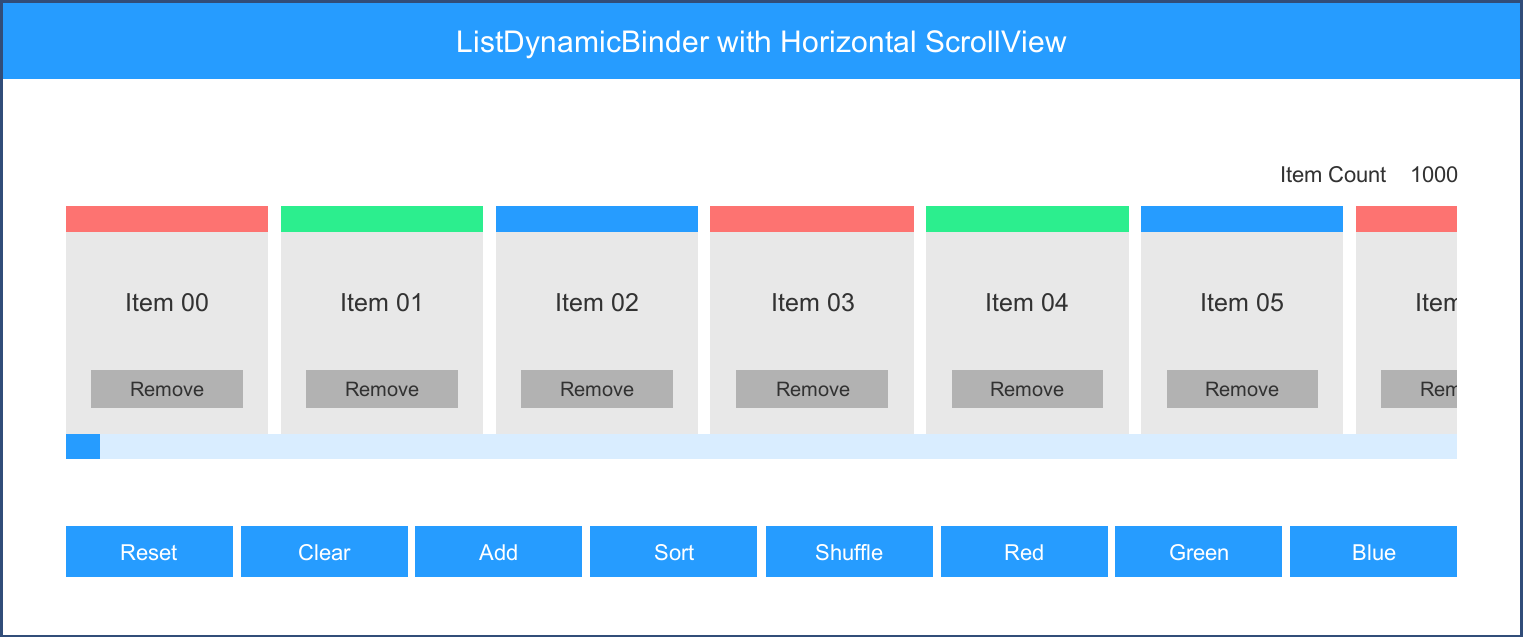
ListDynamicBinder is a collection binder which binds to IList object.
Unlike the CollectionBinder, it only creates and binds the visible items of the list. It requires a dynamic controller to calculate the visible items and handle the layout. It’s very useful for scroll views with a large amount of items, e.g. leaderboard.
How to update
Backup your project first.
Delete the old “Peppermint DataBinding” folder (except the “Peppermint DataBinding/Settings” folder).
Peppermint data binding is submitted with Unity 5.2 for maximum compatibility. I just tested it with 2017.x, some editor features has compatibility issues. I will submit a new version to fix these issues. Here are some quick fixes for different 2017.x versions.
For 2017.1.0f3
ImplicitConverterCodeBuilder will get a generic type, which will cause a compile error. It can be fixed by modifying the BindingEditorUtility.GetImplicitOperatorTypes method.
…
if (!type.IsPublic)
{
continue;
}
// ++++++
if (type.IsGenericTypeDefinition)
{
continue;
}
// ++++++
var methods = type.GetMethods(BindingFlags.Public | BindingFlags.Static);
…
For 2017.2.0f3 and 2017.3.0f3
Unity renamed Mono.Cecil.dll to Unity.Cecil.dll, which will cause an error when using AOT builder and Code Check. The CodeTool.dll of Peppermint DataBinding need reference Mono.Cecil. It can be fixed by copying the old version of Mono.Cecil.dll to Assets/Peppermint DataBinding/Editor/Libs.
The new version of Peppermint DataBinding will also contains new features, such as support CallerMemberNameAttribute in .Net 4.6.
Has this been tested with NGUI?
… also, how would one go about implementing a mocking solution in this? Something like switching out the normal DataContext with a special mock context?
Peppermint data binding is a general data binding framework, it can be worked with any UI framework. Currently, I only added components for UGUI. I may add NGUI support in future version.
Data binding is very easy to extend. I did a quick implementation test for NGUI. It’s very easy to write binders for simple controls, such as UILabel, UISlider. You can use the built-in UGUI binder as a template, the following code is the implementation for UIToggleBinder.
By adding a helper component, the CollectionBinder also works in NGUI.
Switching data context is very simple. In peppermint data binding, the DataContext is just a component which is a holder for the binding source. The only thing you need to do is switching the binding source, no need to modify the view.
Here is a simple example:
    public class MockingExample : MonoBehaviour
    {
        public interface IPlayerViewModel
        {
            string Name { get; }
            long Gold { get; }
        }

        public class RealPlayerViewModel : IPlayerViewModel
        {
            public string Name
            {
                get { return PlayerPrefs.GetString("Player.Name", "User"); }
            }

            public long Gold
            {
                get { return PlayerPrefs.GetInt("Player.Gold", 0); }
            }
        }

        public class DummyPlayerViewModel : IPlayerViewModel
        {
            public string Name { get; set; }
            public long Gold { get; set; }
        }

        public bool useMockObject;
        private IPlayerViewModel playerViewModel;

        void Start()
        {
            if (useMockObject)
            {
                // create mock object
                playerViewModel = new DummyPlayerViewModel { Name = "Dummy", Gold = 9999999 };
            }
            else
            {
                // get real player view model
                playerViewModel = new RealPlayerViewModel();
            }

            // add source
            BindingManager.Instance.AddSource(playerViewModel, "PlayerViewModel");
        }

        private void OnDestroy()
        {
            // remove source
            BindingManager.Instance.RemoveSource(playerViewModel);
        }
    }
Hi guys, I just submitted version 1.2.0. The new version is now available.
changelog
Added CanvasPrinter.
Added CallerMemberNameAttribute support for .NET 4.6.
Fixed Unity 2017.x compatibility issues.
In this version, I added a new example to demonstrate how to do the dynamic binding manually for a custom view. This example is a simplified level selection UI. Usually, the game contains many levels, the level map will be very large and contains tons of objects. Load or create the entire map at runtime is impractical, because it consumes lots of memory and CPU time. So we need two helper components: CanvasScanner and CanvasPrinter.
The CanvasScanner works like a scanner, it “scans” the map and generates a simplified blueprint called CanvasData. The CanvasPrinter works like a printer, it loads generated CanvasData and “prints” the visible portion of the entire map.
The next version will add binders for NGUI. It includes binders to support NGUI’s built-in controls, such as UILabelBinder, UIToggleBinder, etc. It also includes new collection binders for NGUI.
In this version, peppermint data binding added NGUI support. To enable this feature, just double-click the NGUI.unitypackage in “Peppermint DataBinding/Extensions” folder and import it into your project.
This version added TextMesh Pro support, including binders for TMP_Text, TMP_Dropdown, TMP_InputField. I also added a new EnumSelector which is more easy to setup for enum type.
This version also added new examples:
The Localization example demonstrates how to implement localization with data binding.
The MultiView example demonstrates how to switch multiple views.
Change log
Added TextMesh Pro support.
Added EnumSelector.
Added new examples to demonstrate localization and multiple views.
Updated code to support assembly definition files.
How would one go about implementing some sort of drag/drop solution using Peppermint data bindings?
I’ve made a custom binder that handles the first half, triggering an ICommand when a drag starts, but I’m stumped on the drop happens – since ICommands don’t have any parameters, I’m not sure how to tell one model object that another’s been dragged onto it. (I’m using NGUI, but I don’t know how much it matters – once I get past the conceptual roadblock, I think I’ll be fine)
Drag and drop is a view operation, you need to create a view controller to handle it. Basically, the controller will raise two events: start dragging and end dragging. It’s very easy to add data binding support for this controller, all you need to do is bind these events. The following is a simple implementation, you can download the full example in the attachment.
This example uses NGUI’s UIDragDropItem, it only implements the basic drag and drop between two list and the target item is always added to the end of the list. You can use this example as a reference and create your own controller.
DragDropController Binder
using System;
using System.Collections.Generic;
using UnityEngine;

namespace Peppermint.DataBinding.Example
{
    // Binder for DragDropController. It contains two action bindings, these actions will be called
    // by target DragDropController.
    [Binder]
    [RequireComponent(typeof(DragDropController))]
    public class DragDropControllerBinder : MonoBehaviour
    {
        public string beginDragPath;
        public string endDragPath;

        private DragDropController target;
        private IDataContext dataContext;
        private List<IBinding> bindingList;
        private Action beginDrag;
        private Action<Transform> endDrag;

        public Action BeginDrag
        {
            set
            {
                if (beginDrag != null)
                {
                    target.onBeginDrag -= beginDrag;
                }

                beginDrag = value;

                if (beginDrag != null)
                {
                    target.onBeginDrag += beginDrag;
                }
            }
        }

        public Action<Transform> EndDrag
        {
            set
            {
                if (endDrag != null)
                {
                    target.onEndDrag -= endDrag;
                }

                endDrag = value;

                if (endDrag != null)
                {
                    target.onEndDrag += endDrag;
                }
            }
        }

        void Start()
        {
            target = GetComponent<DragDropController>();
            if (target == null)
            {
                Debug.LogError("Require DragDropController Component", gameObject);
                return;
            }

            CreateBinding();
        }

        void OnDestroy()
        {
            BindingUtility.RemoveBinding(bindingList, dataContext);
        }

        private void CreateBinding()
        {
            bindingList = new List<IBinding>();

            if (!string.IsNullOrEmpty(beginDragPath))
            {
                var binding = new Binding(beginDragPath, this, "BeginDrag");
                binding.SetFlags(Binding.ControlFlags.ResetTargetValue);
                bindingList.Add(binding);
            }

            if (!string.IsNullOrEmpty(endDragPath))
            {
                var binding = new Binding(endDragPath, this, "EndDrag");
                binding.SetFlags(Binding.ControlFlags.ResetTargetValue);
                bindingList.Add(binding);
            }

            BindingUtility.AddBinding(bindingList, transform, out dataContext);
        }
    }
}
DragDropExample
using System;
using UnityEngine;

namespace Peppermint.DataBinding.Example
{
    // A simple drag and drop example, it demonstrates how to handle drag events.
    public class DragDropExample : BindableMonoBehaviour
    {
        public class Item : BindableObject
        {
            private string name;
            private ColorTag colorTag;
            private ICommand clickCommand;
            private bool isDragging;
            private Action beginDragAction;
            private Action<Transform> endDragAction;

            #region Bindable Properties

            public string Name
            {
                get { return name; }
                set { SetProperty(ref name, value, "Name"); }
            }

            public ColorTag ColorTag
            {
                get { return colorTag; }
                set { SetProperty(ref colorTag, value, "ColorTag"); }
            }

            public ICommand ClickCommand
            {
                get { return clickCommand; }
                set { SetProperty(ref clickCommand, value, "ClickCommand"); }
            }

            public bool IsDragging
            {
                get { return isDragging; }
                set { SetProperty(ref isDragging, value, "IsDragging"); }
            }

            public Action BeginDragAction
            {
                get { return beginDragAction; }
                set { SetProperty(ref beginDragAction, value, "BeginDragAction"); }
            }

            public Action<Transform> EndDragAction
            {
                get { return endDragAction; }
                set { SetProperty(ref endDragAction, value, "EndDragAction"); }
            }

            #endregion
        }

        public int listACount = 5;
        public int listBCount = 5;

        private Transform containerA;
        private Transform containerB;
        private ObservableList<Item> itemListA;
        private ObservableList<Item> itemListB;
        private ICommand resetListCommand;
        private ICommand shuffleListCommand;

        #region Bindable Properties

        public Transform ContainerA
        {
            set { containerA = value; }
        }

        public Transform ContainerB
        {
            set { containerB = value; }
        }

        public ObservableList<Item> ItemListA
        {
            get { return itemListA; }
            set { SetProperty(ref itemListA, value, "ItemListA"); }
        }

        public ObservableList<Item> ItemListB
        {
            get { return itemListB; }
            set { SetProperty(ref itemListB, value, "ItemListB"); }
        }

        public ICommand ResetListCommand
        {
            get { return resetListCommand; }
            set { SetProperty(ref resetListCommand, value, "ResetListCommand"); }
        }

        public ICommand ShuffleListCommand
        {
            get { return shuffleListCommand; }
            set { SetProperty(ref shuffleListCommand, value, "ShuffleListCommand"); }
        }

        #endregion

        void Start()
        {
            itemListA = new ObservableList<Item>();
            itemListB = new ObservableList<Item>();

            ResetList();

            // create commands
            resetListCommand = new DelegateCommand(ResetList);
            shuffleListCommand = new DelegateCommand(ShuffleList);

            BindingManager.Instance.AddSource(this, typeof(DragDropExample).Name);
        }

        void OnDestroy()
        {
            BindingManager.Instance.RemoveSource(this);
        }

        public void ResetList()
        {
            Debug.LogFormat("ResetList");

            itemListA.Clear();
            ItemListB.Clear();

            for (int i = 0; i < listACount; i++)
            {
                var item = new Item();
                item.Name = string.Format("A{0}", i);
                item.ColorTag = ColorTag.Red;
                item.ClickCommand = new DelegateCommand(() => ClickItem(item));

                // create action with extra parameters
                item.BeginDragAction = () => BeginDragItem(item);
                item.EndDragAction = x => EndDragItem(item, x);

                itemListA.Add(item);
            }

            for (int i = 0; i < listBCount; i++)
            {
                var item = new Item();
                item.Name = string.Format("B{0}", i);
                item.ColorTag = ColorTag.Blue;
                item.ClickCommand = new DelegateCommand(() => ClickItem(item));

                // create action with extra parameters
                item.BeginDragAction = () => BeginDragItem(item);
                item.EndDragAction = x => EndDragItem(item, x);

                itemListB.Add(item);
            }
        }

        public void ShuffleList()
        {
            Debug.LogFormat("ShuffleList");

            itemListA.Shuffle();
            itemListB.Shuffle();
        }

        public void ClickItem(Item item)
        {
            Debug.LogFormat("Click item {0}", item.Name);
        }

        public void BeginDragItem(Item item)
        {
            Debug.LogFormat("Begin drag item {0}", item.Name);

            // set drag flag, it will disable button binder to make it works with UIDragDropItem
            item.IsDragging = true;
        }

        public void EndDragItem(Item item, Transform container)
        {
            Debug.Log(string.Format("End drag item {0}, container {1}", item.Name, container), container);

            // reset flag
            item.IsDragging = false;

            if (container == containerB)
            {
                // drop to list B
                if (itemListA.Contains(item))
                {
                    // item belongs to list A, just move item from A to B
                    Debug.Log("Move item from list A to list B");
                    itemListA.Remove(item);
                    itemListB.Add(item);
                }
                else
                {
                    Debug.Log("Ignore drop to list B");
                }
            }
            else if (container == containerA)
            {
                // drop to list A
                if (itemListB.Contains(item))
                {
                    // item belongs to list B, just move item from B to A
                    Debug.Log("Move item from list B to list A");
                    itemListB.Remove(item);
                    itemListA.Add(item);
                }
                else
                {
                    Debug.Log("Ignore drop to list A");
                }
            }
            else
            {
                Debug.Log("Ignore unknown target");
            }
        }
    }
}
Thank you so much! I’m still relatively new to Peppermint (and, well, using data bindings in general). I didn’t even realize that Actions were a bindable property! This helps immensely.
UPD: After some investigation - it may be Unity 2018.1 internal bug…
And some more suggestions:
Unity 2018.1 has support for .Net 4.5 and has build-in ObservableCollection. I suggest you to move from your own INotifyCollectionChanged to standard one.
Your INotifyCollectionChanged is very memory unefficient. And I’m not sure it will be faster in real world usage.
Thanks for your feedback, I did a quick memory profile for ObservableList and .Net ObservableCollection with the following code.
var collection = new ObservableList<object>();
// or var collection = new System.Collections.ObjectModel.ObservableCollection<object>();

collection.CollectionChanged += (sender, arg) => { };

// add
for (int i = 0; i < collectionTestCount; i++)
{
    collection.Add(i);
}

// indexer
for (int i = 0; i < collectionTestCount; i++)
{
    collection[i] = 2 * i;
}

// remove
for (int i = 0; i < collectionTestCount; i++)
{
    collection.RemoveAt(0);
}
I set collectionTestCount to 10000 and run this test several times with .Net 4.x runtime. Here is the test result:
Test, GC Calls, GC Alloc, Time ms
ObservableList, 130016, 5.7MB, 7.05
ObservableCollection, 180017, 5.6MB, 10.14
ObservableList(Optimized), 90016, 2.7MB, 4.86
The memory usage of ObservableList is almost identical to.Net ObservableCollection, and it uses fewer GC calls and runs faster. Usually, games do not change collections frequently, so the GC won’t be a problem. If you need to manipulate the collection with lots of items, you can use “batch mode” to optimize performance and memory usage. For more information you can check CollectionExtensions.Shuffle method.
I also optimize the NotifyCollectionChangedEventArgs class to reduce memory allocation. Here is the modified code, you can replace the built-in NotifyCollectionChangedEventArgs class.
    public class NotifyCollectionChangedEventArgs
    {
        private class SingleElementList : IList
        {
            private object item;

            public int Count { get { return 1; } }
            public bool IsReadOnly { get { return true; } }
            public bool IsFixedSize { get { return true; } }
            public bool IsSynchronized { get { return false; } }
            public object SyncRoot { get { throw new NotSupportedException(); } }

            public object this[int index]
            {
                get
                {
                    if (index != 0)
                    {
                        throw new IndexOutOfRangeException();
                    }

                    return item;
                }

                set
                {
                    throw new NotSupportedException();
                }
            }

            public SingleElementList(object item)
            {
                this.item = item;
            }

            public bool Contains(object value)
            {
                return value == item;
            }

            public void CopyTo(Array array, int index)
            {
                array.SetValue(item, index);
            }

            public IEnumerator GetEnumerator()
            {
                yield return item;
            }

            public int IndexOf(object value)
            {
                return (value == item) ? 0 : -1;
            }

            public int Add(object value)
            {
                throw new NotSupportedException();
            }

            public void Clear()
            {
                throw new NotSupportedException();
            }

            public void Insert(int index, object value)
            {
                throw new NotSupportedException();
            }

            public void Remove(object value)
            {
                throw new NotSupportedException();
            }

            public void RemoveAt(int index)
            {
                throw new NotSupportedException();
            }
        }

        public NotifyCollectionChangedAction Action { get; private set; }
        public IList NewItems { get; private set; }
        public IList OldItems { get; private set; }

        public NotifyCollectionChangedEventArgs(NotifyCollectionChangedAction action)
        {
            if (action != NotifyCollectionChangedAction.Reset)
            {
                throw new ArgumentException("Only support Reset");
            }

            Action = action;
        }

        public NotifyCollectionChangedEventArgs(NotifyCollectionChangedAction action, object changedItem)
        {
            Action = action;

            var list = new SingleElementList(changedItem);
            if (action == NotifyCollectionChangedAction.Add)
            {
                NewItems = list;
            }
            else if (action == NotifyCollectionChangedAction.Remove)
            {
                OldItems = list;
            }
            else
            {
                throw new ArgumentException("Unhandled action " + action);
            }
        }

        public NotifyCollectionChangedEventArgs(NotifyCollectionChangedAction action, IList items)
        {
            Action = action;
            if (action == NotifyCollectionChangedAction.Add)
            {
                NewItems = items;
            }
            else if (action == NotifyCollectionChangedAction.Remove)
            {
                OldItems = items;
            }
            else if (action == NotifyCollectionChangedAction.Move)
            {
                NewItems = items;
            }
            else
            {
                throw new ArgumentException("Unhandled action " + action);
            }
        }

        public NotifyCollectionChangedEventArgs(NotifyCollectionChangedAction action, object newItem, object oldItem)
        {
            if (action != NotifyCollectionChangedAction.Replace)
            {
                throw new ArgumentException("Only support Replace action");
            }

            Action = action;
            NewItems = new SingleElementList(newItem);
            OldItems = new SingleElementList(oldItem);
        }
    }
Peppermint data binding implements its own INotifyCollectionChanged and ObservableList for the following reasons:
Minimize dependencies, for .Net 3.5 runtime, these types are inside WindowsBase.dll.
More features. ObservableList implements IList instead of ICollection, which contains more methods, such as Sort, AddRange, etc.
The built-in Code Builder contains tools to generate bindable properties code. In most cases, the generated code is ready for use, but in some cases, you need to modify the property to support more features, such as notify associated properties, etc. Once it’s done, you don’t need to generate these properties again.
Peppermint data binding only supports non-associative collections and it does not support associated collections. It can handle generic type such as ObservableList<Tuple<string, Item>>, to bind to Item.Name, you only need to set the path to “Item2.Name”.
If you need to bind to Dictionary in your model, you can use the following steps:
Create an ObservableList in its view model.
Handle dictionary changes in this view model, you can manually sync the ObservableDictionary<int, Item> to the ObservableList, such as added items, removed items, and ordering.
In your UI, you bind to this ObservableList instead.
If you need more information, you can check the MVVM example, it demonstrates how to sync collection from model to view-model.
Added ListSyncController and DictionarySyncController.
Added new examples to demonstrate sync controller.
Updated code generation for ImplicitConverter to support assembly definition files.
Updated collection event to avoid GC.
The new SyncController can be used to synchronize content from source collection to target collection. In Peppermint data binding, collection bindings do not support associated container, such as dictionary, etc. If you need to bind to dictionary, you can use the DictionarySyncController as an adaptor to make your dictionary support data binding.
I also updated the NotifyCollectionChangedEventArgs to eliminate GC and some minor enumerator optimization.