Update April 23 2019: As some of you have noticed, Prefab Asset editing from Project view has been released in 2019.1! Update July 10 2019: For 2018.4 release management wants to gain extra confidence in the stability of the feature. See this thread , try out the preview build there, and give us your feedback to help us assess the stability. Original message below.
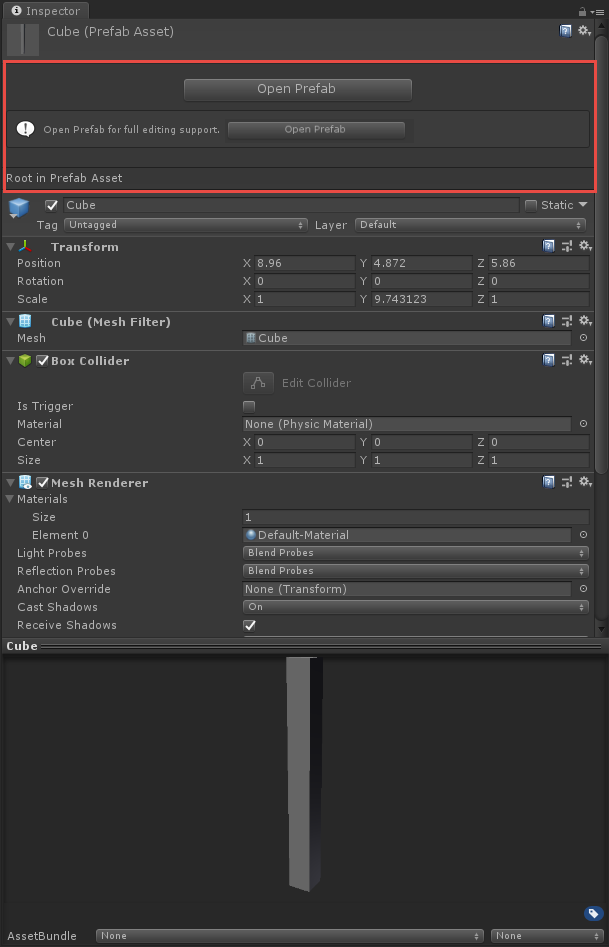
For the past months we’ve been working on making it possible to edit the root GameObject of a Prefab Asset in the Inspector directly from the Project browser without going into Prefab Mode.
We’d love if you could try out this preview build and let us know if it’s working out for you and solving (some of) the problems you’ve had. It’s based on Unity 2018.3.7f1.
Note: The Download page has a link to the Linux Editor but this is not available.
At an earlier point in the development of the new Prefabs system for 2018.3 we thought this type of asset editing would not be viable, due to the nature of Prefabs now being imported objects rather than native assets, but we eventually found out that there is a way, as long as we impose certain limitations and fixed a lot of edge cases. So that’s what we’ve been doing!
When using the asset editing functionality, changes are always saved immediately, similar to when Auto Save is enabled in Prefab Mode. This was one of the necessary limitations. The internal methods for adding and removing components, and for undo, also save and import automatically when changing Prefab Asset objects, and this is necessary to keep that way in order for internal state to remain consistent.
What is possible with asset editing:
Editing the root GameObject and its components.
Adding and removing components on the root GameObject.
Multi-selection of multiple Prefabs and editing common components on their root GameObjects.
Seeing changes reflected in the open scene immediately (though it will be slow for Prefabs that are large and/or are used many places).
What is not possible without opening Prefab Mode:
Editing anything else than the root GameObject and its components.
Applying changes from a Prefab Variant to its base.
Awesome!!! This is honestly so amazing!!! I feel like this is the biggest hole in the new workflow thank you so much for this!
One question - would it be possible to have auto save by default (checkbox), but if disabled it shows “cancel” and “apply” buttons like other inported assets?
Just a thought, since I know auto save results in a little lag this way people can decide which one they like the most. Totally understandable if this isn’t possible, of course!
No, that’s exactly the point. If it was possible to delay the save we’d have added support for that, but we couldn’t find a way to make it feasible. We know that’s not ideal; that’s why we explicitly wrote a paragraph about this limitation.
Most assets in Unity are imported assets, meaning they have to go through some kind of processing before Unity can use them, e.g. FBX models are converted to internal mesh format, textures are processed, audio files are converted and so on. There are a few assets that are native to Unity and does not require processing these are Materials and ScriptableObject and a few more.
Common for imported assets is that once imported you can’t modify them without going through the processing steps again.
Prefabs used to be native assets, but in order to implement nesting we needed to start processing them so now they are imported assets. This means that every time you change a prefab asset on disk we need to do processing and due to nesting and variants there might a lot a prefabs that needs processing when you change a single prefab.
So when you are editing the root GameObject in the project browser you are actually editing the imported and processed objects, which means they get out of sync with the source asset in the Assets folder. This is very dangerous and can cause dataloss unless we always make sure to update the source asset when ever you modify the imported assets. This is one reason that auto save is always enabled when editing the prefab in the project browser.
Well, it’s a preview build. It passes all our automated tests of course and we (developers and QA in our team) didn’t find any issues, but it hasn’t been through a regular alpha and beta phase, so who can really say? Handle responsibly as always. Use backups or version control.
Not clear what you mean here. Are you referring to an editor of a specific component type?
If you mean overriding the default PrefabImporterEditor, then this could have undefined effects, as the new solution also relies on the PrefabImporterEditor.
I really wasn’t expecting this to happen, to the point that was about to actively look for some way to customize all that space left blank right under the “Open Prefab” button.
Definitely it’s going to create mixed feelings as for any “corner case” preference about the UI.
What if this “Module” under the Open Prefab button was actually a Package in the Package Manager, so that you wouldn’t need to fork a beta, while still offering everyone the chance to test it on any present or future builds as an independent feature?
I can see a lot of people complaining about it being more or less intuitive depending on their level of experience.
“because there’s one more thing to keep in mind”.
So making it optional sort of makes sense (to me that I’m outside that black box, at least?)
Would it be possible to implement it as a Package, thus importing a native implementation for a generic “UnderOpenPrefabEditor” class, which could also be extended in other ways (eg: Asset Store assets for customizing the Open Prefab tab) by other tools?
EDIT: I’m probably speaking about the PrefabImporterEditor as well, which makes me assume a “maybe” could be the answer.
Even totally discarding the idea about implementing this (and I hope this is not going to happen), it would be a definite pity to leave all that unused space, to the point of making the “Open Prefab” button feel like out of place in that particular position.
I believe the contents of the root prefabs should be shown at least in read only mode, possibly requiring an extra big, bold, red “Edit Root” button right below the “Open Prefab” one, just to make it evident for starters that it’s NOT a common editing operation. Something similar to what is implemented for Mixers for Runtime Editing.
Maybe dropping this after users get accustomed to that, or from the Preferences.
I know it’s an extra layer and I have no clue about the implications it may have, or even if it’s technically feasible, but felt like sharing the idea, you never know.
(a bit OT: I was wondering: if it is still possible to break a project by leaving its nested assets out of sync if a crash/power off happens in the middle of a chain of nested prefab updates, an operation which appears to be somehow time/processor consuming?)
Are there any relevant performance losses (both at edit time/play time/final build) when using this new interface we’re so happy to see implemented (I can’t exclude that making this possible didn’t require any extra checks or processing even at runtime)?
Looking forward to test it asap, and getting back to you if something goes wrong or have any relevant feedback to share
Opening a prefab gives you greater granularity of nested elements without dragging the prefab into the scene, exposing the root properties gives you quick access to the main settings that may be driving your prefab, which was handy in the old system.
I do agree that without an “apply” button you are going to have to be mindful of the changes you make, but this is also the case for Materials, that also autosave, which we are all used to.
I like this new idea of exposing only attached components of the root prefab. The prefab don’t need to be opened if you are not changing/moving any child on it.
No, it touches code in core Unity that can’t be changed from a package.
Nothing changes for builds at all. Play Mode also shouldn’t be affected by this. What could be affected is selecting Prefabs in the Project Browser, since this has to do work it didn’t before.
Works really great, the only feedback i have is to remove the “Open prefab for full editing support” help box. This takes up quite a lot of space, and i’d rather have this used up with information about the components. Maybe have the text of the button convey this information?
Really happy that this is now a reality. Could we get a little more of a UI distinction other than just plain text and a warning sign? I made a mockup of what I’d personally love to see, as I know that I would most likely start editing stuff and later realize that I was editing the prefab instead of the scene object even with the existing warnings.
I’ve already posted and like this new idea, however after playing a bit more with I’m like the other guys. I feel like the new Prefab UI root inspector takes way too much space. Here is what I suggest:
Instead of this (which eats lot of vertical space):
I edited the second image on Ms Paint to illustrate my idea so please bare with me. In other words, reduce the large empty wasted space at the top while retaining Prefab Root idea and the information to open the Prefab for full editing.

 thank you so much for this!
 Sounds good then!