AGFPRO FAQ(s)
(Q)Can this be transferred to the unity editor as well or it is only within the AGF?
(A) YES and NO. Unfortunately this is not an easy answer. I will do my best. What you mention seeing in our videos is all built into AGF in its internal and external players. The player character,animation and controller/camera code as well as the particle effects and audio are all embedded into AGF as examples to demonstrate what you could do if you took the time to make an external player for AGF that had our AGF scene loading code implemented, those assets are all available from their respective publishers from the UAS. The source for those assets is NOT available in the purchase of AGF nor can it be used in an original game title unless you purchased them as we have and used them for YOUR GAME, application or AGF enabled player.
Our AGF scene loading source code IS INCLUDED in the purchase and is available for you to use in any project that you create and or sell without any further compensation to us. There are 3 examples of external players in the demo that demonstrate how it would work. The tree destruction and terrain deformation code that makes indentations into the terrain from magic impacts IS INCLUDED in the AGF Scene loading source code-set but it is not as well defined as we would like and we are in the process of cleaning all of that up. It is possible to use obviously, but would require some skill on your part implement properly, in its current state. As we get these parts of the offering formatted and documented properly we will provide updates at no extra charge.
NOTE: The file browser code we use to load AGF scenes at run time is a modified version of the “UNI file browser” we do not include the code for that as it is also it’s own product available from the UAS. That would have to be a separate purchase on your part.
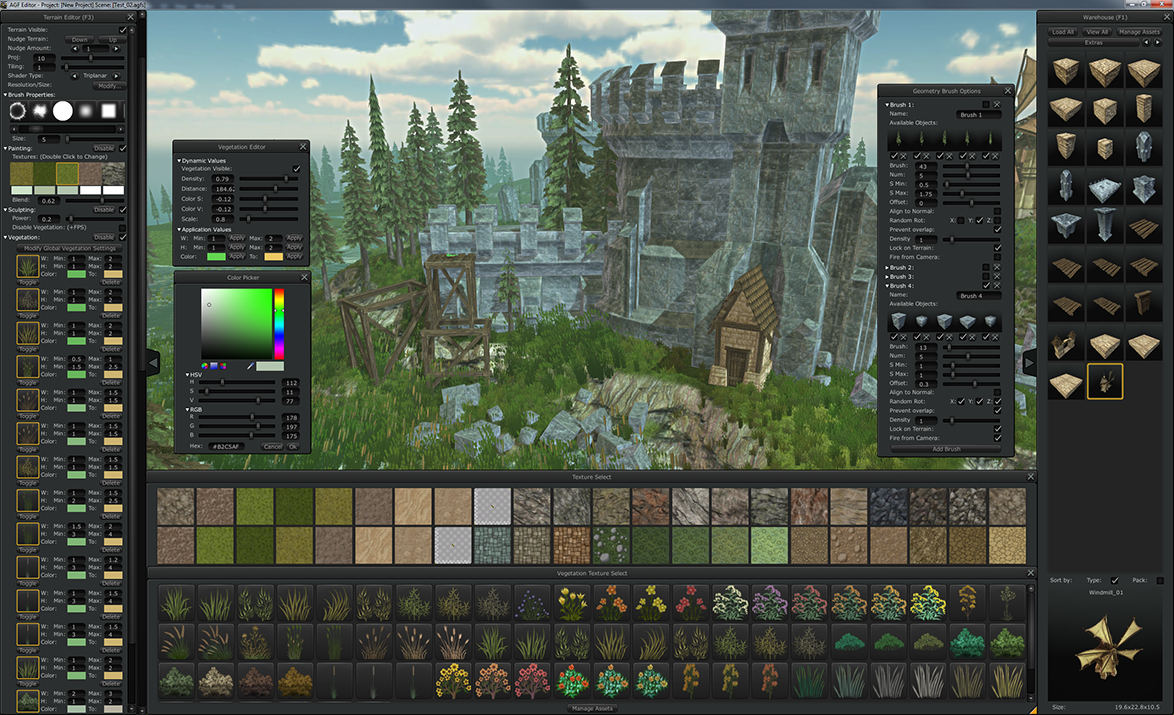
AGFPRO1.0 allows you to easily create maps and game levels and allows you to Import those maps and the packaged assets into UNITY free and Unity PRO
AGFPRO1.0 allows you to create “prefabs” from multiple assets that you can use in your level creation. Prefabs are also saved in the scene file as well as imported into UNITY with the AGF scene loader tools.
AGFPRO1.0 allows UNITY PRO users to create custom asset packs for use in AGF quickly and effectively with batch processing tools.
AGFPRO1.0 is NOT a game engine or game framework of any kind. Look at as AGF as an advanced level/map editor. In future updates (AGFPRO2.0) we plan on making game frameworks. I have not determined when these frameworks will be available nor have I determined what kind of games they will support.
(Q) How easy is it to replace that character with another? (for example the advanced character controller you can find on asset store)
(A) At the point you import a scene made with AGF it is like any other unity scene. You can make additions, changes, substitutions or add any code to it as you would any other scene file. So making your rpg game or adding the advanced character controller you mentioned is not any more difficult then it is normally in Unity.
(Q) How easy is to change the sky and lighting from AGF with the UniStorm asset?
(A) Once the scene file is in Unity it is like any other scene file. You can make any changes that you want. The lights are all there. The Skyboxes are all there. You only need to swap them or edit them as usual.
(Q) How easy is it to change your GUI with the NGUI? Are there any special characteristics in your GUI?
(A) When you get an AGF scene file into UNITY there is no GUI. You can use what ever means you want to create the GUI for your game.
(Q) Is there a way to import it in my AGF as an asset?
(A) Yes, We have batch exporters “AGF Asset Packager” made, that run out of UNITY
(Q) Can I import meshes and other 3d models in AGF and use it as assets in build mode?
(A) We call it prefab mode now, but yes. The asset packager tools we made work in for all the assets that AGF can use. These are the same tools I use to make the models for AGF that are already in the software.
(Q) What is the role of AGF in game making?
(A) AGF is made with UNITY and is a stand alone application. AGF is NOT a plug-in, AGF does NOT need unity to work. You can create terrains, lighting, prefabs, vegetation, atmospheres, presets and scene files. You only need Unity to import the scenes made with AGF. You can make your game as you like. AGF does require a UNITY PRO license to create custom/original assets or add assets that you may buy from the UAS and package them for use in AGF.
(Q) Can I consider it as a side-tool of unity for making levels?
(A) If you could for me please try to look at AGF as you do MAYA, BLENDER, or even PHOTOSHOP. You make a “thing” in those packages and you use that “thing” in UNITY to make your game.
AGF scenes and assets should be viewed in the same manner.
(Q) I don’t see enemies, AI characters in the videos, or moving platforms or puzzle game-play.
Is there some enemies AI to seek player and attack it ?
(A) You can place enemy characters in the demo. Link:Dropbox - Error - Simplify your life
We have a very simple AI feature in AGF that locates and attacks the player character. The player character can also attack and inflict damage to the AI character. When the AI character dies it then re-attacks (re-spawns) from the location of the “monster Locator” (under the “special” tab of the warehouse in AGF) The simple AI we made in AGF is used as an example of what you could make in YOUR GAME. The code we use in AGF to do this AI is NOT part of the UNITY code that is included in the product.
(Q)Or enemies must be made by ourselves and AI coded in Unity by ourselves and moving platforms, doors, puzzles is also to be done in Unity like AI characters ?
(A)I do not believe it is written or stated anywhere that there are AI enemies,moving platforms, doors, puzzle code as part of the product that would be able to be imported into Unity from AGF. Please point any information out to me if this statement is incorrect. You could make assets like you have mentioned and place them in AGF but our internal players would not know what to do with those assets. If you would like to make assets like you have mentioned work from an AGF scene file. You could make your own players to load the AGF scene format. We include in the product all the code needed for you to read the AGF scene format into YOUR GAME. Please understand that making a custom player for AGF is not needed to make levels and maps in AGF. There are two internal players built into AGF and three external players (stand alone apps) that you can use to run through and explore the maps you create in AGF.
Furthermore. I would like to point out that there is no coding needed to import AGF Scenes into Unity. We provide you with all the needed tools and scripts to get assets to and from AGF.
(Q) Are moving platforms,puzzles , doors systems included in AGF ?
(A) Not at the moment. We intend on adding those features in future releases but I can tell you exactly when they will be available.
(Q)Can we sell a game made with AGF ? (containing AGF models and textures)
(A) Yes, All the assets that are available for use in AGF are also available in the download that you would get when you buy it. I provide you with all the source files. So you can use them in any game without any copyright issues. The only exception to this is that we do not provide you with the character, animation or character controller code that we have embedded into AGF.
(Q)Can we make some game using AGF, then import it in Unity, then modify anything and sell it has an independent game?
(A) Yes.
(Q) I mean there is no royalties, we do what we want commercially using AGF and it’s 3D content ?
(A) Yes.
(Q) Indeed what is not authorized is i think to resell AGF 3D models or textures in some 3D packages.
(A) Correct.
You could make standalone Players for use with AGF and redistribute those as you wish. We provide you with the source code to load our scene format at run-time without having to go through UNITY. Any CODE made in this scenario must conform with all the Unity regulations and contracts they have in place.
I also invite users of AGF to make custom art already packaged for use in AGF and sell it on the UAS. All the tools to make “original” asset packages are available in our tool set. Any ART made in this scenario must conform with all the Unity regulations and contracts they have in place.
Here is the link to the feature list for AGFPRO1.0
FEATURES
Here is a link to the latest demos available so you can try AGF out.
DEMOS
Here is a link to the installation PDFfor AGF it may also answer some questions you may have. Dropbox - Error - Simplify your life
Her is the link to the Tutorials page.
Tutorials