Are you tired of waiting for full domain-reload and script compilation every time you make a small code change?
Me too.
Tool will automatically compile only what you’ve changed and immediately hot-reload that into current play session.
Even better it’ll do that on device, be it to already running .exe or deployed Android APK.
Iterate on whatever you’re working on without restarting the app over and over again.
Works with any code editor.

Get It on Asset Store | Documentation | Discord
You can see fixes for current issues at the bottom of this post FAQ/FIXES section.
• Setup
- Import
- Create Build
- Play Build and Editor
- Make Code Change
- See results
It’s that simple.
• One-off custom code executions on Hot-Reload
When you need to set the stage to test your feature out.
Add following methods to changed script:
| void OnScriptHotReload()
| {
| //do whatever you want to do with access to instance via ‘this’
| }
| static void OnScriptHotReloadNoInstance()
| {
| //do whatever you want to do without instance
| //useful if you’ve added brand new type
| // or want to simply execute some code without |any instance created.
| //Like reload scene, call test function etc
| }
• Performance
It’s a development tool, you’re not supposed to ship with it! 
Your app performance won’t be affected in any meaningful way though.
Biggest bit is additional memory used for your re-compiled code.
Won’t be visuble unless you make 100s of changes in same play-session.
• Supports (Tested)
- Unity 2019.3
- Unity 2020.3
- Unity 2021.3
- Unity 2022.2
• Breakpoints in hot-reloaded scripts won’t be hit
- debugger still functional - easy workaround described in the docs
- only for the scripts you changed, others will work
• Generic methods and classes won’t be Hot-Reloaded
Unfortunately generics will not be Hot-Reloaded, to workaround you’d need to move code to non-generic class / method.
• Creating new public methods
Hot-reload for new methods will only work with private methods (only called by changed code)
• Adding new fields
As with methods, adding new fields is not supported in play mode
You can however simply create local variable and later quickly refactor that out
• Extensive use of nested classed / structs
If your code-base contains lots of nested classes - you may see more compilation errors.
• Mac Silicon Editor version not supported
On Mac only Intel Editor version is supported. For Silicon version logs will show that everything is fine but actual change will not happen at runtime
- this is in version 1.1 that’s yet not released - if you need mac support as above please get in touch once you got the asset and I’ll send you the update
• Other minor limitations
There are some other minor limitations, please consult full list
• Roadmap
- add debugger support for hot-reloaded scripts
- better compiler support to work around limitations
• FAQ
1)
I’m creating Android build but it doesn’t work
When changing deployment platfroms please make sure that build symbol ‘LiveScriptReload_IncludeInBuild_Enabled’ is present. Go to Window → Live Script Reload → Start Screen → Options/Build. Disable and Enable ‘Enable Hot-Reload for build’ - this will force tool to re-add build symbol to settings. Issue will be fixed with next release.
2)
I’m getting ‘System.IO.FileNotFoundException’
Quite rarely there seems to be an issue happening with FileWatcher and resolving proper path.
As a workaround, please:
- go to ‘\Assets\FastScriptReload\Scripts\Editor\FastScriptReloadManager.cs’
And whole OnWatchedFileChange method to:
        private void OnWatchedFileChange(object source, FileSystemEventArgs e)
        {
            if (_lastPlayModeStateChange != PlayModeStateChange.EnteredPlayMode)
            {
#if FastScriptReload_DebugEnabled
            Debug.Log($"Application not playing, change to: {e.Name} won't be compiled and hot reloaded");
#endif
                return;
            }

            if (_currentFileExclusions != null && _currentFileExclusions.Any(fp => e.FullPath.Replace("\\", "/").EndsWith(fp)))
            {
                Debug.Log($"File: '{e.FullPath}' changed, but marked as exclusion. Hot-Reload will not be performed. You can manage exclusions via" +
                          $"\r\nRight click context menu (Fast Script Reload > Add / Remove Hot-Reload exclusion)" +
                          $"\r\nor via Window -> Fast Script Reload -> Start Screen -> Exclusion menu");

                return;
            }

            var changedFileName = new FileInfo(e.FullPath).Name;
            var fileFoundInAssets = Directory.GetFiles(DataPath, changedFileName, SearchOption.AllDirectories);
            if (fileFoundInAssets.Length == 0)
            {
                Debug.LogWarning($"Unable to find file '{changedFileName}' via FileWatcherBugWorkaround, changes will not be reloaded, please contact support.");
            }
            else
            {
                _dynamicFileHotReloadStateEntries.Add(new DynamicFileHotReloadState(fileFoundInAssets[0], DateTime.UtcNow));
            }
        }
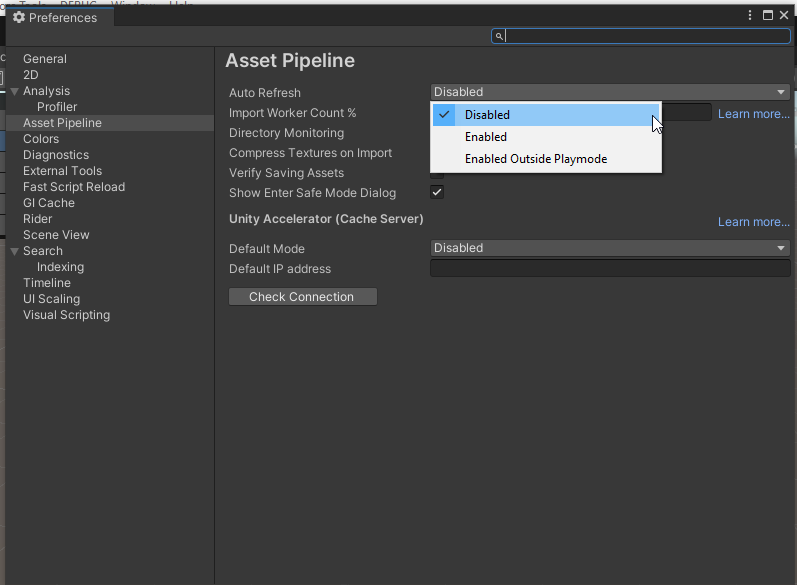
3) My editor does full recompile / reload on every change
Unity editor has settings that trigger fill reload on code / assets change. You can adjust that via:
a) Edit → Preferences
b) Asset Pipeline
c) Auto Refresh - set to ‘Enabled outside of Playmode’ - with that editor will only recompile your changes when you exist playmode which will allow tool to do it’s job quickly.
You can also set to ‘Disabled’ (then you can refresh with CTRL+R)