Hello.
Perhaps you want to simulate on a vertex-by-vertex basis for a mesh that does not contain bones.
If the front and back meshes are separated into two, there is a function to combine the two meshes into one virtual mesh.
By using this, multiple meshes can be regarded as one mesh and cloth simulation is possible.
Please refer to the following document for this function.
It worked! Thanks a lot!
Hi,
I recorded the profiler datas you requested on Unity 2020.3 LTS with an Intel I7 10700k (8c/16t). Unfortunately, the file is 183Mo and 13Mo when compressed so I cannot send it on the forum.
Anyway, here is a screenshot of the profiler. Magica uses all 16 threads but the whole process is taking 0.5ms (on this high-end cpu).
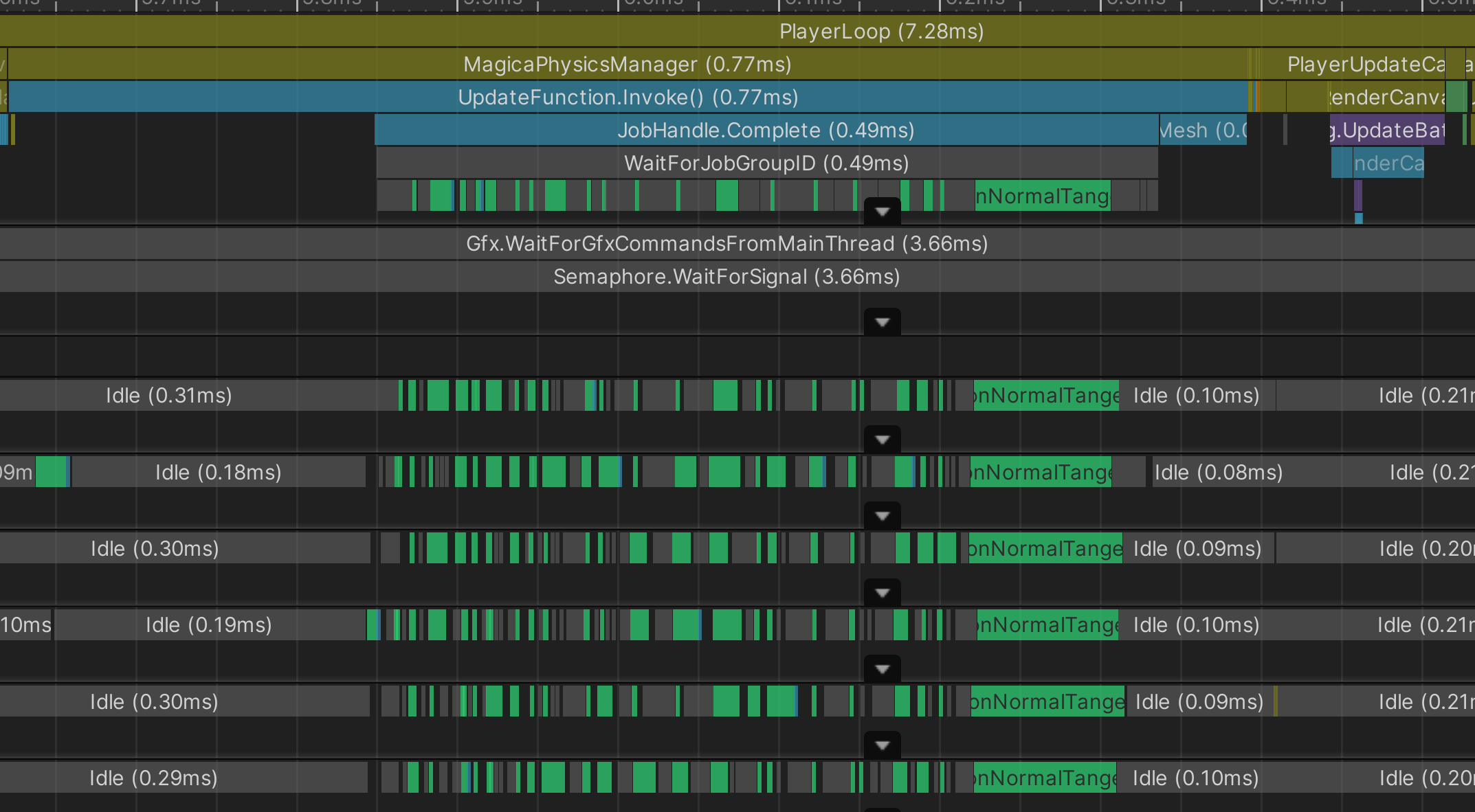

Thank you for the profile image.
As far as you can see this profile, the operation is normal.
First of all, running in the Unity editor looks worse than it really is because it includes profile collection and safechecks.
Therefore, pay attention to the performance of 2 to 3 times by actually building.
If performance is still an issue, you can also use a delayed execution mode.
https://magicasoft.jp/en/magica-cloth-physics-manager-2/
This mode allows you to run the simulation while rendering, which greatly improves performance.
However, be careful because the result is delayed by one frame.
This delay is automatically interpolated by predicting the future.
There is still plenty of room for optimization in terms of performance, and I plan to do that later this year.
Update: 1.9.4
v1.9.4 has been released on the Asset Store!
Improved the vibration problem related to static friction added from v1.9.2.
It also fixes various issues that occurred in Unity Physics (Fixed Update) mode.
Release Note:
Improvement: The problem of vibration caused by static friction has been improved.
Fix: Fixed various issues that were occurring in Unity Physics mode.
Fix: From v1.9.2, fixed the problem that the collision particles were vibrating strongly depending on the situation.
Since I started using Magica Cloth my Unity Editor (2019.4.21f1) started crashing sometimes. Crashes usually happens when scripts recompiling and happening almost every day since last summer when I bought Magica Cloth. Apparently it caused by one of the packages required by Magica Cloth, probably preview Jobs or Collections. Is it a known issue and is there any recommended stable version of these packages that I should use?
Currently using:
Burst 1.4.6
Collections 0.9.0-preview.6
Jobs 0.2.10-preview.13
Mathematics 1.2.1
Hello,
I’m using Magica, to record the motions of the cloths. What I currently have records the moving vertices per frame (the one I set from the point selection) in MagicaMeshCloth. I get the list of the indices in the vertices array being used by MagicaMeshCloth.GetSelectionList();and then only storing the vertices mapped to those indices.
But, if, I use MergeVertexDistance or MergeTriangleDistance, the vertexCount returned by MagicaMeshCloth.GetSelectionList() gets reduced, and I cannot map the returned indices directly to the vertex array I get from the mesh. Can you highlight on how I could get the reduced vertex and triangle list that I can store and then use that to play again?
Here’s essentially what I’m doing. (Sorta pseudo code in the end)
public class Testing : MonoBehaviour
    {
        public SkinnedMeshRenderer renderer;
        public MagicaMeshCloth cloth;

        private List<int> movingIndices;
        private bool recording;
        private void OnValidate()
        {
            List<int> selList = cloth.GetSelectionList();
            for (int i = 0; i < selList.Count; i++)
            {
                if(selList[i]==1)
                    movingIndices.Add(i);
            }
        }

        private void Start()
        {
            Mesh mesh = new Mesh();
            renderer.BakeMesh(mesh);
            var triangles = mesh.triangles;
            //store triangles.
            recording = true;
        }

        private void Update()
        {
            if (recording)
            {
                for (int i = 0; i < movingIndices.Count; i++)
                {
                    Mesh mesh = new Mesh();
                    renderer.BakeMesh(mesh);

                    foreach (var movingIndex in movingIndices)
                    {
                        Vector3 t = mesh.vertices[movingIndex];
                        //store t.
                    }
                }
            }
        }

        private void PlayBack()
        {
                 //per frame, form the vertices array from memory and do
                 Mesh mesh = new Mesh {recFrameVertices, recTriangles}
                 renderer.sharedMesh = mesh;
        }
    }
But this doesn’t work, if the merge vertex/triangle distance, this wouldn’t work. Would it be possible to get the reduced mesh vertices and triangles?
I also tried, MagicaMeshCloth.GetMeshData() (after making the accessor public), but although it returns the correct updated vertex count, it still gives me no way to map the indices to the original vertices array.
Hello.
I have encountered this problem several times.
Unfortunately, the cause is still unknown.
However, it is a problem only for the editor, and it seems that a crash will not occur in the build.
No stable version has been confirmed for the package.
Be sure to always install the latest version.
Also, upgrading to Unity 2020 may solve the problem if possible.
This is because the package versions are different in Unity 2018, 2019, 2020.
The package version in Unity2020.3.LTS is as follows.
<Unity2020.3.LTS>
Burst 1.4.6
Collections 0.15.0-preview21
Jobs 0.8.0-preview23
Mathematics 1.2.1
Hello.
This is a difficult process.
First, MeshCloth works with virtual meshes with Virtual Deformer.
Virtual Deformer combines multiple meshes to reduce vertices and create a virtual mesh.
Therefore, there is no one-to-one correspondence between the selected data list of MeshCloth and the vertices of the mesh of Renderer.
Therefore, you need to separate the Virtual Deformer vertices into the corresponding Renderer vertex indexes.
Unfortunately there is currently no function to do this.
So I created a pseudo code to do this.
The following GetSelectionMeshVertexList () corresponds to that.
For meshIndex, give the index of RenderDeformer set in VirtualDeformer.
You should now be able to get the list of vertices for the mesh set to Move and Fixed in Vertex Paint.
Also note that this function is slow because it is not intended to run in line time.
<MagicaMeshClolth.cs>
        public List<int> GetSelectionMeshVertexList(int meshIndex)
        {
            var vlist = new List<int>();

            // Selection data.
            var selData = GetSelectionList();

            // All RenderDeformer vertices referenced by VirtualDeformer
            Dictionary<int, List<uint>> dict = Deformer.MeshData.GetVirtualToChildVertexDict();

            foreach (var kv in dict)
            {
                int virtualDeformerIndex = kv.Key;

                // Select data judgment
                var sel = selData[virtualDeformerIndex];
                if (sel != SelectionData.Move && sel != SelectionData.Fixed)
                    continue;

                foreach (var pack in kv.Value)
                {
                    int cmindex = DataUtility.Unpack16Hi(pack);
                    int cvindex = DataUtility.Unpack16Low(pack);

                    // render deformer judgment
                    if (cmindex != meshIndex)
                        continue;

                    vlist.Add(cvindex);
                }
            }

            return vlist;
        }
1 Like
Firstly, thanks a ton for replying, and for the piece of code you provided.
I tried it out and ran into a problem. Although its returning the correct length of vertices array, its returning values (I presume they are indices), but I cannot figure out how the function you provided to calculate whether the vertex is moving or not.
The function returns something like this 
But I expected in it to be a 0 or 1 value, depending on whether it was a moving vertex or a fixed vertex. The code I used is pretty simple :
List<int> temp = cloth.GetSelectionMeshVertexList(0); //methodprovided
Debug.Log($"selectionMeshVertexList.Count = {temp.Count}"); //returns the correct count
for (int i = 0; i < temp.Count; i++)
{
     Debug.Log($"selectionMeshVertexList[{i}]={temp[i]}");

}
Can you highlight on how I could achieve this? Thank you 
In this case, the content of the list will be the vertex index of the mesh marked with Move / Fixed.
So in the image example, the vertex indexes 0,1,65,539,540,541,550,949,950,2 are marked with Move or Fixed.
1 Like
Thank you for replying!
I actually wanted to classify the vertex indices on whether they were moving or fixed. Tweaked your original code a bit, and voila!
public (List<int>, List<int>) GetSelectionMeshVertexList(int meshIndex)
        {
            List<int> vMoveList = new List<int>();
            List<int> vFixedList = new List<int>();

            // Selection data.
            List<int> selData = GetSelectionList(); //reduced vertices only.

            // All RenderDeformer vertices referenced by VirtualDeformer
            Dictionary<int, List<uint>> dict = Deformer.MeshData.GetVirtualToChildVertexDict();

            foreach (KeyValuePair<int, List<uint>> kv in dict)
            {
                int virtualDeformerIndex = kv.Key;

                int sel = selData[virtualDeformerIndex];

                if (sel == SelectionData.Move)
                {
                    foreach (uint pack in kv.Value)
                    {
                        int cmindex = DataUtility.Unpack16Hi(pack);
                        int cvindex = DataUtility.Unpack16Low(pack);

                        // render deformer judgment
                        if (cmindex != meshIndex)
                            continue;

                        vMoveList.Add(cvindex);
                    }
                }
                else if (sel == SelectionData.Fixed)
                {
                    foreach (uint pack in kv.Value)
                    {
                        int cmindex = DataUtility.Unpack16Hi(pack);
                        int cvindex = DataUtility.Unpack16Low(pack);

                        // render deformer judgment
                        if (cmindex != meshIndex)
                            continue;

                        vFixedList.Add(cvindex);
                    }
                }
            }

            return (vMoveList, vFixedList);
        }
Again, thanks a lot!
1 Like
Hello, I have a question regarding magica cloth. Is it possible to mix it with unity’s animation rigging package? (Have some bones controlled by animation rigging constraints and some bones by magica cloth. I might also need to attach magica cloth colliders to bones controlled by animation rigging’s IK constraints)
Hello.
I haven’t confirmed Unity’s Animation Rigging, but I think it will work.
There is no problem with a similar Final IK.
If you are uncertain, please let us know as we will give you an evaluation version.
I see, thank you! An evaluation version would be very helpful to help me test it. I sent an email through the website contact form.
I replied to the email so please test it.
If you like it, I would be grateful if you could purchase it.
1 Like
Helloo. Im not sure if someone asked already but will there be (or is already there) option to manage collision between multiple clothing objects? I have clothing that can overlap with different piece of clothing and there is physic (magica) running on both of them. They can sometimes intersect each other and its not looking good.
If its not done yet, can you tell me if its planned and when it should be released? 
Tested and purchased it! It worked without problems with Unity’s animation rigging
Hello.
Sorry, there is currently no proper way to handle layer cloth collisions.
Currently, there is no choice but to avoid it with colliders of different sizes.
The collision detection of layer cloth is the number one goal of this year, including self-collision.
For this reason, we are still experimenting, and hopefully it will be resolved later this year.
2 Likes
Thank you for purchasing!
I’m also happy that it worked with Unity Animation Rigging.
1 Like