Does the Navmesh come out as PNG?
is the dead asset or the developer is still working on us?
Hey, the asset is not being developed further. If you have questions about it feel free to ask.
hello, is there a way to generate the map while running? Part of my game places new path’s during in the game, so I need to be able to update the path after a new path has been created. Also, I an using bridges, that sag due to gravity, it looks like the lower points aren’t being path’d properly. Is there some setting that will allow the path to sag?
Hey Kuyote, It is possible to regenerate the map. Simply execute the same functions as the Pathfinder in its Awake(). I will add a Regenerate() function to make this process smoother, do make sure this is done after other scripts are finished with the Pathfinder, you could use LateUpdate to prevent overlaps between Update functions. However there will be some issues if for example: you remove some mapped area a unit is standing on, there is no build in mechanism to ensure this process goes correctly.
I don’t know the specifics of your other problem “the lower points aren’t being path’d properly” I would need some more info / perhaps screenshots to give comment.
Here is an example of what the map looks like after the bridge is placed. When I select the location for the bridge to be placed, it’s plopped, and then I want to update the map to be able to allow the units to travel over the bridge.
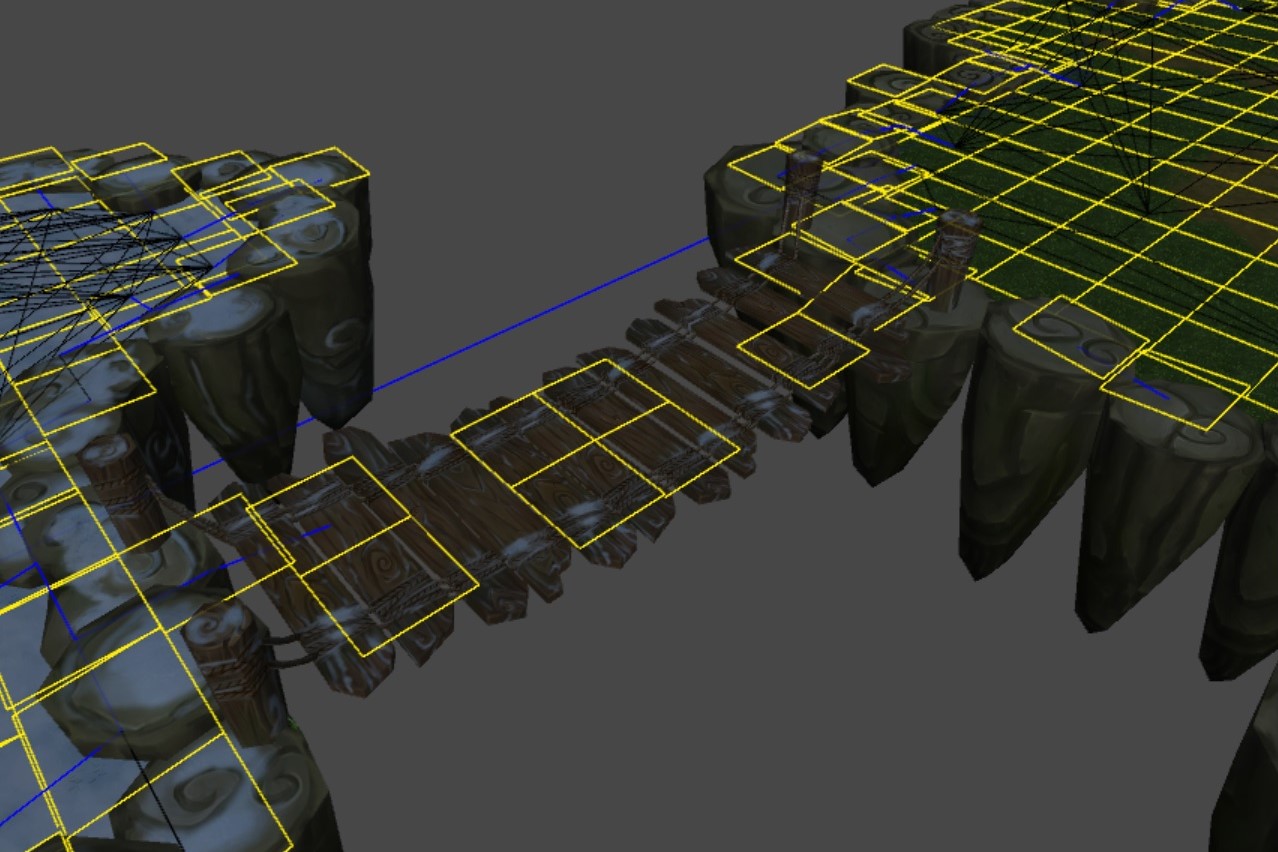
What I expect is happening, is that the raycasting step in mapping the world is missing part of your bridge due to there being some gaps. This could be somewhat solved by increasing the grid resolution, but this would NOT be a good solution. Instead what you want to make is an extra mesh which is a simplified version (like an outline) of your world’s geometry, which is purely used for the mapping.
This will
- fix your gap issue
- probably increase your performence tremendously. Looking at your image, it seems like the world is being cutt-up in a lot of different sectors while that really isn’t neccesary.
For example see the images below, lets say the first example is your level, with slight diffrences in height around the edges and a bridge (which should have gaps)
I would reccomend to make a 2nd simple mesh like in the 2nd example where the bridge is a solid surface (no gaps, but needs perhaps a bit more vertices / smoothness for your specific bridge), and the land masses are also flat, you can easily let Unity take care of characters slightly going up and down seperate from pathfinding on the real geometry.
a diffrent way of constructing your “pathfinding” surface is also fine, its just about the principle of seperating your graphics form your gameplay in this particulair instance.
Note that I raised the simple mesh just so its more ealisy visible.


Thank you Glenn-Korver, I had asked someone else for suggestions on how I might fix this, that that is pretty much what they had said as well. I appreciate the help, and the updates to flowfield!
1 Like
Can this be used on unity’s navmesh, or a navmesh in general ? I don’t use a grid i use a navmesh due to performance reasons. Let me know thanks.
This tool generates its own grid based on raycast collisions on colliders, it’s not designed to work together with a Navmesh.
Ah damn thats a shame 
Hi,
Just bought your asset and try to make it work in 2D.
But i can’t make it work. Do you have a documentation about 2D ?
To try, i just used pathfinder.GetMousePosition(); and it allways send me the same value.
I noticed that the “grid” does not appear on my scene view. Maybe it’s because there is no “ground” layer ?
Indeed i’m making a 2D game with spaceships so my spaceships are not “on” something.
Can you help me ?
I would like to have more flow vectors so I can have a more direct path. Is there a way to have more than just the 8 in FlowFieldManager?
Sorry there is only support for 8 directions / point at neighbouring tiles.
Hi, I used your asset for gourp movement,
but sometimes some unit’s seeker.flowFieldPath become null, but others are right(all use pathfinder.FindPath)
besides, pathfinder.FindPath cannot take effect(maybe ThreadedJob not execute correctly), the flowFieldPath.destination has been previously set;
Hey Cloverstudio, I do not fully understand your question. It sounds like you are saying that the seekers lose their path / the path becomes null, but only some of them, eventhough they have the same destination. Do I understand you correctly?
If you want me to help, I will need to be able to reproduce the problem. Is there a project you can share or a video of the demo scene which show the problem?
yeah,that’s the idea
sorry my poor English;
there is a log: “A Selected Unit cannot be located, is it to far above or below the ground?”

left two horses did not move, and thier flowFieldPath are null.
Hey Clover, I send you a direct message (Unity forum conversation), lets continue there for now, so that we dont fill up this thread with a bunch of back and forth.
Some Questions, even though I feel kinda dumb to ask:
- How do you change Unit speed?
- Is there some sort of event that is being triggered when a unit reaches its destination?
No worries, feel free to ask.
There is some baseline code in the Seeker.cs class which you will have to change / amend / override to get your desired results. The main feature is the pathfinding logic itself, the Seeker class is mostly an example of how you can use it to make units move, but you should make your own “version” which matches the needs of your gameplay.
-
There is a MaxSpeed and MaxForce value that can be adjusted to influence the speed, you could introduce an acceleration value aswell to get more control.
-
there is no event at the moment, but in Seeker.cs there is a ReachedDestination() function, which you could extend to create an event.