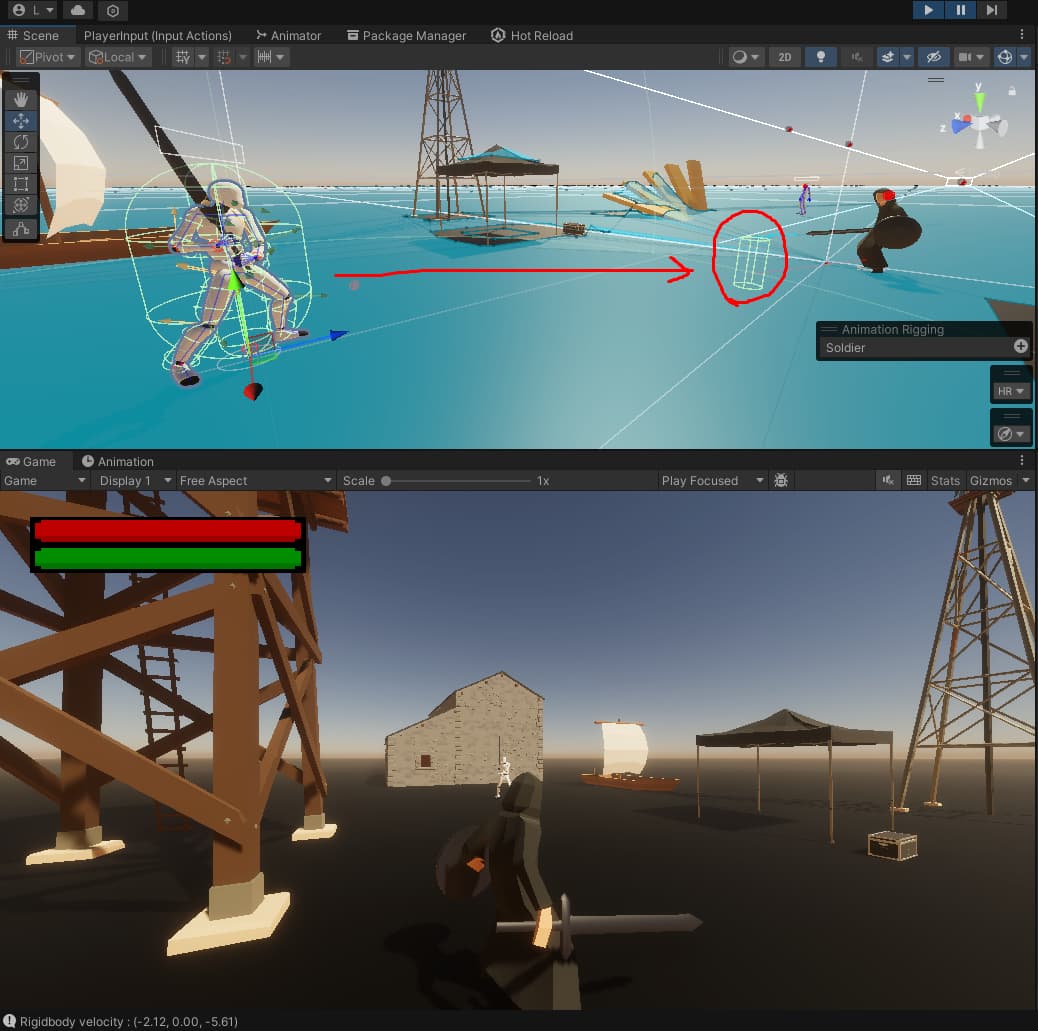
I’m making a 3D 3rd person game and recently learned StateMachines with a little bit animation rigging. All was going well until I realized my Enemy AI refuses to move while my player is moving with almost same exact code and similar components. In the image below, you can see I’m using NavMesh Agent as a MoveDirection indicator. Issue was not the NavMesh Agent. I assumed something was wrong with Rigidbody or my Script.
After some googling, I noticed people claimed it was caused from Animator which is odd because I have a Player character which moves with Rigidbody.velocity while having Animator component as well. I gave it a try and my Enemy started moving as intended after I disabled the animator.
They both use a method called Move() which changes rigidbody.velocity.
private void Move()
{
    //Add the current vertical velocity on top of the movement velocity to avoid resetting vertical velocity.
    stateMachine.Rigidbody.velocity = (moveDirection * moveSpeed) + Vector3.up * stateMachine.Rigidbody.velocity.y;
}
I also set NavMeshAgent’s updateRotation and updatePosition to false by default via Start() method.
I also have Animation Rig attached to my Enemy to allow headtracking of the player for a few seconds before changing it’s weight to 0 (disabling the tracking) prior to ChasingState comes in play which is where enemy starts moving. It all works without any bugs or issues. Only when I decided to move the character using rigidbody.velocity. And Animator.applyRootMotion is also false (just to clarify it is not the issue)
Any help would be so welcome. I was having a blast with game dev till this happened…
Things I tried so far:
I created a parent object to Rig (which is a child object to Soldier game object) and moved Animator + Animation Rigging Components to this new empty child GameObject. Animations did not even work this time but the character was moving again.
Any help? I’m kind of confused what to do… The more I try new things, the more things stop working which causes me to keep reverting back to previous commit…
I tried disabling the animator to see if it was the culprit in this. And my scripts/rigidbody started moving as intended. My script was working. But that didn’t solve my problem because I need my Enemies to animate and move at the same time. So It worked as in I found the issue was the animator.
I spent around 7 hours to change things one by one to see if I can figure out what is the issue and how I can solve it. Good news is I finally fixed it, bad news is I don’t know what precisely the issue is with the animator.
Here is what I did:
I noticed that animator had a warning because I stumbled an error like this one I reconfigured all the avatar bones, enforced T-pose and manually checked every animation clip in my AnimatorController to see if they are Humanoid (oddly all of them were already humanoid). Didn’t really help.
I also tried swapping out Animator’s Avatar to other Avatars using Avatar Builder to create a new avatar. That also didn’t help.
I moved every component to a new Model with a proper rig similar to my Player Character from another asset pack. This somehow solved the issue. The old models I used came from an animation pack that I bought so I don’t know the difference between these two models to be honest.
I also learned that you can’t rename the Parent rig gameObject because it causes animations to fail. In some other post, someone explained that it is because of how animations take a snapshot of the rig and work with it. Changing it causes disruptions.
Issue is gone and honestly that’s good enough for now, it was a roadblock for me. Wish I could figure out exactly why though. I’m no expert with modeling but apparently something was wrong with my model (rig, avatar or perhaps both?)
I can’t really identify what’s happening just from what I’m seeing here.
One potential problem that I can see is that (from your screen shot) it looks like the enemy character has many intersecting colliders. Unless these are all trigger colliders, these can cause a rigidbody object to move in unpredictable ways.
If that’s not the problem, the only other thing I can think of to suggest is my typical character set-up. What I typically do (maybe this will work for you too):
I’ll have one object that has the collider, rigidbody and movement scripts on it. In other words, make the enemy work like you want with no graphics at all.
Then drag your character fbx in to the scene and make it a child of your enemy object (relative position 0,0,0).
Those intersecting colliders are trigger hitboxes. They do not cause problems in terms of collision. I used Ragdoll Wizard to create these colliders.
And I already mentioned that changing the rig, avatar and the model fixed the issue.
This was my backup plan but luckily, it didn’t come to that. I recreated entire enemy with a new model and reconfigured every part step by step by double checking. I even compared the new model to old model to see what’s different, everything was same except the rig, avatar and model. I don’t think it was caused by the colliders.
You are already lightyears ahead of the average gamedev in here who doesn’t use source control, so kudos to you!!
Whenever something doesn’t work and you understand the parts involved, after one or two attempts at fiddling and getting mysterious results, it can be rewarding to strip things down to the simplest form to prove things out, even if this means you have to write one or two stubby test scripts to prove something.
I do this all the time when I’m trying to verify an oddity, and either a) you verify “yeah, this is wonky,” or b) the small test works fine, which lets you bisect back to the original scene and find the issue grossly.
Oft times it is something as simple as a stray copy of your script on another object, for instance.


 Wish I could figure out exactly why though. I’m no expert with modeling but apparently something was wrong with my model (rig, avatar or perhaps both?)