–Overview–
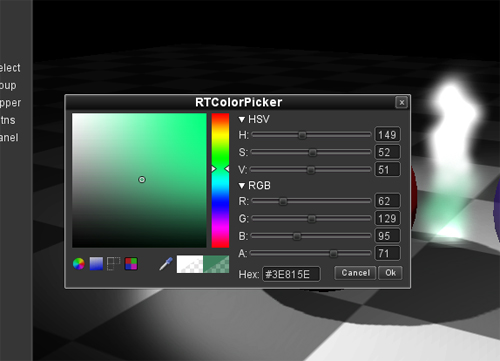
RTColorPicker is a run time full featured color picker for the Unity3D Game Engine. It is designed to fit nicely with new and existing game/application projects. Whether you are making a level editor or need color selection for character customization, RTColorPicker can be a good fit for your project.
There are various configuration options to alter the appearance and functionality of the RTColorPicker. Slider sections, buttons and other features can be easily turned off and on. Need just a simply Alpha slider? Simply turn off everything except for the alpha slider and you’ve got a scaled down alpha color picker.
The RTColorPicker does not use Unity’s readpixels to determine colors using the color selection area or the sliders, it’s just good old fashion math. Readpixels is only used when using the eyedropper/sample color option to generate the effect of zooming in to an area.
–Features–
HSV, RGBA and Hex input
Color selection box and wheel
Eye Dropper/Sample Color tool allows for quick and easy scene color selection
Vertical and Horizontal orientation modes
Includes custom skin (skin can be changed)
Old Color and New Color
Lots of configuration options displaying just the options you need
Colors panel which can configurable default colors and user defined custom colors
Save and Load user defined custom colors through easy to use function callbacks
Hi. I’m overall really happy with our purchase of RTColorPicker. Our game has in depth customization and your color picker saved us tons of time and is probably better than what we would have ended up with.
I have a small issue, however. Whenever I call Show(RGBColor), it always brings up the color picker with black as the selected color. For instance, rtcp.Show( new RGBColor(Color.white) ); brings it up with black selected. Any suggestions?
Edit: Fixed the problem by adding _activeColor=_activeRGBColor.ToUnityColor(); to the Show(RGBColor) method. You pass _activeColor to InitFromColor, which defaults to black and is never modified anywhere else.
and right after I try to use the prefab inside my C# script ( “public RTColorPicker ColorPicker;” ) I get this:
Assets/Models/Ships/D_Player/HullTextureEdit.cs(11,16): error CS0246: The type or namespace name `RTColorPicker’ could not be found. Are you missing a using directive or an assembly reference?
I’m not sure about the first one, since it seems this variable is not even in use (nothing happens if i comment out this line…).
Of course the JS demo works, but my project is in C# and the plugin advertise support for it.
I’m using this and I like it. But I have some questions.
How can I get it to start with the color of my procedural material. I get the material’s color and pass that, but it thinks it’s a camera and I get an error. If I just pass the material, it uses the Main Color from the shader, which isn’t used by the procedural material.
I call
ColorPicker.Show(material)
and it displays the picker. But the code that runs when you select OK is hard whierd to the material I sent it.