Ive been working on a high score list for the past few days and i’m almost done, i just need to save the data. I’ve been following Brackeys’ tutorial found here:
but my situation is a little different from his. I have a custom Class named ScoreClass which stores a string for the name of the user who got the high score and an int for their actual score. for the sake of organization, my script which actually displays the high scores is a different one from the Save and Load script. In the high score display script, there is a list: [SerializeField] public List<ScoreClass> HighScoreData = new List<ScoreClass>(); which is then used to display the scores as such:
 //set score names
        scorenames[0].text = HighScoreData[4].name;
        scorenames[1].text = HighScoreData[3].name;
        scorenames[2].text = HighScoreData[2].name;
        scorenames[3].text = HighScoreData[1].name;
        scorenames[4].text = HighScoreData[0].name;
        //set score numbers
        scorenums[0].text = HighScoreData[4].number.ToString();
        scorenums[1].text = HighScoreData[3].number.ToString();
        scorenums[2].text = HighScoreData[2].number.ToString();
        scorenums[3].text = HighScoreData[1].number.ToString();
        scorenums[4].text = HighScoreData[0].number.ToString();
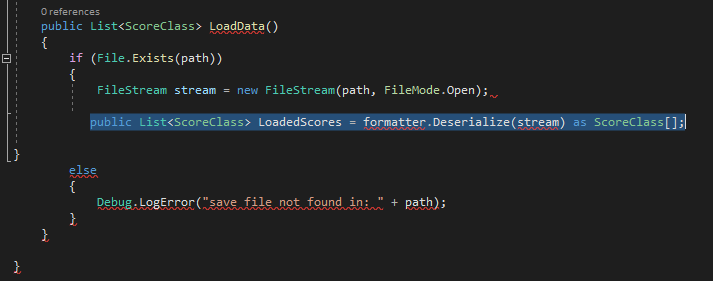
now my problem is this: how to i convert from the data in a save file into a list? Currently it looks like this: public List<ScoreClass> LoadedScores = formatter.Deserialize(stream) as ScoreClass[]; but this brings up errors, and also causes visual studio to tear apart all the code brackets, seen here: https://i.gyazo.com/025d9069c59fe12ca0111ed62e84018b.png
So, this is what i ended up coming up with:
  public List<ScoreClass> LoadData()
    {
        if (File.Exists(path))
        {
            FileStream stream = new FileStream(path, FileMode.Open);

            string[] loadednames = new string[5];
            int[] loadedscores = new int[5];
            loadedscores = formatter.Deserialize(stream) as int[];
            loadednames = formatter.Deserialize(stream) as string[];
            List<ScoreClass> loadedList = new List<ScoreClass>();
            for(int i = 0; i <= 4; i++)
            {
                loadedList[i] = new ScoreClass(loadedscores[i], loadednames[i]);

            }
            return loadedList;

        }
        else
        {
            Debug.LogError("save file not found in: " + path);
            return null;
        }
    }

}
it shows no errors in the compiler, however when calling the function to load, the console shows a NullReferenceException on the line: loadedList[i] = new ScoreClass(loadedscores[i], loadednames[i]); Why would this be?
attempted to debug.log the issue as such:
Debug.Log("loadedlist 1: " + loadedList[0]);
            Debug.Log("loadednames: " + loadednames[0]);
and that brings up its own issue: https://i.gyazo.com/1d2adaa447a9a73bd0bd9b8a07b78558.png
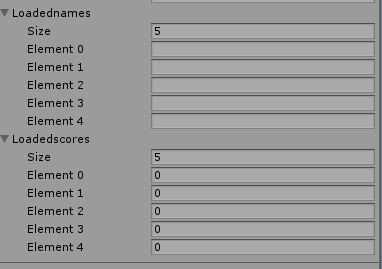
making the variables public to view them in the editor, it seems the “loaded” arrays are coming out empty, despite me having done what i assume is the correct way to load them.
    loadednames = new string[5];
            loadedscores = new int[5];

            loadedscores = formatter.Deserialize(stream) as int[];
            loadednames = formatter.Deserialize(stream) as string[];
            List<ScoreClass> loadedList = new List<ScoreClass>();


            for(int i = 0; i <= 4; i++)
            {

                loadedList[i] = new ScoreClass(loadedscores[i], loadednames[i]);

            }
edit: putting them in the for loop:
  for(int i = 0; i <= 4; i++)
            {
                loadedscores[i] = (int)formatter.Deserialize(stream);
                loadednames[i] = formatter.Deserialize(stream) as string;
                loadedList[i] = new ScoreClass(loadedscores[i], loadednames[i]);

            }
seems to have made them appear in the inspector, however, the variables in these are coming up empty: https://i.gyazo.com/2b2ae3ead7573266c3de4dc265e4fe2f.png
and causes an error in the console: https://i.gyazo.com/82db9b49e976b9b069d54c6fc5098341.png
what gives?
bump, the only reason i can think this would be happening is because maybe Formatter.deserialize doesnt know what to do? is that it?
Noticably, when attempting to deserialize the integers in the save, like so: loadedscores[i] = formatter.Deserialize(stream) as int; brings up the error: “The as operator must be used with a reference type or nullable type(int is a non-nullable value type” but trying it the other way: loadedscores[i] = (int)formatter.Deserialize(stream); shows no errors in visual studio, but when attempting to run in the editor, it beings up a console error: “SerializationException: Attempting to deserialize an empty stream”. How is it possible that my stream is empty? Didnt i do it right?
here is the entire script in full so far, so that everyone knows whats going on:
using System.Collections;
using System.Collections.Generic;
using UnityEngine;
using System.IO;
using System.Runtime.Serialization.Formatters.Binary;
public class SaveScript : MonoBehaviour
{
    public GameObject scoreDB; //reference to the in-scene score database
    Scoreeditor scoreDBscript;
    BinaryFormatter formatter = new BinaryFormatter();

    public string[] SaveNames;
    public int[] SaveNums;

    public string[] loadednames;
    public int[] loadedscores;

    private void Start()
    {

        scoreDBscript = scoreDB.GetComponent<Scoreeditor>();
        SaveNums = new int[5];
        SaveNames = new string[5];
    }
    public void SaveData()
    {
        string path = Application.persistentDataPath + "BobSave.test";
        FileStream stream = new FileStream(path, FileMode.Create);

        for(int i = 0; i <= 4; i++)
        {
            SaveNames[i] = scoreDBscript.HighScoreData[i].name;
            SaveNums[i] = scoreDBscript.HighScoreData[i].number;
        }

       // formatter.Serialize(stream, scoreDB.GetComponent<Scoreeditor>().HighScoreData);
       // formatter.Serialize(stream, SaveNums);
        stream.Close();
        Debug.Log("successfully saved");

    }

    public List<ScoreClass> LoadData()
    {
        string path = Application.persistentDataPath + "BobSave.test";
        if (File.Exists(path))
        {
            Debug.Log("the file exists");
            FileStream stream = new FileStream(path, FileMode.Open);

            loadednames = new string[5];
            loadedscores = new int[5];


            List<ScoreClass> loadedList = new List<ScoreClass>();


            for(int i = 0; i <= 4; i++)
            {
               loadedscores[i] = (int)formatter.Deserialize(stream);
               loadednames[i] = formatter.Deserialize(stream) as string;
               loadedList[i] = new ScoreClass(loadedscores[i], loadednames[i]);

            }
            stream.Close();
            return loadedList;

        }
        else
        {
            Debug.LogError("save file not found in: " + path);
            return null;
        }
    }

}
i went to the save file location on my computer and it exists as it should but windows reports its 0KB, how is that possible? i saved it correctly didnt i?
But are the contents of the file actually there?
opening the file up in notepad++, it looks like this, so presumably not:
but that leads me to the question of how did i do it wrong, and how should i fix it?
Add more debugging. Verify what exactly you are saving to the file, verify you are getting your “successfully saved” message, verify you’re getting 0 runtime errors, and verify you’re looking at the correct file.
i should be saving two arrays, one of strings and the other of numbers. What should i do to ensure theyre saving correctly? ive never worked with serializers before today.
EDIT: sorry, i cant believe i didnt realize i’d commented out the actual saving earlier for debugging. The file saves data now. However loading brings up an InvalidCastException at this line: loadedscores[i] = (int)formatter.Deserialize(stream);
commenting out that line leads to another error being discovered in this loop:
for(int i = 0; i <= 4; i++)
            {
               //loadedscores[i] = (int)formatter.Deserialize(stream);
               loadednames[i] = formatter.Deserialize(stream) as string;
               loadedList[i] = new ScoreClass(loadedscores[i], loadednames[i]);

            }
at this line: loadedList[i] = new ScoreClass(loadedscores[i], loadednames[i]);
“Arguement out of range exception, index was out of range. Must be non-negative and less than the size of the collection”
i realized the reason its out of range is probably because lists work differently than arrays, and i have to manually add each entry to a list, so i edited it as such and also changed the int it creates the scoreClass with to a default value to see if it could at least Deserialize the array of names:
 for(int i = 0; i <= 4; i++)
            {
               //loadedscores[i] = (int)formatter.Deserialize(stream);
               loadednames[i] = formatter.Deserialize(stream) as string;
               loadedList.Add(new ScoreClass(10, loadednames[i]));

            }
and this is the error i get: https://i.gyazo.com/e21faceddc20840b3f497bd79a455f77.png
oh my goodness i am so close to solving this i can feel it! i moved the assignment of Loadednames outside of the for loop, like so:
loadednames = formatter.Deserialize(stream) as string[];
            for(int i = 0; i <= 4; i++)
            {
               //loadedscores[i] = (int)formatter.Deserialize(stream);
               //loadednames[i] = formatter.Deserialize(stream) as string;
               loadedList.Add(new ScoreClass(10, loadednames[i]));

            }
and the game now loads the saved names! Now i just need to figure out how to get my score ints as well! Any ideas?
i got it to load the numbers! doing the same thing i did to loadednames to loadednumbers did the trick! i just need one last bit of help. as you can see from the full script above, all of this loading comes from a function called LoadData. Calling LoadData from a button with OnClick worked, as long as that button was set to load a different function on a different script which called it, “loadlist” however for some odd reason attempting to call loadlist in the start function of another script causes unity to say this: https://i.gyazo.com/807da8de91e0844df47f1776affc96f0.png the line its referring to is this one: HighScoreData = save.LoadData(); but this makes no sense.
what’s a method to wait for the rest of the scene to load first? i think the problem is that calling loadlist from a start function makes it run too early before everything else is ready, because it works from any other method ive tried, except awake.