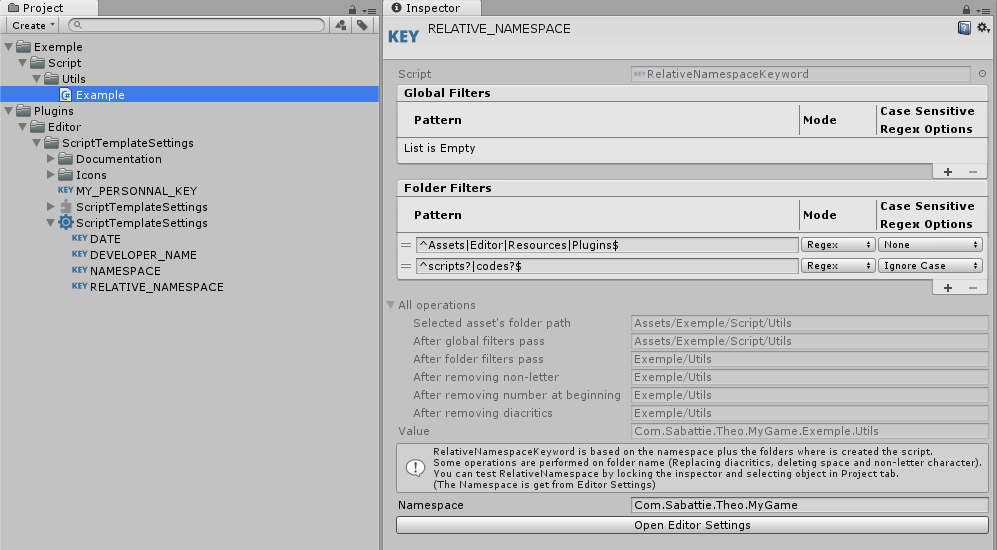
The Keywords values can be serialized per project or globally for all your project, they can also be computed (Date, ScriptNumber, …).
You can create basic keywords (EditorPrefs keyword, Serialized keyword, Date keyword) or write your keywords to make your own way to compute value.
With some enabled options :
Namespace will be updated automatically when script is moved in another folder.
Type name will be updated automatically when a script file is renamed
Basic added keys:
■ #DATE# (computed value)
■ #DEVELOPER_NAME# (personnal value. That value is not a project value, it is saved for each user)
■ #NAMESPACE# (from editor settings (root namespace))
■ #RELATIVE_NAMESPACE# (computed value using namespace concatened with the folders where the script is placed)
■ #PRODUCT# (from player settings (Product Name))
That is free, it’s time to work properly!
You can share your template or your extended keyword in this topic.
You can also give suggestion to improve that plugin or ask any question.
could you please make it so that there is a simple setting replacing the content of the created file with another file at a configurable path?The problem is that if you have many projects you always need to search for the right menu item, it would be awesome if it could just stay always the same standard workflow using always the menuitem "C# script " and the tool would just replace the content with another file (think . “include”) before processing the keywords.
Composition of the menu from the file name:
82-C# Singleton Script-NewSingletonBehaviourScript.cs.txt
82: Menu Item position.
C# Singleton Script: Menu name
NewSingletonBehaviourScript.cs: Default script name
You can also make submenu:
With:
82-C# Example__Singleton-NewSingletonBehaviourScript.cs.txt
@TheoSabattie exactly what you show in the spoiler is the workflow problem, the “active template” should be always where the standard Unity menu is,there shall be no extra menus no submenus blabla ,when you have 20 projects you work on you get mad, there should be a easy “switch” in your tool saying “active template is now A” and this gets used when we use the “C# Script” menu wich should be the only item for making a new script.
A bit shorter, i try… : The menu item and position should be always the same as the original Unity “C# script” named menu item, only the script template it uses should be configurable/switchable.
The golden word here is “Projectwise context” , so for Project A we always use script template 1, if we in project B we always use script template 2 and this has to be automatic, we should not need to look thru the menus like “where is the template for my project i am actually in?”
Thanks for your hard work, it really has potential.
The principle of the plugin is to add templates and template menus as many as you want.
The plugin injects project datas into template with keywords.
For me, that is more logic to add keyword to inject your proper project datas instead of change the used script for the menu item “C# Script”
But :
You would like only one Menu Item “C# Script” and an exposed parameter to set what script is used for this menu item.
Your request could exist for other added templates, (C# ScriptableObject, C# Editor, etc…).
Other users may not have those templates or have other templates.
Unfortunatelly, I didn’t find a way to add MenuItem dynamically.
For your specific request, you should add your own solution with menu item.
public static class TemplatesMenu {
    [MenuItem("Assets/Create/C# Script", priority = 82)]
    private static void CreateScript () {
        ScriptTemplateUtils.CreateScript("Assets/Test.cs");
    }
}
Note : You have to remove the basic C# Script from the Unity templates folder if you want use that MenuItem
“ScriptTemplateUtils::CreateScript” is a method to create a script from a full path or a relative path from the project folder.
“ScriptTemplateUtils::CreateScriptFromTemplate” is a method to create a script from a path relative to the Unity templates folder.
Now you can add your own settings and change what happen in the CreateScript method.
Now, you template can just contains #C#SCRIPT# and you can set what you want.
Note :
The order of replacement is based on “All Keywords” order.
SCRIPTNAME and NOTRIM are the first replaced keyword because Unity handles them. If you want replace them after, You have to rewrite them with Keyword class.
See UnityEditor.ProjectWindowUtil::CreateScriptAssetFromTemplate:
@TheoSabattie I found the github repo where you uploaded some templates a few months ago, but would it be possible to upload the Asset Store project as well, ideally with a “package.json” file and fitting folder structure for a UPM package? This would allow importing it directly from the github url instead of having to log into the Unity Asset Store first
Hello @Hurri041 , thank you for report, I updated the link.
This repo is for another purpose. (next update: install templates from any repository / ensure templates have been installed. And other stuff about namespace consideration)
I take note of your suggestions. Thank you!
My timeline is unfortunatly very busy, I’ll try to dig this kind of things no later than June.