ScriptableObject skill system, how to better organize?

This week I’ve moved my enum/dictionary/all over the place skill system to a ScriptableObject system that I do like and am happy to be working with. However there is still a need for almost constant customization for each skill I was kind of imagining wasn’t going to be the case for some reason.

For example I’ve got TargettedAOE, SelfAOE, TargetMelee, Projectile, Heal, Buff, Passive, Teleport, etc. But even within SelfAOE there is still the need for a check for a spell that goes forward versus a spell that spread out from the player center, etc.

Perhaps I’m trying to place too many specific settings on ScriptableObjects and should really only be giving them the absolute basics that the system needs to function such as Name, Description, ManaCost, MaxLevel, etc. And then actually create an inheriting sub-script for each skills overriding the public override IEnumerator Engage (int level, MonoBehaviour caller) { }

I’m trying to keep everything on basically the second layer, but I think I need something more like:

SkillTemplate → STAttack → STMeleeAttack → STStrike
Basics → damage variables → targetting functions → skill specific sound/animation/visual effect calls

Does anyone have a good example of a robust SO skill system I could compare to? I’m looking to add 200+ skills (crafting/harvesting/attribute passives, etc) over time, and sure fireball and ice missle can use the same SO, they just summon a different projectile and feed it it’s damage, but the first 40 skills I made more than half of them were unique and required specific variables… Perhaps I just tried to generalize too much at the beginning…

1 Like

Don’t go deep and narrow, go wide and shallow. Make your spell system a generic container for different skill components.

For example, create an abstract class for all area of effect descriptors and subclass your different types of area of effects from it. Perhaps expose a method GetTargets that can be called, and can return the player, or all units in an area, or a specific enemy, etc.

Then create a slot on your skill SO (of the abstract base type) to drag in area of effect descriptor SOs into. If you want to get really fancy you can expose an editor interface to allow you to edit the attributes of the SO on the skill itself to avoid creating a ton of almost-duplicate SOs with different attributes.

Rinse and repeat for all the aspects of a skill you might want to cover. Now you basically have a Mr. Potato Head of skill-making. Mix and match to your heart’s content.

That definitely sounds like what I’m aiming for… I just haven’t quite wrapped my head around it… need to put some ideas down on paper…

This is where I’m at in the thought process… Creating modules for all of the things that need to happen. Some things will have to be written specific like FireWall’s GetTargets() could be a WallSkill : GetTargets with options for angleToPlayer, points, distanceBetweenPoints, and then the ApplyAffects would actually spawn a trigger based damage over time…

For the most part I think things will fit into this well though. Might create an animation enumeration to just pass to the player animation manager script…

affects, visuals, and audio might all just go on the base Skill SO. If null ignored, but most everything will have some sort of action on both ends.

Looks pretty good to me! I think you’ve got a good enough handle on the concept to get started, even if it’s not perfectly laid out yet.

You will probably also want some kind of way to pipe data about the environment your skill is being used in to the modules – like if you and your enemy uses the same skill the skill needs to know who it should consider enemies and allies.

So, it’s Sunday, I haven’t had much time to play with this yet, but before going to bed I’ve got one good idea in.

instead of defining a “manaCost” “coolDown” etc. I’ve created a list for skillRequirements which are SOs such as

    public float baseEnergy = 0;
    public float energyPerLevel = 0;

    public bool CheckRequirement (int level) {
        if (baseEnergy + (energyPerLevel * (float)level) > PlayerScriptController._playerStats.GetStat(Stat.Energy)) {
            PlayerScriptController._mainUI.AddLocalMessage("Not enough energy", Color.red);
            return false;
        }
        return true;
    }

that way I don’t have to have an empty “manaCost” on energy based skills, or “meleeWeaponRequired” bool, etc. I can just plug in the modules I need per skill and the base Engage() call will go through the list and check for any failed requirements. The CheckRequirement call handling the error reporting itself. (you can see my embarrassing singleton calls). It’ll take days to convert all of my managers to SO events, something I can’t justify putting everything on hold for when it’s not broken, but I’ll “upgrade” parts here and there over the next few weeks, starting with skills tomorrow.

Hmm, well, the above works good for equipment requirements and static checks, not for mana and energy though. If I try to add them as scriptable objects I would need to create an instance for each skill so Fireball would need a FireballMana.asset and that’s not nice. I tried making a serializable class for SkillCosts and a list on the main SkillSO but there’s only even really the options for mana and energy and sorting them beneath another list was more work than just having them on the top level for all skills even though some don’t require mana or energy.

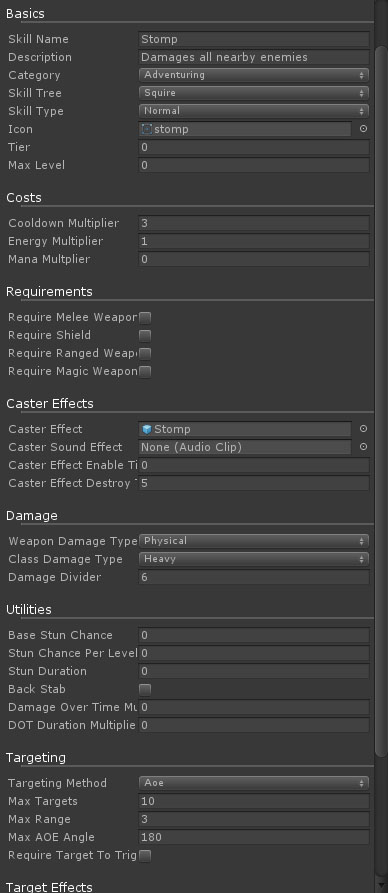
Overall I wasn’t able to get things as modular as I thought I would be able to initially. For example, the idea of having a public GetTargetMethod as a ScripableObject where I could plug in GetMeleeTargets would work, but I wouldn’t be able to change the range, number of targets, angle of detection, etc. per skill without changing the SO and thus changing every skill making use of it. I could make a bunch of instances of the SO like GetMeleeTargetsR2T1A45, GetMeleeTargetsR3T2A20, etc. but that didn’t feel right either… In the end I’ve stuck as much as I can into general method and divided between the major categories like Buff, Attack, TargetArea, etc., and have created a SO slot on my skill SOs for “CustomActions” where I can write an IEnumerator specific for Dashing Strike, plug it onto the skill and know that the skills will call it.

I also found this really useful custom drawer by a guy on Twitter like 5 years ago:
https://twitter.com/mwegner/status/355147544818495488
Here’s how I’m using it:

Not as modular as I was hoping for but still WAY easier than trying to manage everything via code alone.

I’d love to see a screenshot of anyone doing anything similarly complex in a different way. Shooting projectile A versus projectile B is easy, but I’m working on a full scale Everquest/DnD skill system.

That’s why I mentioned this in my post:

What I meant by this is that you’d use the slot to put in a “template” SO. The editor interface would create a clone of that SO and embed it as a new asset in the skill SO. That, combined with drawing the editor for the module’s SO in the skill editor should allow you to have it be as modular as you’d like.

Thank you for the comments all around Madgvox.

That made sense to me even if I didn’t think long enough about it for how actually have the editor create instances on instances… I’m pretty sure they did that in one of the Unite talks. But, essentially that’d still be the same thing as a serializable class at that point… no? What I like about ScriptableObjects is having them as an asset and being able to select and assign them.

It’s late and I’ve been staying up too late this week XD but am I missing some more functionality in that use case?

I used a single ‘skill’ or ‘ability’ SO and made fields for separate things it can do, so targeting would be handled by a separate SO and when the base skill use it, then it would just reach into the targeter field and call the abstract methods on it for the results. Most of this was static calls where all that mattered were the input conditions and the returned result(s).

This modularized everything quite a bit and moved functionality into smaller chunks which offered a lot of flexibility but made a lot of assets in the project that are a little bit cumbersome to track.

1 Like

Ah I hadn’t thought of that… I could have my GetTargets SO after all and just be passing it the variables that vary per skill like maxRange, maxTargets, maxAngle… Heading to bed to think about that for 3-4 hours before I actually fall asleep.

It’s still an asset, but it’s being instantiated on the fly in the editor. It’s kind of difficult to conceptualize, I’ll make a proof of concept and post it here.

Here you go. It creates an editor that looks like this:

Hopefully it’s pretty intuitive. You can drag SOs into the fields. This creates a unique instance of the target SO. It doesn’t use the existing one. The clones are saved as sub-assets of the main skill asset.

There’s still some kinks that would need to be ironed out, such as undo being able to cause sub-assets to get stranded (can’t delete, can’t reassociate).

3559499–286706–skill_editor.unitypackage (5.08 KB)

2 Likes

I will definitely play with that, thank you Madgvox.

@malkere , how did you handle the different types of targets for your ability system?

I unfortunately didn’t get to the point of using Madgvox’s approach of injecting SOs where needed, though I do believe that is the best approach and will be going for it next time I go to spend time on my skill system. That or a system of delegates.

I set things up though so that there are enums for selecting the different aspects that a skill can take on, for example targeting. There is Projectile, Target, TargetArea, and Area.
Projectile can be single hit or AOE, and uses physics to hit after fired.
Target is like a direct debuff or fire spell that instantly hits the targeted enemy.
TargetArea will target the ground beneath the targeted enemy, or the raycast will check for a ground hit if no enemy was hit.
Area casts around the caster.

They’re all just methods of gathering a MonsterAI[ ] within a specific area or target that then gets cycled through to apply damage and effects. All types of enemies inherit from the MonsterAI class.

1 Like

@Madgvox , Thanks for the skill editor. I’m trying to perform something similar and ran into a problem.
The way I’m building my skills is by defining a List of abstract modules(using the terminology provided in the skill editor). The actual actions like target acquisition and cast effects would inherit ‘module’ just like how it works already. The difference is the list, when I trigger the skill it just goes through each action. This should allow for less restrictive skill building, but I ran into the problem that I would need to create a million objects. That was solved with the cloning method in the skill editor, but then 2 other problems were introduced.

  1. I can’t get lists/arrays to display in the inspector (using the skill editor)

so disregarding the list/array problem:
2) Plugging in the skill actions doesn’t work (I think?, it doesn’t display at least). A clone is created, but it doesn’t show as being plugged in and I can’t delete the clone, even when disabling the editor script.

Do you know how to fix these problems?

1 Like