Hello,
We have been working with asset bundles to load code and scenes at runtime, but we couldn’t find a way to get serializable classes/structs to work as well. So we have two different Unity projects: 1 in which we create a scene and 1 in which we want to load that scene at runtime.
Project 1: Creating the Scene
The scene that is going to be in the assetbundle contains an object called ‘MyObject’ which has a component with 3 fields: a string, a Vector3 and a custom serializable struct. Unity screenshot original

The code of this component is this:
Component code
public class SerializeThis : MonoBehaviour {
    public string MainName;
    public Vector3 vector;
    public SerializedField field;

    private void Start()
    {
        Debug.Log(string.Format("{0};{1};{2}", field.Name, field.Number, field.Check));
    }
}

[Serializable]
public struct SerializedField
{
    public string Name;
    public int Number;
    public bool Check;
}
This script is added to its own assembly via assembly definitions and I then build 2 assetbundles (1 for the code and 1 for the scene):
Building bundle code
public static class BuildBundles {

        private static List<AssetBundleBuild> Bundles;

        [MenuItem("BuildBundles/Build")]
        public static void Build()
        {
            Bundles = new List<AssetBundleBuild>();
            Bundles.Add(new AssetBundleBuild()
            {
                assetBundleName = "SceneBundle",
                assetNames = new string[] { "Assets/Scenes/SampleScene.unity" }
            });
            Bundles.Add(new AssetBundleBuild
            {
                assetBundleName = "ScriptBundle",
                assetNames = new string[] { "Assets/ScriptsAssembly.bytes" }
            });
            BuildPipeline.BuildAssetBundles(@"[build location]", Bundles.ToArray(), BuildAssetBundleOptions.None, BuildTarget.StandaloneWindows);
        }

}
Project 2: Loading the scene
I then open the loading project where I load the assetbundles like so:
Loading bundle code
public class Loader : MonoBehaviour {

    void Start ()
    {
        LoadCode();
        LoadScene();
    }

    private void LoadCode()
    {
        var filename = @"[build location]\scriptbundle";
        var codeBundle = AssetBundle.LoadFromFile(filename);
        var assetName = codeBundle.GetAllAssetNames()[0];
        var txt = codeBundle.LoadAsset<TextAsset>(assetName);
        Assembly.Load(txt.bytes);

    }

    private void LoadScene()
    {
        var filename = @"[build location]\scenebundle";
        var sceneBundle = AssetBundle.LoadFromFile(filename);
        var scenePath = sceneBundle.GetAllScenePaths().First();
        SceneManager.LoadScene(Path.GetFileNameWithoutExtension(scenePath));
    }
}
Result vs expectation
If I then run the loading project from the editor, I expect the scene to load, the ‘MyObject’ to be present and all variables set as they were in the above attachment. However, the serialized struct is not shown and empty according to the console.
Unity object loaded
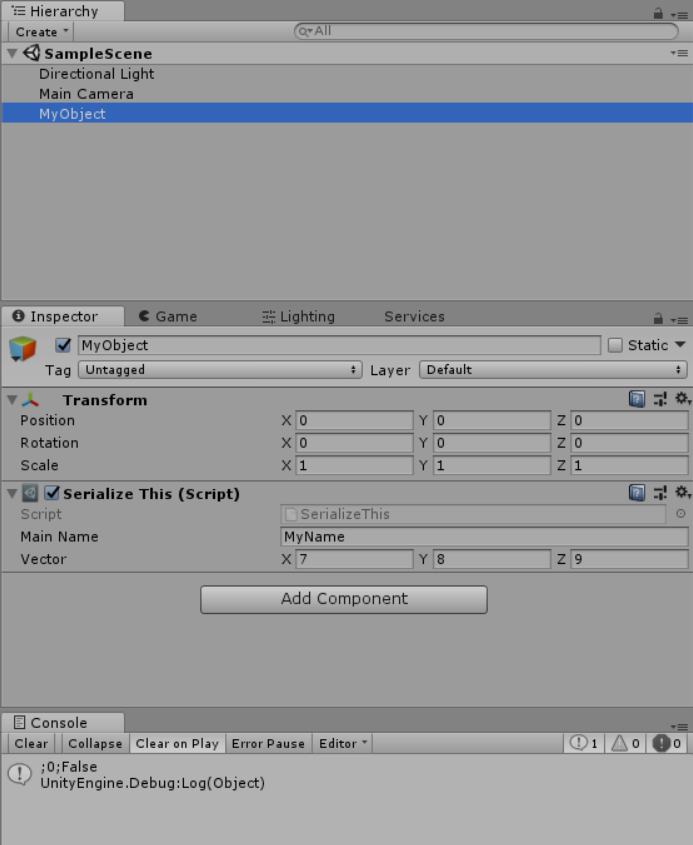
When we try to load the assetbundles in the same project as they were created, the result was as expected, so we think something is going wrong with the loading of assemblies vs the serialization in Unity. The code is loading as we can see the ‘SerializeThis’ class as component in the loading project.
Any thoughts/advice on how to get the expected result?