[SOLVED]: Standalone: Mac Build : Opens Full Screen

Hi,
I am testing some networking, and want to run simoultanously on the editor and a stand alone build (Mac). My issue is that (after testing fine for sometime), the Mac Build now always defaults to full screen at run.

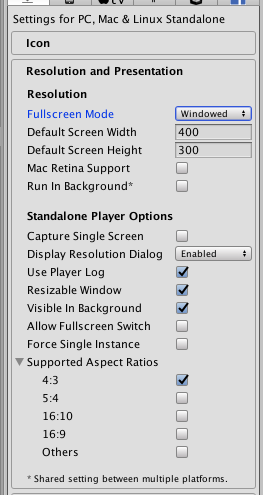
I went into the Player Settings and set the default to Windowed and set the resolution to half my screen size, but it still just opens at full. This is a problem because I can’t watch both now.

Any ideas?

Thanks
Bump.
Here are my player settings, for the standalone build, but despite this, the option window that normally pops up, that asks what quality you want, if you want the game windowed etc, does not appear and the game just runs.

I need the option to window the game to look at it at the editor simultaneously.

Help me Obi Wan Kenobi, you are my only hope!

SOLUTION:

    void Awake()
    {
        Screen.fullScreen = !Screen.fullScreen;
    }
2 Likes