Hey everyone,
As you might already know, each mouse click adds up when you work in the Unity Editor every day. To help you speed up your workflows, we updated our popular e-book, 80+ tips to increase productivity, to Unity 2022 LTS.
There’s been no shortage of big product news from Unity lately, and many of the new features and workflows in Unity 2022 LTS are covered in our updated productivity guide.
We included tips for making the most of the Universal Render Pipeline (URP) with Forward+ rendering, Renderer Features, and Decals; production-ready 2D tools like Sprite Atlas V2, Splines packages, and VFX Graph for 2D effects, and Material Variants for both the High Definition Render Pipeline (HDRP) and URP.
Here are some of the topics included in the updated guide:
Speed up your Editor workflows
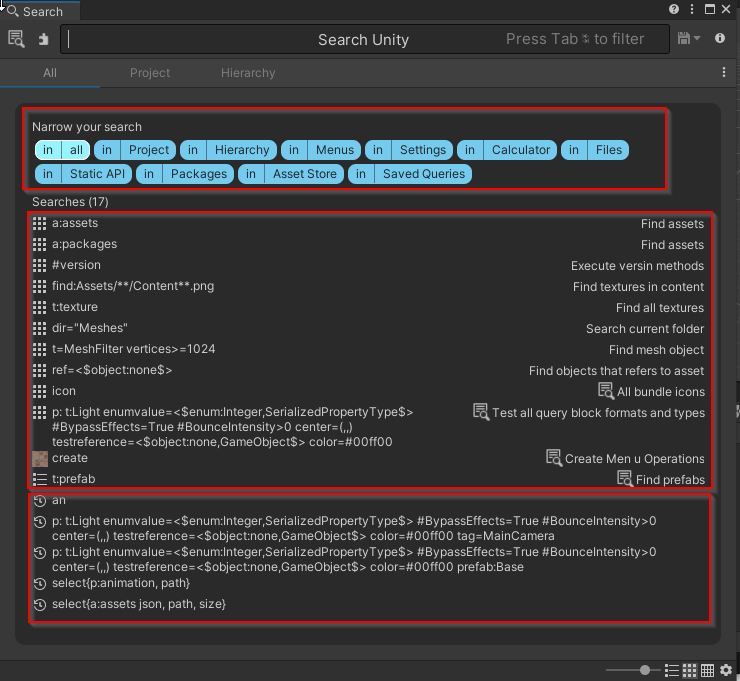
- Leverage new search capabilities like Query Builder to craft complex queries and explore your project
- Use Presets to:
- Customize the default state of anything in your Inspector
- Copy the settings of a component or asset, save it as an asset, and then apply the same settings to another item later
- Use the Scene visibility and picking to hide and show objects in the Scene view:
- Avoid incorrect clicks or a cluttered hierarchy for complex scenes, without changing their in-game visibility
- Conveniently select and edit specific GameObjects
- Display UVs, normals, tangents, and other Mesh information in the Inspector preview
- Use the Layers menu to toggle off the visibility of any Layers (such as UI) that may obscure your Scene view; lock a Layer to avoid changing its state accidentally
- If you frequently select the same objects in your scene, use the hotkey combos under Edit > Selection to quickly save or load a selection set
- Change colors in the Editor via Unity > Preferences > Colors to find certain UI elements or objects more quickly in Editor; adjust the Playmode tint to remind yourself when Play Mode is active so you don’t lose any changes you intended to save on exit
Create faster with tips for artists

-
Pick up pointers from the latest URP 2D sample, Happy Harvest, on how to use Sprite Atlas, 2D Tilemap, 2D skeletal animation, 2D lights, and 2D Sprite Shape.
-
Get tips to help you work in prefab mode, and with nested prefabs, prefab variants, and more
-
See how the Animation Rigging package can help bring your 2D characters to life
-
Speed up your lightmapping with the Progressive Lightmapper
-
Get tips for for optimizing performance with light probes; for example, if you have set dressing or other static meshes that don’t require lightmapping, you can remove them from your lightmap bakes and use light probes instead
-
Get updated URP tips like:
- Basic steps for setting up Decals
- Using URP converters to correctly convert a project made with the Built-in Render Pipeline to URP
- A brief look at the Add Renderer Feature for injecting scripts into the rendering process
-
And, updated HDRP tips for:
- HDRP Global Settings
- The Volume framework
- Lightmapping optimization tips
Save time and effort with developer tools
- Use Enter Play Mode settings to reduce compilation time
- Understand the effects of disabling the Reload Domain and Reload Scene settings
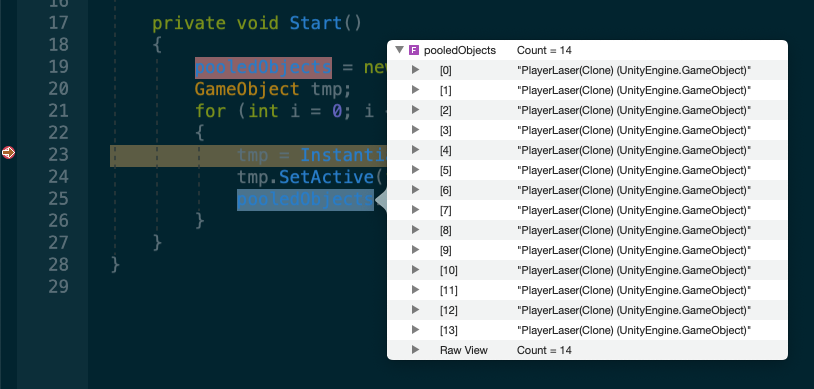
- Improve your debugging workflow with tips on how to use the Unity Debugger while in Play Mode: Attach breakpoints within the code editor in order to inspect the state of your script code and its current variables at runtime
- Learn how you can use script templates to help create consistency in your code base across your development team
- Use custom windows and customize inspectors to streamline workflows for your project needs
- Use the Platform Dependent Compilation feature to include or exclude certain sections of code based on the target platform for your build
- Organize your scripts into custom assemblies to promote modularity and reusability
- Use the Device Simulator to test your project on a range of devices directly in the Editor.
Get the new Unity 2022 LTS productivity e-book
Additionally, we created a cheatsheet with helpful shortcuts in Unity and a video tutorial to help you speed up workflows in Unity 2022 LTS!
Unity Keyboard Shortcuts Cheatsheet
You can download the cheatsheet as a .png or a PDF file, depending on your preferred format. It covers shortcuts for scene navigation, toolbar, editing, scene management, game building, animation, and playtesting.

Unity Keyboard Shortcuts.pdf (79.9 KB)
Video tutorial: Speed up your workflows in Unity with these keyboard shortcuts

We hope you find these materials useful. As usual, please let us know in the comments if you have any feedback, what are some of the tips and shortcuts you use frequently in your projects, or even if you have any new tips that we haven’t covered yet.
Thanks for reading!
