
Hi everyone! 
I want to announce the release of the Sprite Factory sprite animation system for Unity 4.3+ and 5.0+. Sprite Factory is a powerful 2D sprite animation system that makes it easy and fun to work with sprites in Unity.
Available now on the Unity asset store!
DOWNLOAD THE FREE TRIAL NOW!
Try Sprite Factory now for free! This fully-functional trial includes all the same features for you to try out and evaluate it. If you decide to buy it, your data will be automatically upgraded and you can continue developing where you left off.
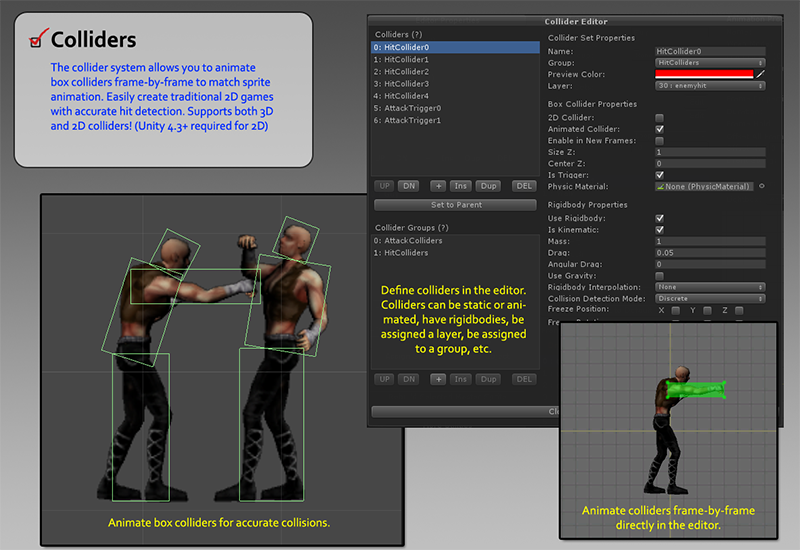
Key Feature: Animated Box Colliders

Sprite Factory includes a powerful animated box collider system for accurate hit detection in 2D games. Want to make a fighting game with characters that have a dozen hit and hurt boxes? No problem! You can add as many colliders as you need to get accurate collisions. Now supports both 3D and 2D colliders! (Unity 4.3+ required for 2D)
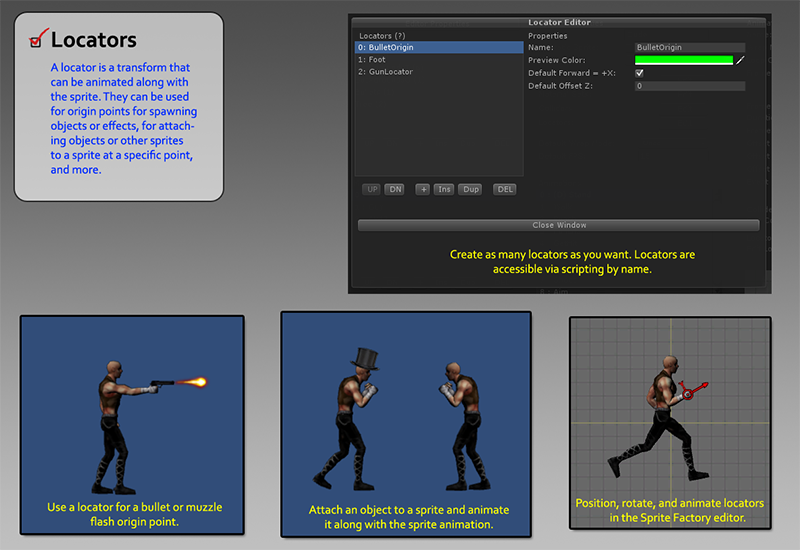
Key Feature: Animated Locators
Creates an animatable point on a sprite which can be used as an origin point for bullets, for attaching objects to a sprite at that point, muzzle flashes, etc. Combine Locators with Frame Events to do something at a specific point on a sprite during a specific frame of animation such as spawning dust particles at the feet of a character when walking.
Sprite Factory Features:
- Colliders are now rotatable!
- Supports 3D and 2D box colliders!
- Supports render Sorting Layers!
- Rectangular or automatic sprite-shaped meshes
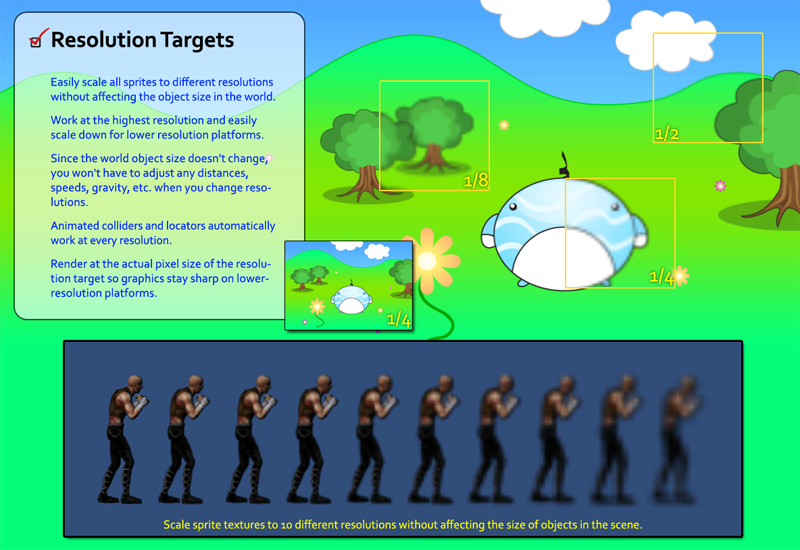
- Resolution Targets
- Animated and Static Sprites
- Sprite Groups
- Automatic Texture Atlasing
- Animatable Box Collider System - Perfect for hit boxes and hurt boxes. Create as many as you need!
- Animatable Locator System - Great for bullet origin points, spawning effects, attaching a objects, and more!
- Material Sets
- Frame Events
- Render at Actual Pixel Size
- Batch Scaling
- Unlimited Animations and Frames per sprite/group
- Tested with sprites containing 1,100+ high-resolution frames each
- Single or Double-Sided Meshes
- Mirror Sprites Horizontally or Vertically
- Billboard Sprites
- Sprites are Loaded from a Template on Instantiation
- Flexible Update Cycle
- Fast and Efficient
- Perfect for old-school 2D games
- Easy to use yet full of powerful features
- Logical workflow with a single editor interface
- Complete C# source code
- Complete documentation with tutorial videos
- Personal, timely support
- Get more information about these features at the Sprite Factory website
Editor Features:
- Centralized editor system
- Highly intuitive workflow
- Real-time animation preview
- Align frames and animations directly in the frame editor
- Lightbox mode for frame alignment
- Size and animate colliders in the frame editor
- Position and animate Locators in the frame editor
- Convenient copy and paste functions for working with collider and locator animation
- Create material sets
- Drag and drop animation building
- Import / export sprite assets
Screenshots




VIDEOS:
Note: Sorry the videos are a little outdated. I need to make a couple of new ones showing the new features like 2D colliders, sorting layers, collider groups, rotatable box colliders, automatic sprite-shaped meshes, etc…
Overview of Features and Workflow Video

Creating Sprites

Collision System

Locator System

Walking Character in 1:45 Including Scripting

More Videos
Sprite Inspector
Frame Events
Material Sets
Documentation is available on the Sprite Factory website.
If you’d like to buy Sprite Factory, you can get it from the Unity Asset Store.
DOWNLOAD THE FREE TRIAL NOW!
Try Sprite Factory now for free! This fully-functional trial includes all the same features for you to try out and evaluate it. If you decide to buy it, your data will be automatically upgraded and you can continue developing where you left off.
Please let me know if there’s if there’s anything else I can do to make anything more clear or explain the features better. If you have any questions or comments, fire away!
I look forward to hearing from everyone and thanks again!
