SpriteSharp is an efficient solution for generating better meshes for sprites, helping reduce your 2D scene total polygon count, draw call amount, overdraw and CPU load.
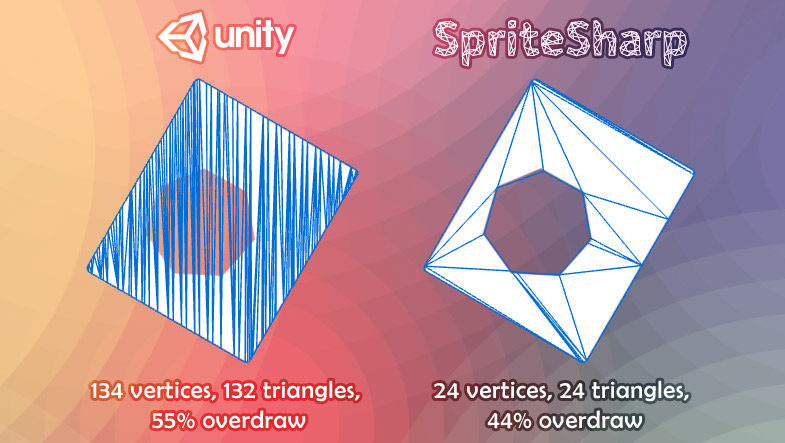
While Unity itself is capable of doing this, the possibilities are limited. There are no options to tweak to get the best possible performance, and sometimes meshes generated by Unity are so suboptimal you have to revert back to using Full Rect quads, losing the overdraw improvement.
This is why SpriteSharp was invented. It extends built-in Unity sprite mesh generation with various tweakable options, allowing you to get the best performance out of your 2D game. It is especially useful when working on complex scenes and developing for mobile platforms, where overdraw is often a problem.
Free evaluation version is available upon request.
Just a few more points:
If you are drawing a lot of sprites, the difference between 1000 and 100 triangles per sprite is going to end up a big deal.
Objects with SpriteRenderer are only batched up to a certain amount of triangles, and the limit of triangles per batch is around 700. This is because sprites are batched on the CPU, and doing that has a slight overhead. Therefore, decreasing the polygon count also decreases the amount of draw calls and offloads the CPU for more interesting work, like running your game scripts.
Unity has no prior knowledge about how sprites will be scaled in the scene. There is no point of making highly-tesselated mesh for an object that takes a small area on the screen. That’s why manual control is needed.
Unity 5.1 and newer is supported, both Personal and Pro.
Within Unity it is not possible to control the amount of vertices generated ?
You posted a dragon picture and that’s strange but in this case Unity uses only 9 vertices even if it is some overdraw.
Or does Unity randomly changes the amount of vertices it generates ?
Exactly, there are no options to control the mesh generation in Unity. It isn’t random, but it isn’t based on some vertex limit. The amount of vertices generated depends on the actual sprite.
Yes, sometimes Unity overshoots the mesh details, and sometimes it undershoots it. In this example, Unity generates too few vertices, which results in increased overdraw, and there is nothing you can do about it. SpriteSharp gives you ability to fine-tune the mesh to get lower overdraw while still maintaining pretty low triangle count.
Hi, I have a question: have you solved problem with that case(?):
-setting up new geometry for sprite
-reimporting sprite(because we wanted to change something in settings)
-in that case we lose mesh which we have created before
If yes: do you hold settings of sprites somewhere? If yes, are they in Assets folder(so I’ll be able to commit them to repository)?
Hi,
yes, of course, the mesh is regenerated after the reimport. Yes, sprite mesh settings are kept in a single file that you can easily put under version control.
Sorry for the delay everyone, it seems like Asset Store guys are overloaded and haven’t even looked at SpriteSharp yet It might take some more time until it is approved.
I am happy to announce that SpriteSharp in now live on Asset Store! The introductory price is $4.95 for just one week, so go grab it until the price is back to normal Asset Store Link
I’d be grateful if you’ll share your experience about how good (or not) SpriteSharp works for you, so I can think of directions to improve the product.
Thanks for your support!
It may look similar at the first glance, but it really isn’t. PolygonCollider2D only works PolygonCollider2D that are used for physics, and it only optimizes the existing paths. SpriteSharp, on the other hand, generates new sprite meshes, and those sprite meshes are used for rendering, not physics. So the purpose is completely different.
That said, the algorithm indeed can have many practical usages, so maybe I’ll implement some physics-related functionality into SpriteSharp as well in some future update.
hi there, quick questions will it work for animated sprite? will it be able to generate new sprite-mesh in runtime? I suppose the new mesh is no longer Sprite-Renderer right? Because I have some shaders only work for Sprite-Renderer.
It is still a SpriteRenderer in all senses, so yes, you can use specific shaders and animate the sprites. However, SpriteSharp only works in the Editor, it can’t be used in runtime. This is a limitation of Unity API. In runtime, the default Unity algorithm will be used, so it’s better to prepare your sprites in Editor, if possible.
@Marrt
Hi, I’m on vacation for now, far away from my PC, so I can’t verify that. I think it may work if you crank the Quality high enough, but I can’t guarantee that at the moment.
Bought it anyway, - Awsome, it works, Animations are also a breeze since you can multi-edit all sprites in a spritsheet:
Detail:1, MergeDistance 1:
(don’t judge my awful template sprites, i just made them as a guide for my artist )
The Detail could be better though - i only have hard Edges (only 0 & 100% alpha), but this Tool is intended for bilinear Sprites with an alpha Falloff on the Edges i guess.
Thanks ZimM!
Something is strange but it is nothing that is bothering me now after everything is set up, so enjoy your vacation:
I get below errors after applying and setting up any bunch of Sprites for the first time in Playmode
Then, after restarting Playmode, everthing works seamlessly until i select a Gameobject containing a modified Sprite
This throws below errors again and Unity crashes - seems like Unity doesn’t like meshing on those small 16x16-sprites initially since on bigger sprites i get no such error
After restarting Unity everthing works, i re-edit the modified sprites with your extension sometimes brings that error back
@Marrt
Thank you for reporting this, I’ll look into this issue when I’m back.
You can also get better results if you set the Texture Mode to Advanced, and then set Extrude Edges to 0 (default is 1). Edge extrusion is pointless for hard-edges sprites.
The tool is great, very nice low poly meshes and good customization! But I have a question: I need to generate some sprites in runtime(you know generating texture and than making it sprite texture) and put them on scene, is that possible to use your code somehow to generate proper mesh for those sprites?




 It might take some more time until it is approved.

