TextMesh Pro bitmap font outlines and shadows

What is the recommended solution for adding outlines or shadows to bitmap fonts (font assets created using the Hinted Raster setting)?

I made a custom shader to do this in the meantime, but my shader skills are lacking. The shader uses a total of 5 passes to render the text 5 times with different offsets applied to the first 4 passes. Obviously this is not good for performance, and it’s very limited in terms of customization.

Attached is an image of what I’m working with below. I would love to see support for outlines and shadows in the material settings for the default bitmap font shader!

1 Like

The ability to dynamically style the text in TextMesh Pro is a bi-product of the use of Signed Distance Field and associated shaders. When using SDF Font Assets, adding outline / shadows is pretty efficient.

Adding shadow and outline to bitmap fonts is much more complex and not currently supported as it is not very efficient.

1 Like

Unfortunately I can’t use SDF in this case because I need a crisp 12pt font and Hinted Raster seems to be the only way to achieve that.

I was using Unity’s Outline component with the UGUI Text component before I switched to TMP. I need to replace it with something.

PS. TMP has been a lifesaver on many levels, especially with the fallback system for localization. Excited to make use of the native Unity integration.


To anyone who stumbles into this thread and wants to use the shader: Here it is. Be warned it is a terrible hack job. If you improve it, please share.

Shader "TextMeshPro/BitmapShadow" {

Properties {
    _MainTex        ("Font Atlas", 2D) = "white" {}
    _FaceTex        ("Font Texture", 2D) = "white" {}
    _FaceColor        ("Text Color", Color) = (1,1,1,1)

    _ShadowColor    ("Shadow Color", Color) = (0,0,0,0)
    _Shadow1X        ("Shadow 1X", Float) = 0
    _Shadow1Y        ("Shadow 1Y", Float) = 0
    _Shadow2X        ("Shadow 2X", Float) = 0
    _Shadow2Y        ("Shadow 2Y", Float) = 0
    _Shadow3X        ("Shadow 1X", Float) = 0
    _Shadow3Y        ("Shadow 1Y", Float) = 0
    _Shadow4X        ("Shadow 2X", Float) = 0
    _Shadow4Y        ("Shadow 2Y", Float) = 0

    _VertexOffsetX    ("Vertex OffsetX", float) = 0
    _VertexOffsetY    ("Vertex OffsetY", float) = 0
    _MaskSoftnessX    ("Mask SoftnessX", float) = 0
    _MaskSoftnessY    ("Mask SoftnessY", float) = 0

    _ClipRect("Clip Rect", vector) = (-32767, -32767, 32767, 32767)

    _StencilComp("Stencil Comparison", Float) = 8
    _Stencil("Stencil ID", Float) = 0
    _StencilOp("Stencil Operation", Float) = 0
    _StencilWriteMask("Stencil Write Mask", Float) = 255
    _StencilReadMask("Stencil Read Mask", Float) = 255

    _ColorMask("Color Mask", Float) = 15
}

SubShader{

    Tags { "Queue" = "Transparent" "IgnoreProjector" = "True" "RenderType" = "Transparent" }
 
    Stencil
    {
        Ref[_Stencil]
        Comp[_StencilComp]
        Pass[_StencilOp]
        ReadMask[_StencilReadMask]
        WriteMask[_StencilWriteMask]
    }
 
 
    Lighting Off
    Cull [_CullMode]
    ZTest [unity_GUIZTestMode]
    ZWrite Off
    Fog { Mode Off }
    Blend SrcAlpha OneMinusSrcAlpha
    ColorMask[_ColorMask]


    Pass {
        CGPROGRAM
        #pragma vertex vert
        #pragma fragment frag

        #include "UnityCG.cginc"


    #if UNITY_VERSION < 530
        bool _UseClipRect;
    #endif

        struct appdata_t {
            float4 vertex        : POSITION;
            fixed4 color        : COLOR;
            float2 texcoord0    : TEXCOORD0;
            float2 texcoord1    : TEXCOORD1;
        };

        struct v2f {
            float4    vertex        : POSITION;
            fixed4    color        : COLOR;
            float2    texcoord0    : TEXCOORD0;
            float2    texcoord1    : TEXCOORD1;
            float4    mask        : TEXCOORD2;
        };

        uniform    sampler2D     _MainTex;
        uniform    sampler2D     _FaceTex;
        uniform float4        _FaceTex_ST;
        uniform    fixed4        _FaceColor;

        uniform    fixed4        _ShadowColor;
        uniform float        _Shadow1X;
        uniform float        _Shadow1Y;
        uniform float        _Shadow2X;
        uniform float        _Shadow2Y;
        uniform float        _Shadow3X;
        uniform float        _Shadow3Y;
        uniform float        _Shadow4X;
        uniform float        _Shadow4Y;

        uniform float        _VertexOffsetX;
        uniform float        _VertexOffsetY;
        uniform float4        _ClipRect;
        uniform float        _MaskSoftnessX;
        uniform float        _MaskSoftnessY;

        float2 UnpackUV(float uv)
        {
            float2 output;
            output.x = floor(uv / 4096);
            output.y = uv - 4096 * output.x;

            return output * 0.001953125;
        }

        v2f vert (appdata_t i)
        {
            float4 vert = i.vertex;
            vert.x += _VertexOffsetX + _Shadow1X;
            vert.y += _VertexOffsetY + _Shadow1Y;

            vert.xy += (vert.w * 0.5) / _ScreenParams.xy;

            float4 vPosition = UnityPixelSnap(mul(UNITY_MATRIX_MVP, vert));

            fixed4 faceColor = i.color;
            faceColor *= _ShadowColor;

            v2f o;
            o.vertex = vPosition;
            o.color = faceColor;
            o.texcoord0 = i.texcoord0;
            o.texcoord1 = TRANSFORM_TEX(UnpackUV(i.texcoord1), _FaceTex);
            float2 pixelSize = vPosition.w;
            pixelSize /= abs(float2(_ScreenParams.x * UNITY_MATRIX_P[0][0], _ScreenParams.y * UNITY_MATRIX_P[1][1]));

            // Clamp _ClipRect to 16bit.
            float4 clampedRect = clamp(_ClipRect, -2e10, 2e10);
            o.mask = float4(vert.xy * 2 - clampedRect.xy - clampedRect.zw, 0.25 / (0.25 * half2(_MaskSoftnessX, _MaskSoftnessY) + pixelSize.xy));
          
            return o;
        }

        fixed4 frag (v2f i) : COLOR
        {
            //fixed4 c = tex2D(_MainTex, i.texcoord0) * tex2D(_FaceTex, i.texcoord1) * i.color;
          
            fixed4 c = tex2D(_MainTex, i.texcoord0);
            c = fixed4 (tex2D(_FaceTex, i.texcoord1).rgb * i.color.rgb, i.color.a * c.a);

            #if UNITY_VERSION < 530
                if (_UseClipRect)
                {
                    // Alternative implementation to UnityGet2DClipping with support for softness.
                    half2 m = saturate((_ClipRect.zw - _ClipRect.xy - abs(i.mask.xy)) * i.mask.zw);
                    c *= m.x * m.y;
                }
            #else
                // Alternative implementation to UnityGet2DClipping with support for softness.
                half2 m = saturate((_ClipRect.zw - _ClipRect.xy - abs(i.mask.xy)) * i.mask.zw);
                c *= m.x * m.y;
            #endif

            return c;
        }
        ENDCG
    }


    Pass {
        CGPROGRAM
        #pragma vertex vert
        #pragma fragment frag

        #include "UnityCG.cginc"


    #if UNITY_VERSION < 530
        bool _UseClipRect;
    #endif

        struct appdata_t {
            float4 vertex        : POSITION;
            fixed4 color        : COLOR;
            float2 texcoord0    : TEXCOORD0;
            float2 texcoord1    : TEXCOORD1;
        };

        struct v2f {
            float4    vertex        : POSITION;
            fixed4    color        : COLOR;
            float2    texcoord0    : TEXCOORD0;
            float2    texcoord1    : TEXCOORD1;
            float4    mask        : TEXCOORD2;
        };

        uniform    sampler2D     _MainTex;
        uniform    sampler2D     _FaceTex;
        uniform float4        _FaceTex_ST;
        uniform    fixed4        _FaceColor;

        uniform    fixed4        _ShadowColor;
        uniform float        _Shadow1X;
        uniform float        _Shadow1Y;
        uniform float        _Shadow2X;
        uniform float        _Shadow2Y;
        uniform float        _Shadow3X;
        uniform float        _Shadow3Y;
        uniform float        _Shadow4X;
        uniform float        _Shadow4Y;

        uniform float        _VertexOffsetX;
        uniform float        _VertexOffsetY;
        uniform float4        _ClipRect;
        uniform float        _MaskSoftnessX;
        uniform float        _MaskSoftnessY;

        float2 UnpackUV(float uv)
        {
            float2 output;
            output.x = floor(uv / 4096);
            output.y = uv - 4096 * output.x;

            return output * 0.001953125;
        }

        v2f vert (appdata_t i)
        {
            float4 vert = i.vertex;
            vert.x += _VertexOffsetX + _Shadow2X;
            vert.y += _VertexOffsetY + _Shadow2Y;

            vert.xy += (vert.w * 0.5) / _ScreenParams.xy;

            float4 vPosition = UnityPixelSnap(mul(UNITY_MATRIX_MVP, vert));

            fixed4 faceColor = i.color;
            faceColor *= _ShadowColor;

            v2f o;
            o.vertex = vPosition;
            o.color = faceColor;
            o.texcoord0 = i.texcoord0;
            o.texcoord1 = TRANSFORM_TEX(UnpackUV(i.texcoord1), _FaceTex);
            float2 pixelSize = vPosition.w;
            pixelSize /= abs(float2(_ScreenParams.x * UNITY_MATRIX_P[0][0], _ScreenParams.y * UNITY_MATRIX_P[1][1]));

            // Clamp _ClipRect to 16bit.
            float4 clampedRect = clamp(_ClipRect, -2e10, 2e10);
            o.mask = float4(vert.xy * 2 - clampedRect.xy - clampedRect.zw, 0.25 / (0.25 * half2(_MaskSoftnessX, _MaskSoftnessY) + pixelSize.xy));
          
            return o;
        }

        fixed4 frag (v2f i) : COLOR
        {
            //fixed4 c = tex2D(_MainTex, i.texcoord0) * tex2D(_FaceTex, i.texcoord1) * i.color;
          
            fixed4 c = tex2D(_MainTex, i.texcoord0);
            c = fixed4 (tex2D(_FaceTex, i.texcoord1).rgb * i.color.rgb, i.color.a * c.a);

            #if UNITY_VERSION < 530
                if (_UseClipRect)
                {
                    // Alternative implementation to UnityGet2DClipping with support for softness.
                    half2 m = saturate((_ClipRect.zw - _ClipRect.xy - abs(i.mask.xy)) * i.mask.zw);
                    c *= m.x * m.y;
                }
            #else
                // Alternative implementation to UnityGet2DClipping with support for softness.
                half2 m = saturate((_ClipRect.zw - _ClipRect.xy - abs(i.mask.xy)) * i.mask.zw);
                c *= m.x * m.y;
            #endif

            return c;
        }
        ENDCG
    }


    Pass {
        CGPROGRAM
        #pragma vertex vert
        #pragma fragment frag

        #include "UnityCG.cginc"


    #if UNITY_VERSION < 530
        bool _UseClipRect;
    #endif

        struct appdata_t {
            float4 vertex        : POSITION;
            fixed4 color        : COLOR;
            float2 texcoord0    : TEXCOORD0;
            float2 texcoord1    : TEXCOORD1;
        };

        struct v2f {
            float4    vertex        : POSITION;
            fixed4    color        : COLOR;
            float2    texcoord0    : TEXCOORD0;
            float2    texcoord1    : TEXCOORD1;
            float4    mask        : TEXCOORD2;
        };

        uniform    sampler2D     _MainTex;
        uniform    sampler2D     _FaceTex;
        uniform float4        _FaceTex_ST;
        uniform    fixed4        _FaceColor;

        uniform    fixed4        _ShadowColor;
        uniform float        _Shadow1X;
        uniform float        _Shadow1Y;
        uniform float        _Shadow2X;
        uniform float        _Shadow2Y;
        uniform float        _Shadow3X;
        uniform float        _Shadow3Y;
        uniform float        _Shadow4X;
        uniform float        _Shadow4Y;

        uniform float        _VertexOffsetX;
        uniform float        _VertexOffsetY;
        uniform float4        _ClipRect;
        uniform float        _MaskSoftnessX;
        uniform float        _MaskSoftnessY;

        float2 UnpackUV(float uv)
        {
            float2 output;
            output.x = floor(uv / 4096);
            output.y = uv - 4096 * output.x;

            return output * 0.001953125;
        }

        v2f vert (appdata_t i)
        {
            float4 vert = i.vertex;
            vert.x += _VertexOffsetX + _Shadow3X;
            vert.y += _VertexOffsetY + _Shadow3Y;

            vert.xy += (vert.w * 0.5) / _ScreenParams.xy;

            float4 vPosition = UnityPixelSnap(mul(UNITY_MATRIX_MVP, vert));

            fixed4 faceColor = i.color;
            faceColor *= _ShadowColor;

            v2f o;
            o.vertex = vPosition;
            o.color = faceColor;
            o.texcoord0 = i.texcoord0;
            o.texcoord1 = TRANSFORM_TEX(UnpackUV(i.texcoord1), _FaceTex);
            float2 pixelSize = vPosition.w;
            pixelSize /= abs(float2(_ScreenParams.x * UNITY_MATRIX_P[0][0], _ScreenParams.y * UNITY_MATRIX_P[1][1]));

            // Clamp _ClipRect to 16bit.
            float4 clampedRect = clamp(_ClipRect, -2e10, 2e10);
            o.mask = float4(vert.xy * 2 - clampedRect.xy - clampedRect.zw, 0.25 / (0.25 * half2(_MaskSoftnessX, _MaskSoftnessY) + pixelSize.xy));
          
            return o;
        }

        fixed4 frag (v2f i) : COLOR
        {
            //fixed4 c = tex2D(_MainTex, i.texcoord0) * tex2D(_FaceTex, i.texcoord1) * i.color;
          
            fixed4 c = tex2D(_MainTex, i.texcoord0);
            c = fixed4 (tex2D(_FaceTex, i.texcoord1).rgb * i.color.rgb, i.color.a * c.a);

            #if UNITY_VERSION < 530
                if (_UseClipRect)
                {
                    // Alternative implementation to UnityGet2DClipping with support for softness.
                    half2 m = saturate((_ClipRect.zw - _ClipRect.xy - abs(i.mask.xy)) * i.mask.zw);
                    c *= m.x * m.y;
                }
            #else
                // Alternative implementation to UnityGet2DClipping with support for softness.
                half2 m = saturate((_ClipRect.zw - _ClipRect.xy - abs(i.mask.xy)) * i.mask.zw);
                c *= m.x * m.y;
            #endif

            return c;
        }
        ENDCG
    }


    Pass {
        CGPROGRAM
        #pragma vertex vert
        #pragma fragment frag

        #include "UnityCG.cginc"


    #if UNITY_VERSION < 530
        bool _UseClipRect;
    #endif

        struct appdata_t {
            float4 vertex        : POSITION;
            fixed4 color        : COLOR;
            float2 texcoord0    : TEXCOORD0;
            float2 texcoord1    : TEXCOORD1;
        };

        struct v2f {
            float4    vertex        : POSITION;
            fixed4    color        : COLOR;
            float2    texcoord0    : TEXCOORD0;
            float2    texcoord1    : TEXCOORD1;
            float4    mask        : TEXCOORD2;
        };

        uniform    sampler2D     _MainTex;
        uniform    sampler2D     _FaceTex;
        uniform float4        _FaceTex_ST;
        uniform    fixed4        _FaceColor;

        uniform    fixed4        _ShadowColor;
        uniform float        _Shadow1X;
        uniform float        _Shadow1Y;
        uniform float        _Shadow2X;
        uniform float        _Shadow2Y;
        uniform float        _Shadow3X;
        uniform float        _Shadow3Y;
        uniform float        _Shadow4X;
        uniform float        _Shadow4Y;

        uniform float        _VertexOffsetX;
        uniform float        _VertexOffsetY;
        uniform float4        _ClipRect;
        uniform float        _MaskSoftnessX;
        uniform float        _MaskSoftnessY;

        float2 UnpackUV(float uv)
        {
            float2 output;
            output.x = floor(uv / 4096);
            output.y = uv - 4096 * output.x;

            return output * 0.001953125;
        }

        v2f vert (appdata_t i)
        {
            float4 vert = i.vertex;
            vert.x += _VertexOffsetX + _Shadow4X;
            vert.y += _VertexOffsetY + _Shadow4Y;

            vert.xy += (vert.w * 0.5) / _ScreenParams.xy;

            float4 vPosition = UnityPixelSnap(mul(UNITY_MATRIX_MVP, vert));

            fixed4 faceColor = i.color;
            faceColor *= _ShadowColor;

            v2f o;
            o.vertex = vPosition;
            o.color = faceColor;
            o.texcoord0 = i.texcoord0;
            o.texcoord1 = TRANSFORM_TEX(UnpackUV(i.texcoord1), _FaceTex);
            float2 pixelSize = vPosition.w;
            pixelSize /= abs(float2(_ScreenParams.x * UNITY_MATRIX_P[0][0], _ScreenParams.y * UNITY_MATRIX_P[1][1]));

            // Clamp _ClipRect to 16bit.
            float4 clampedRect = clamp(_ClipRect, -2e10, 2e10);
            o.mask = float4(vert.xy * 2 - clampedRect.xy - clampedRect.zw, 0.25 / (0.25 * half2(_MaskSoftnessX, _MaskSoftnessY) + pixelSize.xy));
          
            return o;
        }

        fixed4 frag (v2f i) : COLOR
        {
            //fixed4 c = tex2D(_MainTex, i.texcoord0) * tex2D(_FaceTex, i.texcoord1) * i.color;
          
            fixed4 c = tex2D(_MainTex, i.texcoord0);
            c = fixed4 (tex2D(_FaceTex, i.texcoord1).rgb * i.color.rgb, i.color.a * c.a);

            #if UNITY_VERSION < 530
                if (_UseClipRect)
                {
                    // Alternative implementation to UnityGet2DClipping with support for softness.
                    half2 m = saturate((_ClipRect.zw - _ClipRect.xy - abs(i.mask.xy)) * i.mask.zw);
                    c *= m.x * m.y;
                }
            #else
                // Alternative implementation to UnityGet2DClipping with support for softness.
                half2 m = saturate((_ClipRect.zw - _ClipRect.xy - abs(i.mask.xy)) * i.mask.zw);
                c *= m.x * m.y;
            #endif

            return c;
        }
        ENDCG
    }


    Pass {
        CGPROGRAM
        #pragma vertex vert
        #pragma fragment frag

        #include "UnityCG.cginc"


    #if UNITY_VERSION < 530
        bool _UseClipRect;
    #endif

        struct appdata_t {
            float4 vertex        : POSITION;
            fixed4 color        : COLOR;
            float2 texcoord0    : TEXCOORD0;
            float2 texcoord1    : TEXCOORD1;
        };

        struct v2f {
            float4    vertex        : POSITION;
            fixed4    color        : COLOR;
            float2    texcoord0    : TEXCOORD0;
            float2    texcoord1    : TEXCOORD1;
            float4    mask        : TEXCOORD2;
        };

        uniform    sampler2D     _MainTex;
        uniform    sampler2D     _FaceTex;
        uniform float4        _FaceTex_ST;
        uniform    fixed4        _FaceColor;

        uniform float        _VertexOffsetX;
        uniform float        _VertexOffsetY;
        uniform float4        _ClipRect;
        uniform float        _MaskSoftnessX;
        uniform float        _MaskSoftnessY;

        float2 UnpackUV(float uv)
        {
            float2 output;
            output.x = floor(uv / 4096);
            output.y = uv - 4096 * output.x;

            return output * 0.001953125;
        }

        v2f vert (appdata_t i)
        {
            float4 vert = i.vertex;
            vert.x += _VertexOffsetX;
            vert.y += _VertexOffsetY;

            vert.xy += (vert.w * 0.5) / _ScreenParams.xy;

            float4 vPosition = UnityPixelSnap(mul(UNITY_MATRIX_MVP, vert));

            fixed4 faceColor = i.color;
            faceColor *= _FaceColor;

            v2f o;
            o.vertex = vPosition;
            o.color = faceColor;
            o.texcoord0 = i.texcoord0;
            o.texcoord1 = TRANSFORM_TEX(UnpackUV(i.texcoord1), _FaceTex);
            float2 pixelSize = vPosition.w;
            pixelSize /= abs(float2(_ScreenParams.x * UNITY_MATRIX_P[0][0], _ScreenParams.y * UNITY_MATRIX_P[1][1]));

            // Clamp _ClipRect to 16bit.
            float4 clampedRect = clamp(_ClipRect, -2e10, 2e10);
            o.mask = float4(vert.xy * 2 - clampedRect.xy - clampedRect.zw, 0.25 / (0.25 * half2(_MaskSoftnessX, _MaskSoftnessY) + pixelSize.xy));
          
            return o;
        }

        fixed4 frag (v2f i) : COLOR
        {
            //fixed4 c = tex2D(_MainTex, i.texcoord0) * tex2D(_FaceTex, i.texcoord1) * i.color;
          
            fixed4 c = tex2D(_MainTex, i.texcoord0);
            c = fixed4 (tex2D(_FaceTex, i.texcoord1).rgb * i.color.rgb, i.color.a * c.a);

            #if UNITY_VERSION < 530
                if (_UseClipRect)
                {
                    // Alternative implementation to UnityGet2DClipping with support for softness.
                    half2 m = saturate((_ClipRect.zw - _ClipRect.xy - abs(i.mask.xy)) * i.mask.zw);
                    c *= m.x * m.y;
                }
            #else
                // Alternative implementation to UnityGet2DClipping with support for softness.
                half2 m = saturate((_ClipRect.zw - _ClipRect.xy - abs(i.mask.xy)) * i.mask.zw);
                c *= m.x * m.y;
            #endif

            return c;
        }
        ENDCG
    }
}

}
5 Likes

Same problem here, we have to use Hinted Raster param to have a good looking pixel art font with TM Pro. Why don’t you make a shader to have some parameters with Bitmap Fonts (like outline, underlay…) ? I understand it’s not “very efficient” but when it’s the only solution…

Thanks rempelj for your shader, I will try it on my project.

The ability to dynamically add an Outline and Shadow (underlay) using the shader in TMP is a by product of using Signed Distance Field (SDF). This is why this functionality is not available on the bitmap shaders.

Ok, but it is possible to have outlines and shadows by customizing the TMP_Bitmap shader, so why not adding them ? I’m not good at all when it comes to write shaders so I would love to have this included in TextMesh Pro. I love it so much, I really miss it on my pixel art fonts.

PS : I’m really upset to see that I’m paying a subscription for Unity every month and the answer is always “we won’t do anything”, even when it’s a critical bug for us (it’s not the first time I experience that).

1 Like

Consider your thread stumbled upon! Did you ever discover any other ways to do this, or is this shader still the best approach?

Other than a shader it is also possible to get the same outline look using a mesh effect where you add additional vertices with the vertex color set to black.
The old Unity text component supported mesh effects, but Textmesh Pro doesn’t support them out of the box.
This project is attempting to enable mesh effects with TextMesh Pro. It works, but it’s a bit buggy and breaks in certain situations. The project comes with an example mesh effect that creates an outline using the method I mentioned above.

The developer is responsive. If more people ping them, maybe they will get around to fixing the remaining issues.

1 Like

when i try to use their unitypackage, it says type or namespace ‘UIEffect’ could not be found. Any idea why? It seems like it doesn’t exist in Unity2019.3.0f6, is it a custom class?

Has the been any improvement to adding pixel text outlines without using SDF?

2 Likes

Yeah we need outline for bitmap font.

Please?

Has anyone ever found a solution?

Although I don’t have a solution to propose at this time, I wanted to reply to let you all know that I am reading all these posts / threads and keep tracking of all these feature requests.

2 Likes

I found this post while looking for a solution. I ended up following what Stephan_B suggests here - How to achieve Raster font with outline?

I extracted the atlas and used Photopea.com (online Photoshop) to create a special variation of the atlas with the following rules:

  • Red = Font Face (default)
  • Green = Outline
  • Blue = Drop Shadow
  • Background is fully black, uses R/G/B in custom shader as alpha.

I’ve attached a PNG & PSD of this.
7381901--900863--PressStart2P SDF Atlas - ColorMask.png

The shader then uses 1 texture read to handle the default face/outline/drop shadow. You use the Outline/Shadow color picker alpha to turn on/off the feature. You can also use a Face texture for things such as gradient etc.

Here is a link to the shader: TMP_Pixel.shader · GitHub

You must change the materials of your font to use the new shader + atlas texture. This can be done in the inspector.

7381901–900860–PressStart2P SDF Atlas - ColorMask.psd (67.8 KB)

4 Likes

The proposed solution seems like a decent attempt, I am guessing that the process should be able to automated in the textmeshpro.

1 Like

Also looking for a better solution to this. This is specifically useful for pixel art games.

I’ve been using a custom solution where I edit the atlas to add outlines of different colors and a custom shader that repaints the texture based on the new atlas colors. But this feels clunky and it shouldn’t be this much of a hassle to add a custom shader to TMPro

I believe this still is the “best” approach, as doesn’t require extra render passes.
I’d say that applying a 1 pixel offset/stroke is well within the capabilities of TextMeshPro.

We probably don’t even need an RGB texture, as we could use specific grayscale ranges to encode the zones:
font face(255), outline(+128), drop shadow (+64). Of course it has to be an 8bit grayscale image.

The “lazy” (but more versatile) way would be to just use more passes. Again, TMPro could do this natively, baking the contour in the atlas, without requiring us to use a 3rd party program.


In both cases these would be useful examples that could be included in the Samples package of TMPro.

With so many pixel art/mobile/retro style games, would make sense to have this natively integrated.

…unless there’s another more straightforward way to do this that I’m missing…

I was able to eventually get this to work in a…passable way. Using a shader and some tricks, I was able to Make a customizable pixel outline.

Some examples:

The shader is still pretty messy, but I can give a general overview of how it works.

First of all, we need to extract the text atlas, and pass it into our shader (PS. make sure the Texture2D node does NOT have a reference of “_MainTex”. I was burned by that for a while).

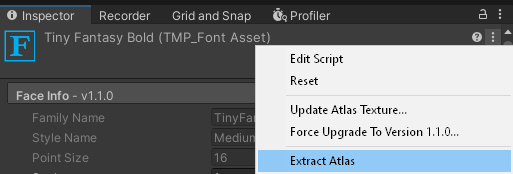
To Extract the Atlas, go to your font asset and:


(Make sure to click the kebab icon in the font asset, not the unity ui window)

Then we create a general pixel outline shader, with whatever properties you might want. Here’s a basic one someone made:

Here’s my default preview in the shader:

The only gotcha, is that the shader needs to get the atlas passed to it to know what to outline. Unfortunately, I don’t think there’s any magic reference to pass the atlas through like “_FontAtlas” as far as I know (like there is for “_MainTex”)

So we just treat it as a 2d texture instead.

When we apply our shader, we have to pass in that font’s atlas:

There’s also a few other things i have set here, like the outline color, and the font override color.

So the whole “font atlas” thing means that it’s still a little more tedious than it should be, but i think this solution beats having to extract the font into another editor/program and mess with it there first. It would be a much simpler solution if somehow TMP passed the atlas as part of the _MainTex property, but oh well.

TMP should really tackle this better, since it is only viable text rendering option we currently have.

1 Like