You need to include the shader in the bundle, or load it some other way (resources, etc). Usually you’d want the shader to be in it’s own bundle which any bundles can have a dependency on, so that each asset doesn’t load a separate copy of the shader.
1 Like
Okay, I’ll look into this. Thanks.
Hi. I use lots of decall in HDRP. Are they supported?
should be.
Hi.
Unity 2020.3.11f1
HDRP 10.5.0
Latest Bakery 1.9
I tried the Better Lit LightMap Mode SH
with Enable Lightmap specular
on a copy Bakery SG example with these settings.
Do you have an idea whats wrong here.
Marked Plane is the Better Lit.
Non marked Plane ist the BakerySH Shadergraph.
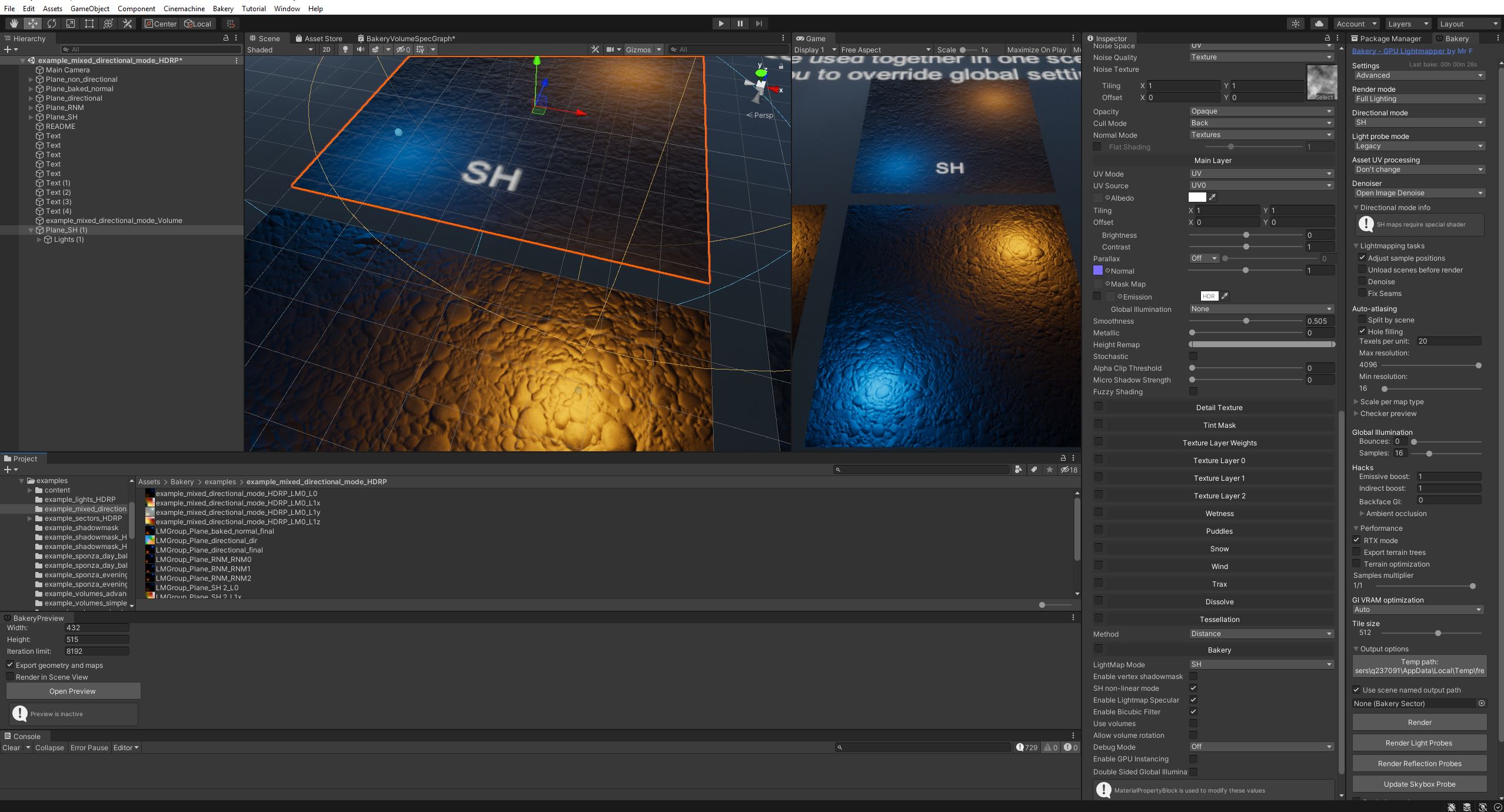
The Light Map Mode SH setting in the Better Lit UI seems not to work.
I compared the result with the Bakery Standard on BuiltInRP and it looks the same when i disable AllowSH Lightmaps there.
For any bakery questions you should ask Frank- he wrote the stackable used for integration… (It ships with Better Shaders as well, the idea being that any asset using Better Shaders to author it’s shaders gets an easy Bakery integration).
OK. I will do.
I leave this here to because of an compiler error in the shader.
Probably you have an idea.
Left
Bakery Standard BIRP, Unity 2019.3.11f
Right
BetterLit HDRP 10.5.0, Unity 2019.3.11f
Settings are all the same.
Set Albedo Color.
Set Normal Map.
Set Roughness 0,507
+
enable Lightmap Mode SH in your Better Lit


full list

Hmm, that’s from the bakery code but I’ll make it at least compile…
Step by step. Nice Job. This is a really powerful and transparent extension.
The Bakery integration on this level is also very helpful.
It s kind of a game changer for me for my mesh based driving tracks and cars.
i asked Mr.F here.
The compile error is gone but i cannot run the Bakery SH and Bakery Volume Demos with BetterLit.
Unity 2020.3.11f1, HDRP 10.5.0
latest Bakery updated (26.06)
latest BetterLit (26.06)
The first 3 Bakery BetterLit tests on Bakery Standard Demos went negative.
BetterLit SH Test , (example_mixed_directional_mode.scene and example_directional_SH.scene)
BetterLit Volume Shadowmask Test (example_volumes_simple_shadowmask.scene)
Bakery - GPU Lightmapper (v1.96) + RTPreview [RELEASED] page-106#post-7273978
Hi.
Unity 2020.3.11 LTS, HDRP 10.5.0
i am missing following Emissive paramter in the Better Lit
- Emission intensity (EV100, Nits)
- Exposure weight
- Emission multiply with …
from HDRP LIT Standard Shader

in the BetterLit Shader

Is it possible to add these?
Hi. Could you add an
Red Metallic
Green Occlusion
Blue Detail mask
Alpha Smoothness
Slot to the Mask Packer.
At the moment there a only these two fields available.
Or did i use it wrong?
Really helpful would be an invert from Rougness checkbox on the Smoothness field.

There are multiple packing options, select the one you want from the menu.
Hi. Sorry i dont get it.
I wanna pack a Mask Map with the Mask Packer
Metallic to Red
Occlusion to Green
Detail mask to Blue
Smoothness to Alpha
but there is only a Color and Smoothness Field
Probably i don t understand how to use Red,Gree,Blue,Alpha dropdown.
Oh, the mode was set wrong in the menu item, change MiniTexturePacker.cs lines 23-27 to:
[MenuItem("Window/Better Lit Shader/Pack Mask Map")]
      static void PackMask()
      {
         InlineTexturePackerWindow.DoWindow(Mode.FourChannel, "Metalic", "Occlusion", "Detail", "Smoothness");
      }
1 Like
Hi,
[RESOLVED]
Couldn’t get URP SSAO to work with Better Lit Shader. Discovered by trial and error than SSAO must be on Depth mode, not Depth Normals. Leaving a note here in case someone else has the same problem.


Some features requests:
-
Ability to make textures non-repeating. It’s very difficult to put useful grime textures on objects right now, because most grime textures start from the bottom and work their way up. On a building, this often means the ground gunk repeating halfway up the building or a wall, and there’s no good way to resolve it. It would be awesome to be able to disable texture repeating on texture layers.
-
Noise stretch. Puddles on roads tend to be stretched out because of natural grooves. The current puddle feature makes nice and round puddles in a way they don’t really ever appear on roads. It would be great if the noise texture could be stretched, ideally with an angle, or less ideally, in X or Y.
-
World space control textures. Things like snow, rain and wetness need to be controlled in world space, or there are abrupt changes where meshes line up. While you can insert a map to control where snow lands, this map isn’t in world space, and therefore not terribly useful for drawing things like snow accumulation. Ideally, I could draw a map from the top down of where snow accumulates, and project it into the snow mask in every shader. Then I could do intelligent snow accumulation, like not under a roof. I could even do a raycasting calculation and generate a texture of where snow can land.
Usually this is done through a second UV set. You can disable texture repeating on a texture via setting the texture to clamp mode, but I think what you are talking about here is having the texture repeat but only in one area, after some other area is displayed.
The texture mask, which has the snow mask in the alpha, can already be sampled in whatever space you want to sample it in. It doesn’t have a specific “projection area” you can set, as it was designed more like a noise function, and thus centered around 0,0,0 in the world.
But regarding the Snow Mask, this is still in the exact UV coordinates and tiling of each object. For example, here I’m using a noise gradient as the snow mask. This example if to put a circle of snow in the middle of the road. The road itself is made of multiple meshes, each with potentially different UV scaling. But the snow mask is strictly tied to the local UV coordinates of each mesh.
So you can’t do a world space map for where snow accumulates. One single map that works consistently across many meshes, just like noise can work in world space for puddles. Here I can’t scale the snow mask (the circle) without also scaling the snow texture. And since the intention is to cover snow accumulation across many meshes (street pieces, curb, grass, sidewalk, fence), it’s unlikely that even a single snow scaling will work for all objects. Small objects tend to have dense UVs, larger objects less so. And some objects repeat UVs.
So this is why the suggestion is whether you could allow mask sources to be in world space.

So the texture mask follows the space chosen by the main texture layer; so it can be in world space- but only if that layer is. What would be nice is to have a projection mode, where you can set the world space bounds of a texture projection. However, I’m currently at the 64 local keyword limit, so can’t add something like that without adding a small cost to every shader using the texture mask. (That limit is being removed in 2021, but that’s still a ways off). Having it just on the texture weight map wouldn’t be that bad, because when it’s not in use it wouldn’t have cost. Ideally, I’d have masks be separate for each feature with a channel selector- but that would require more keywords.