I want to compress the bounds of my tilemap, but I have no idea how to use this.

“I want to compress the bounds of my tilemap, but I have no idea how to use this.”
Is there a question? If you want to compress bounds, just run the command from inspector?
First of all, I found what I was looking for yesterday, and second, how about next time you explain how. I was searching for a gear icon at the top of the inspector, I had no idea that the compress tilemap button was inside the 3 dots next to where to says tilemap itself.
“how about next time you explain how.”
I’m not sure what you are talking about - by inspector I really meant what I said; from that particular tilemap’s inspector. Compress option is right there in gear icon menu of tilemap component, bottom most option “Compress tilemap bounds”.
Maybe you are in Unity 2019? I’m using still 2018.
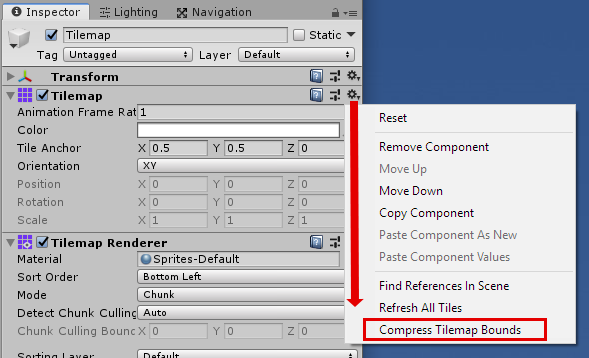
2 Likes