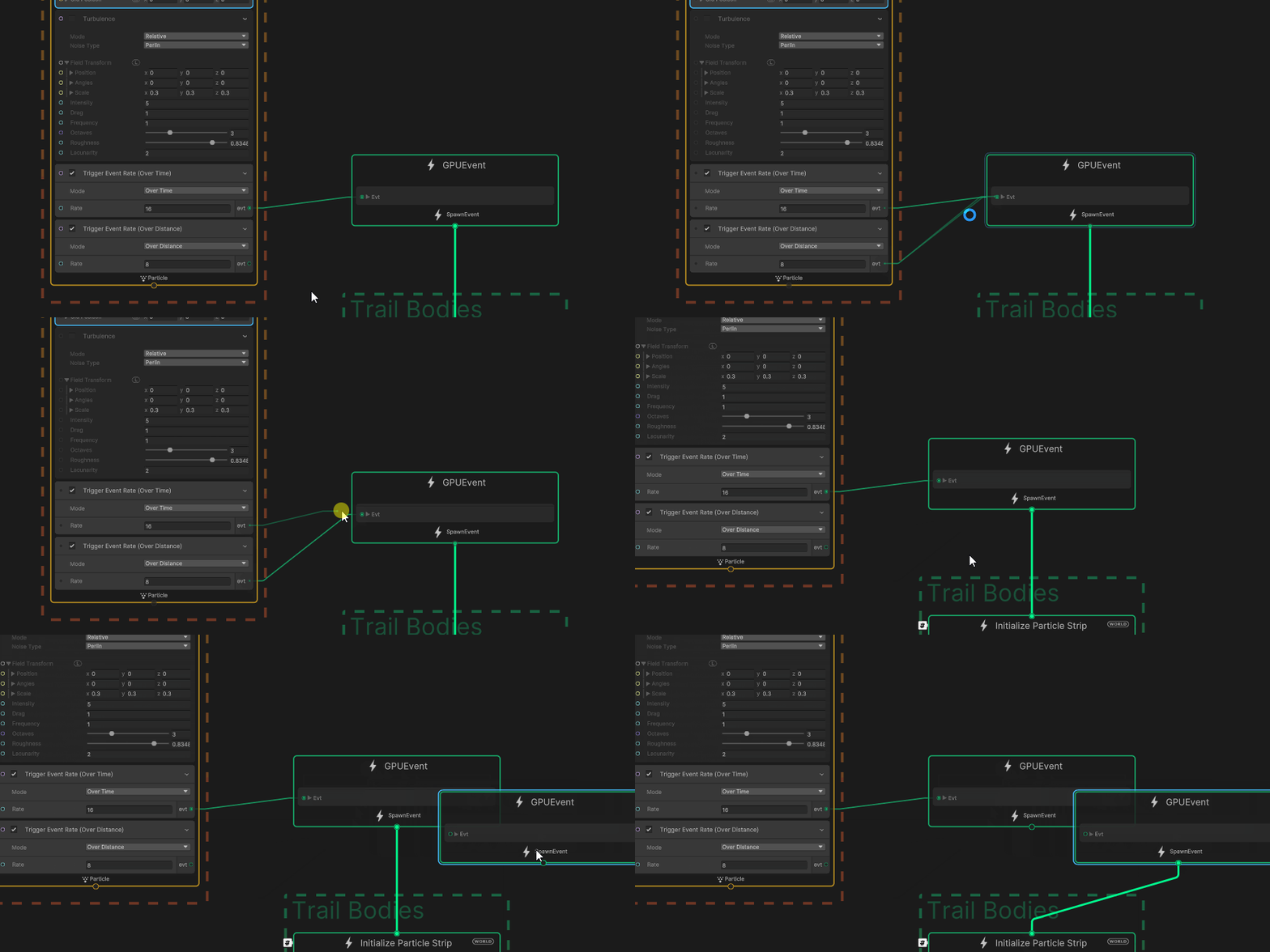
Is is possible to somehow wire two Trigger Event blocks into a gpu event?
I would like to emit over time and over distance, basically giving a steady emission for when the emitter is not moving and add additional particles when the emitter does move. Shuriken lets me do this, but apparently vfx graph isn’t as willing.
Okay I think I figured out a solution already. Calculate the over distance factor manually and add it to the over time factor. Not sure how good this really holds up though.
Morning. I’m not very familiar with Shuriken, but if I’m correct, you are comparing VFX Graph Trigger Event functionality with Shuriken’s Emission/spawn functionality.
In VFX Graph, the Spawn Context also allows you to emit particles based on Rate over Time and a Rate over distance.
For this, you need two sets of blocks: a Constant Spawn Rate and a Spawn Over Distance block. By doing so, you’ll be able, like in the Shuriken Emission section, to modulate the particle’s spawn rate based on Time and movement.
But as I said, you might be referring to other Shuriken’s functionality that I’m not aware of.
Now, what you want to do with trigger events is still valid and interesting. Your solution seems correct, but I think that instead of adding the Rate over distance and the Rate over time, I would do a max between the two.
Also, I’ll add that by default, the Trigger Event Overtime and Over Distance are clamped to one. Based on your needs, you might want to uncheck this.
You could also use the Trigger Event Always, which by default isn’t clamped, but you’ll need to re-create the logic for the time-based spawn rate.
This leads me to my last point. If you check the option “Show additional debug info” in Preferences> VFX.
You’ll be able to visualize the Computed Source Code in the Inspector when selecting a block.
This should allow you to easily replicate a block’s behavior with operators.
Good afternoon and thanks for the long explanation. Yes I am a bit mixing shuriken emission / spawn behaviour terminology with vfx trigger event behaviour. Let me explain.
I am creating a ribbon trail that drags behind the visual effect transform. Similar to the simple heads and trails setup I create a leading particle which does not age and always set it’s position to local (0, 0, 0). from that position feed a ribbon trail with a gpu event. The system is set to world space.
This could be smoke coming off a torch a character is carrying, similar to the trail renderer BUT with turbulence and forces etc. and in vfx graph.
In shuriken the geometry created for a ribbon is based on the amount of particles emitted by the system (basically every particle represents a pair of the vertex strip). With emit over time you get a nice steady, even amount of geometry, but when you move the emitter you need more ribbon geometry to avoid super long stretched triangles and not enough vertices in bends. Hence using both over distance and over time to mitigate that problem a bit.
You could probably set the over time rate to 60 or so or just use always and be okay with the dense geometry of the ribbon. But this way you can get away with fewer vertices :shrug:
Question: Is there a better way to make these kind of following ribbon trails in vfx graph that I don’t see?
The values are a bit extreme here but it gets the use case across: