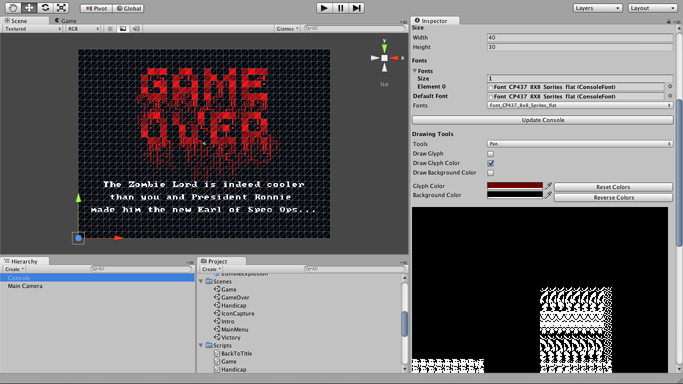
TrueColor CP437 is an ASCII rendering framework for Unity. It mainly consists in a text console mapped on a polygon. The default character sets are inspired by the original MS-DOS Code Page 437 character set. TrueColor CP437 offers everything you need to start developing any ASCII art based game.
Features :
free size ( not constrained to typical console sizes, like 80x24 for example )
comes with 3 default fonts : 8x8, 8x14 and 8x16 pixels
easily design and add new fonts of any size
can be drawn into within the Unity3D editor, like you would with any ASCII art editor
easily programmatically accessed through a simple and comprehensive API
TrueColorCP437 is available now on the Asset Store. Follow the link.
You can find an in depth documentation and a web demo here . Or you can directly ask questions at cp437@jaffarjaipercute.com.
This is pretty cool, but your images arent showing up, and the title doesnt really describe what it is. You should probably call it something like “ASCII Game Rendering Framework”. I also dont see a link to the asset store page. It would also be cool if this had a layer system (although I guess you could create your own layers just by stacking multiple consoles and using alpha?).
EDIT:
Looking at the web player demo I think you may have some uv issues on windows. It looks like the texture is being sampled a little bit off causing each sprite to be 1 pixel offset in the V axis:
compared to your screenshot: http://www.jaffarjaipercute.com/unity/truecolorcp437/Images/sc7.png
Thanks for your feedback. I’ll try to address each point one by one.
There was indeed a problem with the pictures. Fixed. Strange that they were showing on my other machine.
You are right about the post title. It does sound like I’m advertising an art package rather than a scripting package. Sadly, it seems like I can’t change the post’s title. I did update the description in the post’s body and on the web page.
Layers are in the works. Right now, you can’t have multiple consoles in the same scene because they would share the same material and drawing into one would immediately affect all the others. Also, more consoles means more draw calls.
I am also planning on adding a “real sprites” class to the package. Right now, there is a sprite feature but they are constrained to the console’s grid. I want to add sprites made from the character set but that can freely move around, rotate or zoom.
I am very concerned by the v-axis offset problem you mention. I can’t reproduce it here and I don’t have a windows machine. I’ll look into it asap.
Thanks again for the feedback. Feel free to ask more questions.
There was indeed a v-axis problem on windows. After digging a little bit in the forums I believe the problem comes from the differences between OpenGL ( Mac ) and DirectX ( Windows ).
I have a windows box set up now and I found a fix. The online demo was updated to demonstrate that.
I think I’ll be able to push a fixed version by tonight.
Awesome, is this capable of simply converting what you see into ascii? I mean can I buy this and drop it into my project and the entire thing will render like ascii art? or does it not work that way? Looks great, I hope it does!
I don’t think it converts the rendered camera into ASCII. From what I can tell, it provides a surface on which you can draw ASCII on. It won’t automatically convert a 3D screen to ASCII.
Indeed, as kenlem said, TrueColorCP437 doesn’t convert your scene render into ascii. It only lets you create a surface on which to draw ascii art either manually within the Unity editor or programmatically.
I believe it is however possible to do what you want using the “render to texture” feature which is sadly only available in Unity Pro. There are then several algorithms that can convert bitmap data to ascii art. For example : http://mattmik.com/articles/ascii/ascii.html
I hope this answers your questions. Fell free to ask more.