EDIT: As of Unity2.0’s shiny new GUI system, this post and code is pretty much redundant. If you want to build controls like dropdown combos and password fields, have a read up on compound controls and events in the manual or search the Unity GUI section of the forum.
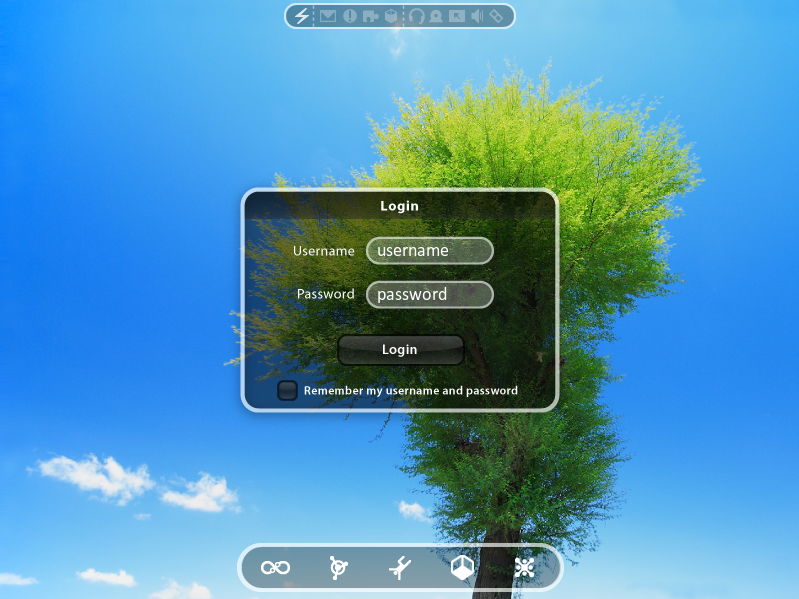
Thought I would share some recent work on a 2D GUI in Unity. Its taken some time to get it functional, as GUI dev in Unity is a very manual process.
Anyway - basic features are:
Buttons
Checkboxes
RadioBox style selection sets (bottom menu)
Icon Status bar
Normal, Rollover, Active (mousedown), Selected and Disabled states
Frozen state (can be seen after clicking login, dims and locks the login panel hierarchy)
Glow option (see the top left icon in the status bar)
Fade In/Out
Text Input - with MaxWidth limit on text
Textboxes and GUITexts know about eachother (i.e. when you click a textbox GUITexture, it activates the corresponding GUIText)
Text Masking for password fields (uses realtext vs. displayed text, plus a mask character)
AutoClear (i.e. “username” autoclears on click)
Draggable (try dragging the Login panel - thx to the Draggable GUI script in wiki )
Tab Control for Textboxes per Panel - Coming Soon (once i can sort the bugs out)
Progress/Loader panel (basic animation for a loading icon, plus display text - you can see it after clicking login)
Context Help / Tooltips (rollover the bottom menu options, they are tooltip GUITextures)
Why am I giving this list? Because I will post these classes on the Wiki shortly (in C#, sorry js guys).
Holy awesome! Looks really nice, and feels good too. Only problem I have is that the button is still activated if you mousedown over it and then mouseup somewhere else. Looking forward to using these classes, though.
That looks awesome!
On a note unrelated to UI, is that tree 2D or 3D? because if it is 3D I would love to know how you do it (it loads so fast and looks good).
Looks really nice. My only feedback would be you need a blinking insertion cursor and/or some way of knowing which input field you are in. Plus implementing the tab key would be cool. So you can tab from one field to the other.
AGhost - for GUI I keep everything in 2D - it makes things much simpler. for screen res changes, I have a positioning function in the class that can reposition elements proportionally.
Thylaxene - System caret would be good… but haven’t had time to code it up Tab control is done, but I have a weird bug that i havent been able to fix yet.
Wow, this project is really amazing. The rollover text is extremely impressive. Looking forward to seeing what you’ve got planned! And thanks so much for the (very generous) wiki contribution!
Sort of reminds me of iGlass for BlitzMax. Ahm one thing i’ve noticed is that you can pull the window outside the right and upper border but you can’t do this with the left and lower ones - stopping at half of the window’s size.
For these graphics the rollover effect for the radiobuttons isn’t noticeable this good. How do you calculate if a rollover happens? Do you calculated this depending on the size of a texture plus a given tolerance, do you define a seperate rectangle or lookup something like a alpha value?
thanks for the support guys - I will try to put the Wiki up ASAP.
@Taumel - the dragging issue is probably related to the settings of the Draggable GUI script from the Wiki (i didn’t spend much time tweaking it).
As for the Radio buttons, I’m not quite sure what you mean. The rollovers are not easy to see, or some other problem? The calculation is done just using the texture size, very simple
As for the Radio buttons, I’m not quite sure what you mean. The rollovers are not easy to see, or some other problem?
<<<
Nope, it’s just that gfx effect of the rollover is hard to see because the size of the radiobuttons is quite small compared to the the login button for instance. No biggy…
The calculation is done just using the texture size, very simple
<<<
Ah okay, i would have thought you’ve choosen somekind of offset because the interface already reacts if my pointer isn’t exactly already over a visual element. For a more easier access you often do this because a pixel exact interface is harder to use, so i thought you’ve used such a tolerance in any way… ;O)
Hmm will this also work with non rectangle buttons (PiP based)?
That is very very good. Am I supposed to be able to drag the window around by clicking anywhere? The only thing that makes it not feel like osx is that when I type my name in and hit tab it doesn’t then switch to the password field.
In my updated GUI dragging script, I attach it to a tiny texture stretched out across the title bar, with alpha = 0. Then you get all the mouse events, but you don’t see it. That way you can easily have dragging only on the title bar when your window is 1 whole texture.
 )
)