UnityEvent with dynamic parameters not showing anymore in the Unity inspector

Hi there!

I have a problem for a few days that didn’t exist before: UnityEvent no longer manages parameters. At first I thought it was related to the Unity version because I updated to 2019.3b, even returning in 2019.2.5f1 the problem exists.

As you can see in the image, the “dynamic” elements are no longer displayed and the type is not present next to the event name.

The code is extremely simple:

using System;
using UnityEngine;
using UnityEngine.Events;

[Serializable] public class VoidEvent : UnityEvent { }
[Serializable] public class BoolEvent : UnityEvent<bool> { }
[Serializable] public class IntEvent : UnityEvent<int> { }
[Serializable] public class StringEvent : UnityEvent<string> { }

public class Cube : MonoBehaviour
{
    [SerializeField] VoidEvent voidEvent = null;
    [SerializeField] BoolEvent boolEvent = null;
    [SerializeField] IntEvent intEvent = null;
    [SerializeField] StringEvent stringEvent = null;

    public void OnVoidEvent()
    {
        Debug.Log("OnVoidEvent");
    }

    public void OnBoolEvent(bool value)
    {
        Debug.Log($"OnBoolEvent {value}");
    }

    public void OnIntEvent(int value)
    {
        Debug.Log($"OnIntEvent {value}");
    }

    public void OnStringEvent(string value)
    {
        Debug.Log($"OnStringEvent {value}");
    }
}

I’ve tried the same code on another computer, the same problem exists. I’m on a mac using Visual studio code and Unity 2019.3b and 2019.2.5f1.

Edit: It works in Unity 2019.2.4f, look like it’s a regression

I’ve experienced the same problem.

Hello! This issue sounds very similar to another issue: Unity Issue Tracker - UnityEvent drawer no longer handles events in non-public fields correctly

This issue is already fixed in 2020.1.0a5, 2019.3.0b4 and above. Also, there is a backport opened for a review for 2019.2 stream. To work around this issue, you’ll have to upgrade to specified versions or above, or use 2019.2.4f1, since the regression was indeed introduced in 2019.2.5f1

Thank you for the clear response! I saw the issue on the issues tracker a bit late, sorry for the noise.

workaround:

    [SerializeField] VoidEvent voidEvent = null;
    [SerializeField] public BoolEvent boolEvent = null;
    [SerializeField] public IntEvent intEvent = null;
    [SerializeField] public StringEvent stringEvent = null;

This issue is not fixed in 2019.3.0b7, I’ve tested. So, I have to downgrade my project to 2019.2.4f1 (which I’ve tested and worked in a new test project) to make it work? I tried that, but doesn’t work for a variety of errors.

This completely destroyed the architeture of my project. Don’t say it was fixed in 2019.3.0b4 and above, because it’s simply not true.

Indeed it’s not fixed.

Dear Unity Team, I’m at a loss for how to continue developing my game due to this issue.

The linked issue is “Fixed” in versions 2019.2, 2019.3 supposedly (Unity Issue Tracker - UnityEvent drawer no longer handles events in non-public fields correctly). However, I’ve installed all Unity 2019 versions made available via the Unity Hub and all repro the issue (versions I’ve tried: 2019.3.0b7, 2019.2.9f1, 2019.2.7f2).

Hello again! It seems that the issue was only partially fixed, and in some cases, in particular when the class is derived from another class, the issue can still be reproduced. This issue is now being tracked, and you can follow its progress here: Unity Issue Tracker - UnityEvent drawer does not handle generic event parameters correctly when the class is derived from another class

The basic case seems to work in 2019.2.9 I can confirm. I was having the problem in 2019.2.6 and .9 fixed it.

This seems to be an issue with 2018.4.9f1 as well…

It’s in 2018.4 LTS as well.

5297610--531957--OnValueChanged.png

This is still an issue with the latest 2019.3.03f…

This does not show up in the inspector:

public class TextUnityEvent : UnityEvent<string>
    {
    }

Then in the class itself

public TextUnityEvent onErrorEvent;

Neither does this (directly in the behaviour class):

public UnityEvent<string> OnLoginError;

It has been several months… what are you doing???

Same to me too~ I always get the static value. Using Unity 2018.4.10f1

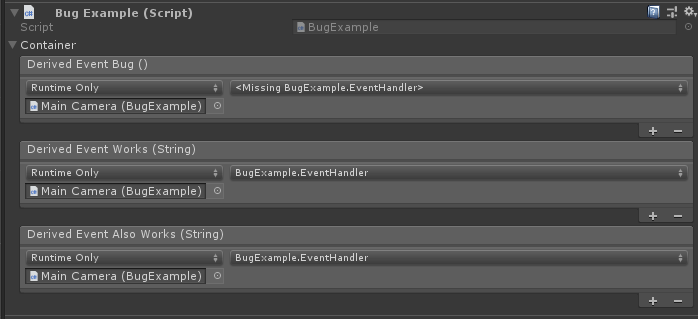
Same/or similar issue in 2019.2.17:

using UnityEngine;
using UnityEngine.Events;

/*
    UnityVersion: 2019.2.17
    Bug Description:
    Incorrect property-drawer is used for templated private fields in serializable classes.
  
*/

public class BugExample : MonoBehaviour
{
    [SerializeField] private DerivedEventContainer container;
}

[System.Serializable]
public class DerivedEvent : UnityEvent<string> {}

public abstract class EventContainer<TEvent>
{
    [SerializeField] private TEvent derivedEventBug;
  
    [SerializeField] public TEvent derivedEventWorks;
}

[System.Serializable]
public class DerivedEventContainer : EventContainer<DerivedEvent>
{
    [SerializeField] private DerivedEvent derivedEventAlsoWorks;
}

FYI seems fixed in 2018.4.16f1 :smile:

This has regressed in 2019.3.3f1.

Possible workaround:

  1. Change PlayerInput component’s Behavior to “Send Messages”
  2. In your custom class that is attached to the same GameObject as the PlayerInput component, add “On” before each action’s respective method and make sure to pass InputValue value as a parameter

Ex:
Action is called “Move”. Custom class has a method with a header that looks like: public void OnMove(InputValue value)

This worked for me in 2018.4.14f1

I ran across this same bug. Upgrading to 2020.1.0b4.3439 fixed it for me.