I cannot seem to find any solid information regarding this process:
I have created a Prefab in the Assets/Prefab folder that I created from an existing GameObject.
I can drag the new prefab into the scene to create a new GameObject fine.
What I want to do is to update the Prefabs based on any changes to the source mesh.
Everytime I have to alter the source mesh for some reason I cant figure out how to update the Prefabs without creating new prefabs.
Every information I find regarding this involves performing a bunch of steps and loop-holes. So I wonder if it is really worth the hassle of creating prefabs if it is possible the source mesh would ever change.
Changing the mesh should automatically update any prefabs or prefab instances that are using the mesh. The only thing I’ve found that doesn’t automatically update is if you add more (sub) meshes to the mesh.
Say I have a door model I imported from 3ds max. This model is just one mesh, the door itself. I add this into my scene and I add a rigidbody and hingejoint to it and configure it how I like it. I make a new prefab out of this in my prefabs folder. Any changes I do in 3ds max to this door mesh will automatically be reflected in my prefab.
But if I go into 3ds max and add another mesh to this model. For instance I want it to consist of both a frame and a door as separate meshes. I overwrite the model in Unity with this updated model. Now the prefab won’t automatically update. I think this is because separate (sub) meshes inside Unity are represented as game objects and Unity doesn’t want to mess with the hierarchy of your prefab. In this case I just add the new door mesh, which consists as both the door and the frame, to the scene and manually copy the changes I want to my existing prefab. This will trigger Unity to tell me that I’m losing the prefab connection, but as long as I overwrite my existing prefab in the prefabs folder when I’m done making changes to it all my existing prefab instances will be updated and it’ll all be good.
I understand what you are saying, BUT getting to the stage of updating the mesh in the prefab is what seems to not be possible. I can update the prefab’s mesh’s material and shaders as expected, but the issue is changing the MESH based the model changing (i.e. the blender mesh or Maya mesh, ect) is the problem.
This seems to be a problem that comes with 3ds max, though. I often create submeshes in Blender and after overwriting the .blend file the submeshes are created automatically, too.
@ArachnidAnimal :
Do you overwrite your mesh data? I mean, does the updated version of your mesh have the same name as the mesh that has been used before? And is it located in the same folder? Depending on the modeling software you use, it might create duplicates that are named differently.
I have some screen shots to show what I mean.
The first screen shot: I created a game obj from the external mesh file (int blender). I then create a pre-fab from it.
Then I go into blender and change the location of the text on the original model.
Screen shot 2 shows the game object created from the source file is updated OK as expected.
The PF was not. I need to get the PF updated. How do I do this? Ive tried “re-import”, revert, apply. There doesnt seem to be an option to do this.
How do I get all of the pre-fabs to update?
Thanks.
I don’t think Unity wants to mess with your prefabs when you add or change submeshes inside your 3d application. Unless Shushustorm knows of a fix I don’t think there is a way. Your problem is exactly what I was talking about.
As long as you work on 1 mesh so that you only get 1 game object in the hierarchy for your prefab everything will update fine, but when you create multiple sub meshes which Unity creates multiple game objects from it doesn’t update your prefab anymore.
I think this is intentional to avoid ruining your work. Take my door/frame example again.
Let’s say that I inside Unity have modified my prefab so it looks like this:
Frame (the source mesh from 3ds max)
Door (the sub mesh from 3ds max)
– Handle (a game object I manually created inside Unity)
– Lock (a game object I manually created inside Unity)
If I later went into 3ds max or Blender and updated the mesh for this object (only frame and door have meshes) I wouldn’t want Unity to overwrite my entire prefab and delete Handle and Lock.
If you don’t need your sub meshes to actually move independently inside Unity you can just merge them all into one mesh inside Blender. That way they’ll import as one mesh into Unity. To get different colors/materials for each part just use multiple material ids.
(I was actually trying to reply to YOUR post, but i clicked on the wrong “reply” button, sorry).
ok, thanks for the explanation. I guess im just going to try to avoid creating the prefabs from now on because it seems they operate differently or are used for a different purpose from what i assumed. it seems just duplicating existing game item is a better approach for me, then i know the meshes will automatically be updated. As far as joining the items in Blender, i think that would cause more headaches inside blender if you have to move things around or re-scale in blender.
thanks.
Maybe I understand this wrong? But take a look at the screenshots I uploaded here.
Updating submeshes from Blender does work. When I add meshes, they will appear and when I delete meshes, they will be gone in Unity. Even updating the material works.
The only thing that is not imported is the diffuse value. And that’s probably because the standard shader doesn’t have one.
@Shushustorm Yeah, that’s what I mean with submeshes, but is that the default prefab you get when you drag your model into your scene or a custom prefab? I think TTTTTa says that it works with the default prefab, but not with a custom one.
I’ve never actually tried using the default prefab. I will have to test when I get off work if that’s feasible or not. My normal workflow is to drag the model into the scene to get a default prefab. Then I add extra game objects to it it, colliders, rigidbody components, scripts, lights etc. And then I take that prefab and create a new custom prefab in my prefabs folder.
If I later update the mesh my custom prefab won’t update correctly.
Perhaps I’m doing it wrong. Like I said, I will check when I get home.
maybe that is the approach i need to take. I am new at unity: the problem i had is I had 300 gameobjects in a scene. half of them were just duplicates of non-PFs. The other half were duplicates of Pre-fabs. So only half of them were changing when i updated the blender mesh and I didn’t realize what was happening until later.
@TwiiK :
I do actually think TTTTTa used a default prefab because the whole prefab is blue. So everything is referencing something. Or are those prefabs supposed to be made of multiple 3d-files?
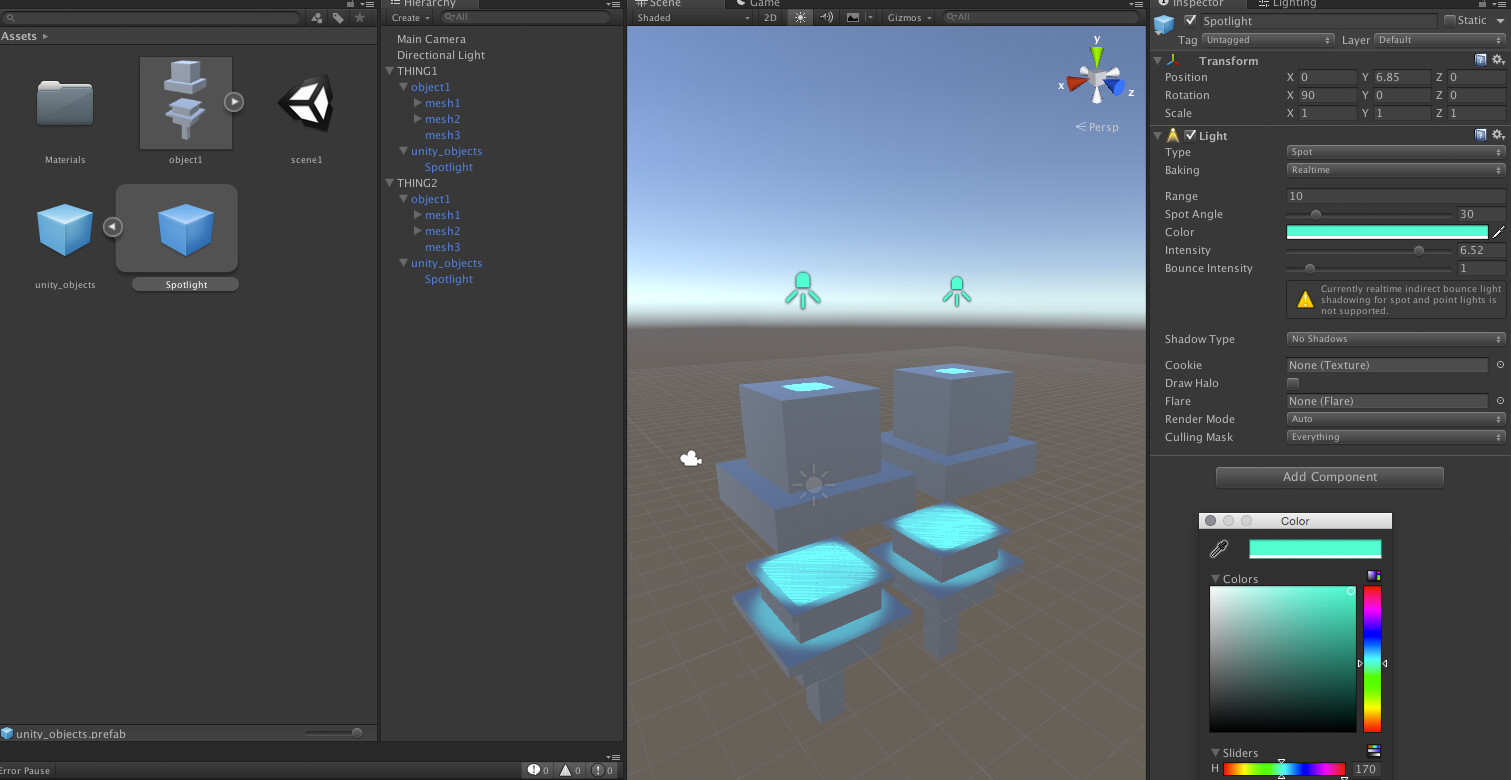
But yes, the first thing I do is throwing the .blend into the scene. Afterwards, I am also able to add Unity-objects (in the example below a spotlight) to the prefab and update the mesh in Blender afterwards resulting in an updated prefab in Unity which still contains the Unity object.
Also, in this example the .blend (“test”) becomes the main object of the prefab because there is only one object in the .blend.
Well, you should plan ahead when you want to use prefabs. I don’t really know an easy way to replace duplicated objects with prefabs that are created afterwards. You could paste the prefab to the same transform, but that’s rather tedious. So basically, if you want an object all over the scene, you should start with a prefab and place the prefabs afterwards. The prefab doesn’t have to be finished, of course. Unity just has to know which prefab you are placing where while still allowing you to edit the prefab file whenever you want.
@Shushustorm I just tested what you said, but there is no “Apply”. Meaning you can’t save your Spotlight to your prefab without actually creating a new custom prefab which will not be updated with future mesh changes. So in other words it’s not a proper prefab. You can’t create instances of it etc.
Instead of “Apply” you have “Open” which I guess opens the model in Blender if you import a blend file? I only use fbx files so it does nothing.
Edit: But I think nested prefabs is something that’s on the roadmap for Unity 5.x if I’m not entirely mistaken. That could be used to solve something like this. The default mesh “prefab” would just be a child inside your custom prefab which housed all the custom Unity stuff.
I’m pretty sure we are talking past each other, maybe because we use different workflows.
But I guess I know what you mean now. And yes, you’re right. That doesn’t seem to work.
I just tested dragging the in-scene prefab into the assets, which makes the spotlight a prefab, too.
Then, I could put the .prefab into the scene, but after changing the original mesh, only the original in-scene prefab would update. I guess it’s because .prefabs don’t look for changes of the referenced meshes?
Anyway, I don’t really see why you would do that. I mean, putting Unity-objects like lights into a prefab of a 3d-model. I mean, those objects cannot be batched, right? So there wouldn’t be any benefit in terms of performance. Also, I don’t think anyone would want to build geometry in Unity internal to add polygons to a 3d-file. So how do you use it? Or did I misunderstand the whole concept of prefabs and only .prefabs can be batched? Because as far as I know, when I use .blends in my scene and duplicate them, those can be batched, too.
So basically, if I would want to add a light to each mesh of a certain object, I wouldn’t create a .prefab, but rather use the .blend as a prefab and add the Unity light to that .blend object in the scene. Then, I can duplicate them all over the scene which allows me to change the in-scene objects when updating the .blend.
I hope this doesn’t get too confusing now
Here is an image that shows how I would approach this:
EDIT:
Alright, I just realized you might want to change the light intensity or color for all the objects. Then, you really should make a prefab of it.
EDIT2:
In that case I would make a separate prefab for Unity-objects only and put that .prefab and the .blend under a new parent. Then you can duplicate the new parent while still being able to access all the Unity prefabs and change the geometry. The following screenshot shows what I mean:
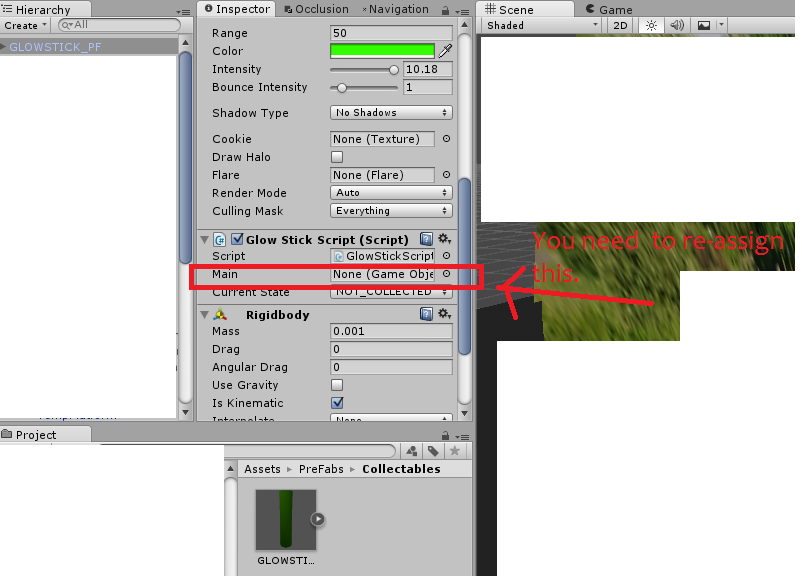
This is why I am not going to use pre-fabs anymore. I think the best approach is to initially create a game object from a pre-fab if you are creating a brand-new scene. Then make changes to the gameObject instance if needed. Then if you need more of them, just duplicate the gameObject now, dont try to re-add the same prefab to the scene. I think this is kind of what how unity intended prefabs to be used: to initially create a single gameobject from a pre-fab for the first time in the scene. . I could be wrong, but there is too much hassle here involved. Also, I found another setback with prefabs: every time you create a gameobject with an attached script from a pre-fab, you have to re-assign public variables to the script via inspector. Whereas, if you create a gameobject instance from the pre-fab, re-assign any public variables in inspector, you can duplicate the gameObject and dont have to worry about re-assigning the variables. But everytime you drag a prefab into a scene, you have to re-assign the script variables. not worth the hassle.
I guess you could copy the component values of the script from one of them, select all the other prefabs and paste the values there. So you don’t have to set each value of each object individually.
I just tried what you said and it worked. You can change your prefab as much as you want as long as you don’t change the hierarchy of the mesh object. So just putting the mesh as a child of your prefab like you said works. I just realized that’s how all my skinned characters have been setup by default.
It’s very fiddly though. The moment you change something in the mesh hierarchy the connection is broken it seems.
I’m creating a modular environment for my Ludum Dare game so being able to set up a module with lights, colliders etc. only once, but still being able to iterate on the mesh of it in 3ds max was crucial.
Edit: Suddenly it stopped working. I hope we get better support for this in the future with nested prefabs etc.
i just wish that Unity could add some wizard to allow the user to update a prefab and all instances of it based on the latest mesh changes in the hierarchy, if the user wants to do that. I know that would solve all of my problems.