Maybe I’m misunderstanding something simple here, but I just upgraded to Unity 5.2 this morning and I’m now having several issues with many of my UI buttons.
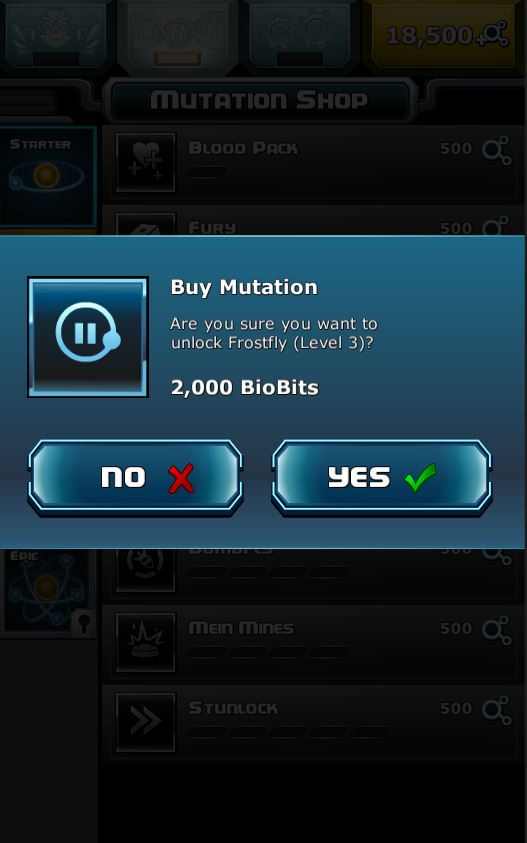
After troubleshooting for about 3 hours I discovered that some of my buttons fail because the touch seems to interact with objects beneath the layer my button is on. This was previously never a problem. In the screenshot below, there are areas of the Yes and No buttons that don’t respond because it seems the click / touch interacts with objects beneath the popup menu.
In this example, I have a Confirm screen with a semi transparent disabler background that previously prevented interaction with the objects below. Now with 5.2 it seems that in some odd cases a touch can interact with objects below the disabler… weird.
I’m going to continue experimenting to provide more clarity here, but if anyone knows something simple that changed in 5.2 that would cause this issue please let me know.
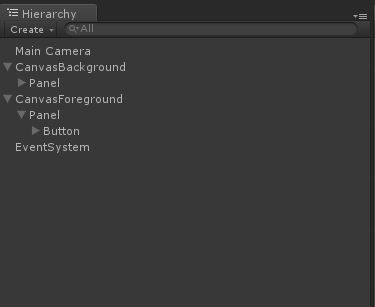
Canvas Foreground:
Contains the blue popup menu and semi-transparent black disabler screen
Canvas Background:
Contains the shop options that you see in the background.
It seems that the “Yes” / “No” button problem can be fixed by unchecking the “Raycast Target” on the Image component in the gameobjects in the background. That of course is not a viable solution since those objects need to remain interactable.
I must be missing something simple that has changed in 5.2. Will keep digging.
Hi Titan having the same issue. Finally got other scripts upgraded to 5.2 and now all my button clicks don’t work. I don’t really have the option to use Overlay as I have particles that are part of my UI. Any more information on this at all? I will keep digging around to see what I will find but need this sorted. Seems like a huge oversight if this is a bug.
Clearly the tabs at the top of the interface are in front. In this example, the black gradient (setup as an Image component) on the rear layer had the “Raycast Target” checkbox checked by default. If checked, none of the buttons in the foreground work.
Maybe not related, but after upgrading my project to 5.2 mouse stopped interacting with buttons. Fixed this by removing checkbox “Force Module Active” in EventManager’s Touch Event Module (script) gameobject.
My setup is having multiple canvas’
one for common UI (including back, home and help buttons)
another for standard views
another for popups
It seems all touches are hitting the popup before hitting the common UI even though the sorting layer, and hierarchy order means the touches / mouse input should hit the common > Popup > standard.
Been bashing my head against this for a while and for now means I will roll back to 5.1 but there are some horrible bugs that 5.2 fixed.
Will have to look into this more tomorrow when I have brain power.
Will post on here if I find a fix or will create a test project and submit a bug report.
I have the same issues with buttons and also DropComponent stop working for me (it looks like another panel must block the one with DropComponent), I have to dig in later. For now I rolled back to 5.1.3.
I don’t think that is related, I did try recreating the EventSystem component just to see but no change… still having issues. If I can’t figure it out in the next few hours I will be rolling back to 5.1.3
i already report it. i guess you guys miss include this one from previous version.
check eventsystem’s raycastcomparer. when i check the bitbucket unlike web source, zip version has a bug which was existed before 5.1.
If you click the Foreground button in the area that overlaps the Background button, you’ll notice that foreground button doesn’t work. It seems related to how many panels nested the button is within the hierarchy. You’ll notice this difference in my two projects.
I managed to solve my problem by following @Shii advice (touch module). I had another eventsystem being created at runtime, which is weird (we use several scenes merged together, it may come from that).
Seems related to touch control in some ways.