When I Open the PackageManager ,it always can’t refresh properly,I try to switch off/on proxy,sign off and then sign on,
I even delete the UnityHub and UnityEditor,
I turn off all the firewall

I try to delect the manifest.json
I use those cmd behind

- @ off
- set HTTP_PROXY=proxy-url
- set HTTPS_PROXY=proxy-url
- start “” “C:\Program Files\Unity Hub\Unity Hub.exe”
,I tried many many ways
but it always have error,
When I chick the  the v2rayN console display
2023/01/04 21:12:53 [Warning] [1977508083] app/proxyman/inbound: connection ends > proxy/http: failed to read http request > malformed HTTP request “\x16\x03\x01\x01u\x01\x00\x01q\x03\x03~TY\x01B\xa2m\x0e\x9f@V\x90C\x8c\xba\xa4@əȒ\x9a$\xd6_薑}\xe5\xd8\xe4 \x03wD\xb9\xec\xd4\xddͿ\x9279\x982\xbfC\xcdK\xe1\x01Ȯ\x90|\xef\xe9N\f{\x13i\x92\x00v\x13\x02\x13\x03\x13\x01\xc0/\xc0+\xc00\xc0,\x00\x9e\xc0’\x00g\xc0(\x00k\x00\xa3\x00\x9f̨̩̪\xc0\xaf\xc0\xad\xc0\xa3\xc0\x9f\xc0]\xc0a\xc0W\xc0S\x00\xa2\xc0\xae\xc0\xac\xc0\xa2\xc0\x9e\xc0\\xc0`\xc0V\xc0R\xc0$\x00j\xc0#\x00@\xc0”
2023/01/04 21:12:54 127.0.0.1:54163 accepted //cdp.cloud.unity3d.com:443 [http → proxy]
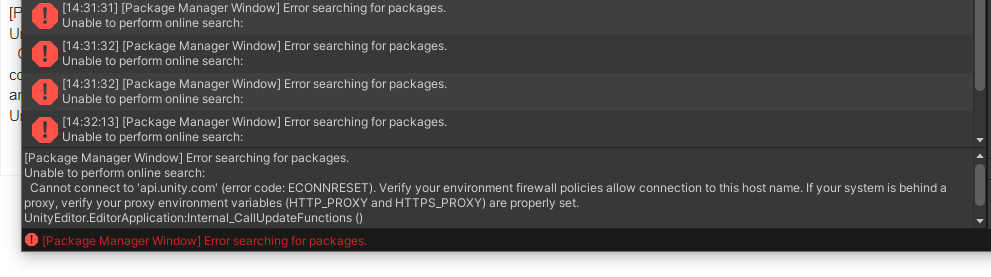
I try to change the v2rayN vision and the UnityEditior Vision ,But I find the malformed HTTP request error always happen,and the Unity Console always display :
"
[Package Manager Window] Error searching for packages.
Unable to perform online search:
Cannot connect to ‘api.unity.com’ (error code: ECONNRESET). Verify your environment firewall policies allow connection to this host name. If your system is behind a proxy, verify your proxy environment variables (HTTP_PROXY and HTTPS_PROXY) are properly set.
UnityEditor.EditorApplication:Internal_CallUpdateFunctions ()
"
I’m surely think it not the mistake of firewall because its had turned off,and proxy environment variables I have properly setting 
I use the Unity Package Manager Diagnostics and I got this log
upm-diag.log:
[2023-01-04T13:11:28.214Z][INFO] Opened report file ‘C:\Users\87247\upm-diagnostic-report.txt’
[2023-01-04T13:11:28.215Z][INFO] Starting diagnostics
[2023-01-04T13:11:28.216Z][INFO][UpmRegistryReachable] Sending HEAD request to https://packages.unity.com
[2023-01-04T13:11:51.577Z][ERROR][UpmRegistryReachable] Error: tunneling socket could not be established, cause=connect ETIMEDOUT 211.162.78.10:80
[2023-01-04T13:11:51.580Z][INFO][PingUpmRegistry] Starting ping test on ‘http://packages.unity.com/com.unity.package-manager.metadata’
[2023-01-04T13:11:51.581Z][ERROR][PingUpmRegistry] Error: Invalid protocol: 127.0.0.1:
[2023-01-04T13:11:51.582Z][ERROR][PingUpmRegistry] Error: Invalid protocol: 127.0.0.1:
[2023-01-04T13:11:51.583Z][ERROR][PingUpmRegistry] Error: Invalid protocol: 127.0.0.1:
[2023-01-04T13:11:51.583Z][ERROR][PingUpmRegistry] Error: Invalid protocol: 127.0.0.1:
[2023-01-04T13:11:51.583Z][ERROR][PingUpmRegistry] Error: Invalid protocol: 127.0.0.1:
[2023-01-04T13:11:51.584Z][ERROR][PingUpmRegistry] Error: Invalid protocol: 127.0.0.1:
[2023-01-04T13:11:51.584Z][ERROR][PingUpmRegistry] Error: Invalid protocol: 127.0.0.1:
[2023-01-04T13:11:51.584Z][ERROR][PingUpmRegistry] Error: Invalid protocol: 127.0.0.1:
[2023-01-04T13:11:51.585Z][ERROR][PingUpmRegistry] Error: Invalid protocol: 127.0.0.1:
[2023-01-04T13:11:51.585Z][ERROR][PingUpmRegistry] Error: Invalid protocol: 127.0.0.1:
[2023-01-04T13:11:51.585Z][ERROR][PingUpmRegistry] Error: Invalid protocol: 127.0.0.1:
[2023-01-04T13:11:51.585Z][ERROR][PingUpmRegistry] Error: Invalid protocol: 127.0.0.1:
[2023-01-04T13:11:51.586Z][ERROR][PingUpmRegistry] Error: Invalid protocol: 127.0.0.1:
[2023-01-04T13:11:51.586Z][ERROR][PingUpmRegistry] Error: Invalid protocol: 127.0.0.1:
[2023-01-04T13:11:51.586Z][ERROR][PingUpmRegistry] Error: Invalid protocol: 127.0.0.1:
[2023-01-04T13:11:51.586Z][ERROR][PingUpmRegistry] Error: Invalid protocol: 127.0.0.1:
[2023-01-04T13:11:51.586Z][ERROR][PingUpmRegistry] Error: Invalid protocol: 127.0.0.1:
[2023-01-04T13:11:51.587Z][ERROR][PingUpmRegistry] Error: Invalid protocol: 127.0.0.1:
[2023-01-04T13:11:51.587Z][ERROR][PingUpmRegistry] Error: Invalid protocol: 127.0.0.1:
[2023-01-04T13:11:51.587Z][ERROR][PingUpmRegistry] Error: Invalid protocol: 127.0.0.1:
[2023-01-04T13:11:51.587Z][ERROR][PingUpmRegistry] Error: Invalid protocol: 127.0.0.1:
[2023-01-04T13:11:51.588Z][ERROR][PingUpmRegistry] Error: Invalid protocol: 127.0.0.1:
[2023-01-04T13:11:51.588Z][ERROR][PingUpmRegistry] Error: Invalid protocol: 127.0.0.1:
[2023-01-04T13:11:51.589Z][ERROR][PingUpmRegistry] Error: Invalid protocol: 127.0.0.1:
[2023-01-04T13:11:51.589Z][ERROR][PingUpmRegistry] Error: Invalid protocol: 127.0.0.1:
[2023-01-04T13:11:51.589Z][ERROR][PingUpmRegistry] Error: Invalid protocol: 127.0.0.1:
[2023-01-04T13:11:51.589Z][ERROR][PingUpmRegistry] Error: Invalid protocol: 127.0.0.1:
[2023-01-04T13:11:51.589Z][ERROR][PingUpmRegistry] Error: Invalid protocol: 127.0.0.1:
[2023-01-04T13:11:51.589Z][ERROR][PingUpmRegistry] Error: Invalid protocol: 127.0.0.1:
[2023-01-04T13:11:51.590Z][ERROR][PingUpmRegistry] Error: Invalid protocol: 127.0.0.1:
[2023-01-04T13:11:51.591Z][INFO][PingUpmDownload] Starting ping test on ‘http://download.packages.unity.com/com.unity.package-manager.metadata/-/com.unity.package-manager.metadata-0.0.1.tgz’
[2023-01-04T13:11:51.592Z][ERROR][PingUpmDownload] Error: Invalid protocol: 127.0.0.1:
[2023-01-04T13:11:51.594Z][ERROR][PingUpmDownload] Error: Invalid protocol: 127.0.0.1:
[2023-01-04T13:11:51.594Z][ERROR][PingUpmDownload] Error: Invalid protocol: 127.0.0.1:
[2023-01-04T13:11:51.594Z][ERROR][PingUpmDownload] Error: Invalid protocol: 127.0.0.1:
[2023-01-04T13:11:51.594Z][ERROR][PingUpmDownload] Error: Invalid protocol: 127.0.0.1:
[2023-01-04T13:11:51.594Z][ERROR][PingUpmDownload] Error: Invalid protocol: 127.0.0.1:
[2023-01-04T13:11:51.595Z][ERROR][PingUpmDownload] Error: Invalid protocol: 127.0.0.1:
[2023-01-04T13:11:51.595Z][ERROR][PingUpmDownload] Error: Invalid protocol: 127.0.0.1:
[2023-01-04T13:11:51.595Z][ERROR][PingUpmDownload] Error: Invalid protocol: 127.0.0.1:
[2023-01-04T13:11:51.595Z][ERROR][PingUpmDownload] Error: Invalid protocol: 127.0.0.1:
[2023-01-04T13:11:51.595Z][ERROR][PingUpmDownload] Error: Invalid protocol: 127.0.0.1:
[2023-01-04T13:11:51.595Z][ERROR][PingUpmDownload] Error: Invalid protocol: 127.0.0.1:
[2023-01-04T13:11:51.596Z][ERROR][PingUpmDownload] Error: Invalid protocol: 127.0.0.1:
[2023-01-04T13:11:51.596Z][ERROR][PingUpmDownload] Error: Invalid protocol: 127.0.0.1:
[2023-01-04T13:11:51.596Z][ERROR][PingUpmDownload] Error: Invalid protocol: 127.0.0.1:
[2023-01-04T13:11:51.596Z][ERROR][PingUpmDownload] Error: Invalid protocol: 127.0.0.1:
[2023-01-04T13:11:51.596Z][ERROR][PingUpmDownload] Error: Invalid protocol: 127.0.0.1:
[2023-01-04T13:11:51.596Z][ERROR][PingUpmDownload] Error: Invalid protocol: 127.0.0.1:
[2023-01-04T13:11:51.597Z][ERROR][PingUpmDownload] Error: Invalid protocol: 127.0.0.1:
[2023-01-04T13:11:51.598Z][ERROR][PingUpmDownload] Error: Invalid protocol: 127.0.0.1:
[2023-01-04T13:11:51.598Z][ERROR][PingUpmDownload] Error: Invalid protocol: 127.0.0.1:
[2023-01-04T13:11:51.598Z][ERROR][PingUpmDownload] Error: Invalid protocol: 127.0.0.1:
[2023-01-04T13:11:51.598Z][ERROR][PingUpmDownload] Error: Invalid protocol: 127.0.0.1:
[2023-01-04T13:11:51.599Z][ERROR][PingUpmDownload] Error: Invalid protocol: 127.0.0.1:
[2023-01-04T13:11:51.599Z][ERROR][PingUpmDownload] Error: Invalid protocol: 127.0.0.1:
[2023-01-04T13:11:51.599Z][ERROR][PingUpmDownload] Error: Invalid protocol: 127.0.0.1:
[2023-01-04T13:11:51.599Z][ERROR][PingUpmDownload] Error: Invalid protocol: 127.0.0.1:
[2023-01-04T13:11:51.600Z][ERROR][PingUpmDownload] Error: Invalid protocol: 127.0.0.1:
[2023-01-04T13:11:51.600Z][ERROR][PingUpmDownload] Error: Invalid protocol: 127.0.0.1:
[2023-01-04T13:11:51.600Z][ERROR][PingUpmDownload] Error: Invalid protocol: 127.0.0.1:
[2023-01-04T13:11:51.601Z][INFO][UpmRegistryDownloadSpeed] Starting speed test with UPM registry
[2023-01-04T13:12:14.934Z][ERROR][UpmRegistryDownloadSpeed] Error: tunneling socket could not be established, cause=connect ETIMEDOUT 211.162.78.10:80
[2023-01-04T13:12:14.944Z][INFO][UpmHealthCheck] Starting health check
[2023-01-04T13:12:19.957Z][INFO] Finished diagnostics
[2023-01-04T13:12:19.957Z][INFO] Created report at ‘C:\Users\87247\upm-diagnostic-report.txt’
upm-diagnostic-report.txt:
Unity Package Manager Diagnostics (v0.3.0)
Ran 7 checks
1 succeeded
5 failed
1 did not run
 UPM registry reachable (FAIL)
Make an HTTP request to the UPM package registry
Connection error. This could be because a proxy is misconfigured.
Ping UPM registry (FAIL)
Measure the latency of the UPM package registry API
No successful pings could be made in 0.01 seconds (30 failed)
Ping UPM download (FAIL)
Measure the latency of the UPM package download endpoint
No successful pings could be made in 0.009 seconds (30 failed)
UPM registry download speed (FAIL)
Test the Internet connection using the UPM package registry
Connection error. This could be because a proxy is misconfigured.
 HTTP proxy environment variables (PASS)
Detect whether proxy-related environment variables are set (HTTP_PROXY, HTTPS_PROXY, ALL_PROXY, NO_PROXY, UNITY_PROXYSERVER, UNITY_NOPROXY)
Proxy support has been configured through the following environment variables:
HTTPS_proxy = 127.0.0.1:10809
HTTP_proxy = 127.0.0.1:10809
 System Proxy configuration (UNKNOWN)
Detect proxy configuration at the system level
The proxy auto configuration feature is not enabled.
UPM health check (FAIL)
Start the UPM process and call its health endpoint
Server started but did not respond to health requests:
Error: Invalid protocol: 127.0.0.1:
Can someone Know how to fix the problem?