I updated from 2017 to 2019 Unity and the opening graphic selection screen isn’t there anymore in Windows builds.
I tried to find out what happened to it and couldn’t find anything on the internet.
Did they remove it from Unity entirely?
I updated from 2017 to 2019 Unity and the opening graphic selection screen isn’t there anymore in Windows builds.
I tried to find out what happened to it and couldn’t find anything on the internet.
Did they remove it from Unity entirely?
Yes.
Another question that now is coming up from the players.
In 2017 full screen was FULLSCREEN and it covered the entire monitor.
Now it is not. It goes full screen but it doesn’t cover the windows task bar or the windowed bar that has the Max Min and close buttons. It is causing problems.
If you have max min etc buttons you are in windowed mode still, no?
So This is how it is supposed to look like and looks like under Unity 2017. In this case I had to hide the windows task bar to get it like this. I did set the Unity 2019 to full screen exclusion too.

This is what it actually looks like when I don’t hide the windows task bar. Full screen should be full screen.
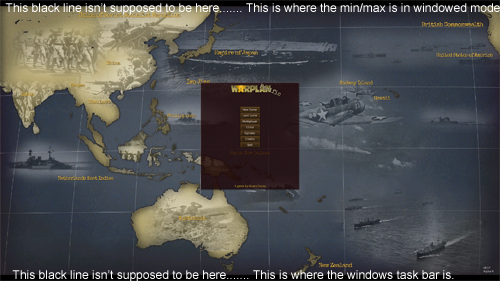
Well if anyone finds this I resolved it. You have to manually set the resolution and then full screen.
If you try and max window and full screen it keeps the bars of the taskbars and isn’t true full screen.