WSA 8.1 Memory issue when going back to menu

Code execution stops when trying to back to menu:
VS2013 Unity 4.7.2 targeting WSA 8.1

I execute this code:

        Application.LoadLevel(escapeScene);
        Debug.Log("ESCAPE_3");

So “escape 3 gets printed” but menu does not load.

ESCAPE_3

(Filename: C:/buildslave/unity/build/artifacts/MetroSupportGenerated/UnityEngineDebug.cpp Line: 62)

DynamicHeapAllocator out of memory - Could not get memory for large allocation
Could not allocate memory: System out of memory!
Trying to allocate: 183026070B with 4 alignment. MemoryLabel: NewDelete
Allocation happend at: Line:0 in Overloaded New
Memory overview

[ ALLOC_DEFAULT ] used: 424413300B | peak: 0B | reserved: 479893522B
[ ALLOC_GFX ] used: 101996089B | peak: 0B | reserved: 121966319B
[ ALLOC_CACHEOBJECTS ] used: 3038992B | peak: 0B | reserved: 12582912B
[ ALLOC_TYPETREE ] used: 0B | peak: 0B | reserved: 0B
[ ALLOC_PROFILER ] used: 760284B | peak: 0B | reserved: 12582912B
Could not allocate memory: System out of memory!
Trying to allocate: 183026070B with 4 alignment. MemoryLabel: NewDelete
Allocation happend at: Line:0 in Overloaded New
Memory overview

[ ALLOC_DEFAULT ] used: 424413300B | peak: 0B | reserved: 479893522B
[ ALLOC_GFX ] used: 101996089B | peak: 0B | reserved: 121966319B
[ ALLOC_CACHEOBJECTS ] used: 3038992B | peak: 0B | reserved: 12582912B
[ ALLOC_TYPETREE ] used: 0B | peak: 0B | reserved: 0B
[ ALLOC_PROFILER ] used: 760284B | peak: 0B | reserved: 12582912B

(Filename: C:/buildslave/unity/build/Runtime/Allocator/MemoryManager.cpp Line: 920)

Template.exe ha desencadenado un punto de interrupción.

Stracktrace looks like this:
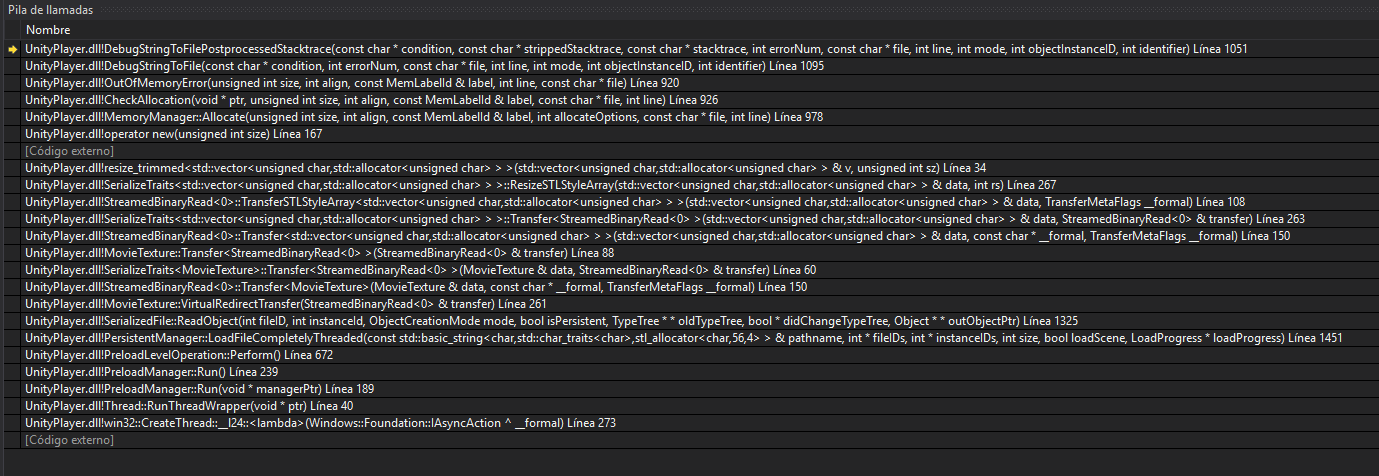
When I double click in stack grace it says:

Source code not found , you must loop up logassert.cpp to see the source code…
But I cant find it and I don´t see any post with same issue :\

So far, in the project properties I get not to search the following source code files:

c:\buildslave\unity\build\runtime\allocator\allocationheader.h
c:\buildslave\unity\build\runtime\camera\shadows.cpp
c:\buildslave\unity\build\runtime\utilities\logassert.cpp
c:\buildslave\unity\build\runtime\allocator\memorymanager.cpp

At some point or another I’ve seen requests for theese to be found, should I edit this list?

3386375--266078--upload_2018-2-9_19-48-33.png

Does this happen on any other platform? What’s the memory usage like at the time of the crash? Could you just be running out of memory?

No, this is the first time it happens, its been on Steam like for a year and in editor all works fine.
Not sur eif this is to be read like this but the memory values in console if you substract used to reserved non goes avore reserved.
In task manager the game uses about 1gb of ram and there is like 16gb 1080 gpu that for sure does not get cloged.
Further happens when going back to menu, and menu itself is a simple thing.

It feels more like fails to unload the current scene in the process of loading the new one :\

What about the memorymanager.cpp what are theese cpp file, are they important cause the name itself sounds like it would be related to the issue.

Similar issue when changing scene:

These are Unity source code files. We do not distribute them.

Is your steam game 32-bit?

Yes it is 32.

I did some tests.

Game has online and ofline. So you choose that in main menu, the main menu is where you are expected to go back when you exit gameplay in offline (the moment it fails).

So you enter online lobby, if you go back to main menu before entering gameplay, it is ok. So you enter again for an online play, setup a match join and you exit game and go back, and game does not crash becasue it goes back to lobby in online mode. But, from lobby at that moment if you bo back to menu it does crash :\

I did a new fake menu scene, empty with single cam and yellow bkg, I can back in ofline to that fake single camera scene. So there may be something in that menu that is causing some issues when coming from gameplay but is simple UI and some simple. Will check if there is anny dont destroy on load coming from gameplay that may interfere in that menu. BUt as said it work in editor.

In regards to memory issues I have another one as no all maps are loading correctly, similar console print in VS. They are not necesarily the most complex.

DynamicHeapAllocator out of memory - Could not get memory for large allocation
Could not allocate memory: System out of memory!
Trying to allocate: 22369648B with 32 alignment. MemoryLabel: Texture
Allocation happend at: Line:411 in C:/buildslave/unity/build/Runtime/Graphics/Texture2D.cpp
Memory overview

[ ALLOC_DEFAULT ] used: 63782810B | peak: 0B | reserved: 85803016B
[ ALLOC_GFX ] used: 1205653882B | peak: 0B | reserved: 1211437158B
[ ALLOC_CACHEOBJECTS ] used: 1364116B | peak: 0B | reserved: 10485760B
[ ALLOC_TYPETREE ] used: 0B | peak: 0B | reserved: 0B
[ ALLOC_PROFILER ] used: 24268B | peak: 0B | reserved: 8388608B
Could not allocate memory: System out of memory!
Trying to allocate: 22369648B with 32 alignment. MemoryLabel: Texture
Allocation happend at: Line:411 in C:/buildslave/unity/build/Runtime/Graphics/Texture2D.cpp
Memory overview

[ ALLOC_DEFAULT ] used: 63782810B | peak: 0B | reserved: 85803016B
[ ALLOC_GFX ] used: 1205653882B | peak: 0B | reserved: 1211437158B
[ ALLOC_CACHEOBJECTS ] used: 1364116B | peak: 0B | reserved: 10485760B
[ ALLOC_TYPETREE ] used: 0B | peak: 0B | reserved: 0B
[ ALLOC_PROFILER ] used: 24268B | peak: 0B | reserved: 8388608B

(Filename: C:/buildslave/unity/build/Runtime/Allocator/MemoryManager.cpp Line: 920)

Template.exe ha desencadenado un punto de interrupción.

Editor and the player are two very different environments. Unfortunately you’re using such an ancient version of Unity that we cannot really support - we stopped releasing patches for it a long time ago. I don’t know what would cause such issues, apart from running out of memory, but you could experiment with different assets in your scene to see if perhaps this is caused by one of the gameobjects.

I perfectly understand I really whant to close this project and get developoing on the 2018 platform. But it is almost working so I’ll do trial and error and see if I manage to make it owrk. TX.

OK, I’ve managed to go arround most of the memory issues. It cost me to dissable 3 maps that I’m unable to get a proper memory allocation of but they’re not the main maps so the port will feature

AFter a lot of trial and error I understand what was going on.

Aparently when targeting WSA 8.1 (hope WSA10 works as normal desktop builds) allocates memorey fore every element in scene even if they’re dissabled.

So in the main menu I had a tutorial with a long video that seemed to allocate a buch of memory and when coming from gameplay looks like the scene did not unload fast enought and all whent boom.

I’ve also added calls to UnloadUnusedAssets everywhere I could and switched loading to async. (last step seems to have no benefits in regards to memory).

In regards to maps, same story. For instance I had in a simple map all the vehicles of the game loaded but hidden, just to take shots for commercial screeens and such. 4k textures all over the place. I noticed hwen wiping lal the visible objs I still bot mem issues. Detele theese and bang, it loaded.

Also instantiating heavy objects like the ingame music caused memory issues. I had radio with a number of channels and each with a number of tracks, even if dissabled al loading at a time so boom. I’ve not yet brought back music, I’ve to see if converting to mp3 will help and probably will reduce to a few tracks.

Finally, the number of instantiated AI is also a problem so maps that may work with 5 AI wont do with 12. So I’had tro trim the available maps to eh ones able to load 12 AI. Still the most improtant ones are present, so I’m ok with this.

Finally I’ve multiplayer pending.

Long story short—> Beware with your hidden scene objects texture size, sound file size, video
size.

EDIT: forgot to mention that the failing maps that ended dissabled seemed to be due to terrain mem usage