what is your scale for cars etc.
we have problems with the engine when our car is for example 1003030 units big but if it is like 822it works fine, so please tell me what is a good scaing for cars using the physicsengine
1 Unit in Unity equals 1 meter. For best physics-results build your car in 1:1 scale…
Note that the only thing which makes the Unity unit equal to 1m is the value of Physics.gravity being set to 9.8 and the assumption that you’re on Earth. Everything is relative to the forces and masses you use.
As far as scale and 3D modeling goes, if using Maya, set units to centimeters in Maya. One centimeter in Maya = 1 meter in Unity for modeling purposes. Learned this the hard way, lol.
okay thank you!
one other question:
are those weight units in unity kg then?
Import set of resources that mesh zoom default value is what is the meaning of 0.01
sorry i don’t understand what you are talking about.
If you mean mass (there isn’t any weight), no, it’s just arbitrary units. Mass is only relevant when colliding with other objects, so an object with a mass of 1 colliding with another object with a mass of .1 will behave exactly the same if the first was 10 and the second was 1. Or 25 and 2.5, etc.
–Eric
Uhm, but what about ForceMode.Force or ForceMode.Impulse?
For both, mass is part of the equation and it isn’t relative to the mass of any other object. Both also appear to make the most sense (based on the docs) if we treat mass as kg.
Yeah, I forgot; mass is also important when adding force. It’s still essentially an arbitrary number though, not kg (e.g., how fast an object goes when adding force depends on the fixed timestep too).
–Eric
mesh scale factor —This value is 0.01 by default, can set the default value of 1 ?Why 0.01?
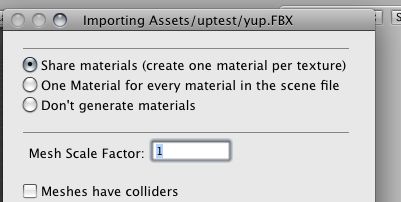
once you set it for a file it will stay that way for that file. but no, there’s no general option i know of to set a default. certainly a few wishlist topics on it…
You should be able set a fixed scale factor in your 3D Apps Preferences or in the FBX Exporter.