3rd person character rotate to camera and rotate to terrain slope

Hello!
I have been browsing the Unity answers for 3 days but have not gotten any results that are usable.
I have a 3rd person character controller that will rotate the character to look in the direction the camera is facing (this works).
I also have a “terrain stick” algorithm that rotates the character to match the angle that the terrain is at (this works).
However, when I combine the two, it most certainly doesn’t work. I was wondering if anyone might be able to toss an assist on this (it is driving me batty!)
I am using a character controller with no rigidbody
The movement script is applied to the “Player” object
Hierarchy:
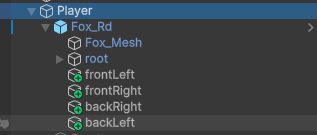
Imgur

Any other help would be greatly appreciated! (entire post of pictures: Unity Answers Help - Rotation - Album on Imgur )

[Header("Rotation Type B")]
public Transform backLeft;
public Transform backRight;
public Transform frontLeft;
public Transform frontRight;
public RaycastHit lr;
public RaycastHit rr;
public RaycastHit lf;
public RaycastHit rf;
public Vector3 upDir;

   
void Update()
{
        //Movement - This all works with no issue
        float h = Input.GetAxis("Horizontal");
        float v = Input.GetAxis("Vertical");
        float moveDelta = Mathf.Clamp01(Mathf.Abs(h) + Mathf.Abs(v));

        var moveInput = new Vector3(h, 0, v).normalized;
        var moveDir = cameraController.PlanarRotation * moveInput; //Gives camera forward
        GroundCheck();

        transform.position += moveDir * moveSpeed * Time.deltaTime;

        Vector3 velocity = moveDir * moveSpeed;
        if(isGrounded) // Applying gravity, works fine
        {
            ySpeed = -0.5f;
        }
        else
        {
            ySpeed += Physics.gravity.y * Time.deltaTime;
        }

        velocity.y = ySpeed;
        charController.Move(velocity * Time.deltaTime);

        //Rotation - This is where things are getting fun

        // Calculate rotation to get character to look in camera forward
        if (moveDelta > 0)
        {
            targetRotation = Quaternion.LookRotation(moveDir);
        }

        //Vector3 down = transform.TransformDirection(Vector3.down);
        Vector3 down = Vector3.down;

        //This gives the proper Y rotation to make the character look in the direction the camera is facing
        facingRotation = Quaternion.RotateTowards(transform.rotation, targetRotation, rotationSmoothing * Time.deltaTime);
        //This works in isolation
        //transform.rotation = facingRotation;
        // see: https://imgur.com/pkT4E2n , https://imgur.com/miMeqlo

        //More specific raycasting for better terrain sticking
        Vector3 down = transform.TransformDirection(Vector3.down); //Have used Vector3.down as well
        Physics.Raycast(backLeft.position, down, out lr, 10f, groundCheckLayerMask);
        Physics.Raycast(backRight.position, down, out rr, 10f, groundCheckLayerMask);
        Physics.Raycast(frontLeft.position, down, out lf, 10f, groundCheckLayerMask);
        Physics.Raycast(frontRight.position, down, out rf, 10f, groundCheckLayerMask);
        Debug.DrawRay(rr.point, Vector3.down, Color.green);
        Debug.DrawRay(lr.point, Vector3.down, Color.green);
        Debug.DrawRay(lf.point, Vector3.down, Color.green);
        Debug.DrawRay(rf.point, Vector3.down, Color.green);

        Vector3 a = rr.point - lr.point;
        Vector3 b = rf.point - rr.point;
        Vector3 c = lf.point - rf.point;
        Vector3 d = rr.point - lf.point;

        // Get the normal at each corner
        Vector3 crossBA = Vector3.Cross(b, a);
        Vector3 crossCB = Vector3.Cross(c, b);
        Vector3 crossDC = Vector3.Cross(d, c);
        Vector3 crossAD = Vector3.Cross(a, d);

        // Calculate composite normal
        upDir = (crossBA + crossCB + crossDC + crossAD).normalized;

        Vector3 upVector = Vector3.Lerp(transform.up, upDir, Time.deltaTime);

        if (isGrounded)
            uprightRotation = Quaternion.FromToRotation(Vector3.up, upVector);
        else
            uprightRotation = Quaternion.identity;

        //This works in isolation
        //transform.rotation = uprightRotation;
        // see: https://imgur.com/ZzqlvhC , https://imgur.com/UtVUWSX


        // This doesn't work, it spams between two rotations
        finalRotation = uprightRotation * facingRotation;
        //transform.rotation = finalRotation;
        // see: https://imgur.com/eae7Uet , https://imgur.com/OScvAix and https://imgur.com/gLa93KM , https://imgur.com/fhllUQe

        // This doesnt work, is just bad, have learned lesson
        //Figure out a way to combine upright and facing
        //finalRotation = facingRotation;
        //finalRotation.x = uprightRotation.x;
        //finalRotation.z = uprightRotation.z;
        //transform.rotation = finalRotation;

        //THIS DIDNT WORK BUT IT IS A NEW STEP
        Vector3 newPos;
        Vector3 normal = upVector;
      
        curNormal = Vector3.Lerp(curNormal, normal, 2 * Time.deltaTime);
        newPos = moveDir;
        newPos.y = 0;
      
        // Doesn't work, character follows camera facing while moving, snaps to the left when at rest.
        // Does not follow terrain
        finalRotation = Quaternion.FromToRotation(Vector3.up, curNormal);
        finalRotation = finalRotation * Quaternion.FromToRotation(Vector3.forward, newPos);
        // transform.rotation = finalRotation;
        // see: https://imgur.com/AudyNW3 , https://imgur.com/AKegU8m


        // Doesn't work - Character snaps to terrain, but doesn't rotate towards camera forward
        finalRotation = uprightRotation * Quaternion.Euler(0, facingRotation.y, 0);
        //transform.rotation = finalRotation;
        // see: https://imgur.com/DDqfHx6 , https://imgur.com/TILrSNV

        // Doesn't work -- character jitters, is never looking at facing, sometimes upside down
        transform.rotation = facingRotation;
        transform.rotation = uprightRotation * transform.rotation;
        // see: https://imgur.com/OCGDcn2 , https://imgur.com/Igcy5rp

        animator.SetFloat(Words.moveAmount.ToString(), moveDelta, 0.2f, Time.deltaTime);
}

Generally combining rotations is best done with separate transforms.

If you want the camera to tilt when you’re standing on the side of a mountain, tilt it.

But don’t do that on the same transform you’re using to look around.

For instance, something like this:

PartThatTiltsWithMountainSlopes
PartThatRotatesAround
Camera```

Depending on what you want you may wish to reverse the stacking of the two center transforms above, but I suspect the above is what you want.

You can test it trivially in about 30 seconds by just making the above four (4) GameObjects and moving them by hand without even running code until you know it's what you need.

I appreciate the reply!
I’m trying to get the player to rotate (the camera itself is outside the system) … I adjusted to similar, but the results still only let me do one or the other (more particularly, the most nested one) … It feels like in theory it should work, and it works with dummy empty objects being manually manipulated, but for some reason in reality it breaks apart

Camera
PlayerController
PartThatTiltsWithSlope (EmptyGO)
PartThatRotates (EmptyGO)
FrontLeft/BackLeft/FrontRight/BackRight Empty GO's
PlayerMesh

CodeThatTiltsWithSlope:

using System.Collections;
using System.Collections.Generic;
using UnityEngine;

public class TerrainAlignment : MonoBehaviour
{
    [Header("Rotation Type B")]
    public Transform backLeft;
    public Transform backRight;
    public Transform frontLeft;
    public Transform frontRight;
    public RaycastHit lr;
    public RaycastHit rr;
    public RaycastHit lf;
    public RaycastHit rf;
    public Vector3 upDir;
    public Quaternion uprightRotation;
    [SerializeField] LayerMask groundCheckLayerMask;


    [SerializeField] PlayerController playerController;

    void Update()
    {
        Vector3 down = transform.TransformDirection(Vector3.down);

        //More specific raycasting for better terrain sticking
        Physics.Raycast(backLeft.position, down, out lr, 10f, groundCheckLayerMask);
        Physics.Raycast(backRight.position, down, out rr, 10f, groundCheckLayerMask);
        Physics.Raycast(frontLeft.position, down, out lf, 10f, groundCheckLayerMask);
        Physics.Raycast(frontRight.position, down, out rf, 10f, groundCheckLayerMask);
        Debug.DrawRay(rr.point, Vector3.down, Color.red);
        Debug.DrawRay(lr.point, Vector3.down, Color.red);
        Debug.DrawRay(lf.point, Vector3.down, Color.red);
        Debug.DrawRay(rf.point, Vector3.down, Color.red);

        Vector3 a = rr.point - lr.point;
        Vector3 b = rf.point - rr.point;
        Vector3 c = lf.point - rf.point;
        Vector3 d = rr.point - lf.point;

        // Get the normal at each corner

        Vector3 crossBA = Vector3.Cross(b, a);
        Vector3 crossCB = Vector3.Cross(c, b);
        Vector3 crossDC = Vector3.Cross(d, c);
        Vector3 crossAD = Vector3.Cross(a, d);

        // Calculate composite normal
        upDir = (crossBA + crossCB + crossDC + crossAD).normalized;

        Vector3 upVector = Vector3.Lerp(transform.up, upDir, Time.deltaTime);

        if (playerController.IsGrounded)
            uprightRotation = Quaternion.FromToRotation(Vector3.up, upVector);
        else
            uprightRotation = Quaternion.identity;

        transform.rotation = uprightRotation;
    }
}

CodeThatRotates

using System.Collections;
using System.Collections.Generic;
using UnityEngine;

public class RotateToCameraFacing : MonoBehaviour
{
    [SerializeField] float rotationSmoothing = 500f;

    Quaternion targetRotation;
    CameraController cameraController;

    private void Awake()
    {
        cameraController = Camera.main.GetComponent<CameraController>();
    }

    // Update is called once per frame
    void Update()
    {
        //TODO: Get these directly from the Player Controller
        float h = Input.GetAxis("Horizontal");
        float v = Input.GetAxis("Vertical");
        var moveDelta = Mathf.Clamp01(Mathf.Abs(h) + Mathf.Abs(v));

        var moveInput = new Vector3(h, 0, v).normalized;
        var moveDir = cameraController.PlanarRotation * moveInput;
        if (moveDelta > 0)
        {
            targetRotation = Quaternion.LookRotation(moveDir);
        }

        transform.rotation = Quaternion.RotateTowards(transform.rotation, targetRotation, rotationSmoothing * Time.deltaTime);

    }
}

PlayerController Code:

using System.Collections;
using System.Collections.Generic;
using System.Runtime.CompilerServices;
using UnityEngine;

public class PlayerController : MonoBehaviour
{
    [Header("Movement Speed Settings")]
    [SerializeField] float moveSpeed = 5f;
    [SerializeField] float rotationSmoothing = 500f;

    [Header("Ground Check Settings")]
    [SerializeField] LayerMask groundCheckLayerMask;
    [Space]
    [SerializeField] float groundCheckRadius = 0.2f;
    [SerializeField] Vector3 groundCheckOffset;
    [Space]
    [SerializeField] bool isGrounded;
    [SerializeField] float ySpeed;

    //Camera Settings
    CameraController cameraController;

    //Animation Settings
    Quaternion targetRotation;
    Animator animator;

    CharacterController charController;


    // Awake is called when the object is loaded
    private void Awake()
    {
        cameraController = Camera.main.GetComponent<CameraController>();
        animator = GetComponent<Animator>();
        charController = GetComponent<CharacterController>();
    }

    enum Words
    {
        moveAmount
    }
    // Start is called before the first frame update
    void Start()
    {
      
    }

    // Update is called once per frame
    void Update()
    {
        //Movement
        float h = Input.GetAxis("Horizontal");
        float v = Input.GetAxis("Vertical");
        var moveDelta = Mathf.Clamp01(Mathf.Abs(h) + Mathf.Abs(v));

        var moveInput = new Vector3(h, 0, v).normalized;
        var moveDir = cameraController.PlanarRotation * moveInput;
        GroundCheck();

        transform.position += moveDir * moveSpeed * Time.deltaTime;

        Vector3 velocity = moveDir * moveSpeed;
        if(isGrounded)
        {
            ySpeed = -0.5f;
        }
        else
        {
            ySpeed += Physics.gravity.y * Time.deltaTime;
        }

        velocity.y = ySpeed;
        charController.Move(velocity * Time.deltaTime);
  
        animator.SetFloat(Words.moveAmount.ToString(), moveDelta, 0.2f, Time.deltaTime);
    }
    void GroundCheck()
    {
        isGrounded = Physics.CheckSphere(transform.TransformPoint(groundCheckOffset), groundCheckRadius, groundCheckLayerMask);

    }

    public bool IsGrounded => isGrounded;


    private void OnDrawGizmosSelected()
    {
        Gizmos.color = new Color(0, 1, 0, 0.5f);

        if (Physics.CheckSphere(transform.TransformPoint(groundCheckOffset), groundCheckRadius, groundCheckLayerMask))
            Gizmos.color = new Color(0, 1, 0, 0.5f);
        else
            Gizmos.color = new Color(1, 0, 0, 0.5f);

        Gizmos.DrawSphere(transform.TransformPoint(groundCheckOffset), groundCheckRadius);

    }
}

https://gamedev.stackexchange.com/questions/151659/rotating-according-to-ground-normal-on-unity-3d
For future reference if any1 is googling this, by referencing the above article, I came up with something.

A couple things to note:

  • You don’t HAVE to do the 4 raycasts down like I am doing in the code below. There are various different methods out there to get the terrain normal (some use a single raycast, some use a spherecast, some use more than 4 points, etc.) The most important thing is being able to get the terrain normal from somewhere.
  • This is not using the rigidbody system, this is using a character controller
  • This script is attached similar to how @Kurt-Dekker was describing above - I liked separating the rotation from the rest of the calculations
Player (With Character Controller)
    Rotation Controller (Empty GO with the RotationController script)
    Mesh
    Objects for raycasting to get terrain normal
using UnityEngine;

[RequireComponent(typeof(CharacterController))]
[RequireComponent(typeof(CameraController))]
public class PlayerController : MonoBehaviour
{
    [Header("Movement Speed Settings")]
    [SerializeField] float moveSpeed = 5f;
    private bool isMoving;
    private Vector3 moveDir;
    public bool IsMoving => isMoving;
    public Vector3 MoveDir => moveDir;


    [Header("Ground Check Settings")]
    [SerializeField] LayerMask groundCheckLayerMask;
    [SerializeField] float groundCheckRadius = 0.2f;
    [SerializeField] Vector3 groundCheckOffset;

    private bool isGrounded;
    public bool IsGrounded => isGrounded;
    private float ySpeed;

    //Loaded Components
    private Animator animator;
    private CharacterController charController;
    private CameraController cameraController;


    // Awake is called when the object is loaded
    private void Awake()
    {
        cameraController = Camera.main.GetComponent<CameraController>();
        animator = GetComponent<Animator>();
        charController = GetComponent<CharacterController>();
    }

    private enum Words
    {
        moveAmount
    }

    // Update is called once per frame
    void Update()
    {
        float h = Input.GetAxis("Horizontal");
        float v = Input.GetAxis("Vertical");
        float moveDelta = Mathf.Clamp01(Mathf.Abs(h) + Mathf.Abs(v));
        isMoving = moveDelta > 0;
       
        //Movement
        var moveInput = new Vector3(h, 0, v).normalized;
        moveDir = cameraController.PlanarRotation * moveInput;
        GroundCheck();

        transform.position += moveDir * moveSpeed * Time.deltaTime;

        //Gravity
        Vector3 velocity = moveDir * moveSpeed;
        if(isGrounded)
            ySpeed = -0.5f;
        else
            ySpeed += Physics.gravity.y * Time.deltaTime;

        velocity.y = ySpeed;

        // Final
        charController.Move(velocity * Time.deltaTime);
        animator.SetFloat(Words.moveAmount.ToString(), moveDelta, 0.2f, Time.deltaTime);
    }

    void GroundCheck()
    {
        isGrounded = Physics.CheckSphere(transform.TransformPoint(groundCheckOffset), groundCheckRadius, groundCheckLayerMask);

    }
   
    private void OnDrawGizmosSelected()
    {
        Gizmos.color = new Color(0, 1, 0, 0.5f);

        if (Physics.CheckSphere(transform.TransformPoint(groundCheckOffset), groundCheckRadius, groundCheckLayerMask))
            Gizmos.color = new Color(0, 1, 0, 0.5f);
        else
            Gizmos.color = new Color(1, 0, 0, 0.5f);

        Gizmos.DrawSphere(transform.TransformPoint(groundCheckOffset), groundCheckRadius);

    }
}
using System.Collections;
using System.Collections.Generic;
using UnityEngine;

public class RotationController : MonoBehaviour
{
    public Transform backLeft;
    public Transform backRight;
    public Transform frontLeft;
    public Transform frontRight;
   
    RaycastHit lr;
    RaycastHit rr;
    RaycastHit lf;
    RaycastHit rf;
    Vector3 upDir;

    [SerializeField] float rotationSmoothing = 500f;
    [SerializeField] PlayerController playerController;
    [SerializeField] LayerMask groundCheckLayerMask;

    // Update is called once per frame
    void Update()
    {
        // If the character is moving
        if (playerController.IsMoving)
        {
            //Get slope rotation from world up
            Quaternion slopeRotation = Quaternion.FromToRotation(Vector3.up, terrainNormal());
           
            // Calc the rotation if we wanted to look towards the camera
            Quaternion targetRotation = Quaternion.LookRotation(playerController.MoveDir);
           
            // Rotate the object, combining the slope rotation with the look rotation, using a smoothing to make it nicer
            transform.rotation = Quaternion.Slerp(transform.rotation, slopeRotation * targetRotation,
                rotationSmoothing * Time.deltaTime);
        }
        // Character is not moving
        else
        {
            // Get the slope rotation with the transform.up instead of world up
            Quaternion slopeRotation = Quaternion.FromToRotation(transform.up, terrainNormal());
           
            //Rotate the object, combining the slope rotation with our current rotation
            transform.rotation = Quaternion.Slerp(transform.rotation, slopeRotation * transform.rotation,
                rotationSmoothing * Time.deltaTime);
        }
    }
    Vector3 terrainNormal()
    {
        Vector3 down = -transform.up;

        //More specific raycasting for better terrain sticking
        Physics.Raycast(backLeft.position, down, out lr, 10f, groundCheckLayerMask);
        Physics.Raycast(backRight.position, down, out rr, 10f, groundCheckLayerMask);
        Physics.Raycast(frontLeft.position, down, out lf, 10f, groundCheckLayerMask);
        Physics.Raycast(frontRight.position, down, out rf, 10f, groundCheckLayerMask);
        //Debug.DrawRay(rr.point, Vector3.up, Color.red);
        //Debug.DrawRay(lr.point, Vector3.up, Color.red);
        //Debug.DrawRay(lf.point, Vector3.up, Color.red);
        //Debug.DrawRay(rf.point, Vector3.up, Color.red);

        Vector3 a = rr.point - lr.point;
        Vector3 b = rf.point - rr.point;
        Vector3 c = lf.point - rf.point;
        Vector3 d = rr.point - lf.point;

        // Get the normal at each corner
        Vector3 crossBA = Vector3.Cross(b, a);
        Vector3 crossCB = Vector3.Cross(c, b);
        Vector3 crossDC = Vector3.Cross(d, c);
        Vector3 crossAD = Vector3.Cross(a, d);

        // Calculate composite normal
        upDir = (crossBA + crossCB + crossDC + crossAD).normalized;

        Vector3 upVector = Vector3.Lerp(transform.up, upDir, Time.deltaTime);

        return upVector;
    }
   
}

Hi, could you post the missing CameraController script aswell, im curious how you made this work with so little code

Please don’t necro-post. If you have a new question, make a new post. It’s FREE!!

How to report your problem productively in the Unity3D forums:

http://plbm.com/?p=220

This is the bare minimum of information to report:

  • what you want
  • what you tried
  • what you expected to happen
  • what actually happened, log output, variable values, and especially any errors you see
  • links to actual Unity3D documentation you used to cross-check your work (CRITICAL!!!)

The purpose of YOU providing links is to make our job easier, while simultaneously showing us that you actually put effort into the process. If you haven’t put effort into finding the documentation, why should we bother putting effort into replying?

If you post a code snippet, ALWAYS USE CODE TAGS:

How to use code tags: https://discussions.unity.com/t/481379

  • Do not TALK about code without posting it.
  • Do NOT post unformatted code.
  • Do NOT retype code. Use copy/paste properly using code tags.
  • Do NOT post screenshots of code.
  • Do NOT post photographs of code.
  • Do NOT attach entire scripts to your post.
  • ONLY post the relevant code, and then refer to it in your discussion.

Camera stuff is pretty tricky… you may wish to consider using Cinemachine from the Unity Package Manager.

There’s even a dedicated forum: https://forum.unity.com/forums/cinemachine.136/

If you insist on making your own camera controller, the simplest way to do it is to think in terms of two Vector3 points in space: where the camera is LOCATED and where the camera is LOOKING.

private Vector3 WhereMyCameraIsLocated;
private Vector3 WhatMyCameraIsLookingAt;

void LateUpdate()
{
  cam.transform.position = WhereMyCameraIsLocated;
  cam.transform.LookAt( WhatMyCameraIsLookingAt);
}

Then you just need to update the above two points based on your GameObjects, no need to fiddle with rotations.