Add file to XCode Copy Bundle Resources Phase via Script

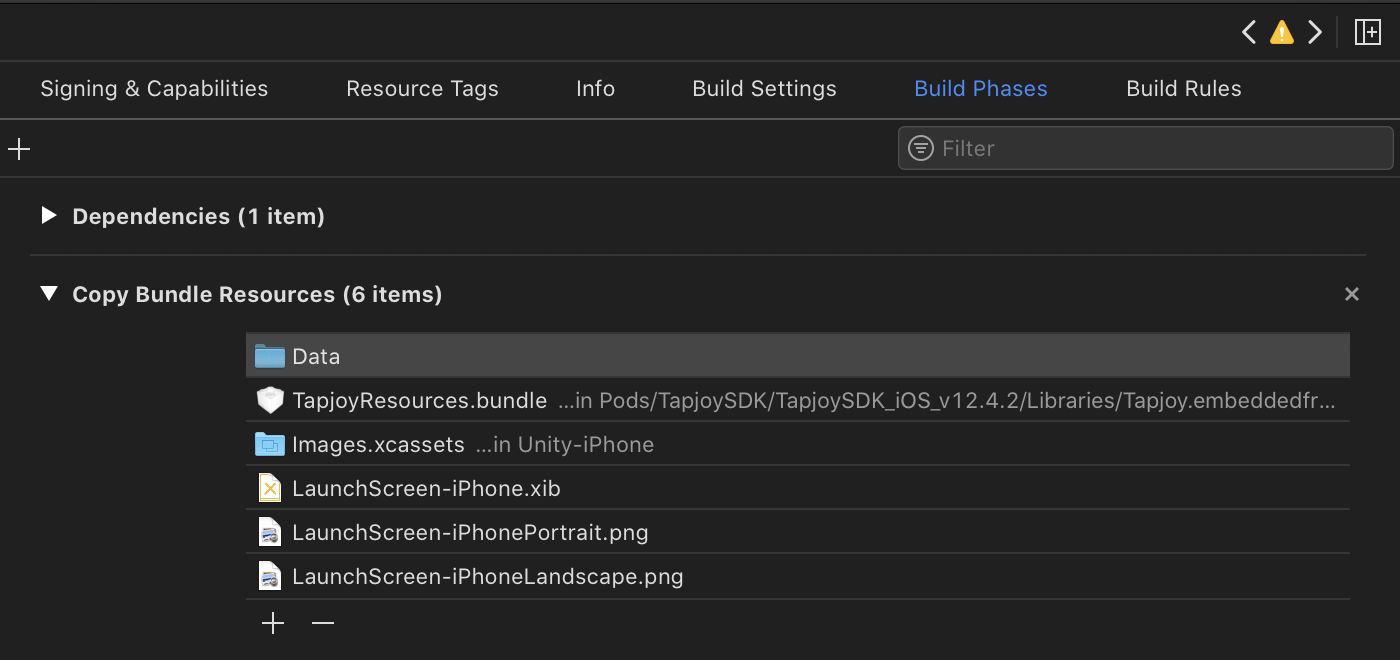
Is there a way to add files to “Copy Bundle Resources” phase in XCode from unity via scripting API in a Postprocess script?

We’re trying to add Tapjoy’s resources bundle to make it compatible with 2019.3.x, and we couldn’t find a way to copy it from another destination into the Xcode.

1 Like

Not a solution but it appears the API has methods to add and insert a “Copy Bundle Resources” phase but I can’t see how you would actually add any files to that phase.

Unfortunately, that method only adds a new “phase”, not a file to an existing phase.

Yes, that’s what I was inferring.

1 Like

There is a way to do it (I did it to add the storyboard launch files to the ‘copy bundle resources’ for a cloud build). Unfortunately the way I did it is really horrible and not really something I would recommend.

If you’re willing to pollute your codebase with this abomination then here’s how to do it:

  1. Add the files you want to include in your xCode project to the ‘StreamingAssets’ folder. In my example I added 2 files:

Assets\StreamingAssets\AA_Gradient.png
Assets\StreamingAssets\AA_Logo.png

This has the effect of telling Unity to copy the files into your xCode project and makes them accessible via:

Data/Raw/AA_Gradient.png
Data/Raw/AA_Logo.png

  1. Setup a [PostProcessBuild] script to run when the build is complete

  2. In the post process script retrieve the xCode project file, convert it to a string

  3. Do a search and replace on the string and inject references to your new files in the correct place to add them to the ‘copy bundle resources’ part (make up some random GUIDs for the files to keep xCode happy).

Here’s a code example that shows the xCode project getting retrieved as a string, injecting the references and then writing it back out again:

[PostProcessBuild]
public static void ChangeXcodePlist(BuildTarget buildTarget, string pathToBuiltProject)
{
    // xCode workspace modifications
    {
        // Open the xCode Project
        string projectPath = pathToBuiltProject + "/Unity-iPhone.xcodeproj/project.pbxproj";
        PBXProject project = new PBXProject();
        project.ReadFromFile( projectPath );
        string targetGuid = project.GetUnityMainTargetGuid();
       
        // Retrieve the xCode project as a string
        string projectString = project.WriteToString();
       
        // Add Launch screen storyboard references
        {
            // Add images and image references
            projectString = projectString.Replace(    "/* Begin PBXBuildFile section */",
                                                                                            "/* Begin PBXBuildFile section */\n\t\tEA8C3480243F64CC002A3835 /* AA_Gradient.png in Resources */ = {isa = PBXBuildFile; fileRef = EA8C347E243F64CC002A3835 /* AA_Gradient.png */; };" +
                                                                                                                                                            "\n\t\tEA8C3481243F64CC002A3835 /* AA_Logo.png in Resources */ = {isa = PBXBuildFile; fileRef = EA8C347F243F64CC002A3835 /* AA_Logo.png */; };" );

            projectString = projectString.Replace(    "/* Begin PBXFileReference section */",
                                                                                            "/* Begin PBXFileReference section */\n\t\tEA8C347E243F64CC002A3835 /* AA_Gradient.png */ = {isa = PBXFileReference; lastKnownFileType = image.png; name = AA_Gradient.png; path = Data/Raw/AA_Gradient.png; sourceTree = \"<group>\"; };" +
                                                                                                                                                                    "\n\t\tEA8C347F243F64CC002A3835 /* AA_Logo.png */ = {isa = PBXFileReference; lastKnownFileType = image.png; name = AA_Logo.png; path = Data/Raw/AA_Logo.png; sourceTree = \"<group>\"; };" );

            // Add images/refs to the 'Copy Bundle Resources' section
            projectString = projectString.Replace(    "/* CustomTemplate */ = {\n            isa = PBXGroup;\n            children = (",
                                                                                            "/* CustomTemplate */ = {\n            isa = PBXGroup;\n            children = (\n                EA8C347E243F64CC002A3835 /* AA_Gradient.png */,\n                EA8C347F243F64CC002A3835 /* AA_Logo.png */,");
               
               
            projectString = projectString.Replace(    "/* LaunchScreen.storyboard in Resources */,",
                                                                                            "/* LaunchScreen.storyboard in Resources */,\n\t\t\t\tEA8C3480243F64CC002A3835 /* AA_Gradient.png in Resources */," +
                                                                                                                                                                                 "\n\t\t\t\tEA8C3481243F64CC002A3835 /* AA_Logo.png in Resources */," );
        }

        // Save the xCode project file
        File.WriteAllText( projectPath , projectString );
    }
}

Haha, this really is a crazy way of getting it done, but hats off at the same time! Thanks for sharing @tonemcbride

I’ve worked on this for days. And finally get it done. These are my codes. Hope that they can help you.
Tested under Unity 2019.4.1
check My V2 codes out from Here Add file to XCode Copy Bundle Resources Phase via Script - Unity Engine - Unity Discussions

--------------------------Don't User these V1 Codes anymore-------------------
using UnityEngine;
using UnityEditor;
using System.IO;
using UnityEditor.Callbacks;
using UnityEditor.iOS.Xcode;
using System.Collections.Generic;

public class XcodeProjectMod : MonoBehaviour
{
    internal static void CopyAndReplaceDirectory(string srcPath, string dstPath)
    {
        if (Directory.Exists(dstPath))
            Directory.Delete(dstPath);
        if (File.Exists(dstPath))
            File.Delete(dstPath);

        Directory.CreateDirectory(dstPath);

        foreach (var file in Directory.GetFiles(srcPath))
            File.Copy(file, Path.Combine(dstPath, Path.GetFileName(file)));

        foreach (var dir in Directory.GetDirectories(srcPath))
            CopyAndReplaceDirectory(dir, Path.Combine(dstPath, Path.GetFileName(dir)));
    }

    [PostProcessBuild]
    public static void OnPostprocessBuild(BuildTarget buildTarget, string path)
    {
        if (buildTarget == BuildTarget.iOS)
        {
            string projPath = PBXProject.GetPBXProjectPath(path);
            PBXProject pBXProject = new PBXProject();

            pBXProject.ReadFromString(File.ReadAllText(projPath));
            string targetGuid = pBXProject.GetUnityMainTargetGuid();
            string projectGuid = pBXProject.ProjectGuid();

//copy bundle resources start from here
            CopyAndReplaceDirectory("Assets/Plugins/iOS/resources", Path.Combine(path, "iOS/resources"));
            List<string> resources = new List<string>();
            GetDirs("Assets/Plugins/iOS/resources", ref resources);
            foreach (string resource in resources)
            {
                Debug.Log(resource);
                string resourcesBuildPhase = pBXProject.GetResourcesBuildPhaseByTarget(targetGuid);
                string resourcesFilesGuid = pBXProject.AddFolderReference(resource, resource, PBXSourceTree.Source);
                pBXProject.AddFileToBuildSection(targetGuid, resourcesBuildPhase, resourcesFilesGuid);
            }


            File.WriteAllText(projPath, pBXProject.WriteToString());

        }
    }

    public static void GetDirs(string dirPath, ref List<string> dirs)
    {
        foreach (string path in Directory.GetFiles(dirPath))
        {
            if (path.IndexOf(".") != 0 && System.IO.Path.GetExtension(path) != ".meta")
            {
                dirs.Add(path.Substring(path.IndexOf("iOS")));
                // dirs.Add(path);
            }
        }

        if (Directory.GetDirectories(dirPath).Length > 0)
        {
            foreach (string path in Directory.GetDirectories(dirPath))
            {
                GetDirs(path, ref dirs);
            }
        }

    }

}
2 Likes

Unfortunately after trying these solutions, Xcode keeps giving errors with SplashScreen.mm inside of the Unity project, that error is for some reason negating the fact that the Xcode Project regonizes the storyboard, it just fails the build because Apple updated submission does not allow the splash screen setup like the builds before…

I have tried changing Build Player Settings to not include splash screen and only enable the link to the LaunchScreen.storyboard file inside of unity asset folder to no avail,

Is there any way to get unity to not include SplashScreen.mm in the ios build xcode project and just recognize launchscreen.storyboard and bundle resources?

Maybe I should try just removing that file that Xcode doesnt like “SplashScreen.mm” and try again…
Line 46 of my codes is error.
It should be:

string resourcesFilesGuid = pBXProject.AddFile(resource, resource, PBXSourceTree.Source);

Sorry about that.

This is my Version 2 code. I think it’s more usable than V1.

using UnityEngine;
using UnityEditor;
using System.IO;
using UnityEditor.Callbacks;
using UnityEditor.iOS.Xcode;
using System.Collections.Generic;
using System.Linq;

public class XcodeProjectMod : MonoBehaviour
{

    static string[] resourceExts = { ".png", ".jpg", ".jpeg", ".storyboard" };

    internal static void CopyAndReplaceDirectory(string srcPath, string dstPath, string[] enableExts)
    {
        if (Directory.Exists(dstPath))
            Directory.Delete(dstPath);
        if (File.Exists(dstPath))
            File.Delete(dstPath);

        Directory.CreateDirectory(dstPath);

        foreach (var file in Directory.GetFiles(srcPath))
        {
            if (enableExts.Contains(System.IO.Path.GetExtension(file)))
            {
                File.Copy(file, Path.Combine(dstPath, Path.GetFileName(file)));
            }
        }

        foreach (var dir in Directory.GetDirectories(srcPath))
        {
            CopyAndReplaceDirectory(dir, Path.Combine(dstPath, Path.GetFileName(dir)), enableExts);
        }
    }

    public static void GetDirFileList(string dirPath, ref List<string> dirs, string[] enableExts, string subPathFrom="")
    {
        foreach (string path in Directory.GetFiles(dirPath))
        {
            if (enableExts.Contains(System.IO.Path.GetExtension(path)))
            {
                if(subPathFrom != ""){
                    dirs.Add(path.Substring(path.IndexOf(subPathFrom)));
                }else{
                    dirs.Add(path);
                }
            }
        }

        if (Directory.GetDirectories(dirPath).Length > 0)
        {
            foreach (string path in Directory.GetDirectories(dirPath))
            {
                GetDirFileList(path, ref dirs, enableExts, subPathFrom);
            }
        }

    }

    [PostProcessBuild]
    public static void OnPostprocessBuild(BuildTarget buildTarget, string path)
    {
        if (buildTarget == BuildTarget.iOS)
        {
            string projPath = PBXProject.GetPBXProjectPath(path);
            PBXProject pBXProject = new PBXProject();

            pBXProject.ReadFromString(File.ReadAllText(projPath));
            string targetGuid = pBXProject.GetUnityMainTargetGuid();
            string projectGuid = pBXProject.ProjectGuid();

            pBXProject.AddBuildProperty(projectGuid, "OTHER_LDFLAGS", "-ObjC -all_load -licucore");
            pBXProject.SetBuildProperty(projectGuid, "ENABLE_BITCODE", "NO");
            List<string> resources = new List<string>();
            CopyAndReplaceDirectory("Assets/Plugins/iOS/resources", Path.Combine(path, "resources"), resourceExts);
            GetDirFileList("Assets/Plugins/iOS/resources", ref resources, resourceExts, "resources");
            foreach (string resource in resources)
            {
                Debug.Log(resource);
                string resourcesBuildPhase = pBXProject.GetResourcesBuildPhaseByTarget(targetGuid);
                string resourcesFilesGuid = pBXProject.AddFile(resource, resource, PBXSourceTree.Source);
                pBXProject.AddFileToBuildSection(targetGuid, resourcesBuildPhase, resourcesFilesGuid);
            }

            File.WriteAllText(projPath, pBXProject.WriteToString());

        }
    }

}
5 Likes
 tmp_PBXProject.AddFileToBuild(tmp_FrameworkTarget, tmp_DataGuid);

Try this code. It’s work for me!