AMD 5950x and Unity (Mostly HDRP)

Hi guys, I am looking into getting AMD 5950X (16 core 32 thread) soon and was wondering if Unity benefits from high CPU core count. I am not worried about standalone performance but more of workflow/editor performance.

I am currently using an i7 6700 (4 core 8 thread) and I am interested to know if the following will benefit.

  • Script compilation times

  • CPU lightmapping performance scale (I am certain it will be faster as there will be more cores, but will it scale well?)

  • Standalone build times

  • Any unexpected gains.

  • Can Unity utilize 16 cores? (in standalone)

  • Can Unity Editor utilize 16 cores?

  • Can the Job System utilize 16 cores?

If anyone has 5950x or 3950x (or any 10+ cores) and can shed some light on whether this investment is worth it, I’d really appreciate it. I am almost certain it will be faster, as it is a newer, stronger CPU, but I could be investing the same money for a RTX3080 (I have RTX2080).

The premise is that I mostly work on Open World Games and my project easily exceeds 100GB in size.

If the devs can chime in, that would be really appreciated. I am particularly interested if the Editor will benefit from more than 8 cores.

Also, should I decide to get 5950x, I will post before/after so that the whole community can have a good reference.

Thanking you in advance,

Got 3900X last summer - 12 cores, whole project re-import time dropped from ~2 hours to 45-50 minutes compare to my old trusty Xeon E2680 v2 (10 cores at ~3.1Ghz) - most of the import time is about compressing textures that is very well scales on 24 threads. Player performance also 1.5-1.8 times faster due higher single core performance.

This is not from personal experience, but some educated guesses (since I’m also interested in getting that CPU).

Pretty sure script compilation is single threaded, so no crazy benefit there.

This is actually the one area well you will probably see the most benefit. It should scale pretty well.

Minor benefit, pretty sure big parts of the process are still single threaded.

I think so, but only if you write code with Burst and Jobs.

Not really.

I think so.

Shader compilation and compressing textures into ASTC in particular will use all cores it can find. Same goes for the C++ compilation step when building IL2CPP.

However, a lot of the stuff that causes the editor to become unresponsive during routine usage are single threaded, like asset database refreshing and domain reloading.

I have decided to get 5950x, so I will upload some standalone build times once I get it. Expect it in 2 ~ 3 days

Unless you have some problem with baking your lightmaps by using gpu (after all, it’s in preview), you should always bake lightmaps with your gpu. These days both nvidia and amd are trying everything to make it as fast as possible.

I have a ryzen 3600 and a gtx 1070. My cpu can do up to 70 mrays/s while my gpu can do 80-220 mrays/s.

I don’t think there is an application that can fully utilize 16 cores, this includes games. You will see performance improvements in heavy workloads (like, reimporting the project), but I think that’s it.

Quick question, does the job system have core limits? Or can it utilize all 16 cores?

Alright I got 5950x today and here are some results


Specs:
i7 6700, 32 GB RAM, RTX2080
The build reports on left lower bottom, are dev build and non-dev build standalone build times.


Specs:
5950Xm 64GB RAM, RTX2080
The build reports on left lower bottom, are dev build and non-dev build standalone build times.

I’ve only had a few hours with this new CPU, but before we go into core count differences, the IPC increase alone makes the experience better.

For example, Photoshop opens up much faster.

And to go the heart of the issue, the core counts,

yes, it does make a difference, but not so much as I hoped as there is definitely diminishing returns.
Shader compilation and other multithreaded CPU performance is actually mind blowing.

The 7zip back up of the project which took about 2hours before, took about 20~30 min.

Once I get enough time with this CPU, I will try to share more info if there is any.
But first impression is 5950x, given the prices, is almost the perfect CPU to develop with Unity.

Are those mono or IL2CPP builds?

GPU lightmapper has a lot more issues than the CPU one.

mono.

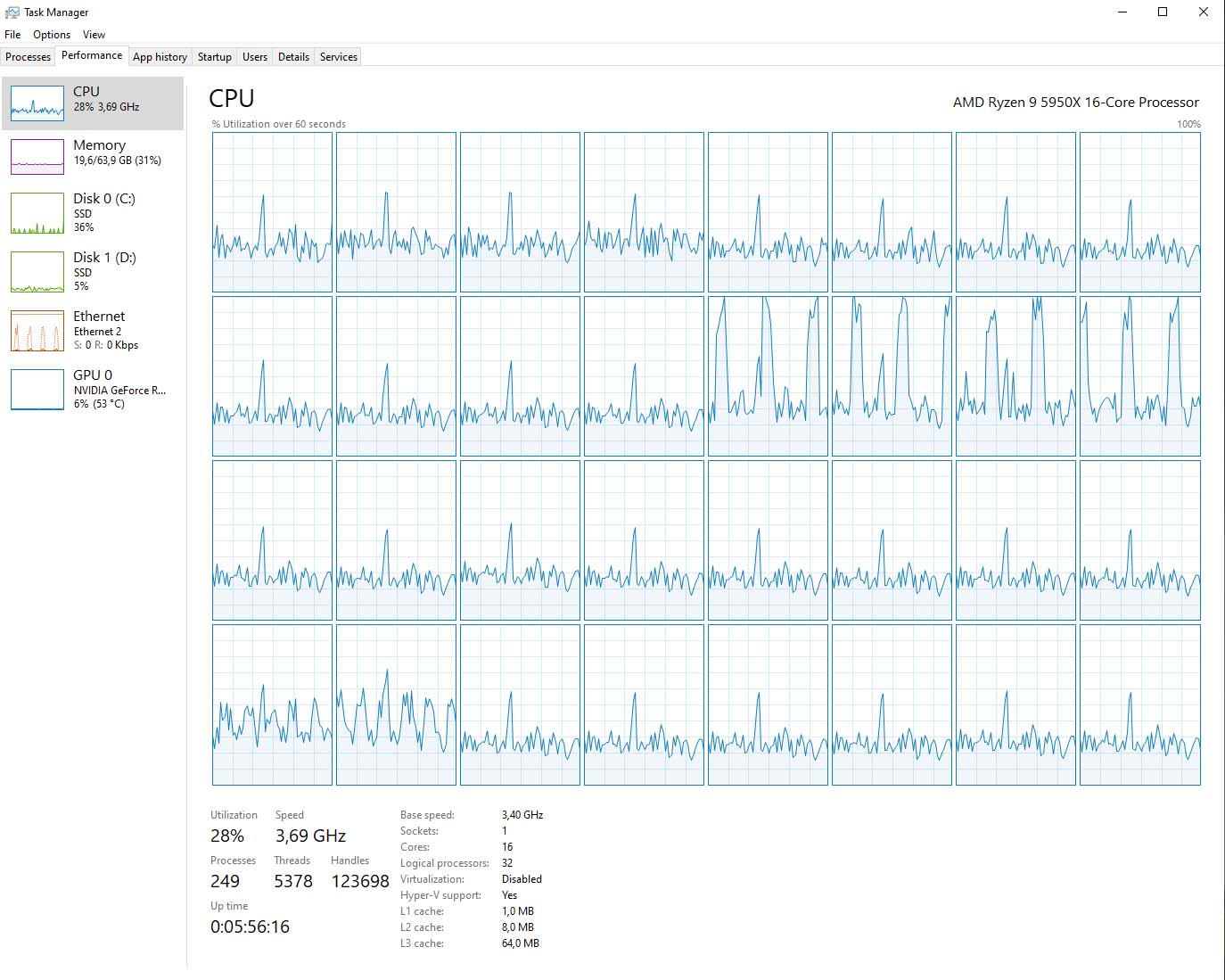
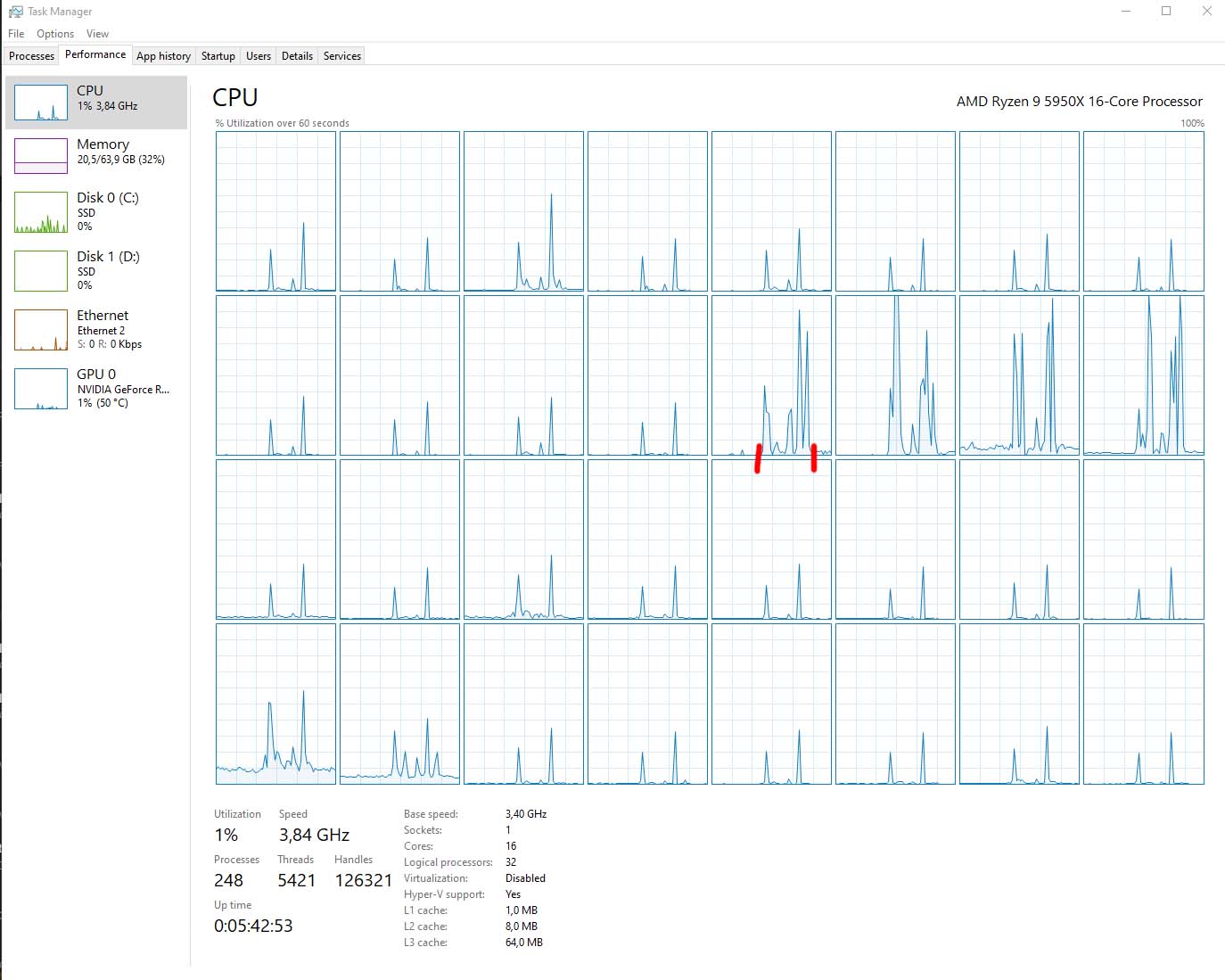
Hey guys, I know its been more than a year since I posted my 5950x story and someone DMed me today asking how it is doing. I took some screenshots of my taskmanager so that those who want to see how Unity handles high CPU cores.

This is during build. I can say build times are much much faster. Probably due to higher IPC and core count. Only 6 cores seems to be working all the time and rest just spike up and down. Utilization never went above 30% in general, so nice and stable. My guess is that some parts of the build process uses more than 4 cores and some don’t

This is importing textures and movie files. And I think this is where Unity shines. It fully utilizes all cores and I am very happy with the result. It took me about 5 minutes to reimport 200gb of 4k textures in the editor. It is very nice to work with imported things in the editor as they don’t make u wait half a day anymore.

This screenshot is taken while I changed a line in my C# script and clicked Save all. It took 5 seconds for Unity to pick up that change has been made, compile and get back to ready status. I marked the duration with red bars and u can see that only the main thread or two cores are used to compile scripts. I have a feeling there is more to this, but I just didn’t have more time to look into it.

Conclusion after 1 year.
I transitioned from i7-6700 to 5950x.

  • Much faster, especially build times and texture import times have gone down drastically. I wouldn’t go back.

  • Job system works way better obviously.

  • For some reason, raycasting performance quadrapled…I am not sure why and how this works as raycast runs on the mainthread…maybe the increased IPC did its magic.

  • I’ve moved on from raycasting to job system based raycasting now, so it is even faster…I can shoot hundreds of rays literally and not even notice :slight_smile:

What I expected to be better but not with 5950x or more cores.

  • Realtime GI baking is so buggy and broken even in 2020, 2021, 2022 having more cores means nothing. It is faster, yes but it breaks down on its own so time spent on working with Realtime GI hasn’t decreased as much as I expected.
  • Normal Lightmap baking is somewhat better but still buggy and GPU baking is just faster…but equally broken…so I can’t really say 5950x is going to make your life better to be honest…lightmap in general is very very wonky.

If you have questions or anything you’d like me to test, feel free to DM me. I will test em out when I can.

Hope this info helps the community.

Cheers!

Nice info!

I’m on AMD 2700x 8-core 16-thread CPU with 32gb 3200mhz ram.
Wondering how much of a jump a AMD 5950x or Intel i9-12900K CPU would be.

Anyone tested any modern Intel chips vs AMD for importing performance?

i upgraded from ryzen5 1600 to ryzen 9 5950x. Since the 5950x will stay the strongest multicore cpu on am4. And i think upgrading will be better than building a new low end am5 system for the same price of the cpu. (no need to reinstall windows 10 after upgrade. a pitfall can be when you use the cpu intern tpm for bitlocker or other stuff, then you must read in how to handle this before upgrading)

i tested creating new urp project in 2021.2.17 and importing unity demo terrain urp time since pressing import button first time in package manager. (smt was on all test disabled)

on ryzen 5 1600 it took 2:29 min for new project and the import took 6:19 min
on all auto setting in bios the 5950x created the new project in 1:29 min and crashed on the import.
i had to disable core boost in bios. to make it stable. probably to my crappy low end components. (putting a 600$ cpu in a 2year old 700$ computer :slight_smile: ). so all cores running max 3400mhz for the test.
with this setting it took 1:55 min to create new project and 4:08 min to import the terrain demo.
the 5950x has the feature to disable 8 cores and run at 8 cores.
with 8 cores it took 1:58 min to create new project and 5:43 min to import the demo terrain.

i found out my current cooler is not powerful enough. since the cpu is105tdp rated i thought a cheap 110w cooler would be enough, but under load without oc the cpu is 142w tdp. so buy at least a 150w or more rated cooler. in idle the cpu use between 25 and 30w . (edit: i installed now a 300w cpu water cooler and problems with core boost are gone)

i tested the game back for blood . its an unreal4 game and it used 8 cores only. the remaining 8 cores was idle.
i tested my unity standard pipeline game and it run mostly on 5 cores. Also the terrain urp demo mostly on 5 cores. Also the hdrp demo 4 to 5 cores.
so it makes sense the last new am4 cpu will the 8 core 3d cache cpu for gaming, making the 5950x the strongest multicore cpu on am4 you can upgrade to. the fastest gaming cpu on am4 will be the new 8 core 3d cache cpu. But since unreal5 demo recommends minimum a 12 core cpu that can change in future.

Mate I think something is going on with your system.
Maybe temperature issue or something.

I tried the same test,

38 sec to create a new URP project.

1:14 sec to import the terrain demo.

Could be my SSD, or temps but I think your system is not performing as fast as it should be.

my assetsfolder is on hdd.i think that explains the time difference. projects on ssd. also i installed now a 300w rated cpu water cooler and the core boost problems are gone.

Interesting this popped up… I have both a 5950x (MSI) and a 12900k (Gigabyte) system and I’ve been juggling back and forth for a few weeks with which to keep. Both have been running 64GB DDR4 and NVMEs. Just today decided to make the AMD system my primary workstation (with the full 128GB). The Intel is going to my kid (he gets a 16GB kit). I was going to keep the Intel system right up until someone hipped me to PBO / Precision Boot Overdrive on the AMD.

I did a bunch of synthetic benchmark softwares and they really didn’t inspire me either way, but Cinebench R23 and Blender renders with some stopwatch style timing convinced me AMD is still king as long as you turn on PBO. Caveat, system stability is of utmost importance to me. I’ve never been an overclocker. While PBO is technically an overlock it’s sanctioned by AMD, you don’t have to fiddle with timings or clocks and all that nonsense, and I didn’t have a single stability issue (did 12 hour custom test durations on each once I got the systems fully tuned). The memory is rated for 3600mhz but not using XMP or AMP so it’s running at the spec of 2667mhz.

Intel - hovered around 26500 (multicore) and 1950 (singlecore)
AMD - ~25000 multi, ~1650 single
AMD w PBO - ~29000 multi, single ~1850

The AMD never caught up to single core Intel but honestly for me, 100 points is a stone’s throw from it, close enough. The multi core before PBO, meh, I was going to keep the Intel. Once PBO was on, for this type of work IMO it’s pretty obvious. One of the AMD PBO runs even topped 30100 / 2000 beating the #1 builtin Threadripper score (bit of an outlier, didn’t factor it into the averaged score).

Outside of motherboards and GPU, both systems are very similar. Same Fractal Design cases, same Corsair case fans. Corsair thermal paste. Different EVGA PSUs but both are 1000W+. I’m using identical 3 fan all in one watercoolers (Lian Li Galahad) for both systems. I tested both systems with a BeQuiet Dark Pro 4 (120mm and 135mm fans) that advertises a 250W TDP, the AMD was fine but the Intel definitely throttled. Only had 1 so swapping back and forth was annoying, eventually just bought a second water cooler, made testing much easier :slight_smile: .

OP if you haven’t tried it, do some testing with Ryzen Master and PBO. It’s impressive. Basically, at the expense of additional power draw and heat it significantly boosts clock speeds. On my system I jumped from all-cores 3.7GHZ @ 105 watts to all-cores 4.3GHZ @ 145 watts. CPU temp went from 60ish C to 70ish C. Single / individual cores went as high as 5.2GHZ. GHZ is basically just a number, but if you look at the Cinebench before and after scores and factor in power draw and compare that to power consumption of the 12900k (it hovered around 275W at full load and 95C, but did throttle so it was hitting 100C at points, and this is water cooled!), it’s an obvious choice IMO.

Again, turn on PBO if your system supports it. Enjoy the free upgrade! Don’t even have to BIOS anything, it’s all done in software.

PS - running Windows 11
PS - Now that I’m settled I may experiment with AMP and memory at 3600mhz. But honestly for me, 1 BSOD is too many and I haven’t had any during any of these tests yet so may just leave it alone as well. We’ll see.
PS - Ryzen Master… I used Advanced Mode / Creators Mode, clicked to enable PBO and hit Apply/Test. That’s it. Instant performance boost.

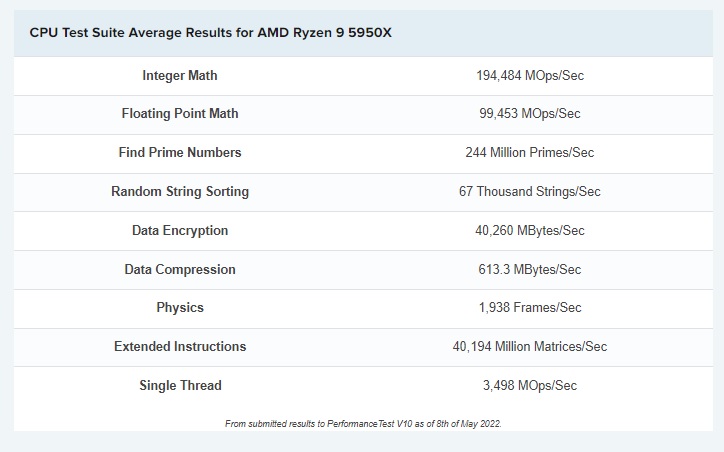
Here is the best place to compare cpu powers.
The scores are very accurate

Unity is mostly under compressing and decompressing. So multi core cpu is very useful . I already tested the Ryzen 5 3600XT . Now unity is much faster than Core 7 4790K (up tp 4x)

I am a tech enthusiast myself, so yes overclocking and tweaking the system is in my blood.

However, when it comes to development, I tend to reset to stock settings.
My reasoning

  • Overlocking/PBO/XMP tweaks are great for performance but comes at the cost of cooling and system stability
  • If your project runs into a bug (eg crash) and your system is overclocked, then you have to do another additional testing under default system settings. It just adds more layer (or simply a day or two) to go through to get to the bottom of things. And this will drive you nuts. Chased by a deadline, and you are not sure if it is the system, the editor, or a human error. Or a combination of all these things.
  • Game development system, provided that you are actually working on a commercial project, requires the system to be active 24 hours. Hardware performance starts to mean less, a year into development, when all parts of the system was abused like cryto mining rigs, and you start to want “stability” rather than “performance”

Hence my reasoning for not overclocking for dev machine.

I usually get the following hardware for Unity HDRP dev

  • Very high end quality parts - especially the motherboard.
  • CPU and cooling that will keep the fans almost dead silent, but still fast enough, but won’t raise the temps beyond 45C. Imagine sitting next to a heat source at 80C in summer, that has fans raging like a jet fighter. Hot and miserable. Now extend the duration to 6+ months, 10+ hours a day. I promise you, sitting and working next to a hot and noisy pc that long will make u want to quit game dev in 2 weeks.
  • Good AC is a must and is not negotiable. Heat dispensed by my cooling system needs to be transferred out of the room eventually.
  • GPU that can drive minimum 2 x 1440p monitors and still have less than 40% usage rate. If more than 40% GPU fans will do the same thing as CPU fans and same results, except GPU fans are worse.
  • Nvidia GPU. Do not go for AMD GPU.
  • Minimum 2 nvme. One for Windows/OS and another for Unity projects.
  • Workstation mouse (not gaming mouse) and mechanical keyboard

This is why I laugh when I hear someone wanting to use a laptop to work on Unity. Maybe simple 2D games are okay but HDRP won’t. You need a full tower desktop with quality parts (recommended twice the performance of target hardware minimum).

I often have more than 2 HDRP editors open, couple 4k Photoshop, maya and substance open. So, no I really don’t recommend PBO/Overclocking, or anything that tips the balance. Just not worth it. It is fun, but doesn’t keep me interested for the late nights working on a game. I also run a 40TB freenas server for backup and assets. And do clean install/wipe of machines every 6 months. Don’t do much dust cleaning, and might regret it one day XD

Hope this helps.

My 5950X with NZXT watercooling, idles around 40C - 43C. Sometimes it spikes to 70C for a few seconds for no apparent reason, but Ive been told that’s just how these CPU’s work. My 3090 idles around 40C, with the fans off in general. On load the fans spin up and temps go to around 50C

I’d add that few weeks back I tested SAME scene in Unity 2022.2.10 with HDRP, vs version 5 of a certain other engine.
The other engine seemed to be less demanding on my hardware, after the initial shader compiles that is.

EDIT: Oh and BIOS is default/optimal settings. I don’t do the overclocking thing also as I need stability but more importantly I need it to last as I can’t buy new equipment every 2 years