My game received some feedback about graphics which needs more detailing. Even as of now my shader is sampling 4 textures in one pass to thirds the draw calls, and that’s the maximum number of sampling I can get without having to upgrade to Open GL ES 3.0.
And now I’d like to add more details to the geometry, but in order to that I need to sample more texture in one pass(to avoid adding more draw calls), and in order to that I need to switch to open gl es 3.0 (or I will have the “not enough interpolators” shader error)…
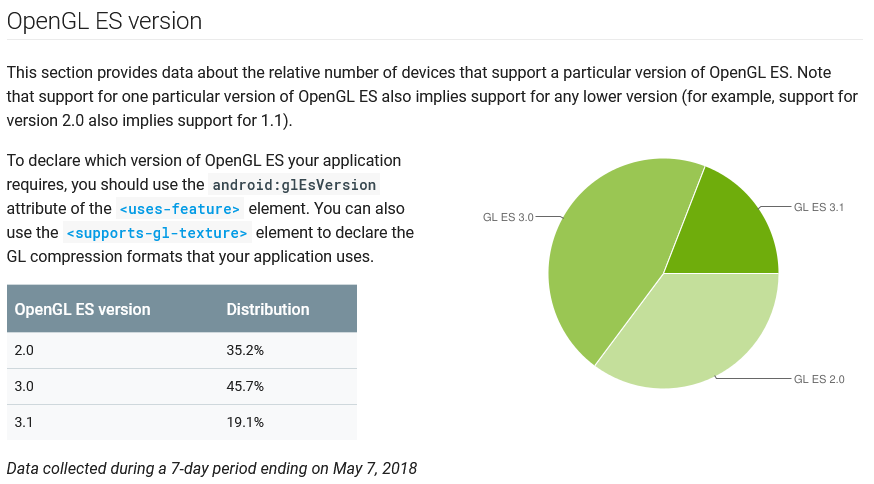
So the question is, is it worth it? Upgrading open gl version means less device supported but how many device is actually still using open gles 2.0?
[Edit]
Should this be posted on Android subforum? If it is, then please, admin, move this thread there
This data from Google seem fishy. Strange that in less than 5 months the percentage dropped 14 points, how the hell did it happen? Did everybody buy a new phone ?
I think you misunderstand what’s happening there a bit
OpenGL ES 2 will likely use different (read: simpler) shaders.
Same specs - I wouldn’t be so sure about that. GPU clock frequency, for example, is controlled by the OS based on manufacturer settings, which might be different between different devices even for the same manufacturer.
For example, is the resolution the same on both devices you’re testing this on?
Galaxy have better resolution (around 2k) so it is supposed to be slower against Sony full HD, both
using same adreno 520. (Checking specs using Snapdragon profiler)
Also in all test we set Resolution by script 1280, 720. (Checked the surface and bin in Profiler)
Tested with 6 phones. (Sony, Google, Galaxy, Sharp and others), All devices have OpenGL 3.0+
Using a simple shader output only color.
Setting Unity to Open GL3 then Open GL2 we have a hit of around 30 fps down in certain devices.
Setting Unity to Open GL2 then Open GL3, all devices are 60 fps.
Even some older devices with Snapdragon 805 and unity set to OpenGL3 (Sony is Snapdragon 820) can go 60 fps with no problem, but some new devices more powerful will be at 30 Fps or less.
Worst case is Sony Devices with Snapdragon 820 OpenGL 3.1. (Super frame hit).
Im 99% sure is a problem with Phone Drivers and Unity OpenGL 3.0.
This person also have the same problem,
Aiming for all android user is better to set Open GL 2.
I will test with more devices today.
Is there a way to force a device that supports OpenGL ES 3.0 to use ES 2.0? (without removing ES 3.0 from the build entirely)
We too are running into issues with buggy device drivers, but we don’t want to make an ES 2.0 only build. But we’d like to have an option in game to force it into ES 2.0 mode, to give more options to people that are having problems with the game with the ES 3.0 version.
@AcidArrow Not at the moment. And it’s quite complicated to provide that from the architectural point of view.
We’re discussing the possibilities for this internally, as there have been requests for this functionality.
Oh I completely forgot about this. We have many issues with cache server now.
The solution Unity gave us was reporting to them all the devices we found with driver problem and they will add it at the next release. The plan is to release using opengl 2.0 as our target device are 3-4 year old but for that we must fix some minor issues (and gain FPS).
If is a big game I recommend paying for unity support instead of using the forum.
By now (May '19), Open GL ES 2 distribution has dropped to 1/5. I’m also guessing that an even smaller share of Android 5+ (Lollipop or upwards) phones still requires version 2, and that owners of such phones are less likely to play games. So we decided to target Lollipop+ and Open GL ES 3+.
I just saw the reply, one year later
I read it correctly. What I meant is that since the graph posted above dated may 2018(see few posts above) and when I saw the updated graph on the website in October only 5 months had passed but the amount of users supporting only GL ES 2.0 had decreased a lot, 15% less.
Which is an enormous amount considering the huge number of Android devices around.