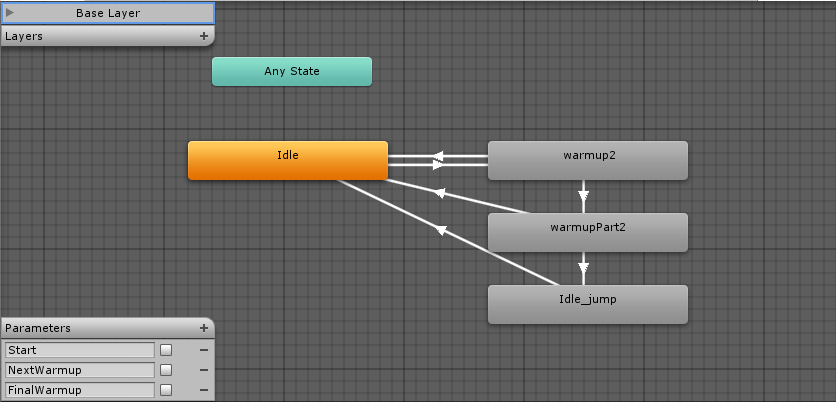
I am working on a project that would allow me to play some animations in a row.
I attached some screenshots of my blend tree and other helpful images
I am trying to go from my idle state, which is the default idle in the Mecanim tutorial, to my own animation rigged in Blender to a mannequin character.
I have tried the solutions online that ask me to set the rig to Humanoid and copy the avatar definition from Dude avatar, but this causes the body to deform when it transitions to my animation. It looks like it sinks into the ground and deforms to a central point.
I don’t know what to do, this is my final year project in University and I am pretty much desperate at this point.
Before switching the Rig to Humanoid, after the transition, the avatar would just sink half into the ground , stuck in a T pose, but the body would not deform.
The collider is set as in the Mecanim tutorial, so I don’t think the problem lies with it.
Its hard to say what is wrong but I think it could be related to your animations ? I don’t use blender but maybe the bones or even just the model doesn’t have the correct orientation. If you post a Unity package that includes a sample scene with the character and one of the animations that makes the model sink into the ground, I could take a look at it.
I have tried uploading a package with all the stuff in it but it won’t allow me. I tried different browsers, computers, etc. Any way I could send the package to you personally?
I would suggest using dropbox and just posting the public link here. That way more people will be able to help in case I can’t find what is causing it.
Your stickman skeleton or hierarchy doesn’t match with the dude’s that is why I think it fails when you use the dude’s avatar definition. It seems it cant find the hips….
Also maybe due to the size problem on the stickman, it might also be responsible for the bone length warnings when you use the dude’s avatar definition.
Solution:
You will need to create the avatar definition from your stickman instead of using the dude’s avatar definition. If you do that it will work.
Thanks for all the help, it works now.
I have another question, I’ve been trying to trigger the animations in my blend tree automatically.
So , in other words, when one animation ends, go to the next one.
Now , I’ve tried to use this :