Hey, I’ve been wanting to implement Cinemachine into my game, but it’s split-screen and uses multiple cameras. Are you guys planning on adding support for multiple Cinemachine Brains in a scene?
It’s already there, fully supported. Check the user manual, full instructions there. It’s a .pdf inside the package under the root folder.
NO WAY! I can’t believe I missed that! Argh, sorry for starting this redundant thread hah hah. Cinemachine is truly amazing!
Here’s a little video - not super explanatory but showing how fast it is to setup
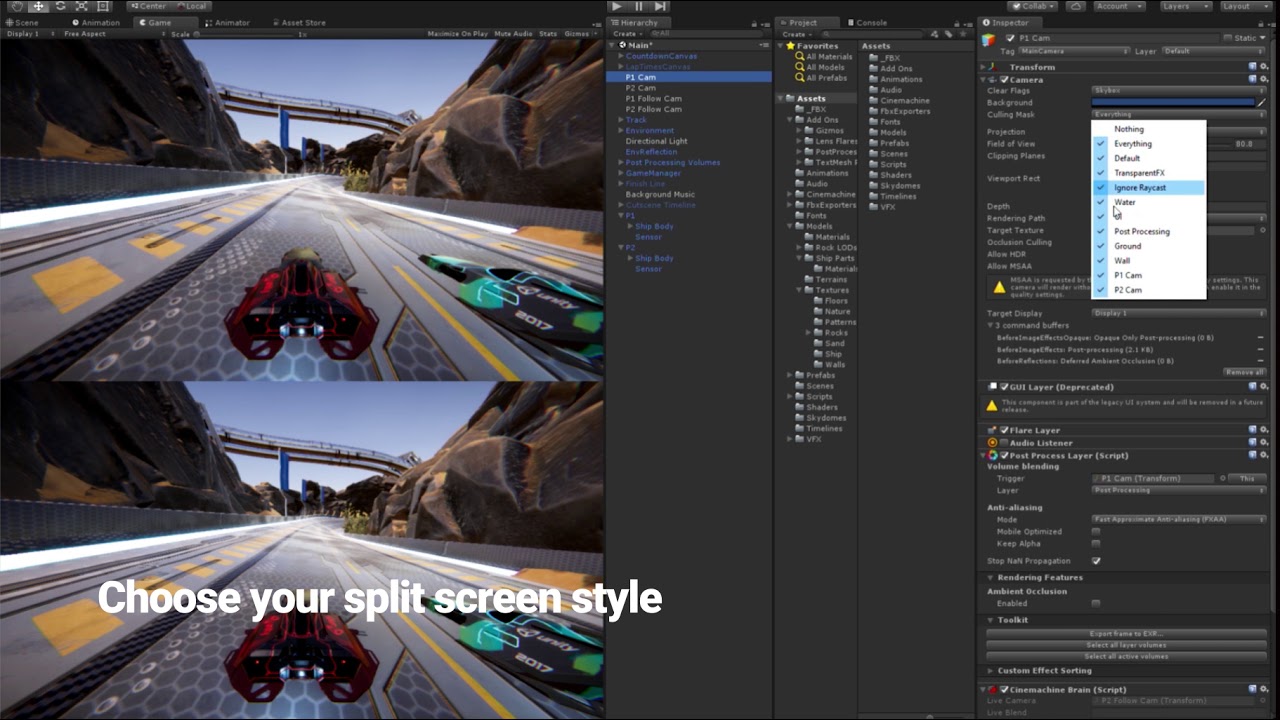
Step by step instructions also here on the forum
1 Like
Thanks, everything looks great!
This doesn’t seem very scalable. Unity has a limit number of layers and it requires a manual setup.
Isn’t any way around using the culling masks for split screen?
And if it is not asking too much, why does it need to be set up this way? It doesn’t look like the cameras are occluding each other or anything similar. It looks like if both cameras were simply pointing at the same character (due to the culling mask configuration?) but it does not make any sense for me.
2 Likes
Doesn’t this setup work with Freelook instead of Followcams?
I have a split screen with freelook, and I have issues because I cannot separate the input for the camera movement between the two players (sources of input). I’m using the new Input system and setting a “bypass” to match the old one.
In other words, I move the 2 cameras with the same input.
How can I move the two cameras separately with different input sources?
 private Vector2 LookDelta;
    [SerializeField] private CinemachineFreeLook freeLook;
    public Vector2 cameraMovement;

    private void Awake()
    {
        CinemachineCore.GetInputAxis = GetAxisCustom;
        Cursor.visible = false;
        Cursor.lockState = CursorLockMode.Locked;
    }

    private float GetAxisCustom(string axisName)
    {
        Vector2 lookDelta = cameraMovement;

        lookDelta.Normalize(); //TODO: needed?
        switch (axisName)
        {
            case "Mouse X":
                return lookDelta.x;
            case "Mouse Y":
                return lookDelta.y;
        }

        return 0;
    }
After some testing, I discovered the problem is when I do CinemachineCore.GetInputAxis = GetAxisCustom;. After a player joins with some input (keyboard or gamepad), it overrides the previous axis and the newest player moves all the cameras
NOTE: The camera is created once the player enters any input. For example, I press W on the keyboard, 1 camera with 1 character spawns. Then I press X on the gamepad and another character with another camera spawns.
So, how do i get it to work with 2 or more inputs? Should i create one CustomAxis for each player? Will it override it anyway? How does this CinemachineCore works exactly?
To me, it makes more sense that each brain controls each camera movement
@Destokado and I managed to get it working by attaching a script to the Camera’s GameObject with the following content:
using System;
using System.Collections;
using System.Collections.Generic;
using Cinemachine;
using UnityEngine;

public class CmCamera : MonoBehaviour
{

    [SerializeField] private CinemachineFreeLook freeLook;

    public InputReader InputReader
    {
        get => _inputReader;
        set
        {
            if (_inputReader != null)
                axisNameToInputReader.Remove(_inputReader.strId);

            _inputReader = value;

            if (value != null)
            {
                freeLook.m_XAxis.m_InputAxisName = value.strId + "X";
                freeLook.m_YAxis.m_InputAxisName = value.strId + "Y";
                axisNameToInputReader.Add(value.strId, value);
            }
        }
    }
    private InputReader _inputReader;

    private static readonly Dictionary<string, InputReader> axisNameToInputReader = new Dictionary<string, InputReader>();


    private vostrId Awake()
    {
        CinemachineCore.GetInputAxis = GetAxisCustom;
    }

    private float GetAxisCustom(string axisName)
    {
        if (axisNameToInputReader.Count <= 0 || InputReader == null)
            return 0;

        Vector2 lookDelta = axisNameToInputReader[axisName.Remove(axisName.Length - 1)].cameraMovement;

        lookDelta.Normalize(); // Maybe you don't need it

        switch (axisName.Substring(axisName.Length - 1))
        {
            case "X":
                return lookDelta.x;
            case "Y":
                return lookDelta.y;
        }

        return 0;
    }

}
The InputReader is a class that we created to manage the input. We are currently using it to read the input from the new Input System but it could read the input from the old one as well. It has a unique identifier that will help the camera understand what input should it be using. In addition, it stores the movement that the camera should perform in a public Vector2 named “cameraMovement”.
However, this approach looks like a patch for something that we think that should be possible to do without major trouble in the Cinemachine system.
When a CM virtual camera (or FreeLook) needs input, it calls the delegate CinemachineCore.GetInputAxis() with a string identifier specifying the input axis it wants. By default, CinemachineCore.GetInputAxis() is set up to point to Input.GetAxis(), and the string identifiers are set up to be Mouse X and Mouse Y.
This is for convenience only, so that it works immediately on creation. You can override and customize all those things.
For multi-player input, the solution is to customize the strings that the vcams pass to GetInputAxis(). In the inspector, you specify that here:

Put your own strings, for example “X1” for player 1 X axis, “X2” for player 2 X axis, etc, and have your custom input handler parse them and fetch the appropriate input from whatever input system you want to use.
Or, if you want to use the default UnityEngine.Input system, you can set up input axes with whatever names you put in the Input Axis Name fields.
Alternatively, you can leave the Input Axis Name field blank, and then Cinemachine won’t call GetInputAxis() at all. In that case you could make a custom script to push input to the vcams every frame, by setting this field, which CM will read and process:

2 Likes