App crash at launch with SDK 34 and Android 14 mobiles

Hello, we are working on an app for Android which works perfectly on all types of devices with SDK 33. The problem is that Google now requires an update to SDK 34 with a deadline of August 31, so we have updated to version 34 and the app works on all devices except those running Android 14.
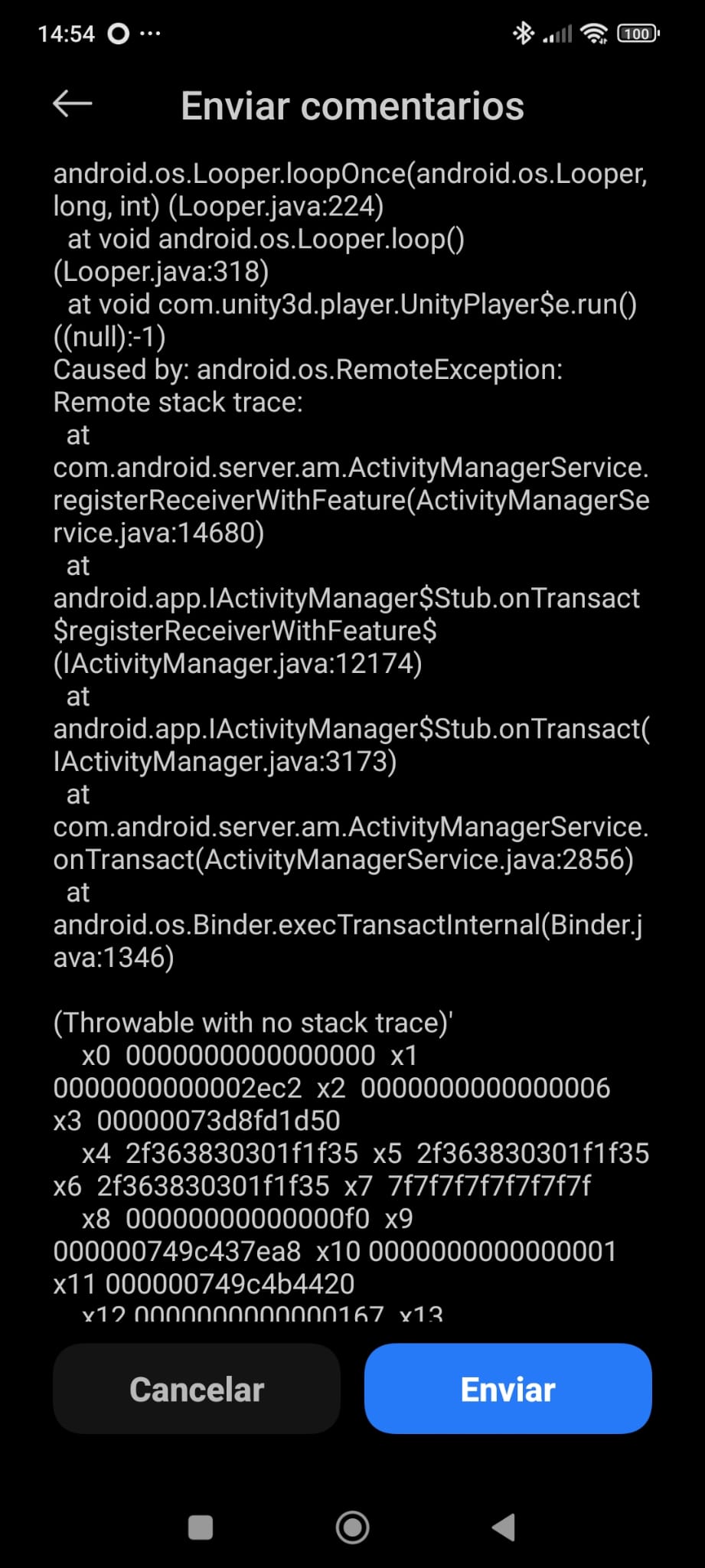
I have managed to take some screenshots of the returned error:

We are working with Unity 2020.3.41f, it is an application for Google Cardboard using Addressables version 1.19.19. To set up the addressables for Play Asset Delivery, we are using this → Addressables-Sample/Advanced/Play Asset Delivery at master · Unity-Technologies/Addressables-Sample · GitHub

So we decided to upgrade to a higher version of Unity 2021/2022. To begin with, it indicated the following regarding the addressables:

So we decided to create those folders where indicated, and the error disappeared. But then the following error started appearing:

We have this custom files:

AndroidManifest.xml

gradleTemplate.properties

mainTemplate.gradle

We have tried everything, from replacing this line with the ones indicated on the website,

with this → DescripciĂłn general de las bibliotecas de Google Play Core  |  Android Developers

changing the SDK libraries to those from Unity, modifying other parts of the project, but we cannot compile the AAB because it fails in Gradle…

Is there any possibility that Unity will release a fix for this problem for Unity 2020? There is no need for an update, just a step-by-step guide to solve the problem so we can apply the fix in Unity 2020.
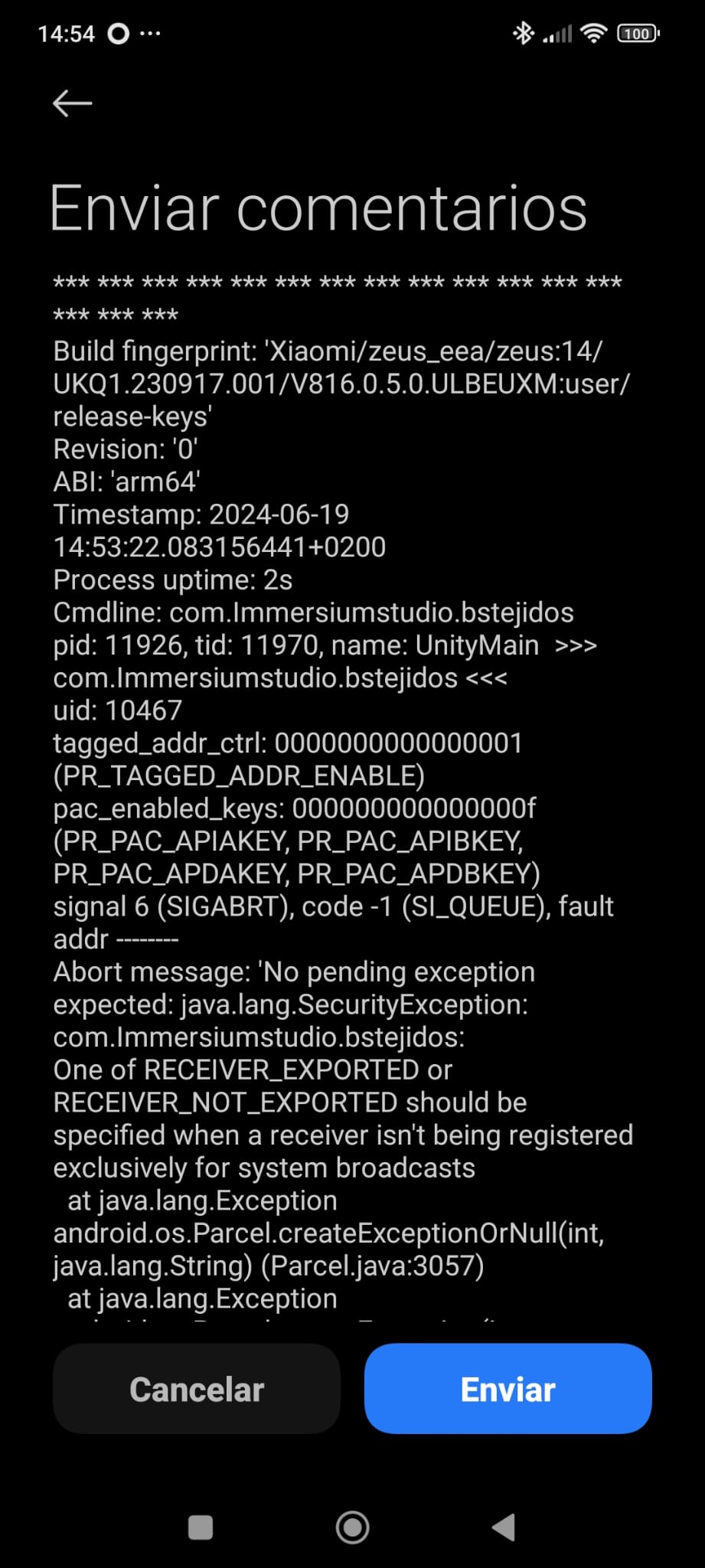
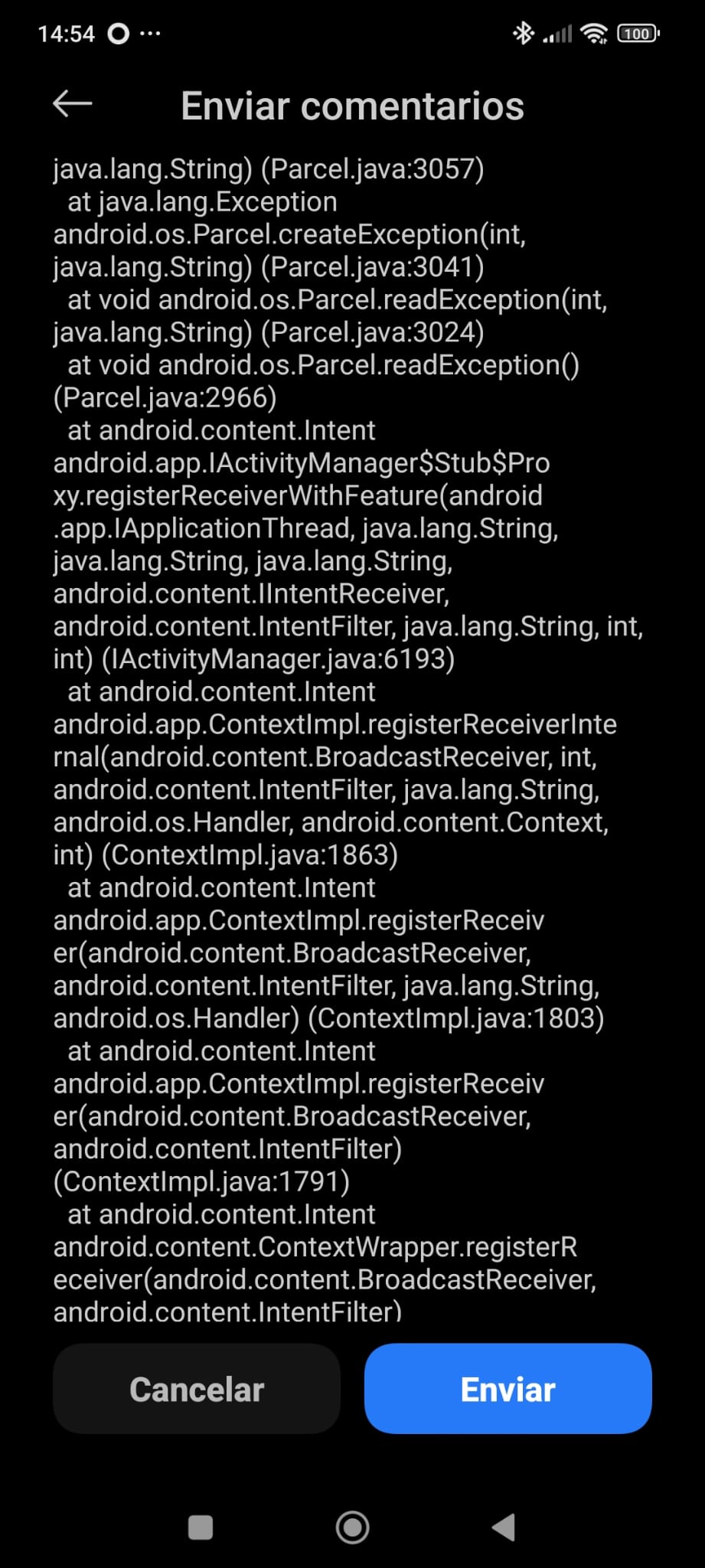
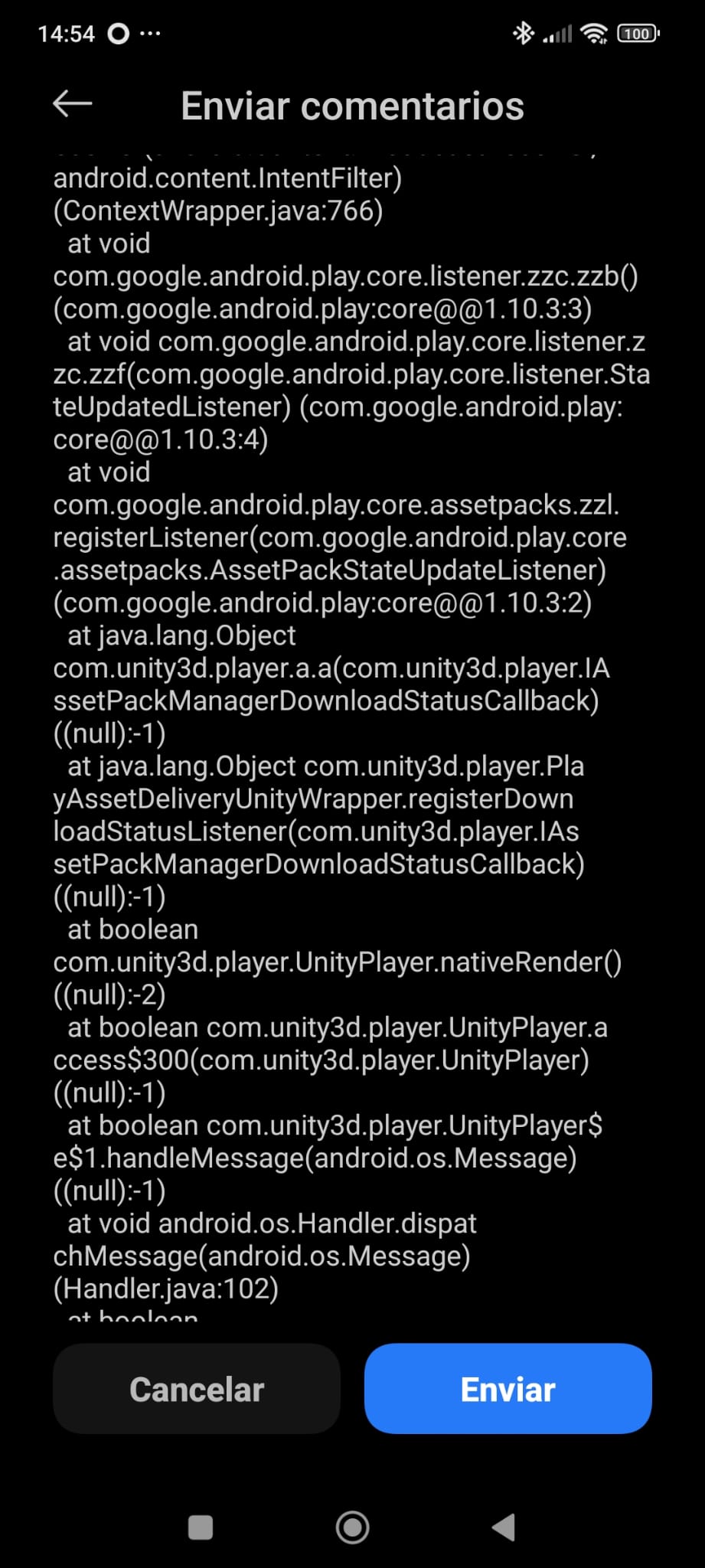
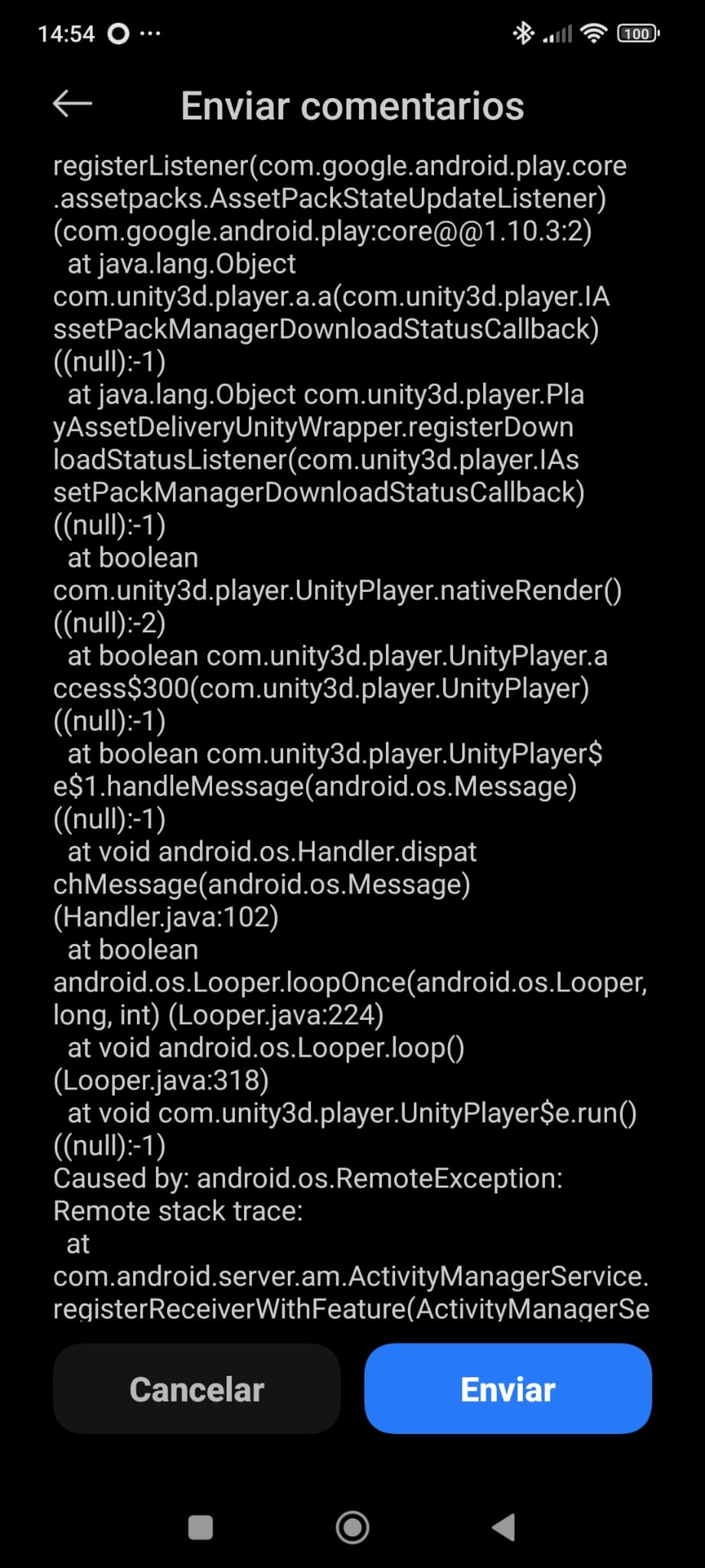
As of now, play core version latest released is 1.10.3.
I don’t think the error is related to the play core version conflict, but the log states you miss exported flag which is a strict requirement(from API 34) for a broadcast.

Send us an empty apk (with no scenes required) from the same project to look into. If it doesn’t give much info you can send us a minimal reproducible project to help you out.

Hi Voxel-Busters,

Thanks for your reply! This is the aab file of the project wit empty scene, builded with SDK 34 and Unity 2020.3.41f1. We can’t create the app in unity 2021 or 2022 because of the errors that I explainet in the first post.

But the error you mentioned is runtime error right? So making an empty apk(no .aab) should be possible.

Yes, we have two types of errors:

  • When we create the AAB for the store, the app works on all mobile devices except for those with Android 14. The app crashes at launch when using SDK 34 (it works perfectly on all devices with SDK 33).

  • The other errors occur when we port the project from Unity 2020 to 2021/2022 and try to create the AAB (play core version errors and other types of errors).

This is the APK version (unity 2020.3.41f1 and SDK 34):

Ok, thanks for clarifying.

Regarding the Play Core duplicate error issue, you can use the script we shared over here .

Regarding the launch crash on API 34/Android 14 devices, surprisingly, I didn’t find anything wrong in the apk manifest which will stop launching on api 34. So, only left out option is to upgrade unity version which support API 34.

Adding the script shared above to avoid duplicate libraries related to play core should solve the issue. Please keep us posted.

Hi Voxel-Busters

First of all, thank you for responding to my messages and looking at the app’s code. We will save the script you have shared with us, as it will surely be useful for the future. Also, thank you for the effort you put into responding and providing solutions.

Yesterday, we encountered the problem of duplicate libraries.

All of these are solutions for Unity version 2021.3.39f1.

We were using an old package, PAD Unity 1.5.0, so we downloaded this package → https://developers.google.com/unity/archive?hl=es-419#play_asset_delivery

We installed it over the old one. This likely caused outdated duplicate files, resulting in compilation issues, so we deleted the two folders related to PAD 1.5.0 from within Unity and installed the PAD Unity package 1.9.0 (it’s important to do this deletion and installation from within Unity because the manifests and gradle files are automatically updated with the necessary entries and dependencies).

Then came the errors with Addressables and Play Asset Delivery. First, with the creation of the src/main/assets folders, which Unity doesn’t create for some reason, so you either create them manually or modify a script to do it automatically.

The other problem is that Unity doesn’t include the bundles within the .aab when creating the app, so you have to manually place the packages in the folders (src/main/assets/ inside the Library/Bee folders) for them to be saved.

For this, I followed the steps of this user who had the same problem → PAD Unity 2021.3 not created src/main/assets/ automatically for custom asset bundle

Still, we haven’t been able to test if this solves the crash problem when launching the application on mobile devices with Android 14. We don’t expect to test it again until next week, so we will update the post next week.

hello
have you been able to solve these issues ? I’m facing the same crash with Android 14 devices and I have the same issue

The crash is (probably) related to the PAD version. Try updating to the latest Unity LTS version (it has PAD package updated) and check if the crash is gone. If not - please share a minimal repro project for further investigation.

Are you telling everyone dealing with this that 2020 is no longer available for google development?

The saddest part is that I am encountering errors and crashes on some devices with API 34 across all my projects. Most frequently, it’s “E/Unity(7493): Using memory addresses from more than 16GB of memory,” and I am simply shocked. The thing is that the games are still on Unity version 2018.2.10f1 because they partially use JavaScript. Google has set deadlines for project updates by August 31st, and now I don’t even know what to do…

google enforcing API level 34 and deprecating all previous plugins install is a nightmare, I encountered bunch of errors here and there solve one and another comes up, solve all issues but build crashes, it never ends, google expect you to mix and match plugins that work and it’s terrible.

if this keeps up, i’ll be porting the game to steam instead. I don’t want to do another sh*t show like this for the upcoming years again.

@AGaming_1 @flixbeat
Do you see the below error too? If not share the crash log.
one of RECEIVER_EXPORTED or RECEIVER_NOT_EXPORTED should be specified when a receiver isn't being registered exclusively for system broadcasts

2020 is no longer supported, so no fixes will land there. You can either try to workaround issues on your own or move to a supported Unity versions

I don’t get any crash logs unfortunately. Once I open the app all I get from logcat is this, then it closes.
9928281--1436406--upload_2024-7-8_14-20-29.png

Already updated my firebase firestore sdk to latest (12.1.0) so it’s probably not the plugin’s fault, however, reverting back to target api level 33, the app works just fine. Game also works when installed for android 13 and below, only crashes on actual android 14 device.

Share the repro project or at least app

Share empty apk or repro project to reproduce the issue.

I would like to get back on this thread and say I was able to resolve the crash issue even on actual android 14 devices, I also tried installing the game on older android versions and it worked.

Here are the following plugins that I updated:

  • firestore sdk 12.1.0
  • play asset delivery 1.9.1
  • iap 4.11.0 (optional if 4.12.0 already worked for you)

it’s important note that I have to delete the whole GooglePlayPlugins folder first before importing the PAD plugin to prevent build errors.

I’m using unity version 2021.3.39f1, what generally causes crash was outdated play asset delivery plugin, however upon updating with the latest (PAD v1.9.0) I face a new problem which regards addressables: Addressable Asset Bundles not Included in .aab file after updating PAD plugin to 1.9.0

I also raised about it on their GIT issue tracker.

I’ll attempt to upgrade my unity version to 2022.3.36f1 LTS and addressables to 2.1.1 and see if it solves the problem. I’ll get back on this post soon.

EDIT 1: Upgrading to unity 2022.3.36f1 LTS made me unable to build the game. I keep getting this gradle error:

FAILURE: Build failed with an exception.

* What went wrong:
Execution failed for task ':unityLibrary:processReleaseManifest'.
> A failure occurred while executing com.android.build.gradle.tasks.ProcessLibraryManifest$ProcessLibWorkAction
   > Manifest merger failed with multiple errors, see logs

This just doesn’t end isn’t it? I’ll get back on this post again if anything that works comes up.

EDIT 2: Error is gone after unticking custom Android Manifest from publishing settings. The only problem left is now the addressable groups are not being included in build (.aab). I’m suspecting this has something to do with the latest PAD plugin that google releases.
I uploaded a repro project with regards the issue for this: GitHub - flixbeat/pad-1.9.0-addressable-bug-repro: A reproduction project that shows bug where asset bundle groups are not built into .aab file when using PAD 1.9.0

hi recenty I’ve dealing with simular issue when I build apk and test it on android 14 it works but when i publish it to google play my app is crashes at the startup thats happening only android 14 if i try my chance with other android the app works well(Im using Admob is that related with admob?)

Hello everyone,

Sorry for the late update. We have finally been able to test the new version of the app with the comments I mentioned earlier. We can confirm that by following the steps I mentioned in the previous post, we managed to fix the problem and now it doesn’t crash on Android 14 and the app works. We need to test now if the Addressables packages load properly, as there is the issue of creating the folders manually and placing the packages.